
Beelink EQ14
Beelink Mini PC EQ14 User Manual
Model: EQ14 N150
1. Introduction
Thank you for choosing the Beelink Mini PC EQ14. This compact and powerful mini PC is designed for a wide range of applications, from light office work and multimedia playback to 4K video streaming and network-attached storage (NAS). Equipped with an Intel Twin Lake N150 processor, ample storage, and versatile connectivity, the EQ14 offers a smooth and efficient computing experience.
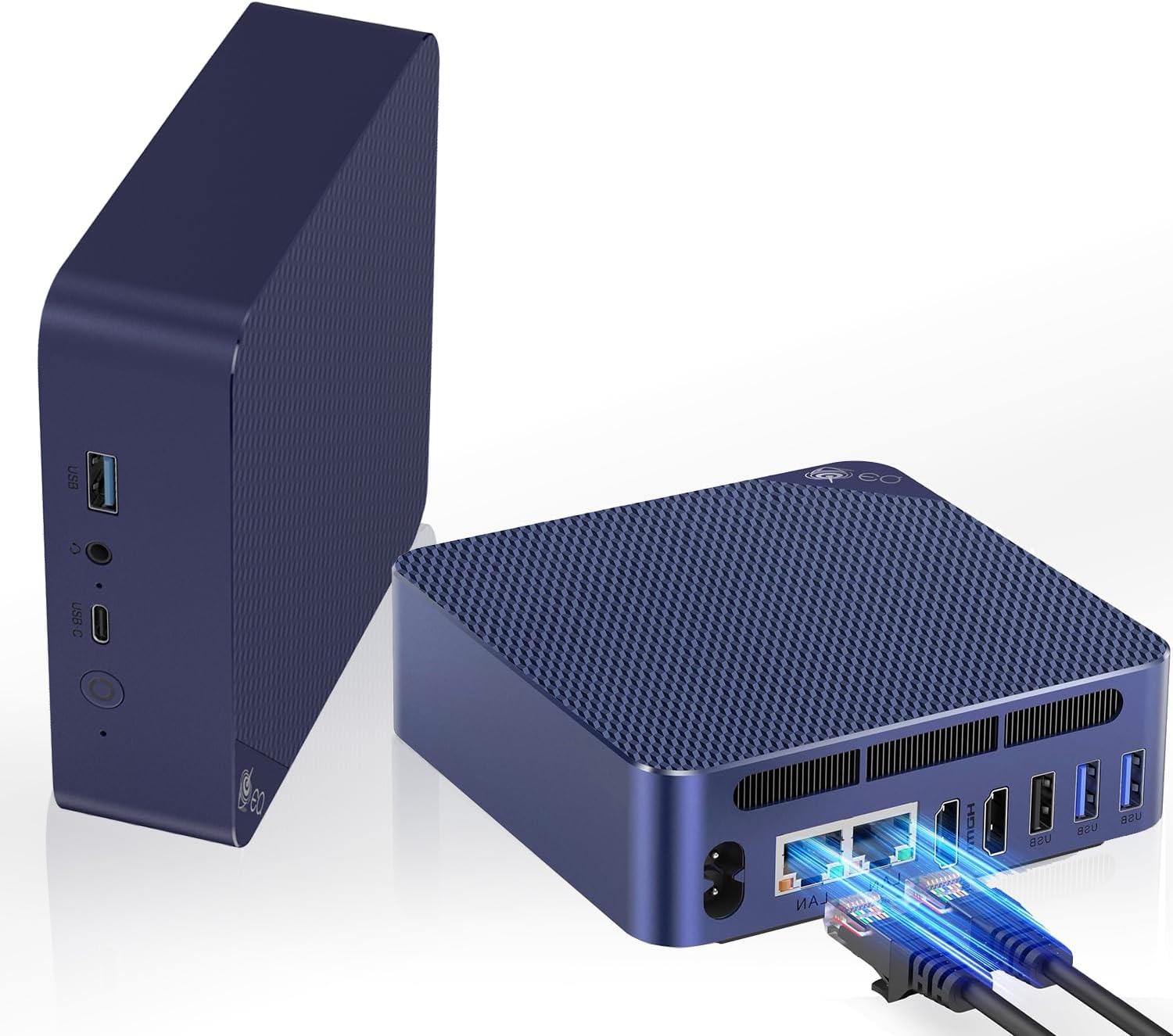
Figure 1: Beelink Mini PC EQ14 with various ports visible.
2. Package Contents
Please verify that all items are present in your package:
- Beelink Mini PC EQ14
- Power Adapter (built-in power supply, only one cable needed)
- HDMI Cable
- User Manual (this document)
3. Setup Guide
3.1 Connecting Your Mini PC
- Connect to Display: Use an HDMI cable to connect the Mini PC to your monitor or TV. The EQ14 supports dual 4K@60Hz displays.
- Connect Peripherals: Plug in your USB keyboard, mouse, and any other USB devices into the available USB 3.2 (10Gbps) or USB 2.0 ports.
- Network Connection: For wired internet, connect an Ethernet cable to one of the two 1000Mbps LAN ports. For wireless, the device supports WiFi 6.
- Power On: Connect the power cable to the AC jack on the Mini PC. The device features a built-in power supply, simplifying cable management. Press the power button located on the front panel.

Figure 2: Front and Rear Port Layout.
3.2 Initial Boot and Operating System Setup
Upon first boot, the Mini PC will guide you through the operating system setup process. Follow the on-screen instructions to configure your language, region, network settings, and user account.
3.3 Intel Unison App Integration
The EQ14 supports seamless connection with mobile devices using the Intel Unison app. This allows you to:
- View your photo galleries on your PC.
- Extend your PC screen with a tablet.
- Make and receive phone calls from your PC.
- Transfer files from phone or tablet to your PC.
- Send and receive text messages from your PC.
- Manage device notifications from a single source.
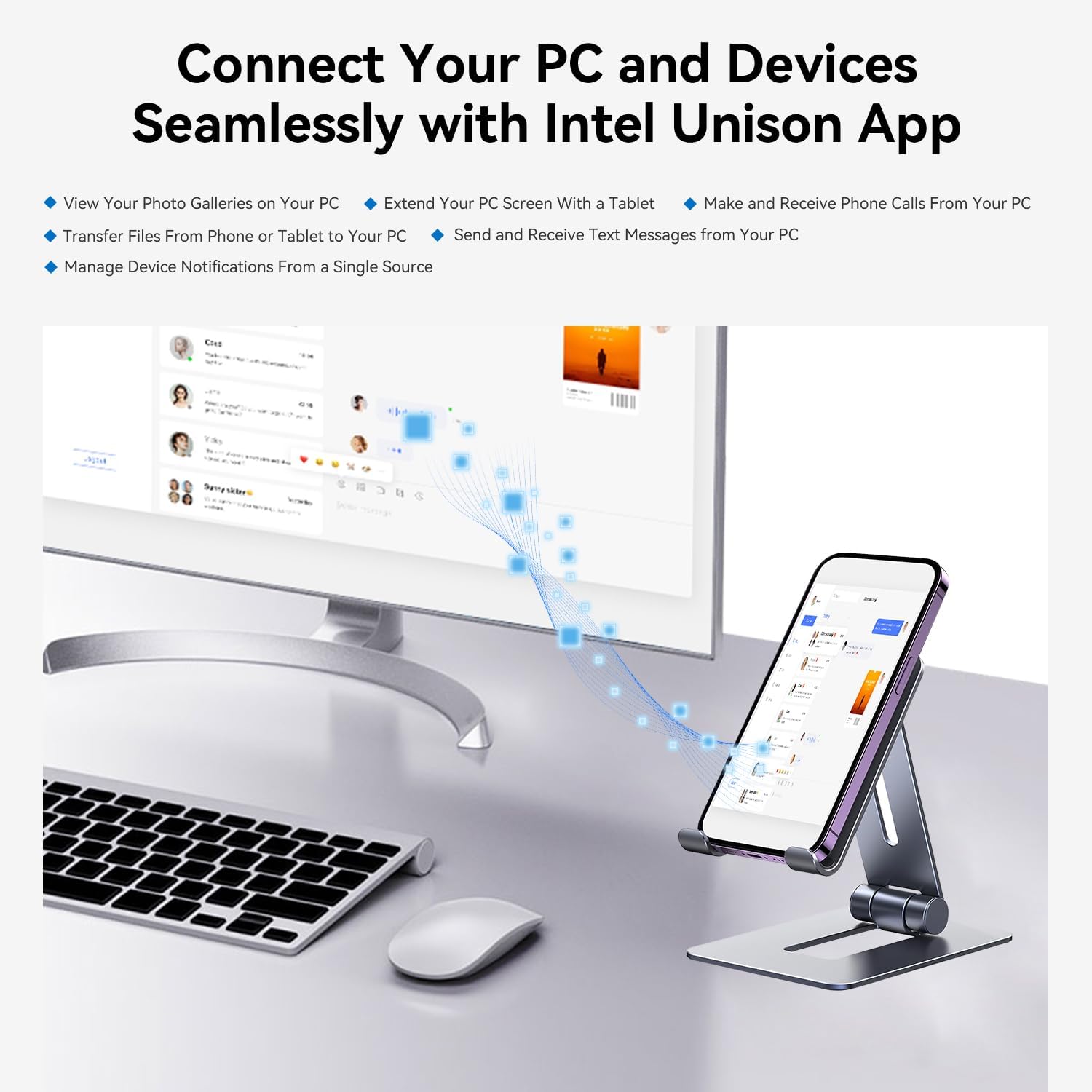
Figure 3: Seamless connectivity with Intel Unison.
4. Operating Your Mini PC
4.1 General Usage
The Beelink EQ14 is versatile and adept at handling various tasks:
- Office Work: Efficiently run productivity software for daily tasks.
- Multimedia Playback: Enjoy smooth playback of videos and music.
- 4K Video: Supports 4K resolution output for high-definition viewing.
- Network Attached Storage (NAS): Utilize the dual LAN ports for robust network capabilities.

Figure 4: Versatile applications of the Mini PC.
4.2 Connectivity Features
- Dual LAN Ports: Two 1000Mbps LAN ports provide high-speed data transfer and lag-free experiences for streaming and downloading.
- WiFi 6: Built-in WiFi 6 ensures fast and stable wireless connectivity.
- Bluetooth 5.2: Connect your wireless peripherals such as keyboards, mice, and headphones.

Figure 5: Dual LAN ports for enhanced network performance.
4.3 Quiet Operation
The EQ14 is designed for near-silent operation. Its efficient bottom air intake and low-speed silent fan ensure the device stays cool and stable with minimal noise, comparable to a fanless design.

Figure 6: Quiet operation for distraction-free work.
5. Maintenance
5.1 Cooling System
The EQ14 features an MSC2.0 Cooling System. The air intake from the bottom is highly efficient at dissipating heat, allowing the device to maintain low fan speeds for stability and quiet operation. To ensure optimal cooling, keep the air intake vents clear of obstructions.

Figure 7: MSC2.0 Cooling System components.
5.2 Storage Expansion
The EQ14 supports up to 16GB DDR4 3200MHz RAM. It also features dual M.2 PCIe 3.0 SSD slots, supporting up to 4TB of high-speed internal storage. The PCIe 3.0 x4 slot is compatible with M.2 SATA III SSDs. For expansion, consult a qualified technician or refer to the detailed upgrade guide available on the Beelink support website.

Figure 8: Internal view showing DDR4 and dual SSD slots.
6. Troubleshooting
If you encounter issues with your Beelink Mini PC EQ14, please refer to the following common troubleshooting steps:
- No Power: Ensure the power cable is securely connected to both the Mini PC and a working power outlet. Verify the power indicator light is on.
- No Display: Check that the HDMI cable is firmly connected to both the Mini PC and the monitor. Ensure the monitor is set to the correct input source. Try a different HDMI cable or monitor if possible.
- No Internet Connection: For wired connections, check the Ethernet cable and router. For Wi-Fi, ensure the Wi-Fi adapter is enabled and you are connecting to the correct network with the correct password.
- Peripheral Not Working: Try connecting the peripheral to a different USB port. Ensure drivers are installed if required by the peripheral.
- System Slowdown: Close unnecessary applications. Check for background processes consuming high resources. Ensure adequate ventilation around the Mini PC.
- System Crash/Freeze: Perform a hard reboot by holding the power button for 5-10 seconds until the device powers off, then restart.
If problems persist, please contact Beelink customer support for further assistance.
7. Specifications
| Feature | Specification |
|---|---|
| Processor | Intel Twin Lake N150 Quad-Core (Up to 3.6GHz) |
| Graphics | Intel Graphics iGPU (24EUs, 1000MHz) |
| RAM | 16GB DDR4 3200MHz (Single-channel, expandable) |
| Storage | 500GB PCIe M.2 SSD (Dual M.2 PCIe 3.0 slots, up to 4TB) |
| Operating System | OS (Pre-installed) |
| Video Output | 2 x HDMI (Supports 4K@60Hz Dual Display) |
| USB Ports | 3 x USB 3.2 (10Gbps), 1 x USB 2.0, 1 x Type-C |
| Network | 2 x 1000Mbps LAN, WiFi 6 (802.11ax) |
| Bluetooth | Bluetooth 5.2 |
| Audio | 3.5mm Audio Jack |
| Power Supply | Built-in (AC 100-240V, DC 12V/4A) |
| Dimensions | 6.06 x 5.98 x 3.78 inches |
| Weight | 1.87 pounds |
8. Warranty and Support
Beelink products come with a standard manufacturer's warranty. For specific warranty terms and conditions, please refer to the warranty card included with your product or visit the official Beelink website. For technical support, driver downloads, and FAQs, please visit the Beelink support page or contact their customer service directly.
Optional protection plans may be available for extended coverage. Please check with your retailer for details on 2-Year or 3-Year protection plans.