1. Introduction
The GUOANVISION S800 Indoor Pan/Tilt Security Camera is designed to provide comprehensive home monitoring with advanced features. This camera offers 5G/2.4G WiFi connectivity, smart motion tracking with auto-focus and zoom, HD night vision, two-way audio communication, and flexible storage options. It is an ideal solution for monitoring babies, pets, or general home security.
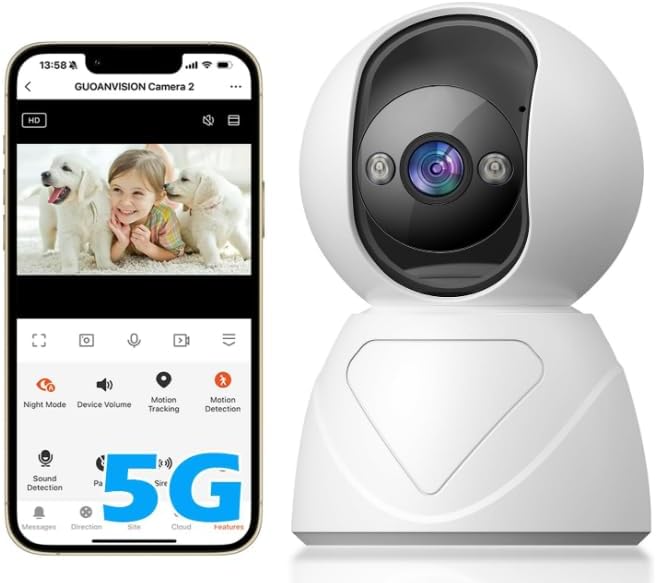
Image: The GUOANVISION S800 Indoor Pan/Tilt Security Camera, showing its compact design and pan/tilt head.
2. What's in the Box
Please check the package contents to ensure all items are present:
- GUOANVISION S800 Indoor Pan/Tilt Security Camera
- Power Adapter
- Mounting Screw
- Instruction Manual (this document)
3. Product Features
Smart Motion Tracking & Auto-Focus and Zoom
The S800 camera features advanced AI-powered automatic tracking that follows human or pet movement. It automatically zooms in up to 3X on the moving object to capture detailed footage, ensuring no important moment is missed.

Image: Illustration of the camera's motion tracking and auto-zoom capability, focusing on a moving dog.
5G/2.4G WiFi & Intercom Communication
Enjoy stable and reliable connectivity with support for both 5G and 2.4G Wi-Fi networks, providing 360° coverage for your home. The built-in microphone and speaker enable clear two-way audio, allowing you to communicate with family members, children, or pets remotely.

Image: Depiction of the two-way audio feature, showing a parent communicating with a baby through the camera.
HD Night Vision & Push Notification
Equipped with integrated IR, full-color, and double-light modes, the S800 provides clear night vision up to 30 feet. The camera records and sends instant alarm notifications to your phone upon detecting motion or sound, ensuring you are always aware of activity.

Image: Comparison of night vision modes (IR, Full Color, Smart Light) showing a baby in a crib.
24/7 Recording & SD/Cloud Storage
The camera supports continuous 24/7 recording. Video footage can be saved locally on a Micro SD card (up to 128GB, not included) or securely stored in the cloud. Advanced encryption technology protects your data, and you can easily share access with family members.

Image: The camera with an illustration of SD card insertion and cloud storage icons, demonstrating storage options.
4. Setup Guide
Download the GUOANVISION App
Search for "GUOANVISION" in your mobile app store (iOS App Store or Google Play Store) and download the official application. Alternatively, scan the QR code provided in the product packaging or on the GUOANVISION website.

Image: The S800 camera alongside a mobile phone displaying the GUOANVISION app download prompt.
Power On the Camera
Connect the provided power adapter to the camera's power input port and plug it into a wall outlet. The camera will power on and initiate its self-check sequence.
Add Device to App
Open the GUOANVISION app, create an account or log in. Follow the in-app instructions to add your new camera. Ensure your mobile device is connected to the same Wi-Fi network (2.4GHz or 5GHz) that you intend to connect the camera to.
Wi-Fi Connection
The app will guide you through connecting the camera to your home Wi-Fi network. This typically involves scanning a QR code generated by the app with the camera's lens or entering your Wi-Fi credentials directly.
Insert Micro SD Card (Optional)
If you wish to use local storage, gently insert a Micro SD card (up to 128GB, not included) into the designated slot on the camera. Ensure the camera is powered off before inserting or removing the SD card.
5. Operating Instructions
Pan & Tilt Control
From the live view interface in the GUOANVISION app, use the directional controls to remotely pan (horizontal rotation) and tilt (vertical movement) the camera lens to adjust the viewing angle. The camera offers 250° horizontal and 115° vertical viewing angles.

Image: Diagram illustrating the camera's pan and tilt range within a living room setting.
Two-Way Audio
Tap the microphone icon in the app's live view to activate two-way audio. You can speak through your phone, and your voice will be projected through the camera's speaker. Similarly, you can hear sounds from the camera's environment through your phone.
Motion and Sound Detection Alerts
Enable motion and sound detection in the app settings to receive instant push notifications on your phone when activity is detected. The camera can also trigger a voice siren or light alarm for deterrence.

Image: A mobile phone displaying an alarm notification, with the camera auto-zooming on a detected intruder.
Night Vision Modes
The camera automatically switches to night vision in low-light conditions. You can select between IR Mode (black and white), Full Color Mode (requires sufficient ambient light or camera's light), or Double-Light Mode (activates white light for color vision upon detection).
Recording and Playback
Access recorded footage through the app's playback feature. You can review events saved on the Micro SD card or in cloud storage. The timeline allows for easy navigation to specific times or detected events.
Multi-User Sharing
Share access to your camera with family members or trusted individuals through the GUOANVISION app. This allows multiple users to view the live feed and recorded footage simultaneously.

Image: Illustration of multiple users viewing the camera feed on their mobile devices, emphasizing the sharing capability.
6. Maintenance
- Cleaning: Use a soft, dry cloth to clean the camera lens and body. Do not use liquid cleaners or aerosols.
- Placement: Place the camera in a stable location, away from direct sunlight, heat sources, and excessive moisture.
- Firmware Updates: Regularly check the GUOANVISION app for firmware updates to ensure optimal performance and security.
- Power Supply: Always use the original power adapter provided with the camera.
7. Troubleshooting
| Problem | Possible Solution |
|---|---|
| Camera offline/Cannot connect to Wi-Fi |
|
| Poor image quality |
|
| No motion/sound alerts |
|
| Two-way audio not working |
|
8. Specifications
| Feature | Detail |
|---|---|
| Model Name | US-S800 |
| Indoor/Outdoor Usage | Indoor |
| Connectivity Protocol | Wi-Fi (5G/2.4G) |
| Power Source | Corded Electric |
| Video Capture Resolution | 1920p |
| Effective Still Resolution | 6 MP |
| Motion Tracking | Yes, with Auto-Focus and 3X Zoom |
| Night Vision | IR, Full Color, Double-Light Mode (up to 30 feet) |
| Two-Way Audio | Yes |
| Storage Options | Micro SD Card (up to 128GB, not included), Cloud Storage |
| Pan/Tilt Range | 250° Horizontal, 115° Vertical |
| Material | Plastic |
| Dimensions (L x W x H) | 5 x 4 x 9 inches |
| Item Weight | 9.9 ounces |
9. Warranty and Support
GUOANVISION is committed to providing high-quality products and excellent customer service.
Warranty
Your GUOANVISION S800 camera comes with a 365 Days Limited Warranty from the date of purchase. This warranty covers manufacturing defects and ensures product reliability.
Returns & Refunds
We offer a 30 Days Returns & Refunds policy. If you are not completely satisfied with your purchase, please contact us within 30 days for assistance.
Customer Support
For any issues, questions, or support needs, please do not hesitate to contact us. We provide 12 Hours Online Email support and are dedicated to providing 100% satisfied solutions.
You can also visit the official GUOANVISION store for more information and support resources: GUOANVISION Store

Image: Summary of GUOANVISION's after-sales service, including warranty, returns, and support contact.