
1. Introduction
Thank you for choosing the HUXGO HXA007 Wireless Home Alarm System. This system provides comprehensive security for your home with dual WiFi and 4G GSM connectivity, allowing for remote control and notifications via the TUYA Smart App or SMS. This manual will guide you through the installation, operation, and maintenance of your alarm system to ensure optimal performance and security.
2. Safety Information
- Ensure the control panel is installed in a dry, secure location away from direct sunlight and extreme temperatures.
- Do not attempt to disassemble or repair the system components yourself. Refer to qualified service personnel.
- Keep the system away from strong electromagnetic interference sources.
- Use only the provided power adapter.
- Test the alarm system regularly to ensure all components are functioning correctly.
3. Package Contents
The HXA007 alarm system package includes the following components:
- 1x Alarm Control Panel
- 1x Wireless Solar Siren
- 7x PIR Motion Detectors
- 7x Door/Window Opening Detectors
- 2x Remote Controls
- 2x RFID Key Fobs
- 1x Power Adapter
- Batteries for sensors
- Mounting Accessories (screws, adhesive tape)
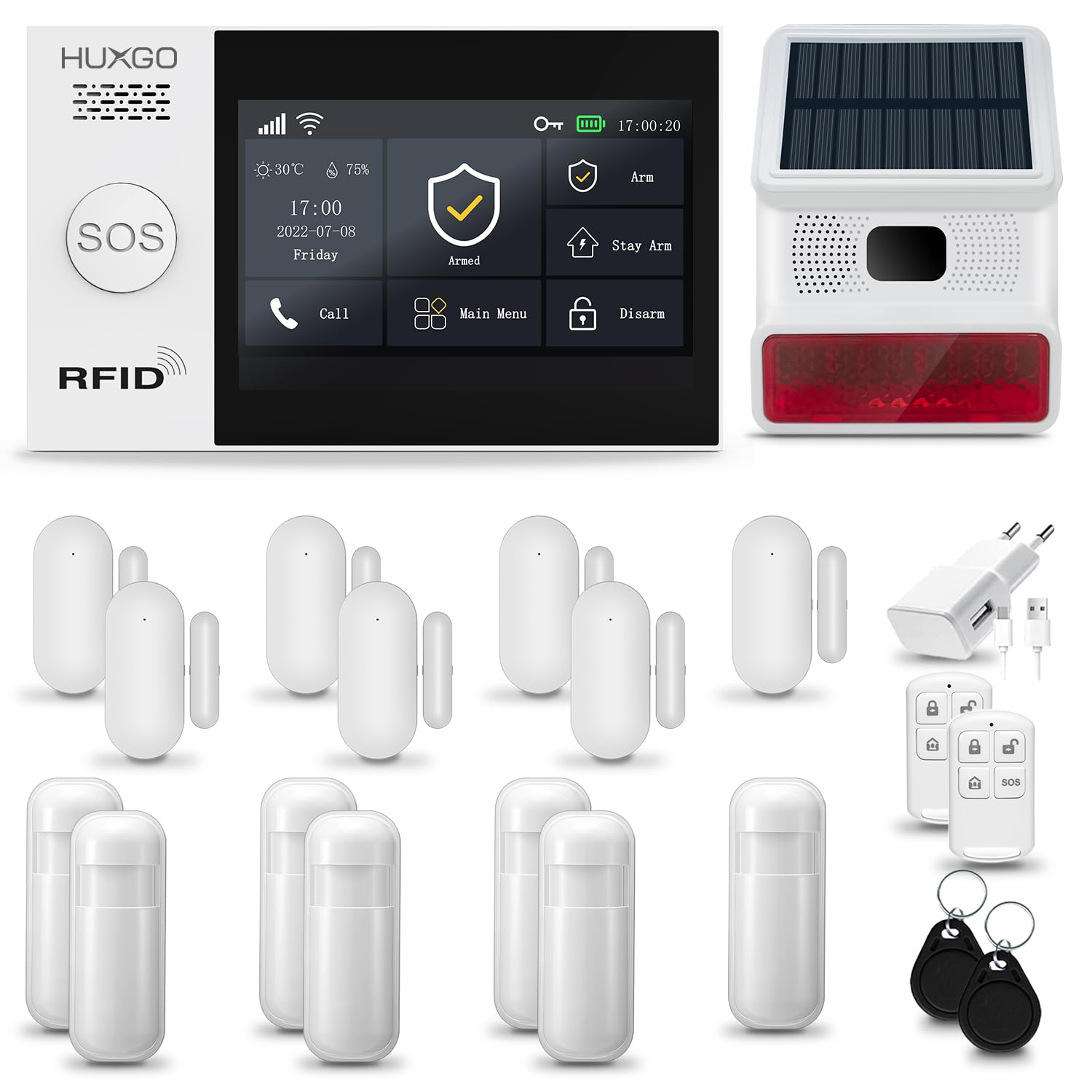
Figure 3.1: Overview of the HUXGO HXA007 alarm system components, including the control panel, solar siren, motion sensor, door/window sensor, remote control, and RFID tag.
4. Setup Instructions
4.1. Control Panel Installation
The control panel is the central unit of your alarm system. Choose a central location in your home, preferably near a power outlet and within good WiFi signal range. You can mount it to a wall using the provided screws or place it on a flat surface.
- Connect the power adapter to the control panel and plug it into a wall outlet.
- The control panel features a 4.3-inch TFT LCD color touchscreen for easy operation.

Figure 4.1: Dimensions of the HUXGO HXA007 control panel (160mm x 98mm x 19mm).
4.2. SIM Card Insertion (for 4G GSM)
For 4G GSM functionality, insert a compatible SIM card into the designated slot on the control panel. Ensure the SIM card is activated and has sufficient credit for SMS and calls. Important: Ensure the SIM card is permanently unlocked before insertion. Otherwise, it may not be recognized by the system.
4.3. Sensor Installation
Wireless sensors allow for quick and efficient installation without additional wiring.
- PIR Motion Detectors: Install motion detectors in areas where intruders are likely to pass, such as hallways or living rooms. Mount them at a height of approximately 2-2.2 meters for optimal coverage.
- Door/Window Opening Detectors: Attach these sensors to doors and windows. Ensure the two parts of the sensor are aligned and within 1 cm of each other when the door/window is closed.
- Use the provided adhesive tape or screws for mounting.

Figure 4.2: PIR Motion Detector

Figure 4.3: Door/Window Opening Detector
4.4. Wireless Solar Siren Installation
Install the wireless solar siren outdoors in a location that receives ample sunlight to charge its internal battery. Ensure it is mounted securely and is visible to deter potential intruders.

Figure 4.4: Wireless Solar Siren
4.5. TUYA Smart App Pairing
Download the TUYA Smart App from your device's app store (iOS and Android compatible). Follow the in-app instructions to add your HXA007 alarm system. This app allows you to control the alarm and integrate with other smart home devices.
5. Operating Instructions
5.1. Arming and Disarming the System
The system can be armed or disarmed using multiple methods:
- Control Panel: Use the touchscreen interface to select 'Arm' or 'Disarm'.
- Remote Control: Press the lock button to arm and the unlock button to disarm.
- RFID Key Fob: Tap the RFID key fob on the designated area of the control panel to arm or disarm.
- TUYA Smart App: Control the system remotely via the app.
- SMS Commands: Send specific SMS commands to the system's SIM card number.

Figure 5.1: Remote Control for arming/disarming.

Figure 5.2: RFID Key Fob for quick access.
5.2. Alarm Notifications
When an alarm is triggered, the system will:
- Activate the solar siren (100 dB).
- Send push notifications to your smartphone via the TUYA Smart App.
- Send SMS alerts to pre-configured phone numbers.
- Initiate calls to pre-configured phone numbers.

Figure 5.3: Illustration of alarm triggers from motion and door/window sensors.
5.3. Dual Network Control (WiFi & 4G GSM)
The HXA007 system supports both WiFi and 4G GSM networks, providing reliable connectivity even if one network fails. Control your alarm via the TUYA App (WiFi) or SMS (GSM).

Figure 5.4: The alarm system can be controlled via the TUYA App (WiFi) or SMS (GSM).
5.4. Two-Way Communication
The control panel allows for two-way communication, enabling you to speak through the panel and hear responses from the protected area when an alarm call is initiated.

Figure 5.5: Illustration of the two-way communication feature of the control panel.
5.5. Security Zones
The system supports up to 99 detectors and can be configured with different security zones:
- Interior Zone: Typically for motion sensors inside the home, active when away.
- Exterior Zone: For perimeter sensors (e.g., door/window sensors), active when home or away.
- 24/7 Zone: Always active, for smoke detectors or emergency buttons.

Figure 5.6: Illustration of the three configurable security zones: Interior, Exterior, and 24/7.
6. Maintenance
- Battery Replacement: Sensors are battery-powered. Replace batteries when the system indicates a low battery warning.
- Control Panel Backup Battery: The control panel has an emergency power supply with a 6 to 8-hour battery life. Ensure it is regularly charged.
- Cleaning: Wipe the control panel and sensors with a soft, dry cloth. Do not use liquid cleaners.
- Regular Testing: Periodically test all sensors and the siren to ensure they are functioning correctly.
7. Troubleshooting
- System Not Responding: Check power connection. Ensure the backup battery is charged.
- No App Notifications: Verify WiFi connection. Check app settings for notification permissions. Ensure the control panel is connected to the internet.
- No SMS/Call Notifications: Check SIM card insertion and activation. Ensure the SIM card has credit. Verify 4G GSM signal strength.
- Sensor Not Triggering: Check sensor battery. Ensure the sensor is correctly paired with the control panel. Verify sensor placement and alignment.
- False Alarms: Adjust sensor sensitivity if applicable. Ensure motion sensors are not facing heat sources or areas with pets.
8. Specifications
| Feature | Specification |
|---|---|
| Model Number | HXA007 |
| Connectivity Technology | Wireless (WiFi & GSM 4G) |
| Control Method | Application, Touchscreen, Remote Control |
| Power Source | Electric Cable, Battery |
| Control Panel Dimensions (L x W x H) | 16 x 9.8 x 2 cm |
| Weight | 1232 Grams |
| Sound Level (Siren) | 100 Decibels |
| Emergency Battery Life | 4-8 hours (Control Panel) |
| Compatible Devices | Personal Computer, Tablet, Smartphone |
| Installation Method | Screw-in |
| Alert Type | Audio and Motion |
9. Warranty and Support
For warranty information and technical support, please refer to the contact details provided with your purchase or visit the official HUXGO website. Keep your purchase receipt as proof of purchase for warranty claims.