
Gueray H-01
Gueray Portable CD Player
User Manual
Introduction
Thank you for choosing the Gueray Portable CD Player. This manual provides essential information for the proper setup, operation, and maintenance of your device. Please read it thoroughly before use to ensure optimal performance and longevity of your CD player.
Safety Precautions
- Do not expose the unit to rain, moisture, or extreme temperatures.
- Avoid placing the unit near heat sources or in direct sunlight.
- Use only the specified power supply or batteries.
- Do not attempt to disassemble or modify the unit. Refer all servicing to qualified personnel.
- Keep the unit away from strong magnetic fields.
- Ensure proper ventilation around the unit during operation.
Product Overview
The Gueray Portable CD Player (Model H-01) is designed for high-quality audio playback on the go. It features a compact design, anti-skip protection, and various playback modes.
Included Components
- Gueray Portable CD Player
- Earphones
- Type-C Charging Cable
- AUX Cable

Image: The Gueray Portable CD Player, its packaging, earphones, and charging cable are shown, illustrating the complete set of included items.
Parts and Controls

Image: A detailed diagram of the Gueray Portable CD Player highlighting its various parts and controls, including the CD door switch, display, playback buttons, volume knob, and power ports.
- CD Door Switch: Used to open the CD compartment.
- CD Door Close Position: Indicates the correct position for closing the CD compartment.
- Programming/Stop Button (PROG): Used to program tracks for playback or stop current playback.
- EQ Button: Cycles through sound effects (BSS, Pop, Rock, Jazz, Classic).
- Mode Button (M): Selects playback modes (Repeat a track, Repeat ALL, Play in random order, INTRO).
- Display: LCD screen showing track number, time, and other status indicators.
- Play/Pause Button (►||): Starts or pauses CD playback.
- Previous/Fast Rewind Button (◀◀): Skips to the previous track or fast rewinds the current track.
- Next/Fast Forward Button (►►): Skips to the next track or fast forwards the current track.
- CD Compartment Cover: Protects the CD disc.
- Battery Compartment Cover: Access for battery installation.
- Power ON/OFF Switch: Turns the unit on or off.
- External DC 5V Port: For connecting the Type-C charging cable.
- Headphone/Audio Output (PHONES): 3.5mm jack for connecting earphones or an AUX cable.
- Volume Up/Down Knob: Adjusts the audio output volume.
Setup
Powering the Device
The Gueray Portable CD Player can be powered in two ways:
- Using the USB Power Cable: Connect the included Type-C charging cable to the External DC 5V port on the player and the other end to a USB power adapter (not included) or a USB port on a computer.
- Using Batteries: Open the Battery Compartment Cover and insert 2 x LR6 1.5V batteries (AA size, not included), ensuring correct polarity.

Image: The CD player is shown connected to a USB power adapter for home use and also demonstrates its compatibility with car audio systems via an AUX cable.
Connecting Earphones/Headphones
Plug the earphones or headphones into the 3.5mm Headphone/Audio Output (PHONES) jack on the side of the player.
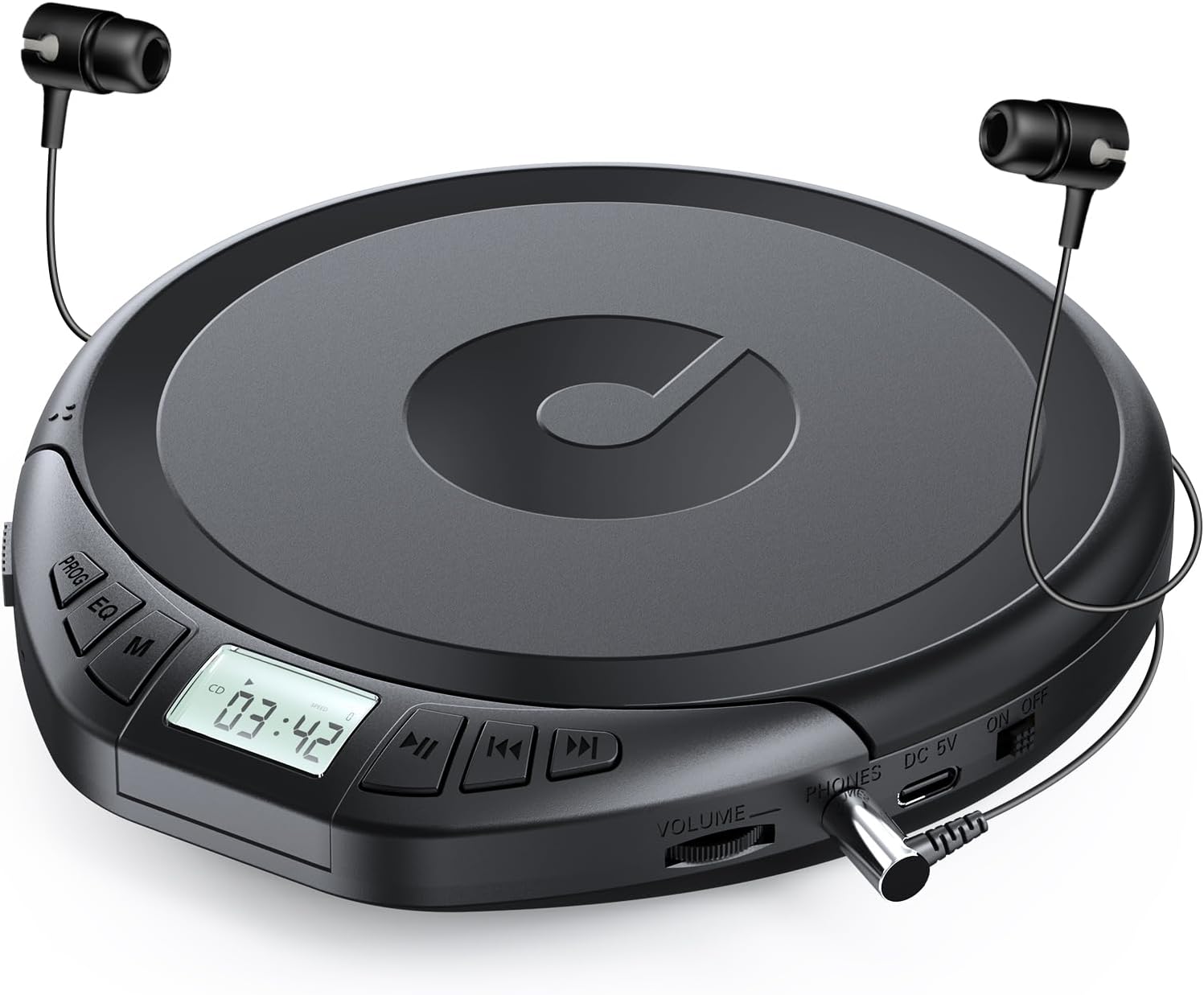
Image: The Gueray Portable CD Player is displayed with its included earphones plugged into the headphone jack, ready for use.
Loading a CD
- Slide the CD Door Switch to open the CD Compartment Cover.
- Carefully place a CD, CD-R, CD-RW, CD-MP3, or CD-WMA disc onto the center spindle with the label side facing up.
- Gently press the CD down until it clicks into place.
- Close the CD Compartment Cover firmly until it latches.

Image: A user is shown exercising with the CD player nearby, emphasizing its support for various CD formats (CD, CD-R, CD-RW, CD-MP3, CD-WMA) and its Anti-Skip Protection (ASP) feature.
Operating Instructions
Basic Playback
- Power On: Slide the Power ON/OFF switch to the "ON" position.
- Play/Pause: Press the Play/Pause (►||) button to start playback. Press it again to pause.
- Next/Previous Track: Press the Next/Fast Forward (►►) button to skip to the next track. Press the Previous/Fast Rewind (◀◀) button to go to the beginning of the current track or the previous track.
- Fast Forward/Rewind: Press and hold the Next/Fast Forward (►►) or Previous/Fast Rewind (◀◀) button to fast forward or rewind within a track.
- Stop: Press the Programming/Stop (PROG) button once to stop playback.
- Power Off: Slide the Power ON/OFF switch to the "OFF" position.
Volume Control
Rotate the Volume Up/Down Knob to adjust the listening volume to your preference.
Sound Effects (EQ)
Press the EQ button repeatedly to cycle through the available sound effects: BSS (Bass Boost), Pop, Rock, Jazz, Classic. The selected effect will be indicated on the Display.

Image: A person is shown relaxing on a train, listening to the CD player, highlighting its support for programmed play and various sound modes like BSS, Pop, Jazz, Classic, and Rock.
Play Modes
Press the Mode (M) button repeatedly to select different playback modes:
- Repeat 1: Repeats the current track.
- Repeat ALL: Repeats all tracks on the disc.
- Random: Plays tracks in a random order.
- INTRO: Plays the first few seconds of each track.
Programmed Play
You can program up to 20 tracks to play in a specific order:
- While the player is stopped, press the Programming/Stop (PROG) button. The display will show "PROG" and the track number to be programmed.
- Use the Next/Fast Forward (►►) or Previous/Fast Rewind (◀◀) buttons to select the desired track.
- Press the PROG button again to confirm the selection.
- Repeat steps 2 and 3 to add more tracks to your program.
- Once all desired tracks are programmed, press the Play/Pause (►||) button to start programmed playback.
Anti-Skip Protection (ASP)
The player features an Anti-Skip Protection system to prevent playback interruption during minor vibrations. It provides up to 100 seconds of anti-skip protection for standard CDs and 40 seconds for MP3 CDs.
Memory Function
The player has a memory function that allows it to resume playback from where it was last paused when turned off and then back on. This is particularly useful for audiobooks or long recordings.

Image: A person is shown studying with the CD player, highlighting its features like A-B Repeat and Memory Function, making it suitable for language learning and audiobooks.
Car Use
To use the CD player in your car, connect the included AUX cable from the player's Headphone/Audio Output (PHONES) jack to your car's AUX input. Ensure your car audio system supports AUX input. Adjust the volume on both the CD player and your car stereo for optimal sound.
Video: This video demonstrates the compact size and portability of the Gueray CD Player, showing it being used in various settings such as during travel, study, and relaxation, emphasizing its convenience for enjoying music anywhere.
Maintenance
Cleaning
- Wipe the exterior of the player with a soft, dry cloth.
- Do not use abrasive cleaners or solvents.
- For the optical lens, use a specialized CD lens cleaner if necessary. Avoid touching the lens directly.
Storage
When not in use for extended periods, remove batteries to prevent leakage. Store the player in a cool, dry place away from direct sunlight and dust.
Battery Care
- Always use fresh batteries of the specified type (LR6 1.5V AA).
- Do not mix old and new batteries, or different types of batteries.
- Dispose of used batteries responsibly according to local regulations.
Troubleshooting
| Problem | Possible Cause | Solution |
|---|---|---|
| No power | Batteries are dead or incorrectly inserted; power cable not connected properly. | Replace batteries, check polarity; ensure power cable is securely connected. |
| Disc not playing | Disc is dirty, scratched, or inserted incorrectly; unsupported disc format. | Clean the disc; reinsert correctly; ensure disc is CD, CD-R, CD-RW, CD-MP3, or CD-WMA. |
| Sound skipping or distorted | Disc is dirty or scratched; excessive vibration; earphones not fully plugged in. | Clean the disc; place player on a stable surface; ensure earphones are securely connected. |
| No sound from earphones | Volume is too low; earphones are faulty; earphones not fully plugged in. | Increase volume; try different earphones; ensure earphones are securely connected. |
Specifications
| Feature | Detail |
|---|---|
| Model Number | H-01 |
| Compatible Disc Formats | CD, CD-R, CD-RW, CD-MP3, CD-WMA |
| Anti-Skip Protection | 100 seconds for CD, 40 seconds for MP3 CD |
| Sound Effects (EQ) | BSS, Pop, Rock, Jazz, Classic |
| Play Modes | Repeat 1, Repeat ALL, Random, INTRO |
| Power Supply | DC 5V (Type-C USB) or 2 x LR6 1.5V (AA) batteries |
| Connectivity | 3.5mm Headphone/AUX Output |
| Item Weight | 10.9 ounces (approx. 309 grams) |
| Dimensions | 7.44 x 6.34 x 1.54 inches |
Warranty and Support
Gueray is committed to providing high-quality audio products. For any questions, technical assistance, or support regarding your Gueray Portable CD Player, please contact Gueray customer service. Refer to the product packaging or the official Gueray website for contact information.
Related documentsH-01

Ask a question about this manual
Ask about setup, troubleshooting, compatibility, parts, safety, or missing instructions. Manuals+ will review the question and use this page’s manual context to help answer it.