
COOLDOVE W18A
COOLDOVE Electric Air Duster
Instruction Manual
1. Product Overview
The COOLDOVE Electric Air Duster is a high-performance, rechargeable device designed for efficient dust and debris removal from various surfaces. It offers a powerful airflow, multiple speed settings, and a built-in LED light for enhanced cleaning precision. This eco-friendly alternative replaces traditional compressed air cans, providing a sustainable and cost-effective cleaning solution.

Figure 1: COOLDOVE Electric Air Duster and included accessories.
2. Setup
2.1 Package Contents
- Electric Air Duster Unit
- 3 Nozzles (Universal, Brush, Inflatable)
- 3 Brushes
- USB Type-C Charging Cable
- Storage Bag
- User Manual
2.2 Charging the Device
Before first use, fully charge the Electric Air Duster. Connect the provided USB Type-C cable to the charging port on the device and to a compatible USB power adapter (not included). The LED indicators will show charging status. A full charge typically takes 2-2.5 hours for the 10,000mAh battery.

Figure 2: Charging the Electric Air Duster via USB Type-C.
2.3 Attaching Nozzles and Brushes
Select the appropriate nozzle or brush for your cleaning task. Align the nozzle/brush with the air outlet of the duster and push firmly until it clicks into place. To remove, gently twist and pull.

Figure 3: The three included nozzles and three brushes for diverse cleaning needs.
3. Operating Instructions
3.1 Powering On/Off
Press and hold the power button for 3 seconds to turn the device on or off. The LED indicators will illuminate when the device is active.
3.2 Adjusting Airflow Speed
The duster features 4 adjustable speed gears, reaching up to 300,000 RPM. Briefly press the power button to cycle through the different speed settings. Choose a lower speed for delicate items and a higher speed for stubborn dust.
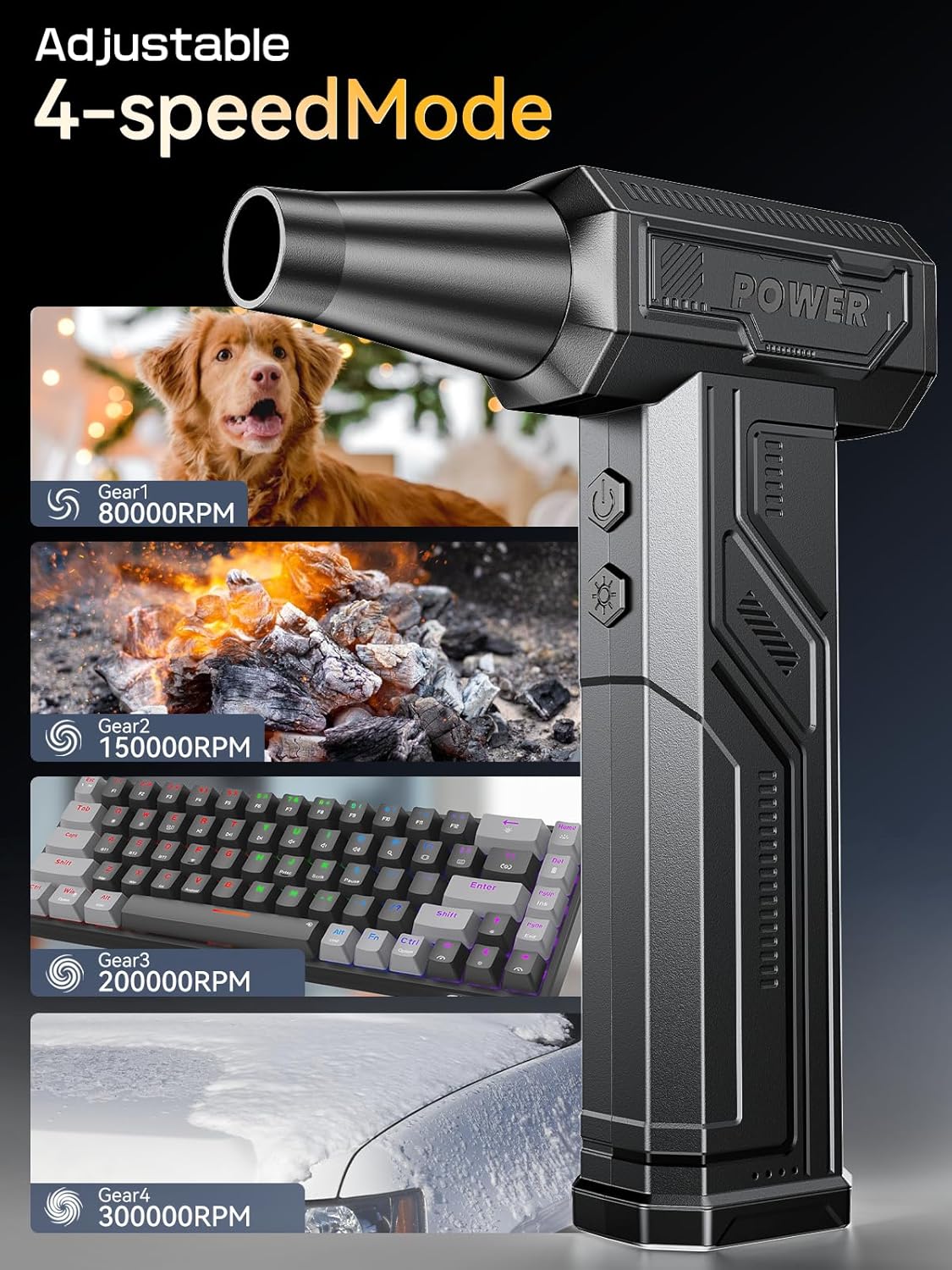
Figure 4: The 4-speed modes (80,000 RPM to 300,000 RPM) for varied cleaning tasks.
3.3 Using the LED Light
Press the light button (located below the power button) to activate the built-in LED light. This feature is useful for illuminating dark or hard-to-reach areas, ensuring thorough cleaning.

Figure 5: The integrated LED light provides visibility in confined spaces.
3.4 Application Examples
- Electronics: Safely remove dust from keyboards, PC components, cameras, and other sensitive devices.
- Automotive: Clean car interiors, vents, and hard-to-reach crevices.
- Household: Dust blinds, furniture, and small appliances.
- Outdoor: Inflate air mattresses or assist with campfire management using the appropriate nozzle.
4. Maintenance
4.1 Cleaning the Filter
Regularly check and clean the air intake filter located at the rear of the device to ensure optimal performance and prevent dust from entering the motor. Gently remove any accumulated dust or debris using a soft brush or cloth. Ensure the filter is dry before reattaching.
4.2 Storage
When not in use, store the Electric Air Duster and its accessories in the provided storage bag to protect them from dust and damage. Store in a cool, dry place away from direct sunlight and extreme temperatures.
5. Troubleshooting
5.1 Device Not Turning On
- Ensure the device is fully charged. Connect it to a power source and allow sufficient charging time.
- Verify that the power button is pressed and held for 3 seconds.
5.2 Low Airflow
- Check the air intake filter for blockages and clean if necessary.
- Ensure the selected nozzle is properly attached and not obstructed.
- Recharge the device if the battery level is low.
6. Specifications
| Feature | Specification |
|---|---|
| Model Number | W18A |
| Max RPM | 300,000 RPM |
| Battery Capacity | 10,000mAh |
| Charging Time | 2-2.5 Hours |
| Item Weight | 11.2 ounces (approx. 317g) |
| Product Dimensions | 5.2 x 5.2 x 7.05 inches |
| Color | Black |
7. Warranty and Support
The COOLDOVE Electric Air Duster comes with a 12-month warranty from the date of purchase. This warranty covers manufacturing defects and issues arising from normal use. For any product-related inquiries, technical support, or warranty claims, please contact our professional after-sales service team. Refer to the contact information provided on the product packaging or our official website.
We are committed to ensuring your satisfaction and providing prompt resolution for any concerns you may have.
Ask a question about this manual
Ask about setup, troubleshooting, compatibility, parts, safety, or missing instructions. Manuals+ will review the question and use this page’s manual context to help answer it.