
XINMEILAN 60V 27A/2000W 2-in-1 Micro Motor Controller
XINMEILAN 60V 27A/2000W Electric Scooter 2-in-1 Micro Motor Controller Instruction Manual for Kaabo Mantis 10/Warrior X
Model: 60V 27A/2000W 2-in-1 Micro Motor Controller
Introduction
This instruction manual provides essential information for the proper installation, operation, and maintenance of your XINMEILAN 60V 27A/2000W Electric Scooter 2-in-1 Micro Motor Controller. This advanced replacement control module is specifically designed for Kaabo Mantis 10 and Kaabo Warrior X electric scooters. It is intended for replacing damaged or old components. Please ensure accurate selection for your specific vehicle model. Professional installation is highly recommended to ensure correct functionality and safety.
Product Overview
The XINMEILAN 60V 27A/2000W 2-in-1 Micro Motor Controller is a critical component for managing the power delivery and overall performance of compatible electric scooters. It integrates control functions for efficient and reliable operation.

Figure 1: The XINMEILAN 60V 27A/2000W 2-in-1 Micro Motor Controller, showing its compact design and various wiring harnesses for connection to the scooter's electrical system.

Figure 2: The controller unit with an overlay indicating its specifications as a 60V 27A 2-in-1 controller, compatible with new 60V universal systems.
Setup and Installation
This controller is designed as a direct replacement for specific Kaabo Mantis 10 and Warrior X models. Due to the complexity of electric scooter electrical systems, professional installation is strongly recommended. Incorrect installation can lead to damage to the controller, scooter, or pose safety risks.
Pre-Installation Checklist:
- Ensure the scooter's power is completely off and the battery is disconnected.
- Verify that the new controller matches the specifications and connector types of the original unit.
- Gather necessary tools (e.g., screwdrivers, wire cutters/strippers, electrical tape, multimeter).
- Review the wiring diagrams specific to your Kaabo Mantis 10 or Warrior X model (not provided in this manual).
General Installation Steps (Consult a professional):
- Carefully remove the old controller, noting the connections of each wire. It is advisable to take photos for reference.
- Connect the new controller's wires to the corresponding components of the scooter (motor, battery, display, throttle, brakes, etc.). Pay close attention to color coding and connector shapes.
- Secure the controller in its designated housing, ensuring it is protected from moisture and vibration.
- Once all connections are made and secured, reconnect the battery.
- Perform initial power-on tests in a safe environment, checking for proper function of the throttle, brakes, lights, and display.

Figure 3: A detailed view of the various wiring harnesses extending from the controller, each designed for specific connections within the electric scooter's system.

Figure 4: An image showing the robust entry point of the wiring into the controller casing, indicating secure and organized cable management.
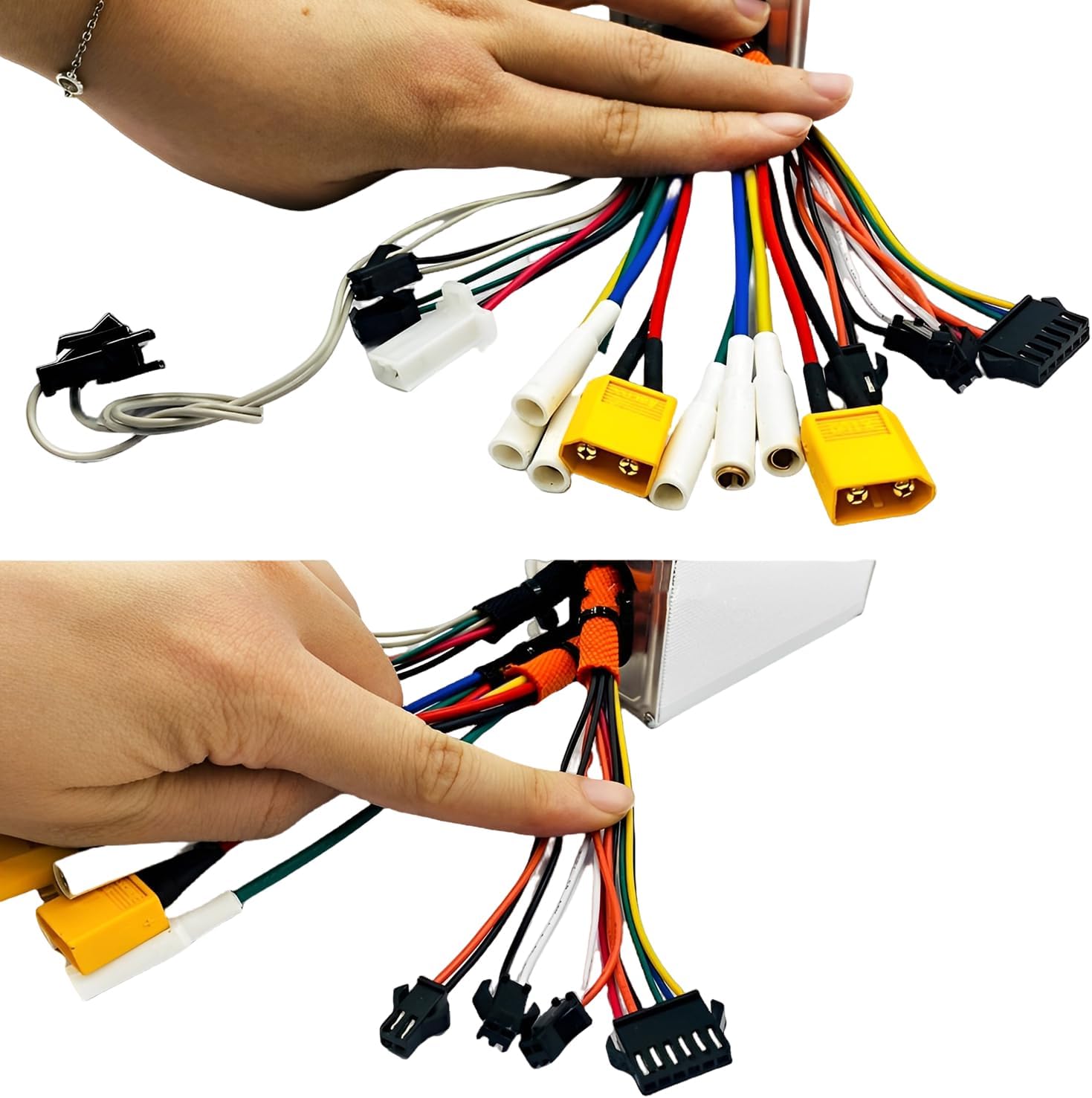
Figure 5: Hands pointing to different connectors on the controller, illustrating the various connection points for the scooter's electrical components.
Operating the Controller
The controller manages the power flow from the battery to the motor, interpreting signals from the throttle, brakes, and other sensors to provide precise control over the scooter's speed and performance. Once installed, the operation of the controller is integrated with your scooter's existing display and throttle system.
Key Functions:
- Motor Control: Regulates power to the motor based on throttle input.
- Brake Cut-off: Disables motor power when brakes are applied for safety.
- Display Communication: Transmits data to the scooter's display for speed, battery level, and other parameters.
- Error Detection: May provide error codes through the scooter's display in case of malfunctions.
Video 1: This video demonstrates the components of an electric bike controller system, including the controller unit, display, and wiring. While specific to an electric bike, it illustrates the general components and connections relevant to electric scooter controllers.
Maintenance
Proper maintenance ensures the longevity and reliable performance of your controller. As an electronic component, it requires minimal direct maintenance but benefits from regular inspection of its environment and connections.
- Keep Dry: Ensure the controller remains dry and protected from water ingress.
- Cleanliness: Periodically inspect the controller's housing for dirt or debris buildup. Clean gently with a dry, soft cloth if necessary.
- Connection Integrity: Regularly check all wiring connections for tightness and signs of corrosion or damage. Loose connections can lead to intermittent operation or component failure.
- Physical Damage: Inspect the controller for any signs of physical damage, such as dents, cracks, or frayed wires.
Do not attempt to open the controller casing, as this may void the warranty and expose sensitive electronic components to damage.
Troubleshooting
If you experience issues with your electric scooter after controller installation, consider the following basic troubleshooting steps. For complex problems, professional diagnosis and repair are recommended.
- No Power:
- Check battery charge level.
- Verify all power connections to the controller are secure.
- Inspect the main fuse (if applicable) for your scooter.
- Erratic Operation / Intermittent Power:
- Inspect all wiring harnesses for loose connections or damage.
- Ensure the throttle and brake sensors are functioning correctly.
- Error Codes on Display:
- Refer to your scooter's specific user manual for the meaning of any displayed error codes. These codes often indicate issues with specific components connected to the controller.
If troubleshooting steps do not resolve the issue, contact a qualified electric scooter technician or the manufacturer's support.
Specifications
| Feature | Detail |
|---|---|
| Brand | XINMEILAN |
| Model Number | 60V 27A/2000W 2-in-1 Micro Motor Controller |
| Voltage | 60 Volts |
| Current Rating | 27 Amperes |
| Power Output | 2000 Watts |
| Compatibility | Kaabo Mantis 10, Kaabo Warrior X |
| Manufacturer | XML-SHL |
| UPC | 741960596201 |
Warranty Information
This product comes with a 1-year warranty from the date of purchase. The warranty covers defects in materials and workmanship under normal use. It does not cover damage resulting from improper installation, misuse, accidents, unauthorized modifications, or normal wear and tear. Please retain your proof of purchase for warranty claims.
Customer Support
For technical assistance, warranty claims, or further inquiries regarding your XINMEILAN 60V 27A/2000W Electric Scooter 2-in-1 Micro Motor Controller, please contact the seller or manufacturer directly. When contacting support, please have your product model number and proof of purchase available.
Ask a question about this manual
Ask about setup, troubleshooting, compatibility, parts, safety, or missing instructions. Manuals+ will review the question and use this page’s manual context to help answer it.