
HYZQ 11006
HYZQ Sectional Sofa with Smart Module (Model 11006)
User Instruction Manual
Introduction
Thank you for choosing the HYZQ Sectional Sofa with Smart Module. This manual provides essential information for the safe assembly, operation, and maintenance of your new furniture. Please read these instructions carefully before beginning assembly and retain them for future reference.
Safety Information
To ensure safe use and prevent damage, please observe the following safety guidelines:
- Keep charging ports dry and free from debris. Avoid liquid spills near electrical components.
- Do not overload the storage ottoman. Distribute weight evenly.
- Keep LED lights away from flammable materials. Ensure proper ventilation around the light strips.
- Use caution when assembling and moving the sofa due to its size and weight. It is recommended to have at least two people for assembly and relocation.
- Supervise children and pets to avoid entrapment risks within storage compartments or under the sofa.
- Ensure all connections are secure and stable before use.
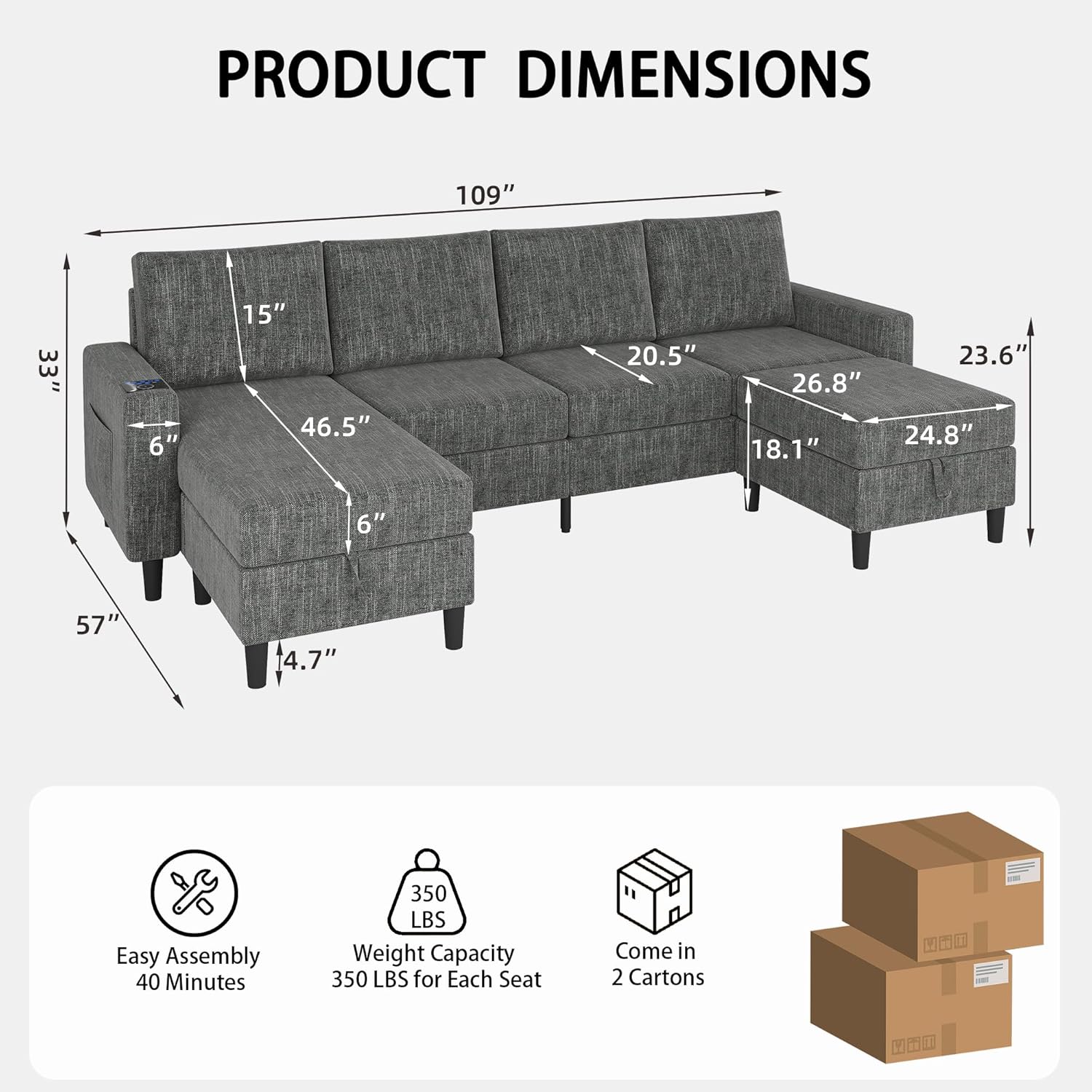
- Maximum weight capacity is 350 lbs per seat. Do not exceed this limit.
Package Contents
Your HYZQ Sectional Sofa is shipped in two (2) separate boxes. Please ensure you have received both packages before beginning assembly. The packages may arrive at different times.
Upon opening, verify that all components are present:
- Sofa sections (main frame components)
- Back cushions and seat cushions (vacuum compressed)
- Two (2) movable storage ottomans (hidden inside sofa armrests)
- Sofa legs and connecting hardware
- Smart module with wireless charging, USB, and Type-C ports
- Power adapter for smart module and LED lights
- Assembly tools (if provided)
Important Note: The two (2) storage ottoman pieces are hidden inside the sofa armrests. Please locate and open the Velcro fasteners at the bottom of each armrest to retrieve them before proceeding with assembly.
Setup and Assembly
Assembly typically takes approximately 2 hours with two people. Follow these steps carefully:
- Unpack All Components: Carefully remove all parts from both boxes. Lay them out on a clean, soft surface to prevent scratches.
- Locate Hidden Ottomans: As noted in the Package Contents, open the Velcro on the underside of the sofa armrests to retrieve the two storage ottomans.
- Assemble Ottomans: Attach the legs to the storage ottoman bases. Do not overtighten bolts initially; ensure the lid fits properly before final tightening.
- Connect Sofa Sections: Align the main sofa sections and securely connect them using the provided hardware. Ensure a stable and flush connection.
- Attach Sofa Legs: Install the sofa legs to the underside of the main sofa frame. Attach them loosely at first, then adjust to ensure the sofa sits evenly on the floor before fully tightening.
- Install Smart Module: Place the smart module into its designated slot on the armrest. Connect the power cable.
- Connect LED Lights: Locate the LED light strips and connect them to the smart module. Ensure the connection is secure.
- Place Cushions: Unpack the vacuum-compressed cushions. Allow them approximately 48 hours to fully expand and regain their original shape and firmness.
- Test Functionality: Plug in the power adapter for the smart module and LED lights. Test the wireless charging, USB/Type-C ports, and all LED light functions.
Operating Instructions
Smart Module (Charging Station)
The integrated smart module provides convenient charging options:
- Wireless Charging: Place your compatible smartphone or device on the designated wireless charging pad on the armrest. Ensure the device is centered for optimal charging.
- USB Port: Connect your device using a standard USB cable to the USB-A port for charging.
- Type-C Port: Connect your device using a USB Type-C cable to the Type-C port for charging.
RGB LED Lights
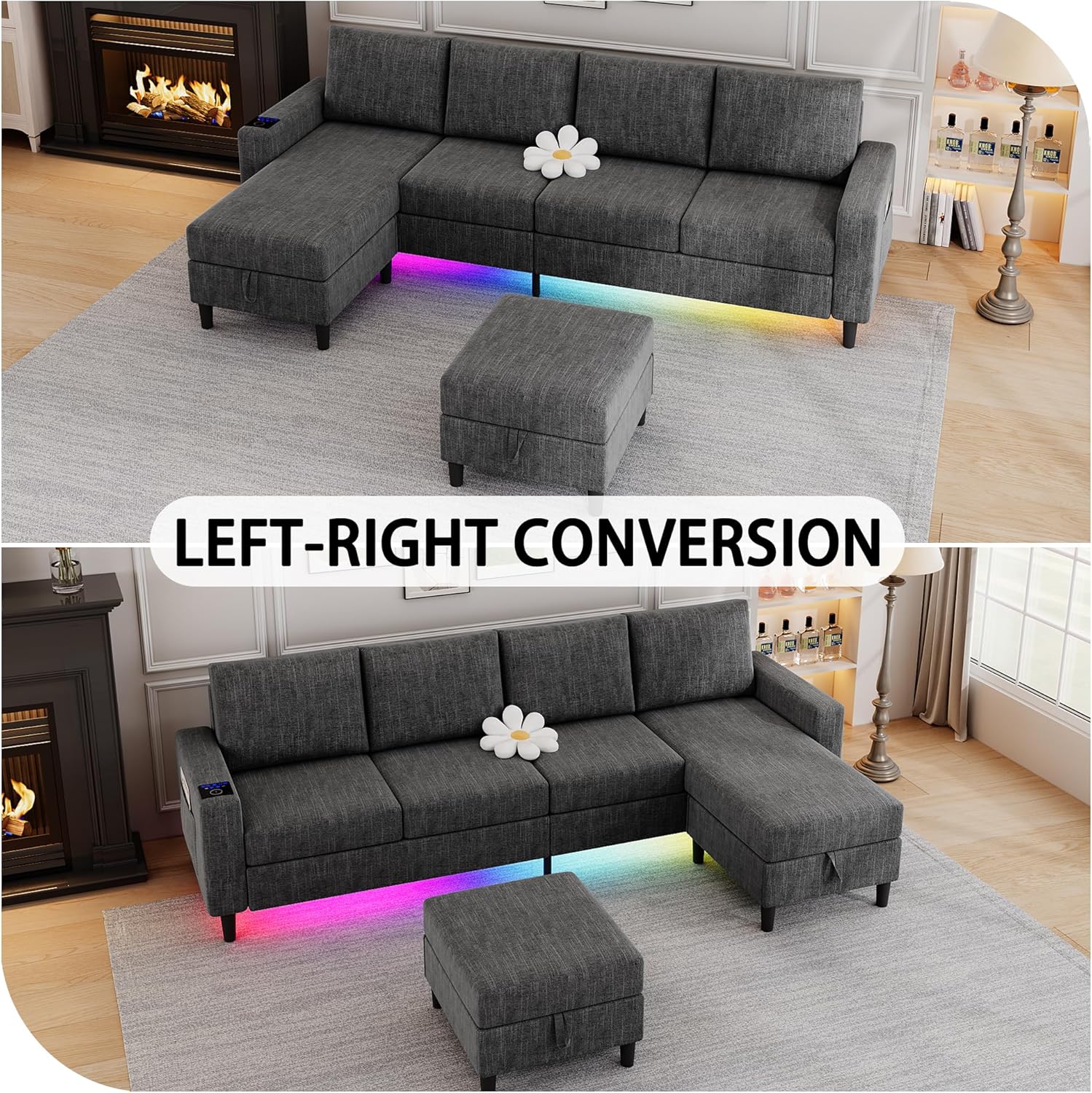
The sofa features RGB LED light strips with various modes, controlled via the smart module panel:
- Power On/Off: Press the power button on the control panel to turn the LED lights on or off.
- Static Modes: Cycle through 7 static color modes by pressing the 'Static Light' button.
- Dynamic Modes: Cycle through 7 dynamic RGB light modes by pressing the 'Dynamic Light' button.
- Music Sync Mode: Activate the 'Music Sync Light' mode to have the light colors and brightness change in rhythm with music.
- Brightness Adjustment: Use the 'Brightness+' and 'Brightness-' buttons to adjust the intensity of the LED lights.


Reversible Chaise Lounge
The chaise lounge is designed for flexibility and can be positioned on either the left or right side of the sofa. To reverse the chaise, detach it from the main sofa section, reposition it to the desired side, and re-secure it using the connecting hardware.
Storage Ottoman
The two movable ottomans provide convenient storage. Simply lift the top cushion of the ottoman to access the storage compartment underneath. Close securely after use.

Maintenance
Proper care will extend the life and appearance of your sofa:
- Cleaning: For general cleaning, wipe the linen fabric with a dry cloth. For spills, blot immediately with a clean, dry cloth. Avoid harsh chemicals or abrasive cleaners.
- Cushion Care: Periodically fluff and rotate cushions to maintain their shape and even out wear.
- Frame Inspection: Regularly check all bolts and connections to ensure they remain tight. Retighten as necessary.
- Electrical Components: Keep the smart module and LED light connections clean and dry. If any electrical component appears damaged, discontinue use and contact support.
Troubleshooting
- Issue: Missing parts or hardware.
- Solution: Double-check all packaging, including inside the sofa armrests where ottomans are stored. If parts are still missing, contact HYZQ customer support with your purchase details.
- Issue: Cushions appear flat or misshapen after unpacking.
- Solution: Cushions are vacuum-compressed for shipping. Allow up to 48 hours for them to fully expand and regain their original form. Fluffing them manually can help accelerate the process.
- Issue: LED lights are not working.
- Solution: Ensure the power adapter is securely plugged into a working outlet and connected to the smart module. Verify that the LED light strip connection to the smart module is intact and not damaged. Check the control panel for power and mode settings.
- Issue: Wireless charging or USB/Type-C ports are not functioning.
- Solution: Confirm the smart module is powered on. Ensure your device is compatible with wireless charging and correctly positioned. Try a different cable for USB/Type-C ports. Check for any debris in the ports. If issues persist, contact support.
- Issue: Sofa feels unstable or uneven.
- Solution: Recheck all leg and section connections. Loosen, adjust, and retighten the legs to ensure they are all making firm contact with the floor. Ensure all connecting hardware between sofa sections is fully tightened.
Specifications
| Feature | Detail |
|---|---|
| Model Number | 11006 |
| Brand | HYZQ |
| Material | Linen, Metal, Wood |
| Color | Dark Grey |
| Product Dimensions (L x W x H) | 109 x 57 x 33 inches |
| Item Weight | 104 pounds |
| Assembled Seat Height | 18.1 Inches |
| Weight Capacity (per seat) | 350 lbs |
| Special Features | Charging Station (Wireless, USB, Type-C), RGB LED Lights, Storage Ottomans, Reversible Chaise |
| Product Care Instructions | Wipe with Dry Cloth |
Warranty Information
For specific warranty details regarding your HYZQ Sectional Sofa, please refer to the warranty card included with your purchase or contact HYZQ customer support directly. Warranty coverage typically includes manufacturing defects for a specified period from the date of purchase.
Customer Support
If you have any questions, require assistance with assembly, or encounter any issues with your HYZQ Sectional Sofa, please do not hesitate to contact our customer support team. You can find contact information on the HYZQ brand store or through your retailer.
Visit the official HYZQ Store for more information and support: HYZQ Store on Amazon
Ask a question about this manual
Ask about setup, troubleshooting, compatibility, parts, safety, or missing instructions. Manuals+ will review the question and use this page’s manual context to help answer it.