
1. Important Safety Information
Please read and understand all safety instructions before operating your Barphygo G1000 Portable Power Station. Failure to follow these instructions may result in electric shock, fire, or serious injury.
- Do not disassemble, repair, or modify the unit.
- Do not place the unit near heat sources or in direct sunlight for extended periods.
- Avoid exposure to rain or moisture.
- Use only approved accessories and chargers.
- Keep out of reach of children.
- Ensure proper ventilation during use and charging.
- In case of fire, use a dry powder fire extinguisher. Water may cause electric shock.
2. Product Overview
The Barphygo G1000 is a portable power station designed to provide reliable power for various applications, including camping, outdoor activities, and home emergency backup. It features a 1024Wh LiFePO4 battery and a 1000W AC output.

Image 2.1: Front view of the Barphygo G1000 Portable Power Station, showing the handle, display, and various output ports.
2.1 Key Features
- High Capacity: 1024Wh LiFePO4 battery for extended power.
- Powerful Output: 1000W AC output (Pure Sine Wave) to power various appliances.
- Multiple Charging Options: Recharge via AC wall outlet, car charger, or solar panel (optional).
- Versatile Ports: Includes AC outlets, USB-C (PD 100W), USB-A (QC 18W, 5V/2.4A), and DC outputs.
- Advanced Safety: Built-in Battery Management System (BMS) with protections against overcharging, over-discharging, overcurrent, short-circuiting, and temperature fluctuations.
- Integrated Lighting: LED light with Flashlight, Strobe, and SOS modes.
- Informative Display: High-definition LCD panel showing input/output status, power, and remaining time.
2.2 Included Components
The package contains the following items:
- Barphygo G1000 Portable Power Station (1 unit)
- AC Adapter (1 unit)
- Car Charger Cable (1 unit)
- User Manual (1 unit)
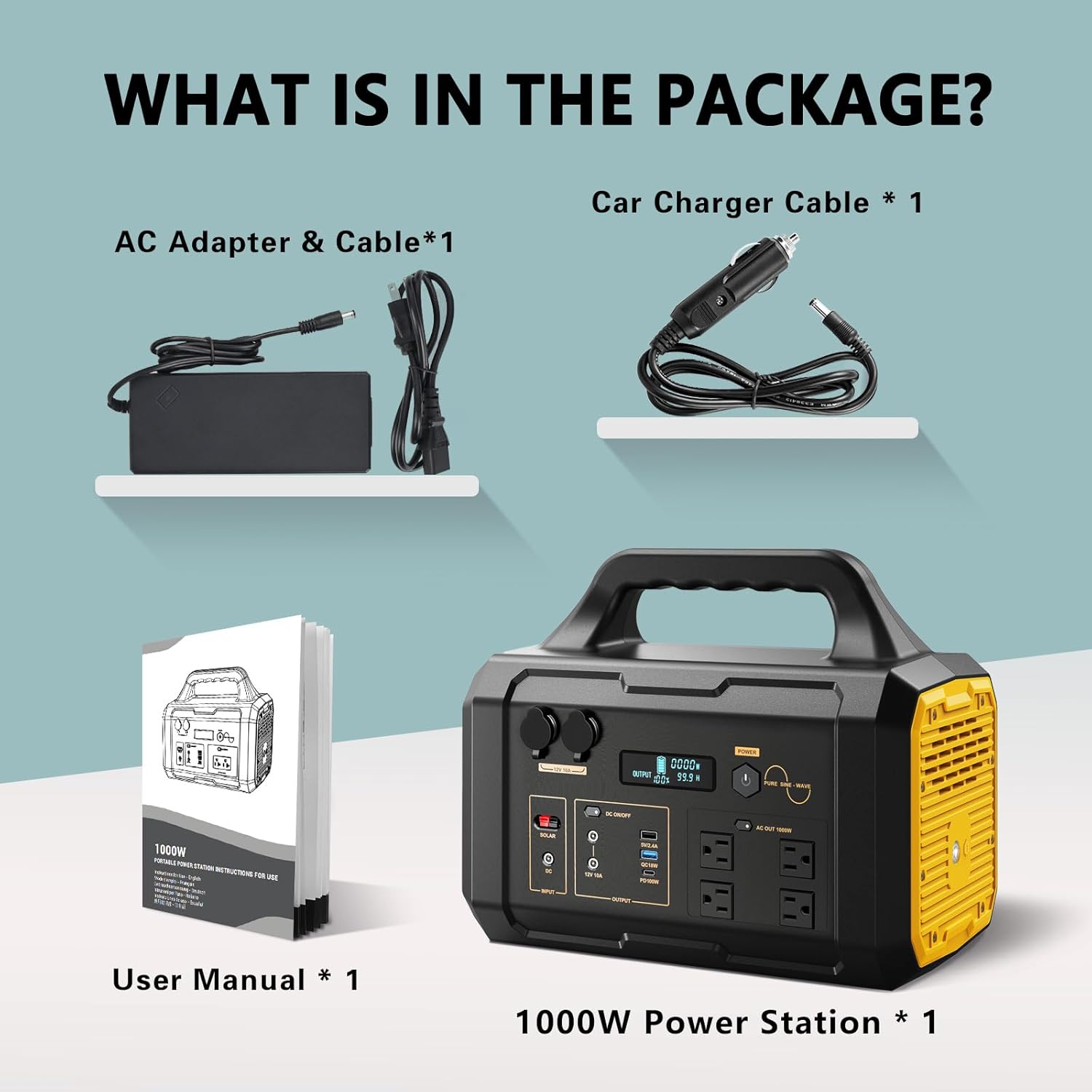
Image 2.2: Visual representation of the items included in the Barphygo G1000 package.
3. Setup and Charging
Before first use, it is recommended to fully charge the power station.
3.1 Charging Methods
The Barphygo G1000 offers three primary charging methods:
- AC Wall Charging: Connect the provided AC adapter to the power station's input port and then to a standard wall outlet. This is the fastest recommended method for home charging.
- Estimated Charging Time: 3-4 hours.
- Car Charging: Use the provided car charger cable to connect the power station to your vehicle's 12V cigarette lighter socket. This method is suitable for charging while traveling.
- Estimated Charging Time: 8-10 hours.
- Solar Panel Charging: Connect a compatible solar panel (100-400W, not included) to the power station's solar input port. The integrated MPPT charging system optimizes solar input for efficient charging. Ensure the solar panel is placed in direct sunlight for best results.
- Estimated Charging Time: 5-7 hours (with 100-400W solar panel, depending on sunlight conditions).
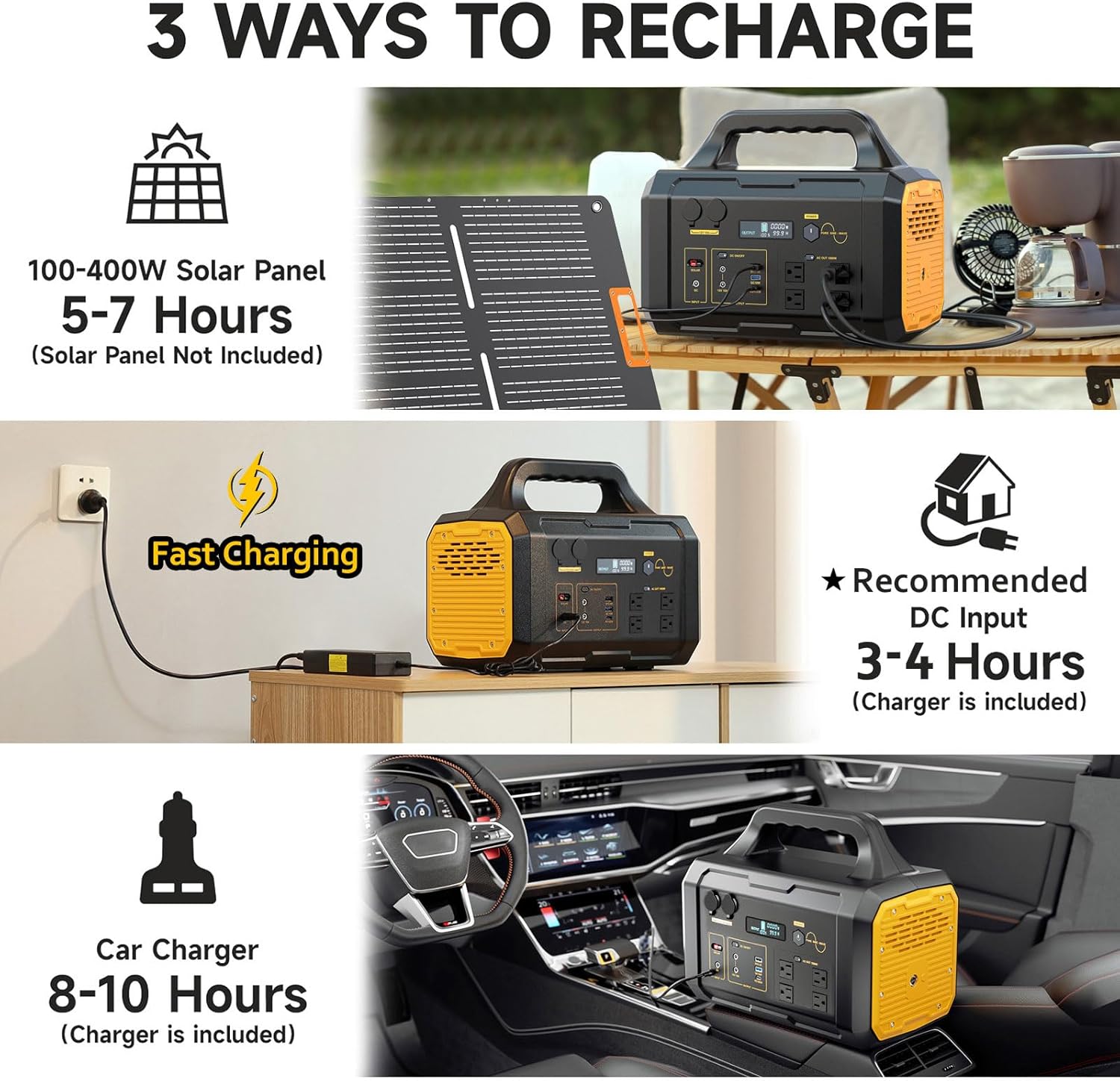
Image 3.1: Illustration of the three available charging methods for the Barphygo G1000.

Image 3.2: Solar panel charging in action, demonstrating outdoor setup.
4. Operating Instructions
4.1 Powering On/Off
- To power on the unit, press and hold the main power button until the LCD screen illuminates.
- To power off, press and hold the main power button until the LCD screen turns off.
4.2 LCD Display Overview
The high-definition LCD display provides real-time information about the power station's status:
- Input Status: Shows the current power input (e.g., from AC, car, or solar).
- Output Status: Displays the total power being drawn by connected devices.
- Battery Remaining: Indicates the current battery charge level as a percentage.
- Time Remaining: Estimates the remaining operating time or charging time based on current power usage/input.

Image 4.1: Detailed view of the LCD display and its indicators.
4.3 Connecting Devices
The Barphygo G1000 can power up to 11 devices simultaneously through its various output ports:
- AC Outlets (4x 1000W): Press the "AC OUT" button to activate the AC outlets. Connect devices requiring 120V AC power. Ensure the total wattage does not exceed 1000W.
- USB-C Port (1x PD 100W): For fast charging compatible USB-C devices like laptops and smartphones.
- USB-A Ports (1x QC 18W, 1x 5V/2.4A): For charging standard USB devices. The QC port supports Quick Charge compatible devices.
- DC Outputs (2x 12V/10A): For devices requiring 12V DC power.
- Car Ports (2x 12V/10A): For connecting car appliances or other 12V devices.
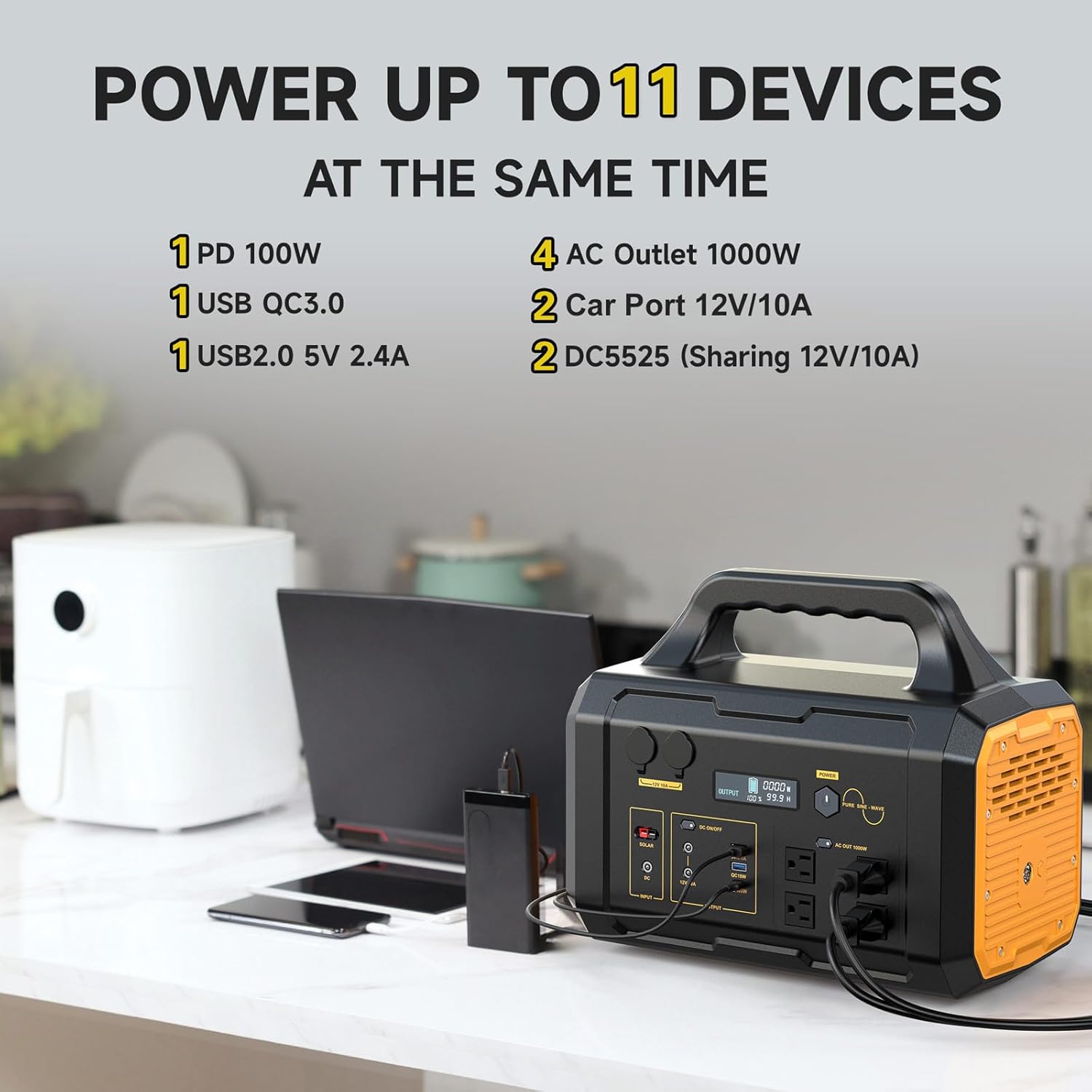
Image 4.2: Overview of output ports and simultaneous device charging capability.

Image 4.3: The power station actively charging multiple devices.
4.4 LED Lighting Function
The Barphygo G1000 includes a built-in LED light with three modes:
- Flashlight Mode: Provides steady illumination.
- Strobe Mode: Flashing light for signaling or attention.
- SOS Mode: Emits the international Morse code distress signal (S.O.S.).
To activate or cycle through the modes, press the LED light button located on the unit.

Image 4.4: The LED light function showing its three operational modes.
5. Maintenance and Storage
Proper maintenance ensures the longevity and optimal performance of your Barphygo G1000.
5.1 General Maintenance
- Keep the unit clean and free from dust and debris. Use a dry, soft cloth for cleaning.
- Ensure all ports are free from obstructions.
- Avoid dropping or subjecting the unit to strong impacts.
5.2 Battery Care and Storage
The Barphygo G1000 uses a LiFePO4 battery, known for its long cycle life. To maximize battery lifespan:
- For long-term storage (over 3 months), store the unit with a charge level between 50% and 80%.
- Recharge the unit to 50-80% every 3-6 months during storage to prevent deep discharge.
- Store the unit in a cool, dry place, away from direct sunlight and extreme temperatures.
- Avoid fully discharging the battery frequently, as this can reduce its overall lifespan.
6. Troubleshooting
If you encounter issues with your Barphygo G1000, refer to the following common problems and solutions:
| Problem | Possible Cause | Solution |
|---|---|---|
| Unit does not power on. | Battery is completely discharged. | Connect to an AC wall outlet using the provided adapter and charge for at least 30 minutes. |
| AC outlets not providing power. | AC output not activated; device draws too much power. | Press the "AC OUT" button to activate. Ensure connected device wattage is below 1000W. Check for overload protection activation on the display. |
| Solar charging is slow or not working. | Insufficient sunlight; solar panel not properly connected; incompatible solar panel. | Ensure solar panel is in direct sunlight and clean. Verify connections. Use a compatible solar panel (100-400W). |
| Unit shuts off prematurely (e.g., at 50-60% charge). | Battery calibration issue or internal fault. | Perform a hard reset: Completely drain the battery until the unit shuts off. Then, fully recharge the unit using the AC adapter without interruption. If the issue persists, contact customer support. |
| USB ports not charging devices. | USB output not activated; device incompatibility. | Ensure the DC/USB output is activated. Try a different USB cable or device. |
7. Specifications
| Feature | Detail |
|---|---|
| Brand | Barphygo |
| Model Name | PYS-PEG-U01000 |
| Battery Type | LiFePO4 (Lithium Iron Phosphate) |
| Capacity | 1024 Watt-hours (Wh) |
| AC Output | 4 x 120V AC, 1000W (Pure Sine Wave), 2000W Running Wattage, 4000W Starting Wattage |
| USB-C Output | 1 x PD 100W |
| USB-A Output | 1 x QC 18W, 1 x 5V/2.4A |
| DC Output | 2 x 12V/10A |
| Car Port Output | 2 x 12V/10A |
| Charging Input | AC Adapter, Car Charger, Solar Panel (MPPT) |
| Dimensions (L x W x H) | 15.12" x 9.13" x 12.64" |
| Weight | 28.8 Pounds |
| Material | Aluminum |
| Special Features | Automatic Shut Down, Digital Display, Overload Protection, Short Circuit Protection, USB Port, LED Light (Flashlight, Strobe, SOS) |
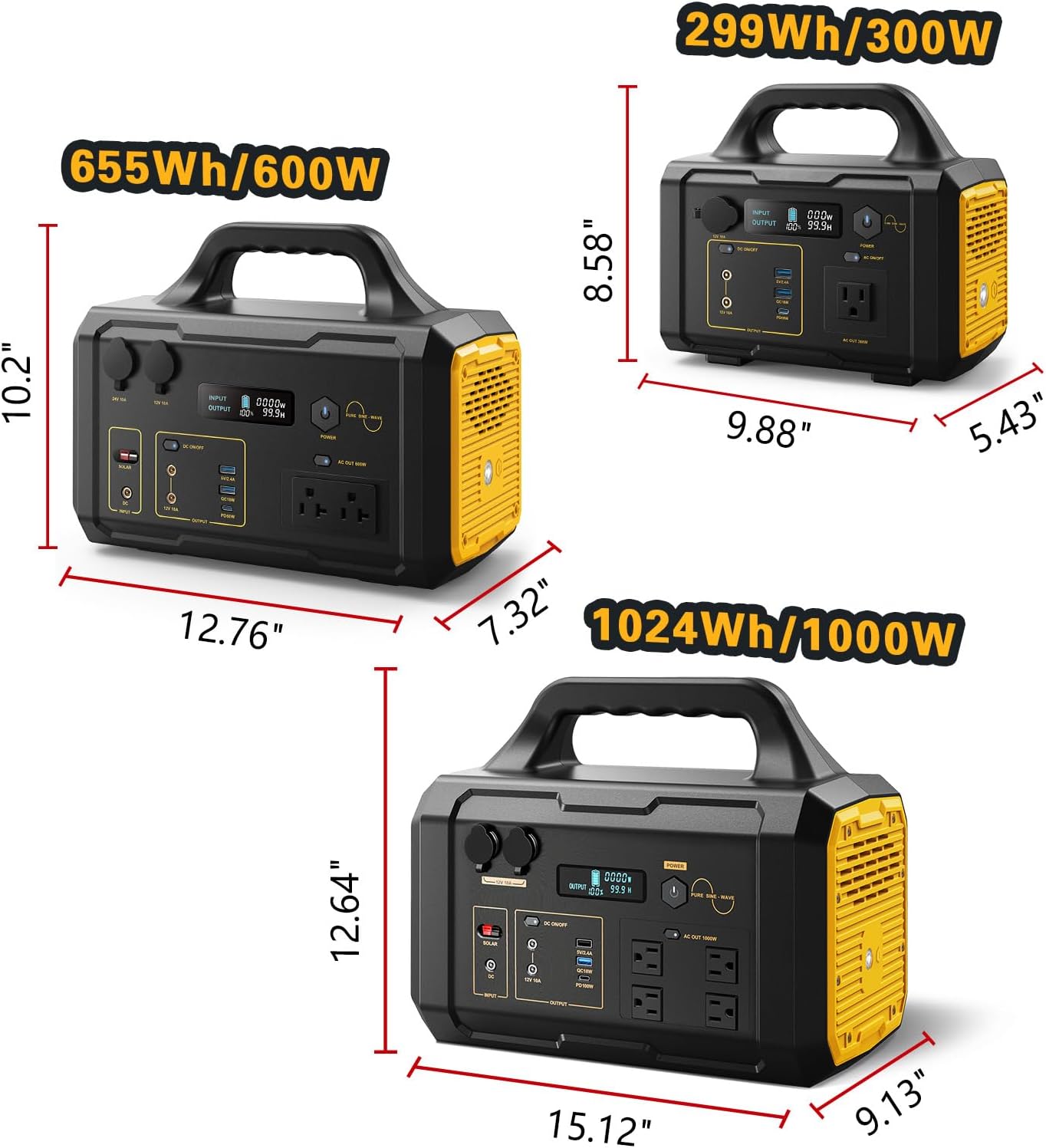
Image 7.1: Physical dimensions of the Barphygo G1000.
8. Warranty and Support
8.1 Warranty Information
The Barphygo G1000 Portable Power Station comes with a 1-Year Manufacturer's Warranty from the date of purchase. This warranty covers defects in materials and workmanship under normal use. It does not cover damage caused by misuse, accidents, unauthorized modifications, or natural disasters.
Please retain your proof of purchase for warranty claims.
8.2 Customer Support
For technical assistance, warranty claims, or any questions regarding your Barphygo G1000 Portable Power Station, please contact Barphygo customer support. Refer to the contact information provided on the product packaging or the official Barphygo website.
When contacting support, please have your model number (PYS-PEG-U01000) and purchase date available.