
1. Introduction
Thank you for choosing the Philips 44W 4200 Lumen LED Security Light. This outdoor flood light features a PIR motion sensor, 5000K daylight color temperature, and a durable, waterproof design. It is equipped with two adjustable heads and offers four distinct operating modes to enhance security and illumination around your home. This manual provides essential information for safe installation, operation, and maintenance of your new security light.

Figure 1.1: Philips 44W 4200 Lumen LED Security Lights (2-pack) and packaging.
2. Safety Information
Please read and understand all instructions before beginning installation. Failure to follow these instructions may result in electric shock, fire, or other hazards that could cause property damage or personal injury.
- Electrical Safety: Always turn off power at the circuit breaker or fuse box before installing, servicing, or changing any part of the fixture. Ensure proper grounding.
- Qualified Electrician: If you are unsure about the installation process, consult a qualified electrician.
- Wiring: Ensure all electrical connections are made in accordance with local codes, ordinances, and the National Electric Code (NEC).
- Operating Temperature: Do not operate the fixture in temperatures outside its specified range.
- Light Source: Do not stare directly into the LED light source when illuminated.
- Modifications: Do not attempt to modify the fixture. Any modifications may void the warranty and create safety hazards.
3. Package Contents
Verify that all components are present before installation. If any parts are missing or damaged, contact customer service.
- Philips LED Security Light Fixture (x1 or x2 depending on pack)
- Mounting Screws (x2)
- Wire Nuts (x3)
- Mounting Plate (x1)
- Rubber Plug (x1)
- Gasket (x1)
- Instruction Manual (this document)

Figure 3.1: Included accessories and product dimensions (6.69"L x 9.05"W x 9.45"H).
4. Setup and Installation
This security light requires hardwiring. A junction box is not included and must be provided separately. The recommended installation height is 8.2 feet (approximately 2.5 meters).
4.1 Mounting Options
The fixture can be installed in two ways: wall-mounted or eave-mounted. Ensure a tight seal between the wall/eave and the lamp to enhance water resistance. Eave installation may slightly reduce the sensing range.
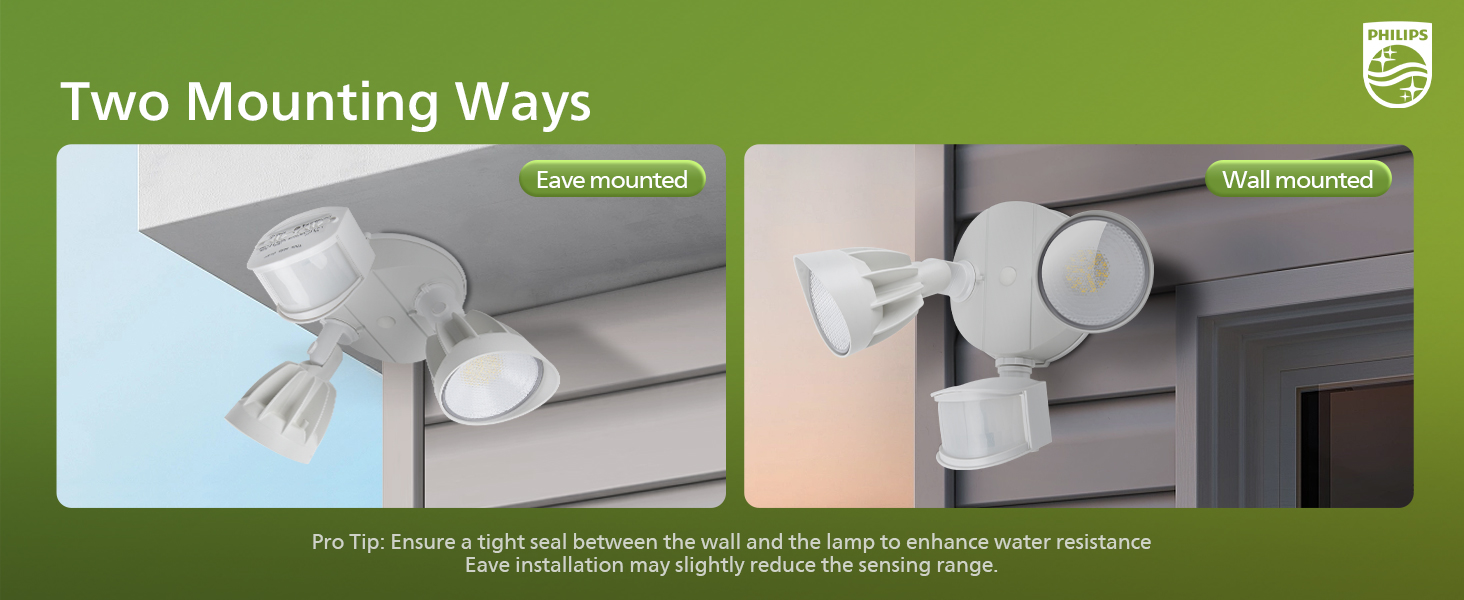
Figure 4.1: Eave-mounted and Wall-mounted installation examples.
4.2 Installation Steps
- Prepare Wiring: Turn off power at the circuit breaker. Remove the existing fixture (if any) and expose the junction box wiring.
- Attach Mounting Plate: Secure the mounting plate to the junction box using the provided screws. Ensure the gasket is properly seated for a waterproof seal.
- Connect Wires: Connect the house wiring to the fixture wiring using the wire nuts. Typically, black to black (live), white to white (neutral), and green/bare copper to green (ground).
- Mount Fixture: Align the fixture with the mounting plate and secure it with the remaining screws.
- Adjust Heads: Adjust the two light heads and the motion sensor to the desired angles. The light heads are adjustable up to 180 degrees vertically and 360 degrees horizontally. The motion sensor has a 180-degree adjustable angle.
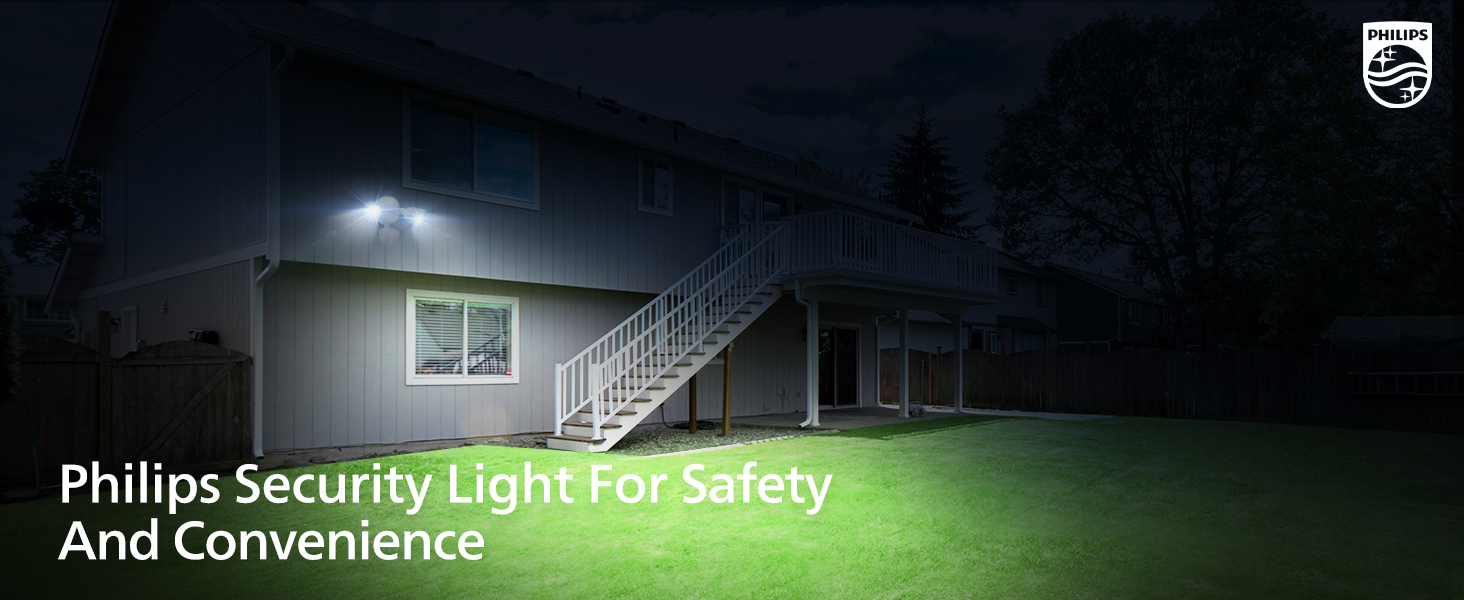
Figure 4.2: Adjustable head design for customized coverage.
5. Operating Modes and Settings
The Philips security light offers four distinct operating modes and adjustable sensor settings.
5.1 Sensor Settings
The motion sensor has adjustable settings for detection distance and activated lighting time. These settings are typically located on the underside of the sensor unit.
- Distance (Sensitivity):
- L (Low): 0-20 feet sensing range
- M (Medium): 0-39 feet sensing range
- H (High): 0-69 feet sensing range
- Time (Duration): Sets how long the light stays on after motion is detected.
- 1 MIN: 1 minute
- 3 MIN: 3 minutes
- 10 MIN: 10 minutes

Figure 5.1: Motion sensor adjustment dials for distance and time.

Figure 5.2: Motion sensor detection angle and maximum range.
5.2 Lighting Modes
The light can operate in four modes, selected via a switch on the sensor unit:
- Test Mode:
Can be activated in both daytime and nighttime. The light turns on for 5 seconds when motion is detected, then turns off. This mode is useful for testing the sensor's coverage area after installation.
- Security Mode (Sensor Mode):
Activates only in nighttime. The light turns on at 100% brightness for the set duration (1, 3, or 10 minutes) when motion is detected, then turns off if no further motion is detected.
- Dusk-to-Dawn Mode:
Activates only in nighttime. The light automatically turns on at dusk and remains on at 100% brightness until dawn, then turns off.
- Manual Override Mode:
Can be activated in both daytime and nighttime. This mode allows the light to stay on continuously at 80% brightness for a maximum of 6 hours.
- To Activate: Switch the light OFF and ON two times within 3 seconds.
- To Deactivate: Switch the light OFF and ON once for more than 3 seconds. The light will automatically return to sensor mode after 6 hours.

Figure 5.3: Overview of the four lighting modes.

Figure 5.4: Activating and deactivating Manual Override Mode.
6. Maintenance
The Philips LED Security Light is designed for minimal maintenance and long-lasting performance.
- Cleaning: Clean the fixture periodically with a soft, damp cloth. Do not use abrasive cleaners or solvents, as these can damage the finish or electrical components.
- No Bulb Replacement: This fixture uses integrated LED technology, meaning there are no bulbs to replace. The LEDs are designed to last the lifetime of the product.
- Weather Resistance: The light is IP65 rated, indicating it is waterproof and resistant to corrosion, heavy rain, high humidity, and UV exposure.
- Inspection: Periodically inspect the wiring and mounting for any signs of wear or damage.

Figure 6.1: The security light is designed for wet locations and all weather conditions.

Figure 6.2: Key features including durable aluminum construction and weather resistance.
7. Troubleshooting
If your Philips LED Security Light is not functioning as expected, refer to the following common issues and solutions:
| Problem | Possible Cause | Solution |
|---|---|---|
| Light does not turn on. |
|
|
| Light stays on continuously. |
|
|
| Light flashes or flickers. |
|
|
| Motion sensor range is too short or too long. |
|
|
8. Specifications
Detailed technical specifications for the Philips LED Security Light (Model 7601905053).
| Feature | Specification |
|---|---|
| Brand | Philips |
| Model Name | Flood/Security Sensor White |
| Model Number | 7601905053 |
| UPC | 046677607357 |
| Wattage | 44 Watts |
| Brightness | 4200 Lumens |
| Color Temperature | 5000 Kelvin (Daylight) |
| Light Source Type | Integrated LED |
| Number of Light Sources | 2 |
| Power Source | Corded Electric |
| Voltage | 120 Volts |
| Material | Aluminum, Plastic |
| Finish Type | Powder Coated |
| Product Dimensions | 6.69"L x 9.05"W x 9.45"H |
| Item Weight | 4.18 pounds |
| Indoor/Outdoor Usage | Outdoor |
| Water Resistance Level | IP65 (Waterproof) |
| Special Features | Anti-Rust, Energy Efficient, Motion Sensor, Waterproof |
| Motion Sensor Detection Angle | 180° |
| Motion Sensor Sensing Range | 0-69 feet |
| Lighting Time Adjustment | 1, 3, or 10 minutes |
9. Warranty and Support
Philips products are manufactured to high quality standards. This product is covered by the standard manufacturer's warranty. Please refer to the warranty card included with your purchase or visit the official Philips website for detailed warranty terms and conditions.
For technical support, troubleshooting assistance, or to inquire about replacement parts, please contact Philips customer service. Contact information can typically be found on the Philips website or on your product packaging.
You can visit the official Philips store for more information: Philips Lighting LED Store


