
Sanag B22S
Sanag B22s Bone Conduction Earphones User Manual
Model: B22S
Introduction
Thank you for choosing the Sanag B22s Bone Conduction Earphones. These headphones are designed to provide a unique audio experience by transmitting sound through your cheekbones, leaving your ears open to ambient sounds. Featuring IPX5 waterproof rating, Bluetooth 5.3 connectivity, and a long 16-hour playtime, the B22s are ideal for sports, outdoor activities, and daily use. Please read this manual carefully to ensure proper use and maintenance of your device.
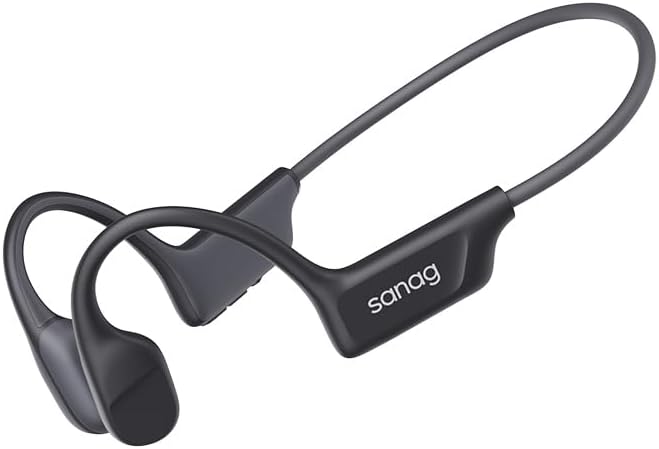
Image: Sanag B22s Bone Conduction Earphones, showcasing their sleek, lightweight design.
Safety Information
- Do not use the earphones at excessively high volumes for extended periods to prevent hearing damage.
- Be aware of your surroundings when using the earphones, especially in traffic or dangerous environments, as they allow ambient sound.
- Keep the device away from extreme temperatures, direct sunlight, and corrosive materials.
- Do not attempt to disassemble or modify the earphones. This will void the warranty and may cause damage.
- Keep out of reach of children.
Package Contents
Please check the package for the following items:
- Sanag B22s Bone Conduction Earphones
- USB Charging Cable
- User Manual
Product Overview
Familiarize yourself with the main components of your Sanag B22s earphones.

Image: Close-up view of the mechanical buttons on the Sanag B22s earphones, indicating power, volume, and charging port.
- Transducers: Deliver sound through bone conduction.
- Control Buttons: Power/Multi-function button, Volume Up/Next Track, Volume Down/Previous Track.
- Charging Port: USB-C port for charging.
- Microphone: For calls and voice assistant.
Setup
1. Charging the Earphones
Before first use, fully charge your Sanag B22s earphones.
- Connect the USB charging cable to the charging port on the earphones.
- Connect the other end of the cable to a USB power adapter (5V/1A recommended) or a computer's USB port.
- The LED indicator will show charging status (e.g., red for charging, blue for fully charged).
- A full charge typically takes approximately 1.5-2 hours.

Image: Illustration of the Sanag B22s earphones highlighting their extended battery life, offering up to 16 hours of playtime.
2. Pairing with a Bluetooth Device
- Ensure the earphones are turned off.
- Press and hold the Power/Multi-function button for approximately 3-5 seconds until the LED indicator flashes red and blue alternately, indicating pairing mode.
- On your device (smartphone, tablet, computer), enable Bluetooth and search for new devices.
- Select "Sanag B22s" from the list of available devices.
- Once connected, the LED indicator will flash blue slowly or turn off, depending on the model.
- If prompted for a password, enter "0000".
Operating Instructions
Power On/Off
- Power On: Press and hold the Power/Multi-function button for 2 seconds.
- Power Off: Press and hold the Power/Multi-function button for 3 seconds.
Music Playback
- Play/Pause: Press the Power/Multi-function button once.
- Next Track: Press and hold the Volume Up button for 2 seconds.
- Previous Track: Press and hold the Volume Down button for 2 seconds.
- Volume Up: Press the Volume Up button once.
- Volume Down: Press the Volume Down button once.
Call Management
- Answer/End Call: Press the Power/Multi-function button once.
- Reject Call: Press and hold the Power/Multi-function button for 2 seconds.
Voice Assistant
- Activate Voice Assistant: Double-press the Power/Multi-function button.
Maintenance
Cleaning
- Wipe the earphones with a soft, damp cloth.
- Do not use harsh chemicals or abrasive cleaners.
- Ensure the charging port is dry before charging.
Storage
- Store the earphones in a cool, dry place when not in use.
- Avoid storing in direct sunlight or extreme temperatures.
Water Resistance Care (IPX5)
The Sanag B22s are IPX5 water-resistant, meaning they can withstand splashes and sweat. They are not designed for submersion.

Image: The Sanag B22s earphones demonstrating their IPX5 water resistance, suitable for workouts and light rain.
- Do not rinse under running water or submerge in water.
- Dry the earphones thoroughly after exposure to sweat or splashes before charging.
Troubleshooting
| Problem | Possible Cause | Solution |
|---|---|---|
| Earphones won't turn on | Low battery | Charge the earphones fully. |
| Cannot pair with device | Earphones not in pairing mode / Device Bluetooth off / Too far apart | Ensure earphones are in pairing mode (flashing red/blue). Turn on device Bluetooth. Keep devices within 10 meters. |
| No sound | Volume too low / Not connected / Incorrect audio output | Increase earphone and device volume. Re-pair the earphones. Check device's audio output settings. |
| Poor sound quality | Interference / Device too far / Low battery | Move closer to the device. Avoid strong electromagnetic interference. Charge the earphones. |
| Microphone not working | Incorrect device settings / Obstruction | Check device's microphone input settings. Ensure microphone is not covered. |
Specifications
| Feature | Detail |
|---|---|
| Model Number | B22S |
| Connectivity Technology | Wireless (Bluetooth 5.3) |
| Form Factor | Bone Conduction |
| Water Resistance Rating | IPX5 |
| Playtime | Up to 16 hours (varies with volume and content) |
| Control Method | Touch / Mechanical Buttons |
| Item Weight | 6.7 ounces |
| Color | Black |
Warranty and Support
Sanag products come with a limited warranty. For detailed warranty information, please refer to the warranty card included in your package or visit the official Sanag website. If you encounter any issues or have questions regarding your Sanag B22s earphones, please contact our customer support team:
- Email: support@sanag.com (Example email, please refer to actual product documentation for correct contact)
- Website: www.sanag.com (Example website, please refer to actual product documentation for correct contact)
Please have your model number (B22S) and purchase details ready when contacting support.
Ask a question about this manual
Ask about setup, troubleshooting, compatibility, parts, safety, or missing instructions. Manuals+ will review the question and use this page’s manual context to help answer it.