1. Introduction
This manual provides essential information for the safe and effective operation, setup, and maintenance of the JOANLAB Lab Automatic Moisture Analyzer, model MBA1102. This instrument is designed for precise measurement of moisture content in various samples using halogen heating technology. Please read this manual thoroughly before operating the device.
2. Product Overview
The JOANLAB MBA1102 is an automatic moisture analyzer that combines weighing and oven functions. It features a halogen heating lamp for rapid drying and a high-precision weighing scale for accurate moisture determination.
2.1 Key Components

Image Description: This image displays the JOANLAB MBA1102 Moisture Analyzer with various components labeled. Key parts include a silicone cushion, slideable top window, PT-100-2 temperature sensor, control switch, aluminum sample weighing pan, windproof pan, insulated hand basket, horizontal bubbles, 5-inch touch screen, power switch, and an RS232 interface.
- Halogen Heating Lamp: Provides direct internal heating for efficient drying.
- 5-inch Full-Color Touch Screen: For intuitive operation and real-time display of test results.
- Aluminum Sample Weighing Pan: Holds the sample during the drying process.
- RS232 Interface: For data output to a printer or external device.
- Power Switch: Controls the device's power supply.
2.2 Halogen Heating System

Image Description: This image shows a close-up view of the halogen heating lamp inside the JOANLAB MBA1102 Moisture Analyzer, highlighting the high-quality temperature sensor. The lamp emits a warm glow, indicating its operational state.
The MBA1102 utilizes a halogen heating lamp for direct internal heating of the substance. This method significantly reduces drying time compared to conventional methods, ensuring fast and accurate moisture analysis. A high-quality temperature sensor ensures precise temperature control.
2.3 User Interface

Image Description: This image displays the 5-inch full-color touch screen of the JOANLAB MBA1102 Moisture Analyzer. The screen shows a clear display of readings including weight, moisture percentage, and a real-time curve change graph, indicating test results and progress.
The device features a 5-inch full-color touch screen for effortless control and intuitive operation. It provides a clear display of readings and allows users to view test results as a curve change in real-time.
2.4 Drying and Shutdown Modes
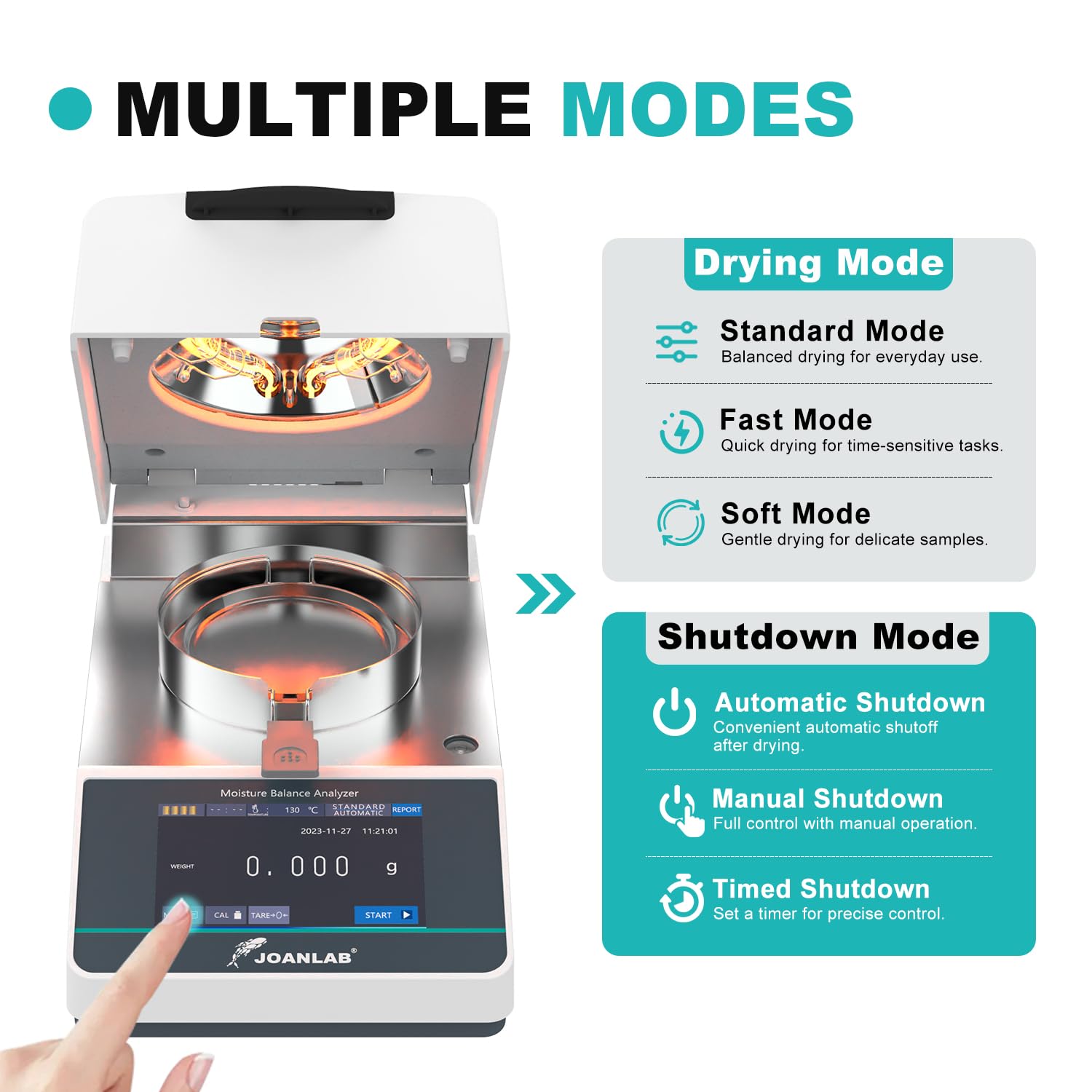
Image Description: This image illustrates the multiple drying and shutdown modes available on the JOANLAB MBA1102 Moisture Analyzer. Drying modes include Standard, Fast, and Soft, while shutdown modes include Automatic, Manual, and Timed.
- Drying Modes:
- Standard Mode: Balanced drying for general use.
- Fast Mode: Quick drying for time-sensitive tasks.
- Soft Mode: Gentle drying for delicate samples.
- Shutdown Modes:
- Automatic Shutdown: Convenient automatic shutoff after drying.
- Manual Shutdown: Full control with manual operation.
- Timed Shutdown: Set a timer for precise control.
2.5 Applications

Image Description: This image demonstrates the versatility of the JOANLAB MBA1102 Moisture Analyzer, showing its application in measuring moisture content in food, powder, and for agricultural research. The device is shown with a sample being analyzed.
The MBA1102 is a versatile instrument suitable for various applications, including but not limited to food moisture analysis, powder moisture determination, and agricultural research. It provides quick results, typically within 7-15 minutes.
3. Technical Data and Specifications

Image Description: This image presents a detailed table of technical data for various models of JOANLAB moisture analyzers, including MBA1102. It lists specifications such as capacity, readability, sensor type, pan size, operating temperature, heating source, temperature range, moisture range, and power supply.
| Feature | Specification |
|---|---|
| Model | MBA1102 |
| Capacity | 110g |
| Readability | 0.01g |
| Sensor | Load Cell |
| Pan Size | Φ96mm |
| Operating Temperature | 5°C - 35°C |
| Heating Source | Halogen lamp |
| Temperature Range | 40°C - 160°C |
| Temperature Setting Increment | 1°C |
| Moisture Range | 90%-10% |
| Moisture Readability | 0.1% |
| Testing Range | 90%-10% |
| DRY% Readability | 0.1% |
| Storage Capacity | 20 reports |
| Analysis Curve | Real-time dynamic curve |
| Testing Height | 30mm |
| Power Supply | 220V 50Hz / 110V 60Hz |
| Dimensions (L*W*H) | 336*185*165mm |
| Item Weight | 3.5 kg |
| Weight Limit | 110 Grams |
| Special Features | Large Display |
4. Setup
- Unpacking: Carefully remove the moisture analyzer from its packaging. Retain all packaging materials for future transport or storage.
- Placement: Place the instrument on a stable, level surface, free from vibrations, direct sunlight, drafts, and significant temperature fluctuations. Ensure adequate space around the unit for ventilation. Verify the horizontal bubbles indicate a level surface.
- Power Connection: Connect the power cable to the instrument and then to a grounded electrical outlet matching the specified voltage (220V 50Hz or 110V 60Hz).
- Initial Calibration: Before first use, or if the instrument has been moved, perform a calibration. The device comes with a 100g standard weight for this purpose. Refer to the 'Operating Instructions' section for detailed calibration steps.
- Environmental Conditions: Ensure the operating environment is within the specified temperature range of 5°C to 35°C and appropriate humidity levels to ensure optimal performance.
5. Operating Instructions
5.1 Powering On and Preheating

Image Description: This image illustrates the 'One-Click Preheating' function of the JOANLAB MBA1102 Moisture Analyzer. The device is shown with the heating lamp active, warming an empty sample disk. A timer indicates 'Preheating 3 minutes auto stop'.
- Press the power switch to turn on the instrument.
- Allow several seconds for the display to initialize.
- For accurate results, it is recommended to preheat the empty sample disk. Touch the 'START' button on the touch screen to initiate preheating. The device will automatically preheat for 3 minutes and then stop.
5.2 Working Panel Overview

Image Description: This image provides a detailed view of the working panel of the JOANLAB MBA1102 Moisture Analyzer, with various display elements and buttons clearly numbered and labeled. It shows the indicator area, timing display, current temperature, temperature measurement mode, stopping mode, previous data, menu, calibration button, tare button, start test button, and data display.
The touch screen interface provides access to all functions:
- Indicator Area: Displays status icons.
- Timing Display: Shows elapsed time during a test.
- Current Temperature: Displays the real-time temperature of the heating chamber.
- Temperature Measurement Mode: Indicates the selected temperature setting.
- Stopping Mode: Shows the current shutdown mode (automatic, manual, timed).
- Previous Data: Accesses stored test results.
- Menu: Navigates to settings and advanced options.
- Calibration Button: Initiates the calibration process.
- Tare Button: Zeros the scale before adding a sample.
- Start Test: Begins the moisture analysis process.
- Data Display: Shows weight, moisture percentage, and other relevant data.
5.3 Sample Preparation and Testing
- Prepare Sample: Ensure the sample is representative and prepared according to standard laboratory procedures for moisture analysis.
- Place Pan: Place an empty aluminum sample weighing pan on the pan support.
- Tare: Press the 'TARE' button to zero the scale.
- Add Sample: Carefully add the desired amount of sample (up to 110g) to the weighing pan. Ensure even distribution.
- Select Mode: Navigate to the 'Menu' to select the appropriate drying mode (Standard, Fast, or Soft) and shutdown mode (Automatic, Manual, or Timed) based on your sample type and requirements. Set the desired temperature between 40°C and 160°C.
- Start Test: Close the lid and press the 'START' button to begin the analysis. The instrument will heat the sample and continuously measure its weight loss.
- Monitor Results: The 5-inch touch screen will display real-time data, including current weight, moisture percentage, and a dynamic curve showing the drying process.
- End Test: The test will conclude automatically based on the selected shutdown mode or can be stopped manually.
- Record Data: The device can store up to 20 reports. Data can be viewed on the screen or sent to a printer via the RS-232 port.
5.4 Calibration
The MBA1102 supports two calibration modes: Point/Standard and Linear. Use the included 100g standard weight for calibration. Consult the on-screen menu for detailed, step-by-step instructions for each calibration type.
6. Maintenance
- Cleaning: Regularly clean the sample pan and the heating chamber. Ensure the instrument is powered off and unplugged before cleaning. Use a soft, damp cloth with a mild detergent. Avoid abrasive cleaners or solvents.
- Halogen Lamp: The halogen lamp is a consumable part. If replacement is needed, ensure the instrument is cool and unplugged. Handle the new lamp carefully, avoiding direct contact with skin oils, which can reduce its lifespan.
- General Care: Keep the instrument free from dust and spills. Do not expose it to excessive moisture or extreme temperatures.
- Storage: When not in use for extended periods, store the instrument in its original packaging in a dry, temperature-controlled environment.
7. Troubleshooting
- Inaccurate Readings:
- Ensure the instrument is level and free from vibrations.
- Perform a calibration using the 100g standard weight.
- Check for drafts or air currents affecting the weighing pan.
- Verify the sample size is within the 110g limit.
- Display Not Responding:
- Ensure the device is properly powered on and has completed its initialization sequence.
- If unresponsive, power off the unit, wait 30 seconds, and power it back on.
- Heating Element Not Working:
- Check power connection.
- Ensure the lid is properly closed.
- If the lamp is visibly damaged or not glowing, it may need replacement. Contact customer support.
- Error Messages:
- Refer to the on-screen error code for specific troubleshooting steps. If the issue persists, contact customer support.
For issues not covered in this section, please contact JOANLAB customer support or your local distributor.
8. Warranty and Support
For detailed information regarding the product warranty, please refer to the warranty card included with your purchase or contact your JOANLAB authorized dealer or the manufacturer directly. Support for technical inquiries and service requests can be obtained through the same channels.


