Maia Toys Rayla 10-Function Rechargeable Dual Stimulator Instruction Manual
Model: Rayla
Important Safety Information
Please read all instructions carefully before using your Maia Toys Rayla Dual Stimulator. Retain this manual for future reference.
- This product is intended for adult use as a non-medical pleasure device only. It is not intended for medical use.
- Discontinue use immediately in the event of any medical condition, discomfort, or pain. Consult a healthcare professional if symptoms persist.
- Keep out of reach of children.
- Do not use if the product appears damaged or defective.
- Use only water-based or hybrid lubricants with this product. Oil-based lubricants may damage the silicone material.
- Clean the product thoroughly before and after each use as described in the Maintenance section.
Product Overview
The Maia Toys Rayla is a fully rechargeable dual stimulation vibrator designed for both G-Spot and clitoral excitement. It features a body-safe design and multiple vibration settings for a personalized experience.
Key Features:
- 10 Vibration Levels: Offers a variety of intensity settings.
- Dual Stimulators: Designed for comprehensive pleasure.
- Fully Rechargeable: Convenient USB charging.
- Body-Safe Materials: Made from 100% Medical Grade Silicone and ABS Plastic.
- Waterproof: Submersible design for easy cleaning and use in wet environments.
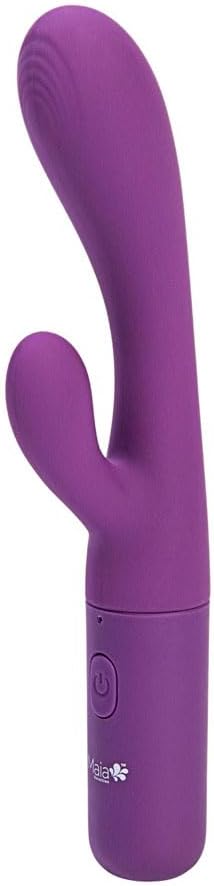
Image: The Maia Toys Rayla Dual Stimulator, highlighting the power button and charging port at the base.
Setup
Charging the Device:
- Before first use, fully charge the Rayla Dual Stimulator.
- Locate the silicone-covered charging port at the bottom of the device.
- Insert the included charging cable into the port. Connect the other end to a USB power source (e.g., computer, USB wall adapter).
- During charging, the indicator light will flash.
- Once fully charged, the indicator light will become solid. Disconnect the charging cable.

Image: The Maia Toys Rayla Dual Stimulator shown in its retail packaging.
Operating Instructions
Power ON/OFF:
- To turn the device ON, press and hold the Power Button for 3 seconds.
- To turn the device OFF, press and hold the Power Button for 3 seconds again.
Changing Vibration Settings:
- Once the device is ON, press and release the Power Button to cycle through the 10 distinct vibration settings.

Image: A close-up view of the flexible stimulator end of the Maia Toys Rayla.
Maintenance
Cleaning:
- Clean the Rayla Dual Stimulator thoroughly before and after each use.
- Wash with mild soap and warm water, or use a specialized adult toy cleaner.
- Since the device is submersible, it can be rinsed under running water.
- Ensure the charging port is securely sealed before cleaning with water.
- Pat dry with a lint-free cloth or allow to air dry completely before storage.
Storage:
- Store the device in a clean, dry place away from direct sunlight and extreme temperatures.
- Avoid storing with other toys made of different materials to prevent potential damage or reactions.
Troubleshooting
| Problem | Possible Cause | Solution |
|---|---|---|
| Device does not turn on. | Battery is depleted. | Charge the device fully using the provided USB cable. |
| Device does not charge. | Charging cable not properly connected or faulty. USB power source not active. | Ensure the charging cable is securely connected to both the device and the power source. Try a different USB port or adapter. |
| Vibrations are weak or inconsistent. | Low battery. | Recharge the device. |
| Device stops working unexpectedly. | Low battery or internal malfunction. | Charge the device. If the issue persists, contact customer support. |
Specifications
- Model: Rayla
- Brand: Maia Toys
- Functions: 10 Vibration Levels
- Stimulation: Dual (G-Spot and Clitoral)
- Materials: 100% Medical Grade Silicone, ABS Plastic
- Color: Purple
- Overall Length: 7 inches
- Insertable Length: 4.5 inches
- Waterproof Rating: Submersible (IPX7 implied by "Submersible for Wet Fun")
- Power: Rechargeable via USB
- Package Dimensions: 9.21 x 3.11 x 1.46 inches
- Weight: 4.16 ounces
Warranty and Support
The Maia Toys Rayla Dual Stimulator comes with a 1-YEAR WARRANTY from the date of purchase.
For warranty claims, technical support, or any questions regarding your product, please contact Maia Toys customer service through their official website or the retailer where the product was purchased.
Please retain your proof of purchase for warranty validation.