
1. Introduction
This manual provides comprehensive instructions for the installation, operation, and maintenance of the Foxeer Reaper F4 128K 65A BL32 4in1 ESC. Please read this manual thoroughly before use to ensure proper functionality and safety. This Electronic Speed Controller (ESC) is designed for high-performance racing drones, offering robust power delivery and advanced control capabilities.
2. Product Overview
The Foxeer Reaper F4 128K 65A BL32 4in1 ESC integrates four individual ESCs into a single compact board, simplifying wiring and reducing overall weight in your drone build. It is engineered for demanding applications, supporting high current loads and advanced communication protocols.
Key Features:
- Performance: Supports DShot1200 for enhanced throttle response in racing drones.
- Compatibility: Ideal for 3-8S setups with a voltage range of 9-40V, versatile for various builds.
- Design: Compact 30.5x30.5mm M3 form factor fits easily into your drone frame without hassle.
- Current Handling: Capable of delivering 65A continuous current per motor for robust performance even under demanding conditions.
- Technology: Features advanced BLHeli32 firmware enabling rapid motor control and smooth flight.
- Efficiency: Optimized for effective power management, ensuring reliable operation during races.
- Installation: User-friendly design allows for straightforward installation with minimal tools required.
Product Views:

Figure 1: Top view of the Foxeer Reaper F4 128K 65A BL32 4in1 ESC, showing motor pads M1-M4, power input, and main components.

Figure 2: Angled view of the ESC, highlighting the compact design and component layout from one perspective.
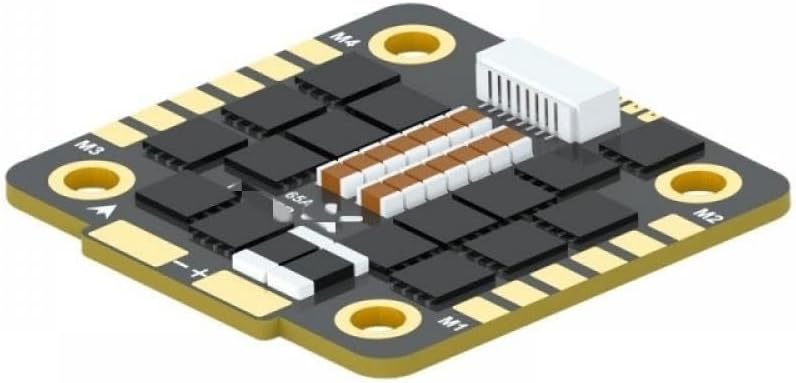
Figure 3: A different angled view, providing a clearer look at the power input pads and mounting holes.

Figure 4: Side angled view, illustrating the low profile of the ESC and the arrangement of the signal connector.

Figure 5: Top-down angled view, showing the overall footprint and the distribution of components across the board.
3. Specifications
| Feature | Specification |
|---|---|
| Firmware | FOXEER_Reaper4IN1_F4_65A_128_Multi_32_9 |
| Continuous / Burst Current | 65A*4 / 100A*4 |
| Input Voltage | DC 9V~40V (3-8S Lipo) |
| BEC | No |
| Telemetry | Supported |
| ESC Programming | BLHeli32 |
| Input Protocols | DShot 150/300/600/1200 / MultiShot / OneShot etc. |
| Working Temperature | -20 ~ +55 ℃ |
| Working Humidity | 20-95% |
| Storage Temperature | -20 ~ +70 ℃ |
| Mounting Hole | 30.5x30.5mm, 4mm/M3 |
| Dimension | 42.5x42x5.5mm |
| Weight | 14.8g |
| Package Dimensions | 1.18 x 0.79 x 0.39 inches |
| Item Weight (Package) | 14.1 ounces (400 Grams) |
| Item Model Number | VyTRdW134 |
4. Setup
Proper installation is crucial for the performance and longevity of your ESC. Follow these guidelines carefully:
4.1 Mounting
The ESC features a 30.5x30.5mm mounting pattern with M3 holes. Ensure secure mounting within your drone frame, using appropriate standoffs and screws. Avoid contact with conductive surfaces or excessive pressure that could damage components.
4.2 Power Connection
Connect the main battery lead (DC 9V~40V, 3-8S Lipo) to the designated positive (+) and negative (-) pads on the ESC. Observe correct polarity to prevent irreversible damage to the ESC and other components. Use adequately sized wires for the current draw.
4.3 Motor Connection
Connect each of the four motor phases (typically U, V, W) from your brushless motors to the corresponding motor pads (M1, M2, M3, M4) on the ESC. The order of connection may affect motor rotation direction, which can be adjusted later in the firmware configuration.
4.4 Flight Controller Connection
Connect the signal wires from your flight controller to the appropriate signal input pads on the ESC. This ESC supports various digital and analog protocols including DShot 150/300/600/1200, MultiShot, and OneShot. Ensure your flight controller is configured to output the correct protocol for optimal performance.
5. Operating
The Foxeer Reaper F4 128K 65A BL32 4in1 ESC utilizes BLHeli32 firmware, offering advanced configuration options and performance tuning for your drone.
5.1 Firmware
The default firmware is FOXEER_Reaper4IN1_F4_65A_128_Multi_32_9. For updates or advanced settings, use the BLHeliSuite32 software. Connect the ESC to your computer via a compatible flight controller passthrough or a dedicated BLHeli32 programmer. Always ensure you are using the latest stable version of BLHeliSuite32 and the correct firmware for your ESC.
5.2 Configuration
Within BLHeliSuite32, you can adjust various parameters to optimize performance for your specific motors and drone setup. Key configurable settings include:
- Motor Direction: Reverse motor direction if necessary.
- Motor Timing: Adjust timing to match your motors for efficiency and power.
- PWM Frequency: Set the appropriate PWM frequency for smooth motor operation.
- Damped Light: Enable for active braking and faster throttle response.
- Startup Power: Adjust for reliable motor startup.
Ensure all settings are appropriate for your components to prevent damage or suboptimal performance.
5.3 Telemetry
Telemetry is supported, allowing real-time monitoring of ESC data (e.g., RPM, temperature, current, voltage) through your flight controller and OSD (On-Screen Display). This feature is valuable for diagnostics and performance analysis.
6. Maintenance
Regular maintenance helps ensure the reliability and extends the lifespan of your ESC.
6.1 Inspection
Periodically inspect the ESC for any signs of physical damage, such as cracked components, loose solder joints, or burnt areas. Check for debris or dust accumulation, especially around heatsinks and power components.
6.2 Cleaning
Gently clean the ESC with a soft brush or compressed air to remove dust and dirt. If necessary, use isopropyl alcohol and a cotton swab for stubborn grime, ensuring the ESC is completely dry before reapplying power. Avoid using water or other conductive liquids directly on the board.
6.3 Storage
When not in use, store the ESC in a dry, cool environment, away from direct sunlight, extreme temperatures, and static electricity. It is recommended to store it in an anti-static bag.
7. Troubleshooting
This section addresses common issues you might encounter with your ESC.
7.1 Motor Not Spinning or Stuttering
- Check Connections: Verify all motor phase connections (U, V, W) for continuity and correct soldering. Ensure signal wire connections to the flight controller are secure.
- Power Supply: Confirm the ESC is receiving power and the battery is adequately charged.
- Firmware Settings: Check BLHeliSuite32 for correct motor direction, motor timing, and ESC protocol settings. An incorrect protocol (e.g., DShot vs. OneShot) can cause issues.
- Motor Damage: Inspect the motor for any physical damage, bent shafts, or shorted windings.
7.2 Motor Desyncs
- Motor Timing: Adjust motor timing settings in BLHeliSuite32. Some motors perform better with higher timing.
- Cooling: Ensure adequate cooling for the ESC and motors. Overheating can lead to desyncs.
- Motor/Propeller Load: Verify that the motor/propeller combination is not drawing excessive current beyond the ESC's rating, which can stress the ESC.
- Noise Filtering: Ensure proper noise filtering on the signal lines from the flight controller.
7.3 Overheating
- Airflow: Ensure sufficient airflow around the ESC. Avoid enclosing it in tight spaces without ventilation.
- Current Draw: Verify that the motor/propeller combination is not drawing excessive current beyond the ESC's continuous rating (65A per motor).
- Short Circuits: Check for any short circuits on the motor pads or power lines.
- Component Damage: Inspect for any visibly damaged or burnt components on the ESC.
7.4 No Power
- Battery Connection: Inspect the main battery connection and ensure correct polarity.
- Power Leads: Check for damaged power leads or cold solder joints.
- Fuses: Although this ESC does not have user-replaceable fuses, check for any external fuses in your power distribution system.
8. Warranty and Support
For warranty information, technical support, or service inquiries regarding your Foxeer Reaper F4 128K 65A BL32 4in1 ESC, please refer to the official VyTRdW website or contact your authorized dealer. Keep your proof of purchase for any warranty claims.