
Introduction
This manual provides detailed instructions for the setup, operation, maintenance, and troubleshooting of your INSIGNIA Full-Size Bluetooth Wireless Number Pad. Please read this manual thoroughly before using the device to ensure proper functionality and longevity.
Product Features
- Wireless connectivity via Bluetooth 3.0 and 5.0 for broad device compatibility.
- Advanced quiet Scissor-Switch keys for a comfortable and responsive typing experience.
- 22 keys, including dedicated NumLock, ESC, and a direct calculator shortcut key.
- Slim, compact, and portable design.
- Ergonomic right-handed contour design.
- Simple plug-and-play functionality.
- Powered by one AAA battery.
- Compatible with Windows 10, 11 or later, Chrome OS, macOS, iPadOS, and Android.
Package Contents
Verify that all items are present in the package:
- INSIGNIA Full-Size Bluetooth Wireless Number Pad
- Quick Setup Guide
- AAA Battery

Image: The retail packaging of the INSIGNIA Full-Size Bluetooth Wireless Number Pad, showing the product and key features.
Setup
1. Battery Installation
- Locate the battery compartment on the underside of the number pad.
- Slide the battery compartment cover open.
- Insert one AAA battery, ensuring the polarity (+/-) matches the diagram inside the compartment.
- Close the battery compartment cover securely.

Image: The underside of the number pad, clearly showing the battery compartment and the ON/OFF switch.
2. Powering On
Locate the ON/OFF switch on the underside of the number pad, near the battery compartment. Slide the switch to the "ON" position. An LED indicator on the top of the number pad will briefly illuminate.
3. Bluetooth Pairing
- Ensure the number pad is powered on.
- On your computer, laptop, tablet, or smartphone, navigate to the Bluetooth settings.
- Enable Bluetooth if it is not already enabled.
- The device will begin searching for nearby Bluetooth devices. Look for "INSIGNIA Number Pad" or a similar name in the list of available devices.
- Select the number pad from the list to initiate the pairing process.
- Follow any on-screen prompts to complete the pairing. Once successfully paired, the LED indicator on the number pad may change or turn off, indicating a stable connection.

Image: A close-up view of the number pad's keys, including the Bluetooth indicator light.
Operation
Once paired, the INSIGNIA Number Pad functions as an external numeric keypad for your device.
Key Functions
- Numeric Keys (0-9): Standard number input.
- Arithmetic Operators (+, -, *, /): Standard mathematical operations.
- Enter: Confirms input or acts as a carriage return.
- NumLock: Toggles the numeric keypad function. When NumLock is active, the numeric keys input numbers. When inactive, they may function as navigation keys (Home, End, Pg Up, Pg Dn, arrows). An LED indicator typically shows NumLock status.
- ESC: Escape key, often used to cancel operations or close menus.
- Calculator Key (with calculator icon): Directly opens the calculator application on compatible operating systems.
- Tab: Moves the cursor to the next tab stop or field.
- Backspace/Delete (with backspace/delete icon): Deletes characters.
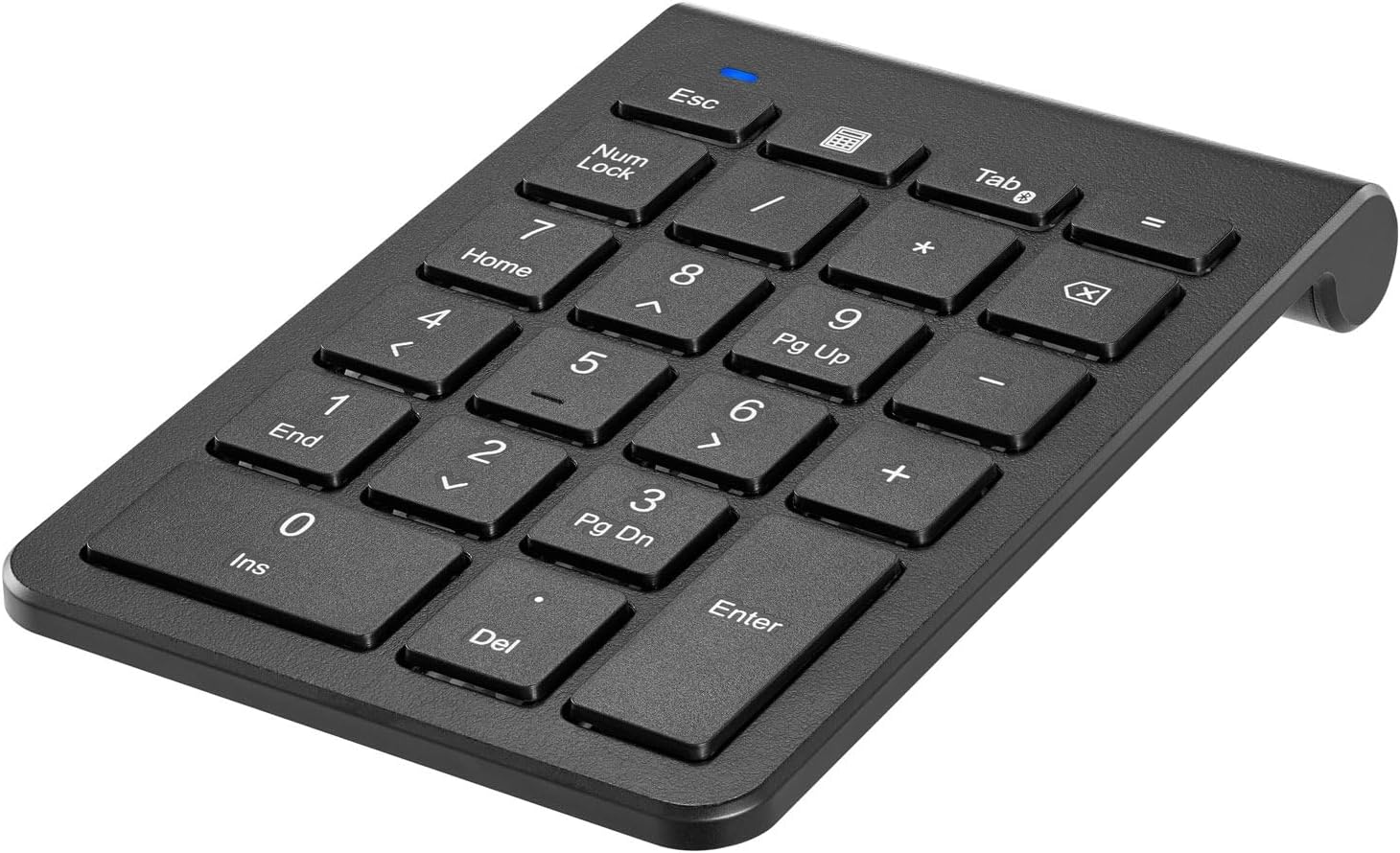
Image: An angled view of the number pad, highlighting the layout and key labels.
Compatibility
The number pad is compatible with a wide range of operating systems and devices, including:
- Windows 10, 11 or later
- Chrome OS
- macOS
- iPadOS
- Android
Maintenance
Cleaning
To clean your number pad, gently wipe the surface with a soft, dry, lint-free cloth. For stubborn dirt, slightly dampen the cloth with water or a mild, non-abrasive cleaner. Avoid using harsh chemicals, solvents, or abrasive materials, as these can damage the surface.
Battery Replacement
When the number pad's performance degrades or the LED indicator suggests low power, replace the AAA battery following the "Battery Installation" steps in the Setup section.
Troubleshooting
| Problem | Possible Solution |
|---|---|
| Number pad does not power on. |
|
| Number pad does not connect via Bluetooth. |
|
| Keys are not responding or typing incorrect characters. |
|
Specifications
| Feature | Detail |
|---|---|
| Model Number | NS-PK3KANB24-C |
| Connectivity Technology | Bluetooth 3.0, Bluetooth 5.0 |
| Number of Keys | 22 |
| Key Type | Scissor-Switch |
| Power Source | 1 x AAA Battery |
| Compatible Devices | Gaming Console, Laptop, PC, Smartphone, Tablet |
| Operating System Compatibility | Windows 10, 11 or later, Chrome OS, macOS, iPadOS, Android |
| Color | Black |
| Dimensions (Package) | 6 x 4 x 1 inches |
| Item Weight | 3.52 ounces |
| Hand Orientation | Right |
Warranty and Support
This INSIGNIA product is covered by a 3-Year Limited Warranty. For detailed warranty terms and conditions, please refer to the Quick Setup Guide included with your product or visit the official INSIGNIA support website.
For customer support, troubleshooting assistance, or to inquire about warranty service, please contact INSIGNIA customer service. Contact information can typically be found on the product packaging or the official INSIGNIA website.

Image: The back of the product packaging, displaying compatibility information, features, and warranty details, including a 3-year limited warranty.


