
Pioneer B0DNTG93B1
Pioneer Men's Heated Softshell Jacket User Manual
Model: B0DNTG93B1
Brand: Pioneer
1. Product Overview
The Pioneer Men's Heated Softshell Jacket is designed to provide warmth and comfort in cold conditions. It features integrated heating elements, water-resistant fabric, and a detachable hood, making it suitable for various outdoor activities and work environments.
- Heated Jacket: Integrated heating panels for warmth.
- 3 Heating Panels: Two in the front, one in the back, utilizing 3rd generation Nano Carbon technology.
- 4 Temperature Settings: Adjustable heat levels via an easy-to-operate control button.
- Water Resistant: Premium wind- and water-resistant material with a waterproof front zipper.
- Comfort & Mobility: Made with 4-way stretch material and fully lined with polyester taffeta for comfort and freedom of movement.
- Detachable Hood: Includes a hood with toggle adjuster for versatility.
- Storage: Two roomy zippered pockets and one inner pocket.
- Machine Washable: Easy care and maintenance.
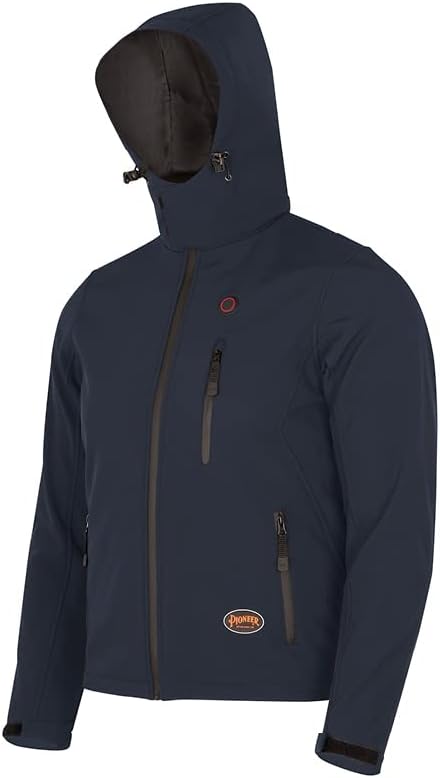
Image: Front view of the Pioneer Men's Heated Softshell Jacket in navy blue, showcasing its design and detachable hood.

Image: A person adjusting the cuff of the jacket, highlighting its comfortable 4-way stretch material and adjustable hem.

Image: A person adjusting the hood of the jacket, emphasizing its water repellent, breathable fabric, and waterproof zippers.
2. Safety Information
Please read and understand all safety warnings before using the heated jacket. Failure to follow these instructions may result in electric shock, fire, or serious injury.
- Do not use the heated jacket if you have a medical condition that makes you sensitive to heat. Consult a physician before use if you have a pacemaker, diabetes, circulatory problems, or are pregnant.
- Do not use the heated jacket on infants, children, incapacitated persons, or anyone insensitive to heat.
- Do not use the heated jacket in wet conditions or immerse it in water unless specifically instructed for cleaning.
- Always disconnect the power bank before washing the jacket.
- Do not puncture, cut, or disassemble the heating elements.
- Use only power banks that meet the specified voltage and current requirements. (Note: Power bank is not included with the jacket).
- If the jacket becomes excessively hot, turn it off immediately and discontinue use.
- Avoid folding or creasing the jacket excessively when heated, as this may damage the heating elements.
3. Setup
To prepare your heated jacket for use, follow these steps:
- Acquire a Power Bank: The jacket requires a USB power bank (not included) to operate the heating elements. Ensure your power bank is fully charged before use. A power bank with a capacity of 10,000mAh or more is recommended for extended heating duration.
- Locate the USB Cable: Inside the jacket, typically in an inner pocket, you will find a USB cable.
- Connect Power Bank: Insert the USB cable from the jacket into the output port of your charged power bank. Place the power bank securely in the designated inner pocket.

Image: A person connecting a USB power bank to the internal cable of the heated jacket, illustrating the power connection process.
4. Operating Instructions
Once the power bank is connected, you can operate the heating function:
- Power On: Locate the control button on the exterior of the jacket (usually on the chest). Press and hold the button for 3-5 seconds until it illuminates. The jacket will typically start on the highest heat setting (Red light).
- Adjust Temperature: Briefly press the control button to cycle through the four temperature settings. Each press will change the color of the light, indicating a different heat level:
- Red: Highest heat setting.
- Blue: Medium heat setting.
- Green: Low heat setting.
- White: Lowest heat setting.
- Power Off: To turn off the heating function, press and hold the control button for 3-5 seconds until the light turns off. Always turn off the jacket when not in use or before disconnecting the power bank.

Image: Diagram illustrating the jacket's heating panels, temperature settings, and fabric layers.
5. Maintenance
Proper care will extend the life of your heated jacket.
Cleaning Instructions:
- Disconnect Power: Always ensure the power bank is disconnected and removed from the jacket before cleaning.
- Machine Wash: The jacket is machine washable. Use cold water on a gentle cycle.
- Detergent: Use a mild detergent. Do not use bleach or harsh chemicals.
- Drying: Tumble dry on low heat or hang dry. Do not wring or iron the jacket. Ensure the jacket is completely dry before reconnecting the power bank or storing.
Storage:
Store the jacket in a cool, dry place away from direct sunlight when not in use. Ensure the power bank is removed before long-term storage.
6. Troubleshooting
If you experience issues with your heated jacket, refer to the following common problems and solutions:
| Problem | Possible Cause | Solution |
|---|---|---|
| Jacket not heating up. | Power bank not connected, power bank discharged, control button not activated, faulty connection. | Ensure power bank is fully charged and securely connected. Press and hold the control button to activate. Check USB cable for damage. Try a different power bank. |
| Heating is uneven or localized. | Heating elements may be damaged or folded, power bank output insufficient. | Ensure the jacket is not excessively creased. Use a power bank with sufficient output (e.g., 2A or higher). If problem persists, contact customer support. |
| Battery drains quickly. | High heat setting used, low capacity power bank, old power bank. | Use a lower heat setting for longer duration. Use a higher capacity power bank (e.g., 20,000mAh). Replace old or degraded power banks. |
| Control button light is off. | Jacket is off, power bank disconnected/discharged. | Press and hold the button to turn on. Check power bank connection and charge level. |
7. Specifications
- Model: B0DNTG93B1
- Brand: Pioneer
- Fabric Type: 96% Polyester, 3% Elastane, TPU membrane + polar fleece (3-layer laminated softshell)
- Lining: Polyester Taffeta
- Heating Technology: 3rd Generation Nano Carbon
- Heating Zones: 3 (2 front, 1 back)
- Temperature Settings: 4 (Red, Blue, Green, White)
- Power Source: USB Power Bank (not included)
- Water Resistance: Wind- and water-resistant with waterproof front zipper
- Care Instructions: Machine Wash
- First Available Date: November 22, 2024
8. Warranty and Support
Warranty Information:
Specific warranty details for the Pioneer Men's Heated Softshell Jacket are not provided in this manual. Please refer to the product packaging or the official Pioneer website for the most current warranty policy and registration information.
Customer Support:
For technical assistance, troubleshooting beyond this manual, or warranty claims, please contact Pioneer customer support through their official website or the retailer from whom you purchased the product. Have your product model number (B0DNTG93B1) and purchase date ready when contacting support.
You can visit the official Pioneer store on Amazon for more information: Pioneer Store
Ask a question about this manual
Ask about setup, troubleshooting, compatibility, parts, safety, or missing instructions. Manuals+ will review the question and use this page’s manual context to help answer it.