
1. Introduction
Thank you for choosing the COLAMY Ergonomic Office Chair. This manual provides detailed instructions for assembly, operation, maintenance, and troubleshooting to ensure you get the most out of your new chair. Designed for optimal comfort and support, this chair features adjustable headrests, 4D armrests, adjustable lumbar support, height adjustment, a 4-position tilt lock, and a sliding seat.

Figure 1.1: Front view of the COLAMY Ergonomic Office Chair, highlighting its robust design and 300 lbs weight capacity.
2. Product Features
The COLAMY Ergonomic Office Chair is engineered with several key features to provide a superior seating experience:
- Ergonomic Design: Features adjustable headrests, 4D armrests, adjustable lumbar support, and a sliding seat for personalized comfort.
- Ventilated Mesh Back: High-end breathable mesh fabric imported from Korea, designed to fit the spine's curve and protect the cervical and lumbar regions.
- High-Density Cushion: Thickened and widened seat cushions with high-density molding foam for enhanced comfort during long hours of use.
- Adjustable Tilt Lock: Offers a 4-position tilt lock mechanism (107°, 115°, 123°, 132°) for various reclining preferences.
- Sliding Seat Adjustment: Allows the seat to slide forward or backward to ensure proper back support and relieve pressure from the knees.
- Durable Construction: Equipped with a 360-degree swivel, sturdy base, and smooth-rolling casters. BIFMA certified with a Class 4 gas cylinder, supporting up to 300 lbs.
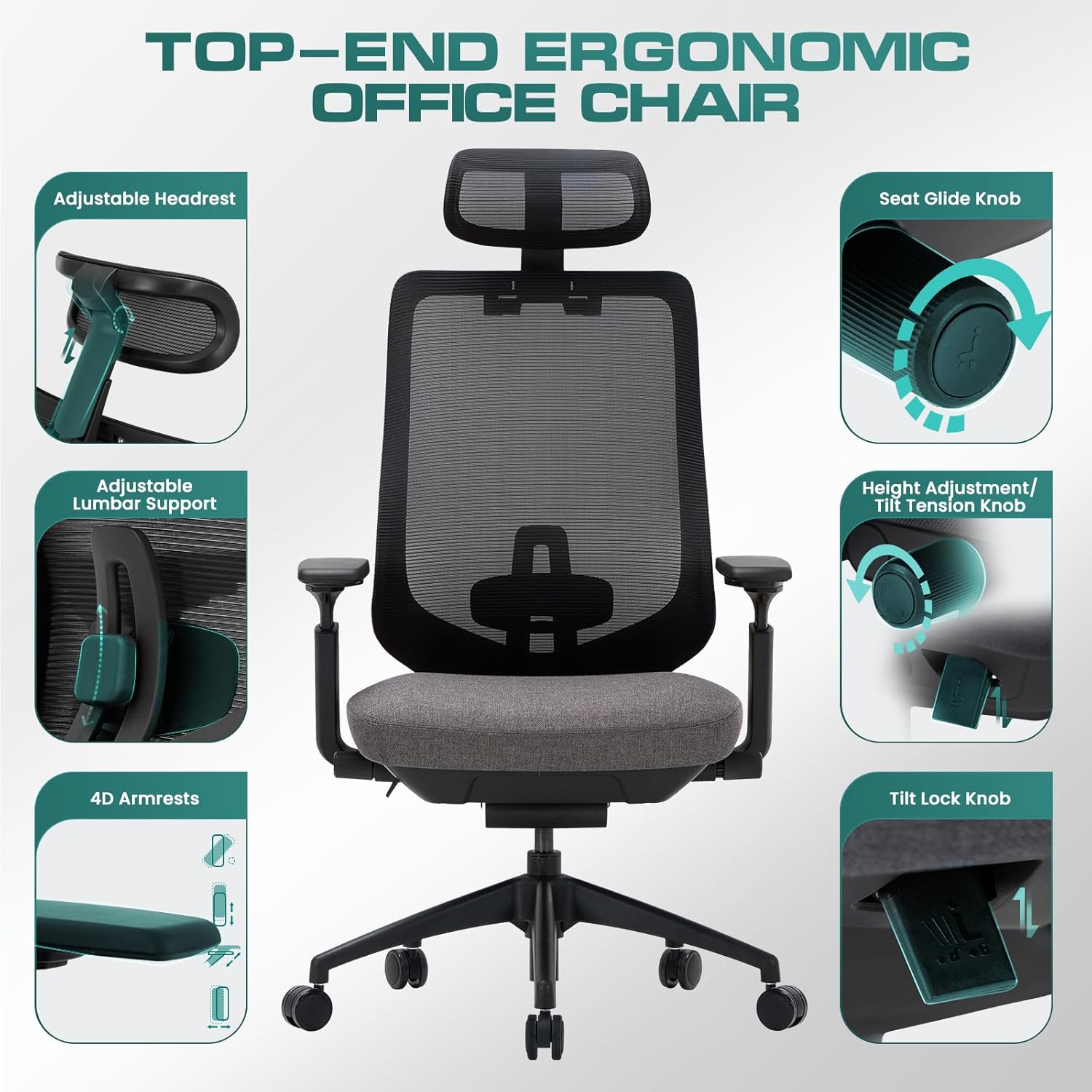
Figure 2.1: Overview of the chair's top-end ergonomic features, including adjustable headrest, lumbar support, 4D armrests, seat glide knob, height adjustment, and tilt lock knob.
3. Setup and Assembly
The COLAMY Ergonomic Office Chair is designed for straightforward assembly. All necessary hardware and tools are included in the package. Assembly typically takes 10-15 minutes.
3.1. Before You Begin
- Unpack all components and verify against the parts list (not provided in this manual, refer to packaging).
- Ensure you have enough clear space for assembly.
- Keep small parts away from children.
3.2. Assembly Steps
- Attach the casters to the chair base.
- Insert the gas lift cylinder into the center hole of the base.
- Attach the armrests to the seat cushion.
- Secure the backrest to the seat cushion.
- Mount the assembled seat and backrest onto the gas lift cylinder.
- Attach the headrest to the top of the backrest.
- Tighten all screws and ensure all connections are secure.

Figure 3.1: The sturdy chair base with smooth-rolling casters, designed for stability and mobility.
4. Operating Instructions
Your COLAMY Ergonomic Office Chair offers multiple adjustment options to customize your seating experience.
4.1. Seat Height Adjustment
To adjust the seat height, locate the lever on the right side under the seat. Pull the lever upwards while taking your weight off the seat to raise it. To lower the seat, pull the lever upwards while remaining seated. Release the lever to lock the height.
4.2. Tilt and Tilt Lock Mechanism
The chair features a 4-position tilt lock. To recline, pull the lever on the left side of the chair outwards. To lock the tilt at a desired angle (107°, 115°, 123°, or 132°), push the lever inwards. To return to the upright position, lean forward slightly and pull the lever outwards, then push it back in to lock.
4.3. Tilt Tension Adjustment
Adjust the resistance of the chair's tilt by rotating the round knob located under the seat, at the front. Turn clockwise to increase tension (making it harder to recline) and counter-clockwise to decrease tension (making it easier to recline).
4.4. Adjustable Headrest
The headrest can be adjusted vertically and angled to provide optimal neck and head support. Gently push or pull the headrest to adjust its height and tilt.
4.5. Adjustable Lumbar Support
The lumbar support can be adjusted vertically to align with the natural curve of your lower back. Locate the adjustment mechanism on the backrest and slide it up or down to your preferred position.
4.6. 4D Armrests
The armrests offer four-dimensional adjustments:
- Height Adjustment: Press the button on the side of the armrest and slide it up or down.
- Forward/Backward: Slide the armrest pad forward or backward.
- Left/Right Pivot: Pivot the armrest pad left or right.
- Inward/Outward: Slide the entire armrest assembly inward or outward.
4.7. Sliding Seat Adjustment (Seat Depth)
To adjust the seat depth, locate the knob on the left side under the seat. Rotate the knob to unlock the seat, then slide the seat forward or backward to achieve the desired depth. Rotate the knob back to lock the seat in place. This feature helps distribute weight evenly and relieve pressure from the back of the knees.

Figure 4.1: Detailed view of the chair's multi-functional adjustments, including recline angles, seat height, seat depth, and tilt tension.
5. Maintenance
Regular maintenance will help prolong the life and appearance of your COLAMY office chair.
- Cleaning: Wipe clean with a damp cloth. Avoid harsh chemicals or abrasive cleaners, especially on the mesh and fabric components.
- Casters: Periodically check casters for hair or debris and clean as needed to ensure smooth rolling.
- Fasteners: Occasionally check all screws and bolts to ensure they are tight. Retighten if necessary.
- Mesh Care: While the mesh is durable, avoid sharp objects that could snag or tear the fabric.
6. Troubleshooting
If you encounter any issues with your chair, refer to the following common troubleshooting tips.
| Problem | Possible Cause | Solution |
|---|---|---|
| Chair does not adjust height | Gas lift cylinder issue or lever not engaged. | Ensure the height adjustment lever is fully pulled. If the issue persists, contact customer support. |
| Chair wobbles or feels unstable | Loose screws or improper assembly. | Check all assembly screws and tighten them securely. Ensure the base and gas lift are properly seated. |
| Casters not rolling smoothly | Debris caught in casters. | Turn the chair over and remove any hair, dust, or debris from the caster wheels. |
| Backrest does not tilt or lock | Tilt lock lever not engaged or tilt tension too high. | Ensure the tilt lock lever is correctly engaged/disengaged. Adjust the tilt tension knob counter-clockwise to reduce resistance. |
7. Specifications
Key specifications for the COLAMY Ergonomic Office Chair (Model: XK01-darkgrey):
- Brand: COLAMY
- Model Name: XK01
- Color: Xk01-darkgrey
- Product Dimensions (D x W x H): 17.72"D x 28.94"W x 51.38"H
- Back Style: Mesh
- Maximum Weight Recommendation: 300 Pounds
- Item Weight: 46 pounds
- Seat Height: 21.06 Inches (adjustable range not specified, but typical for office chairs)
- Arm Height: 30.83 Inches (adjustable range not specified)
- Fill Material: Foam (High-density molded cushion)
- Reclining Position Count: 4 Position (107°, 115°, 123°, 132°)
- Certifications: BIFMA certified, Class 4 gas cylinder verified by SGS.
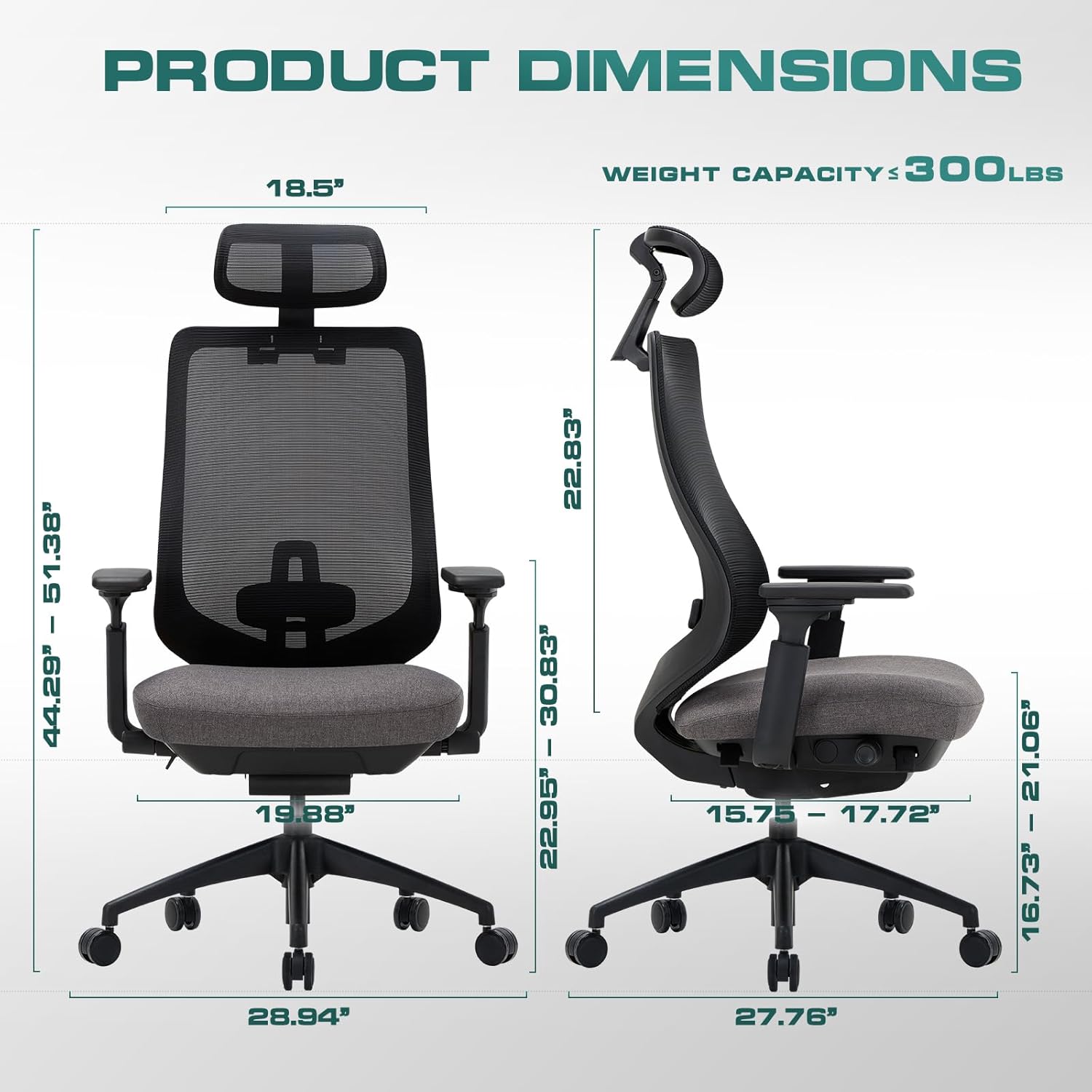
Figure 7.1: Detailed product dimensions and weight capacity of the chair.
8. Safety Information
Please observe the following safety guidelines to ensure safe use of your chair:
- Weight Capacity: Do not exceed the maximum weight capacity of 300 lbs. Exceeding this limit may cause damage to the chair and potential injury.
- Proper Use: Use the chair only for its intended purpose as an office or desk chair. Avoid standing on the chair or using it as a step stool.
- Children: Keep children away from the chair during assembly. Supervise children when they are near or using the chair.
- Maintenance: Regularly inspect the chair for any signs of wear, damage, or loose components. Do not use the chair if it is damaged.
- Floor Protection: While casters are designed for smooth rolling, consider using a chair mat to protect delicate flooring surfaces.
9. Warranty and Support
COLAMY is committed to complete customer satisfaction.
- Returns: The product is eligible for 30-day free returns, refund/replacement.
- Customer Service: Should you have any questions, concerns, or require assistance with your COLAMY office chair, please do not hesitate to contact our customer support team. We are dedicated to assisting you with any inquiries.
- Contact Information: Please refer to the product packaging or the official COLAMY website for the most current customer support contact details.


