
Introduction
This manual provides essential instructions for the safe and effective use of your KIIUMI Mobility Sit-to-Stand Assist Lift. Designed to assist individuals with limited mobility in transitioning between sitting and standing positions, this device enhances independence and supports caregivers. Please read this manual thoroughly before assembly or operation.

Image: Front view of the KIIUMI Mobility Sit-to-Stand Assist Lift.
Safety Information
Always prioritize safety when using the KIIUMI Mobility Sit-to-Stand Assist Lift. Failure to follow these guidelines may result in injury to the user or caregiver.
- Weight Capacity: Do not exceed the maximum weight capacity of 400 lbs (181 kg).
- Supervision: Always ensure a trained caregiver is present and assisting during transfers.
- Brakes: Engage all wheel brakes before any transfer or when the lift is stationary.
- Clearance: Ensure sufficient space around the lift and the user during operation.
- Stability: Verify the lift is on a stable, level surface before use.
- User Condition: Ensure the user has sufficient upper body strength to grasp the handles and follow instructions.
- Assembly: Ensure all components are correctly assembled and secured before first use.
Setup and Assembly
The KIIUMI Mobility Sit-to-Stand Assist Lift requires minimal assembly. Follow these steps to prepare your device for use.
- Unpacking: Carefully remove all components from the packaging. Inspect for any damage.
- Frame Assembly: Connect the main frame components as per the included diagram (if applicable). Ensure all bolts and fasteners are securely tightened.
- Knee Pads and Seat: Attach the ergonomic knee pads and the folding flip seat. Verify they are securely fastened and can be adjusted as needed.
- Handlebars: Ensure the soft foam armrests/handlebars are firmly in place.
- Casters: Confirm all four swivel casters are properly installed and the locking mechanism functions correctly.
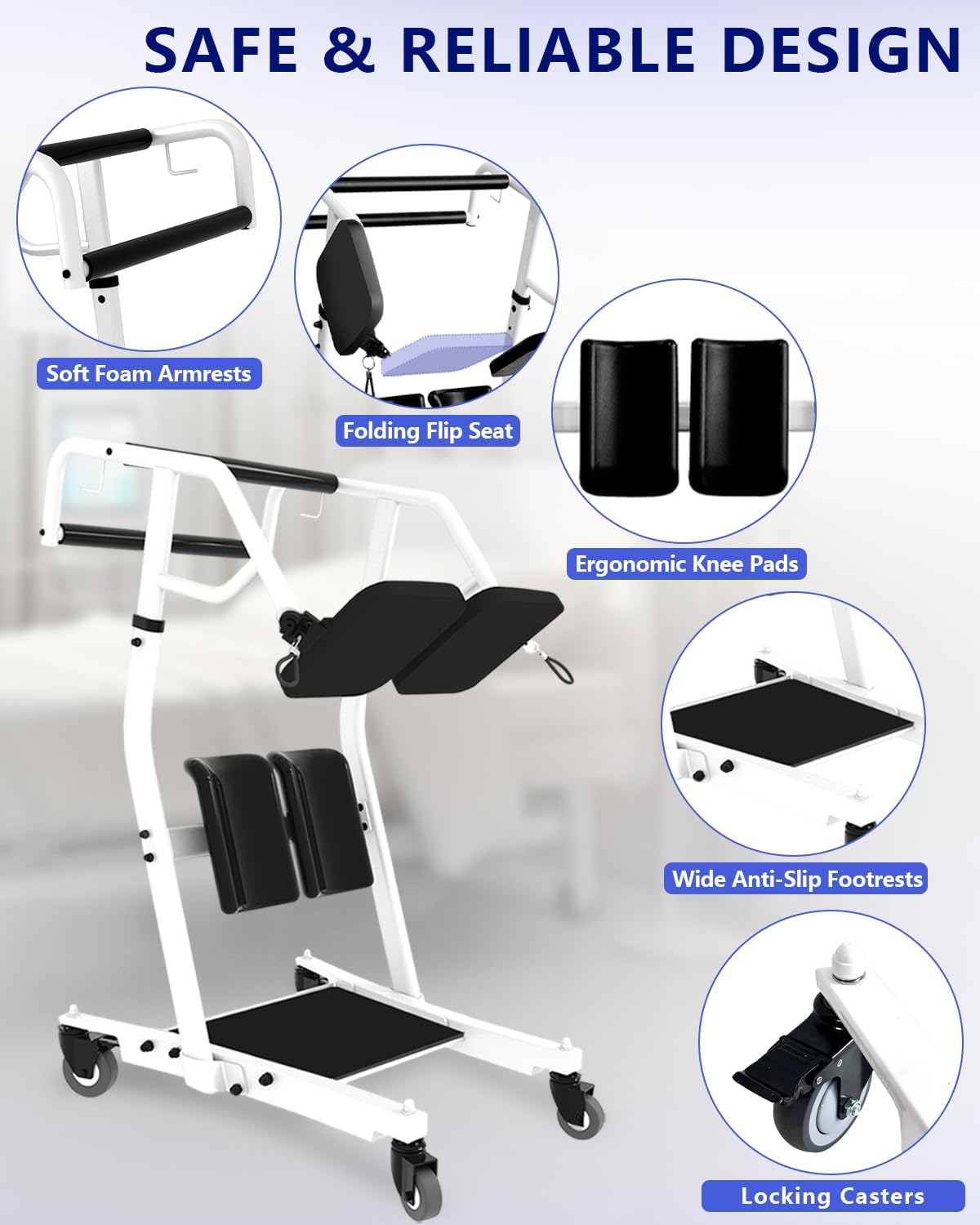
Image: Key features of the KIIUMI Sit-to-Stand Lift, highlighting soft foam armrests, folding flip seat, ergonomic knee pads, wide anti-slip footrests, and locking casters.
Operating Instructions
This section details the steps for safely operating the KIIUMI Mobility Sit-to-Stand Assist Lift for patient transfers.
Transferring from a Seated Position to Standing
- Position the Lift: With the user seated (e.g., on a sofa or bed), position the lift directly in front of them. Ensure the base of the lift is as close as possible to the user's feet.
- Engage Brakes: Lock all four casters by pressing down on the brake levers with your foot to prevent movement during the transfer.
- User Positioning: Assist the user in placing their feet on the footrest platform and their knees against the ergonomic knee pads. Ensure the user can comfortably grasp the handlebars.
- Assisted Standing: Instruct the user to grasp the handlebars firmly. With the caregiver providing support and guidance, the user can gently lift themselves to a standing position. The caregiver should maintain control of the lift.
- Seat Adjustment (if needed): If the user needs to sit on the lift's seat for transfer, pull the locks to form the seat.

Image: Visual guide for operating the lift, demonstrating how to deploy the seat for assisted sitting and transfer.
Transferring to Another Seated Position
- Unlock Brakes: Once the user is safely standing or seated on the lift's seat, disengage the caster brakes.
- Move the Lift: Carefully push or pull the lift to the desired new location (e.g., wheelchair, toilet, another chair). Ensure the path is clear of obstacles.
- Engage Brakes: Once at the new location, lock all four casters again.
- Assisted Sitting: If the user was standing, guide them to sit down slowly onto the new seat, maintaining a firm grip on the handlebars. If the user was on the lift's seat, pull the locks again to restore the original position, allowing the user to transfer to the new seat.
Video Demonstration: How to Use
Video: A demonstration of how to use the KIIUMI Mobility Sit-to-Stand Lift for patient transfers. This video illustrates the process of assisting a user from a seated position to standing, and then transferring them to another seat.

Image: Step-by-step visual guide for using the KIIUMI Sit-to-Stand Lift, including positioning, adjustment, and transfer.
Maintenance
Regular maintenance ensures the longevity and safe operation of your KIIUMI Mobility Sit-to-Stand Assist Lift.
- Cleaning: Wipe down all surfaces with a damp cloth and mild detergent. Avoid abrasive cleaners.
- Inspection: Periodically check all bolts, screws, and fasteners to ensure they are tight. Inspect the casters for smooth operation and wear.
- Lubrication: If any moving parts (e.g., caster swivels) become stiff, apply a small amount of silicone-based lubricant.
- Storage: Store the lift in a dry, clean environment when not in use.
Troubleshooting
If you encounter issues with your KIIUMI Mobility Sit-to-Stand Assist Lift, refer to the following common solutions.
- Difficulty Moving:
- Ensure all caster brakes are disengaged.
- Check for debris obstructing the casters.
- Verify the floor surface is smooth and clear.
- Unstable During Transfer:
- Confirm all caster brakes are fully engaged.
- Ensure the lift is on a level surface.
- Verify the user's feet are securely on the footrest and they are holding the handlebars.
- Parts Not Aligning During Assembly:
- Double-check the assembly instructions and diagrams.
- Ensure no parts are bent or damaged. If parts are damaged, contact customer support.
Specifications
Key specifications for the KIIUMI Mobility Sit-to-Stand Assist Lift.
| Dimensions (L x W x H) | 34" x 28" x 47" (86.4 cm x 71.1 cm x 119.4 cm) |
| Turning Radius | 43.3" (110 cm) |
| Doorway Clearance | Minimum 29" (73.7 cm) wide |
| Weight Capacity | Up to 400 lbs (181 kg) |
| Material | Sturdy Steel Frame |
| Casters | Four swivel casters with locking mechanism |

Image: Detailed product dimensions and weight capacity of the KIIUMI Sit-to-Stand Assist Lift.
Warranty and Support
For warranty information, technical support, or to order replacement parts, please contact KIIUMI customer service. Refer to your purchase documentation for specific warranty terms.
Manufacturer: KIIUMI
ASIN: B0DNT5RS5D