
NEWCARE 8541711519
NEWCARE HDMI to RCA and HDMI Adapter Converter User Manual
Model: 8541711519
1. Product Overview
The NEWCARE HDMI to RCA and HDMI Adapter Converter is designed to convert a digital HDMI signal into both an analog composite video (CVBS) signal with L/R stereo audio and a pass-through HDMI signal. This allows you to connect modern HDMI-enabled devices to older televisions or monitors that only support RCA (AV) inputs, while also providing an HDMI output for simultaneous connection to an HDTV or monitor. It supports both NTSC and PAL standard TV formats.
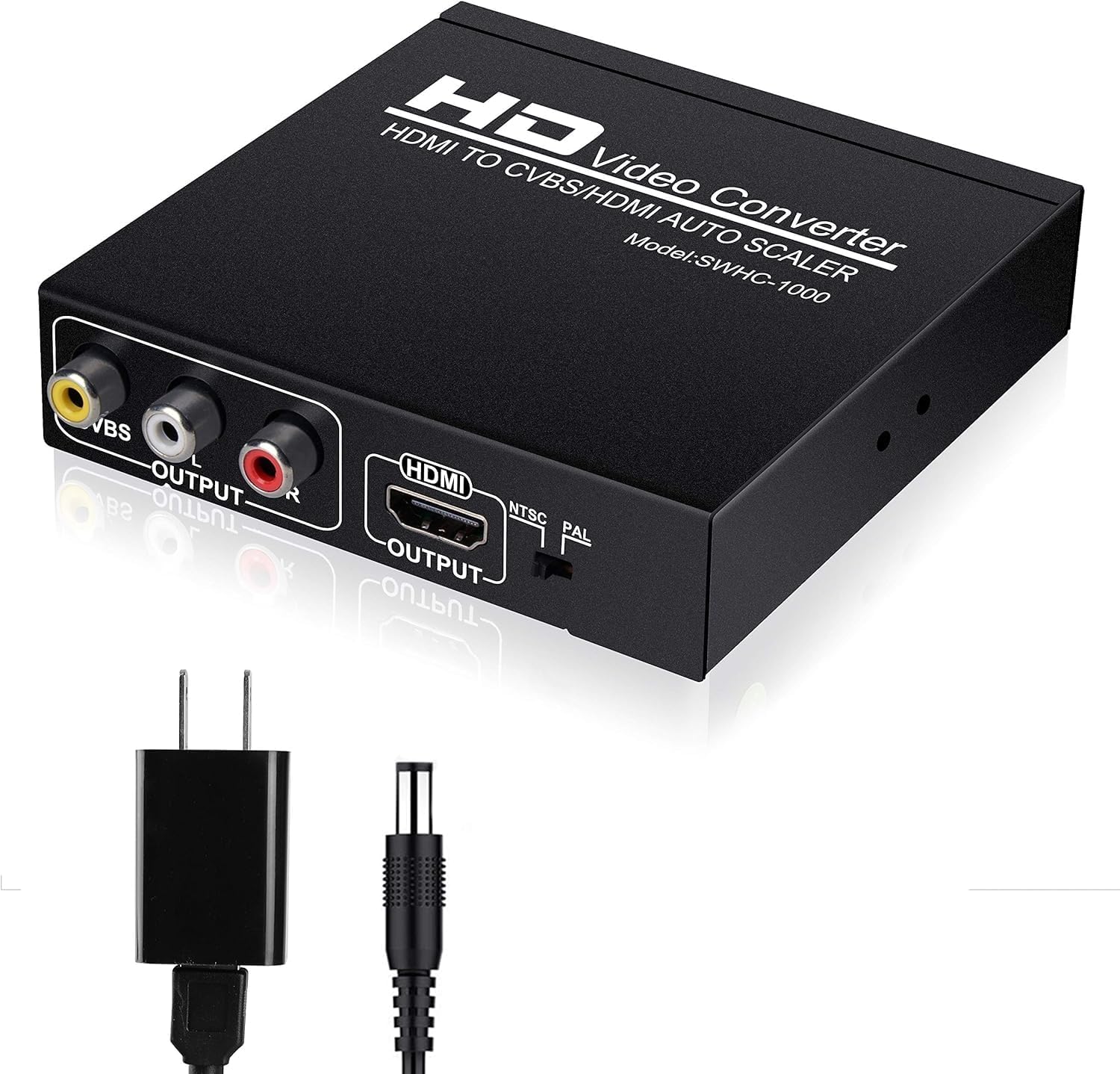
Image 1.1: The NEWCARE HDMI to RCA and HDMI Adapter Converter, shown with its included power adapter.
2. Key Features
- One Input to Two Outputs: Distributes 1 HDMI input signal to both an HDMI output and a CVBS composite video signal with L/R stereo audio output.
- Simultaneous Transmission: Transmits video and audio concurrently without loss or lag.
- Plug & Play: Features a built-in IC chip for direct use without requiring driver installation.
- Format Support: Supports both PAL and NTSC standard TV formats for output.
- HDMI Input Formats: Compatible with 480P/576P/720P/1080p@60Hz and DVI modes (800x600, 1024x768, 1280x720, 1280x1024, 1920x1080/60Hz).
- Audio/Video Output: Provides AV video output (480i/576i optional) and L/R channel audio output.
- HDCP Protocol Support: Compatible with HDCP Protocol and HDMI 1.3.
- Wide Compatibility: Works with devices such as VHS VCRs, Xbox 360, PS3, set-top boxes, DVD recorders, Blu-Ray players, digital cameras, gaming consoles, projectors, and televisions.
3. Package Contents
Please verify that all items are present in your package:
- 1 x NEWCARE HDMI to HDMI+AV(RCA) Converter
- 1 x 5V1A Power Adapter
- 1 x User Manual

Image 3.1: The converter unit, power adapter, and user manual are included in the package.
4. Product Diagram
Familiarize yourself with the input and output ports on the converter unit:
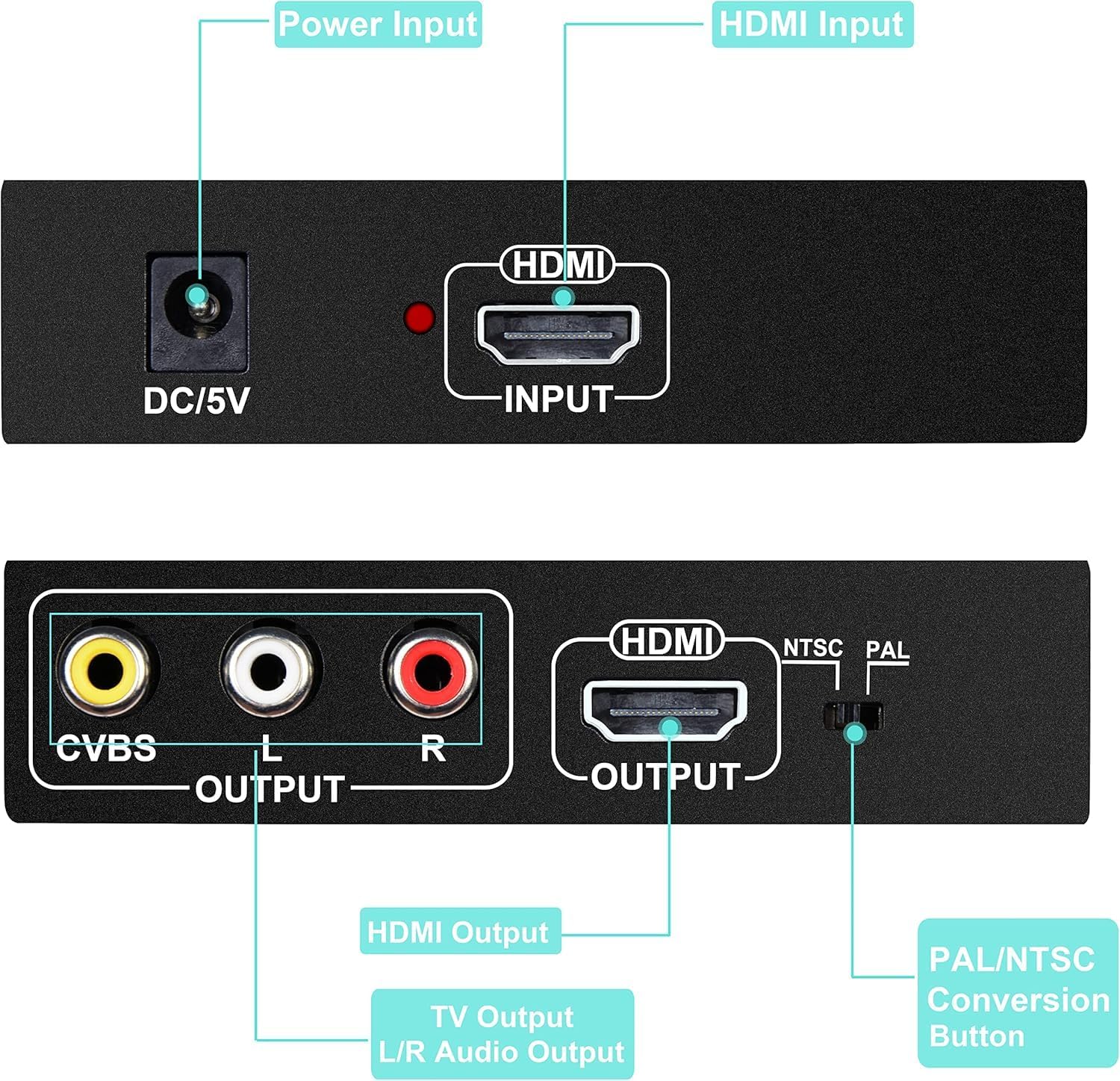
Image 4.1: Top view showing the DC/5V Power Input and HDMI Input. Bottom view showing CVBS Output (Yellow), L/R Audio Output (White/Red), HDMI Output, and the NTSC/PAL Conversion Button.
- DC/5V Power Input: Connect the included 5V power adapter here.
- HDMI Input: Connect your HDMI source device (e.g., game console, Blu-ray player, Fire Stick, Roku).
- CVBS Output (Yellow RCA): Connect to the composite video input of your older TV or monitor.
- L/R Audio Output (White/Red RCA): Connect to the left and right audio inputs of your older TV, monitor, or audio system.
- HDMI Output: Connect to the HDMI input of your HDTV, projector, or monitor.
- NTSC/PAL Conversion Button: Toggles between NTSC and PAL video output formats.
5. Setup and Installation
Follow these steps to set up your NEWCARE HDMI to RCA and HDMI Adapter Converter:
- Connect Power: First, connect the included 5V power adapter to the DC/5V input port on the converter unit. Then, plug the power adapter into a wall outlet. It is crucial to connect the power adapter first to ensure proper functionality and signal output.
- Connect HDMI Input: Connect an HDMI cable from your source device (e.g., game console, Blu-ray player, set-top box) to the HDMI Input port on the converter.
- Connect RCA Output (Optional): If connecting to an older TV or monitor, connect RCA cables (yellow for video, white for left audio, red for right audio) from the CVBS and L/R Audio Output ports on the converter to the corresponding input ports on your display device.
- Connect HDMI Output (Optional): If connecting to an HDTV or modern monitor, connect an HDMI cable from the HDMI Output port on the converter to the HDMI input port on your display device.
- Power On Devices: Power on your source device and all connected display devices.
- Select Input: On your display device(s), select the correct input source (e.g., AV, HDMI 1) that corresponds to where the converter is connected.
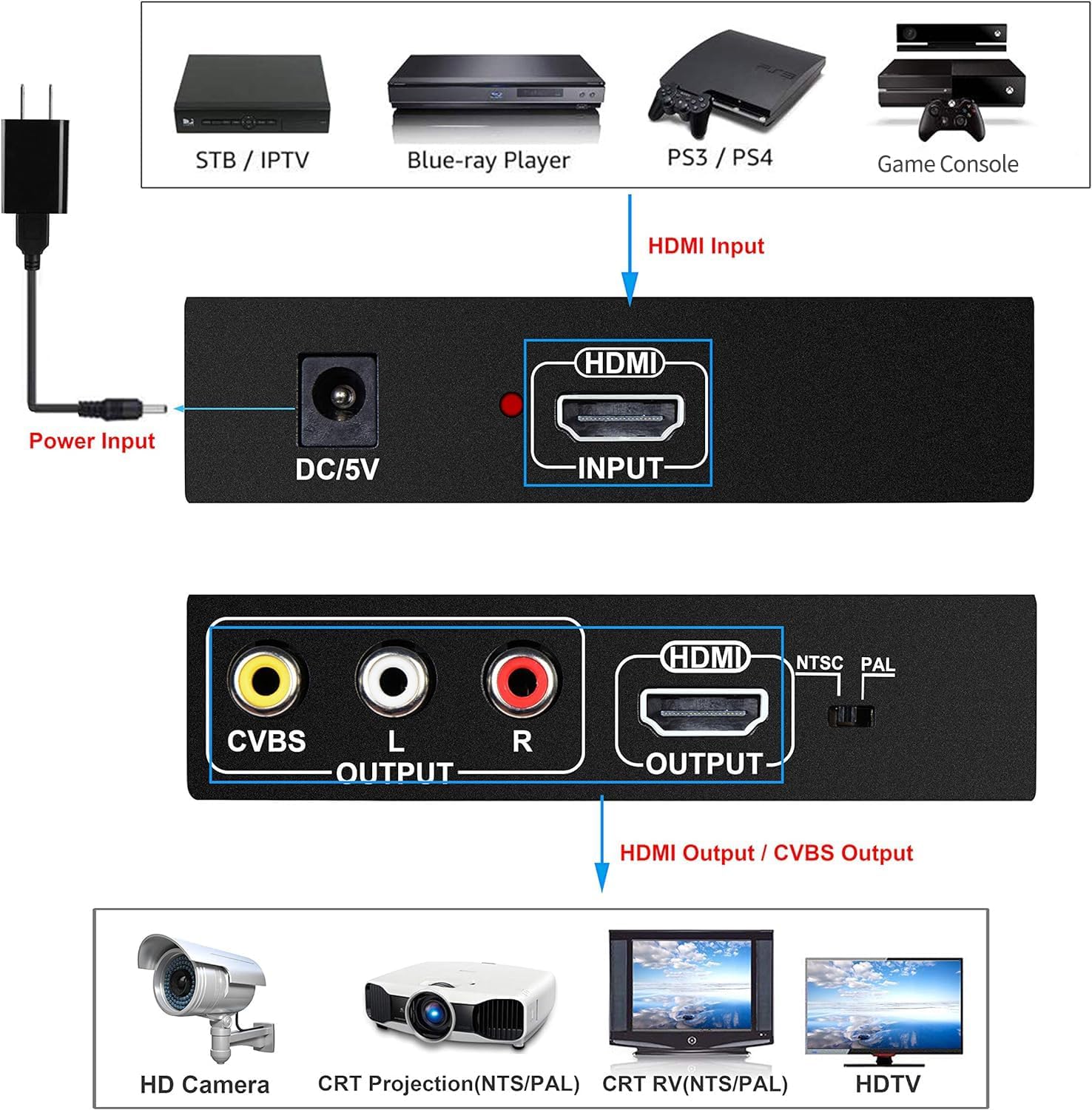
Image 5.1: A visual guide demonstrating how to connect input devices (STB/IPTV, Blu-ray Player, PS3/PS4, Game Console) via HDMI to the converter, and output to various display types (HD Camera, CRT Projection, CRT TV, HDTV) via HDMI or CVBS.
6. Operating Instructions
Once connected, the converter operates automatically. The primary operational control is the NTSC/PAL switch.
- NTSC/PAL Switch: Use the NTSC/PAL conversion button on the unit to toggle between NTSC (National Television System Committee) and PAL (Phase Alternating Line) video output formats. Select the format compatible with your connected analog display device (e.g., older TV). Most devices in North America use NTSC, while many European and Asian countries use PAL.
- Resolution Adjustment: If you experience no signal output, try adjusting the resolution of your input source to automatic or a lower resolution (e.g., 1080p, 720p, 480p) to ensure compatibility with the converter and your display.
7. Compatibility
The NEWCARE HDMI to RCA and HDMI Adapter Converter offers broad compatibility with various devices and resolutions:
- Input Devices: Blue-Ray players, digital cameras, gaming consoles (Xbox 360, PS3, PS4), projectors, televisions, set-top boxes, DVD recorders, Fire Sticks, Roku devices.
- Output Devices: HD TVs, older TVs with RCA inputs, monitors, projectors.
- HDMI Input Resolutions Supported: 480P, 576P, 720P, 1080p@60Hz.
- DVI Mode Compatibility: 800x600, 1024x768, 1280x720, 1280x1024, 1920x1080/60Hz.
- AV Video Output: 480i/576i (optional).
- Audio Output: L/R channels.
- HDMI Version: Supports HDMI 1.3.
- HDCP: Supports HDCP Protocol.
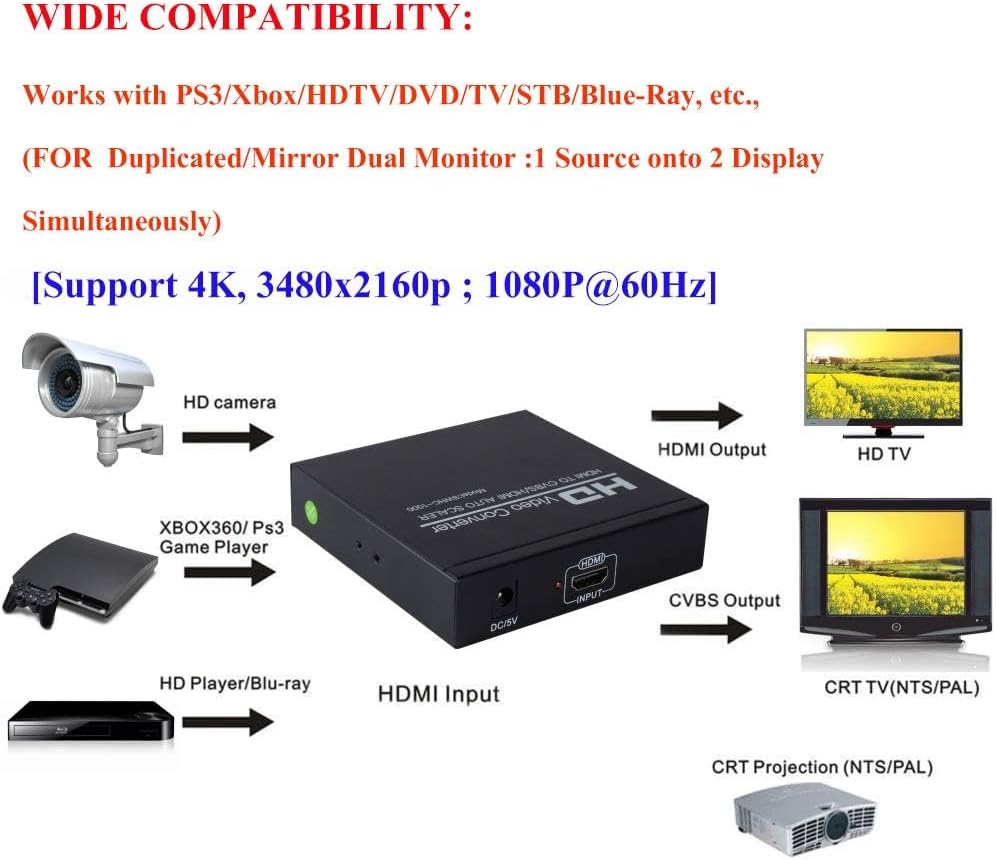
Image 7.1: The converter is compatible with various HDMI sources like HD cameras, Xbox/PS3 game players, HD players/Blu-ray, and outputs to HD TVs, CRT TVs (NTSC/PAL), and CRT projectors.
8. Troubleshooting
If you encounter issues with your converter, please refer to the following common solutions:
- No Picture/Sound Output:
- Ensure the 5V power adapter is connected to the converter and plugged into a working power outlet before connecting other cables. Incorrect connection order can prevent proper signal.
- Verify all cables (HDMI, RCA) are securely connected to their respective ports on the converter and display devices.
- Check that your display device is set to the correct input source (e.g., AV, HDMI 1).
- Try adjusting the resolution of your input source device to automatic or a lower resolution (e.g., 1080p, 720p, 480p).
- Incorrect Color/Flickering on Analog Output:
- Press the NTSC/PAL conversion button on the converter to switch between NTSC and PAL formats. Ensure the selected format matches your analog display device's regional standard.
- No Audio on Analog Output:
- Ensure the red and white RCA audio cables are correctly connected to the L/R Audio Output ports on the converter and the corresponding audio input ports on your display device or audio system.
- The converter supports 2-channel stereo audio. If your HDMI source is outputting surround sound (e.g., Dolby Digital 5.1), it may not be converted correctly. Adjust your source device's audio settings to output 2-channel PCM stereo.
- Converter Does Not Work:
- This device is an HDMI to AV/HDMI converter and cannot be used as an AV/RCA to HDMI converter. Ensure your signal flow is from HDMI source to RCA/HDMI output.
- If the issue persists after trying the above steps, please contact NEWCARE customer support.
9. Specifications
| Feature | Detail |
|---|---|
| Product Dimensions (L x W x H) | 4 x 4 x 1 inches |
| Item Weight | 10.2 ounces |
| Model Number | 8541711519 |
| Color | Black |
| Manufacturer | NEWCARE |
| Connector Type | Component, DVI, HDMI, RCA |
| Compatible Devices | Blue-Ray, Digital Camera, Gaming Console, Projector, Television |
| Specific Uses | Camera, Monitor, TV |
| HDMI Version Support | HDMI 1.3 |
| HDCP Support | Yes |
| Power Supply | 5V1A Power Adapter (included) |
10. Warranty and Support
NEWCARE is committed to providing high-quality products and customer satisfaction. We offer lifetime technical support for our products.
If you have any questions, encounter issues, or require assistance with your NEWCARE HDMI to RCA and HDMI Adapter Converter, please do not hesitate to contact our customer service team. We aim to respond to all inquiries within 24 hours.
For support, please refer to the contact information provided on the product packaging or the official NEWCARE website.
Ask a question about this manual
Ask about setup, troubleshooting, compatibility, parts, safety, or missing instructions. Manuals+ will review the question and use this page’s manual context to help answer it.