
1. Introduction
Thank you for choosing the SONGMICS Electric Height Adjustable Desk. This manual provides essential information for the safe assembly, operation, and maintenance of your new desk. Please read it thoroughly before use and retain it for future reference. This desk is designed to promote a healthy working posture by allowing seamless transitions between sitting and standing positions.

Image 1.1: The SONGMICS Electric Height Adjustable Desk, 180 x 80 cm, Cloud White, in a typical office setup.
2. Safety Instructions
- Ensure all components are present and undamaged before assembly. Do not use if any parts are missing or defective.
- Assemble the desk on a soft, clean surface to prevent scratches.
- Keep children and pets away from the desk during operation to prevent injury.
- Do not overload the desk. The maximum static load capacity is 70 kg.
- Ensure there are no obstructions above or below the desk when adjusting its height.
- Do not sit or stand on the desk.
- Only use the provided power adapter. Disconnect power before cleaning or maintenance.
- Avoid spilling liquids on the control panel or motor components.
- If the desk makes unusual noises or movements, stop operation immediately and contact customer support.
3. Package Contents
Please verify that all the following components are included in your package. If any parts are missing or damaged, please contact customer service.
- Desk frame (legs and crossbar)
- Desktop panels (180 x 80 cm)
- Electric motor and control box
- Control panel with LED display
- Power adapter and cable
- Fabric organizer pouch
- 3 hooks (for bags/headphones)
- Cable management accessories (cable ties, cable holes)
- Assembly hardware kit (screws, Allen keys, etc.)
- Instruction manual

Image 3.1: Desk dimensions and load capacity. Note: The fabric organizer and large hook cannot be attached to the same side.
4. Assembly Instructions
The assembly process for your SONGMICS desk is designed to be straightforward. Follow the detailed instructions and use the numbered parts provided in the assembly kit.
- Unpack Components: Carefully unpack all parts and lay them out on a clean, soft surface to prevent damage. Verify against the package contents list.
- Assemble Desk Frame: Follow the step-by-step diagrams in the included assembly manual to connect the desk legs to the crossbar. Ensure all screws are tightened securely.
- Attach Desktop: Place the desktop panels onto the assembled frame. Align the pre-drilled holes and secure the desktop using the provided screws.
- Install Control Box and Motor: Mount the control box and motor according to the instructions. Connect all necessary cables.
- Attach Control Panel: Secure the control panel to the underside of the desk in a convenient location.
- Cable Management: Utilize the cable holes, fabric organizer, and hooks to manage cables and accessories. The fabric organizer and large hook cannot be installed on the same side of the desk.
- Connect Power: Once fully assembled, connect the power adapter to the control box and then to a power outlet.

Image 4.1: The control panel for height adjustment and memory presets.
5. Operating Instructions
5.1 Height Adjustment
Your SONGMICS Electric Height Adjustable Desk allows for smooth height adjustments between 72 cm and 120 cm.
- To Raise the Desk: Press and hold the Up arrow (▲) button. The desk will move upwards. Release the button when the desired height is reached.
- To Lower the Desk: Press and hold the Down arrow (▼) button. The desk will move downwards. Release the button when the desired height is reached.
- The current height will be displayed on the LED screen of the control panel.
5.2 Memory Presets
The desk features four memory preset buttons (M1, M2, M3, M4) to save and quickly recall your preferred sitting and standing heights.
- To Save a Height:
- Adjust the desk to your desired height using the Up (▲) or Down (▼) buttons.
- Press the "M" button (or the button labeled "S" if present, depending on the control panel version). The LED display may flash "S-" or "M-".
- Within 3 seconds, press one of the memory buttons (M1, M2, M3, or M4). The current height will be saved to that preset.
- To Recall a Saved Height:
- Simply press the desired memory button (M1, M2, M3, or M4). The desk will automatically move to the saved height.

Image 5.1: Demonstrating the continuous height adjustment from 72 cm to 120 cm and the 4-height memory function.
5.3 Cable Management and Accessories
The desk includes features to help keep your workspace organized.
- Cable Holes: Two integrated cable holes allow for neat routing of monitor, laptop, and other device cables through the desktop.
- Fabric Organizer: A fabric pouch can be attached to the side of the desk to store small items like pens, notebooks, or charging cables.
- Hooks: A large hook is provided for hanging bags, headphones, or other personal items. Note that the fabric organizer and the large hook cannot be installed on the same side of the desk.
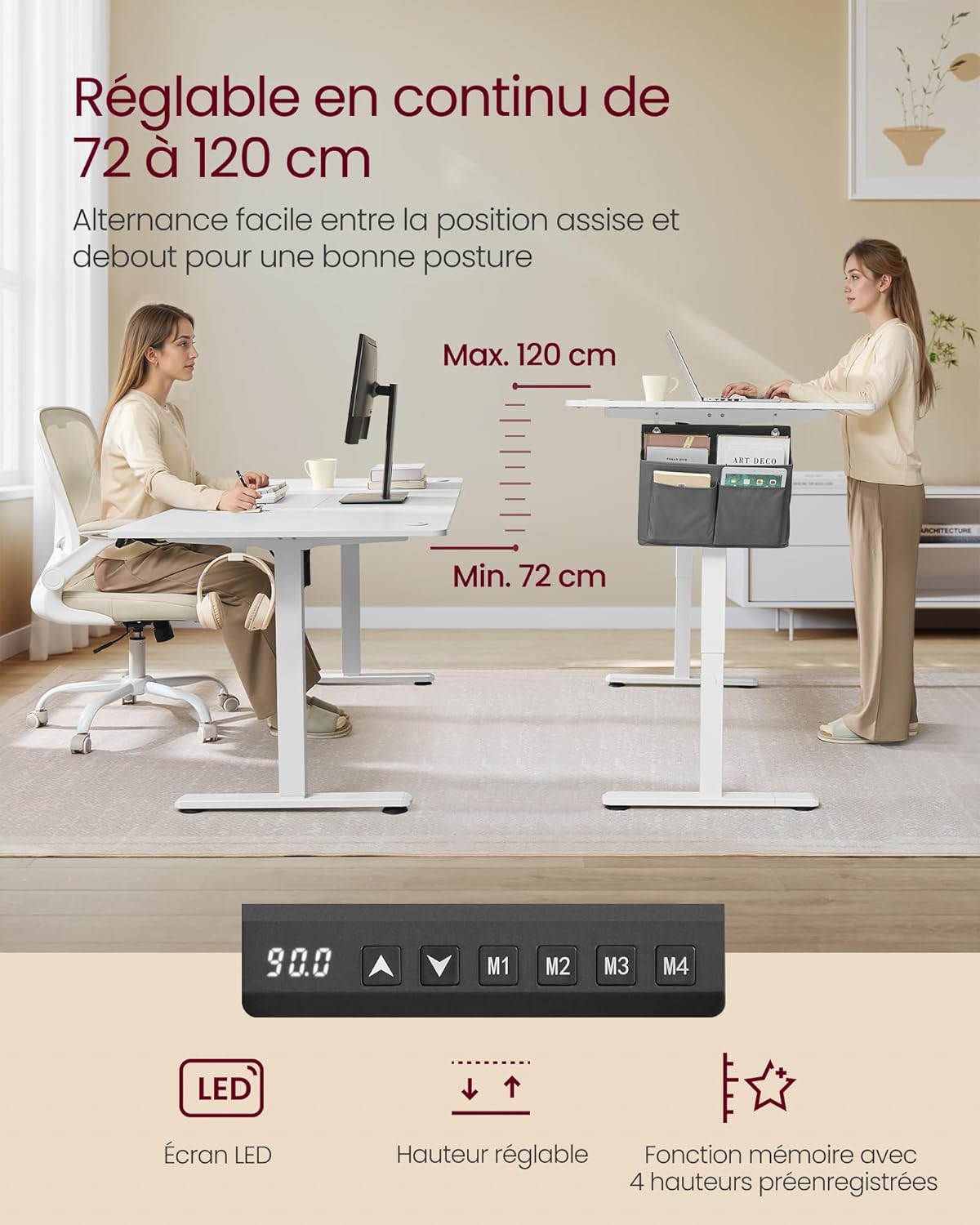
Image 5.2: Cable management features and accessory storage.
6. Maintenance
Regular maintenance ensures the longevity and optimal performance of your desk.
- Cleaning: Wipe the desktop and frame with a soft, damp cloth. Avoid abrasive cleaners or harsh chemicals that could damage the finish. Ensure the desk is unplugged before cleaning.
- Cable Check: Periodically inspect all cables for wear or damage. Replace any damaged cables immediately.
- Tighten Screws: Over time, screws may loosen. Periodically check and tighten all assembly screws to maintain stability.
- Motor Care: The electric motor is designed for durability. Avoid obstructing its movement or placing excessive weight on the desk.

Image 6.1: Cleaning the desk surface.
7. Troubleshooting
If you encounter any issues with your desk, please refer to the following common problems and solutions.
| Problem | Possible Cause | Solution |
|---|---|---|
| Desk does not move. | Power cable disconnected, motor error, overload. | Check power connections. Unplug and replug the desk. Reduce weight on the desk. |
| Desk moves unevenly or makes unusual noise. | Loose connections, obstruction, motor issue. | Check all screws and connections. Ensure no obstructions. Contact customer support if issue persists. |
| Memory presets not working. | Presets not saved correctly. | Re-save the desired heights following the operating instructions. |
| LED display shows an error code. | Specific system error. | Refer to the detailed error code list in the full manual (if available) or contact customer support. Often, a power cycle (unplug, wait 30 seconds, replug) can resolve minor errors. |
8. Specifications
| Feature | Detail |
|---|---|
| Brand | SONGMICS |
| Model | LSD138W01 |
| Color | Cloud White |
| Desktop Dimensions | 180 x 80 cm |
| Height Adjustment Range | 72 - 120 cm |
| Maximum Static Load Capacity | 70 kg |
| Material | Engineered Wood (desktop), Alloy Steel (base) |
| Noise Level (Operation) | Less than 48 dB |
| Adjustment Speed | 25 mm/s |
| Memory Presets | 4 programmable heights |
| Included Accessories | Fabric organizer, 3 hooks, cable management kit, USB port, cable holes. |
| Item Weight | 31.2 Kilograms |

Image 8.1: Internal view of the electric motor.
9. Warranty and Support
SONGMICS products are designed for quality and durability. For specific warranty information, please refer to the documentation included with your purchase or visit the official SONGMICS website.
If you require assistance with assembly, operation, or troubleshooting that is not covered in this manual, please contact SONGMICS customer support.
- Online Support: Visit the SONGMICS Brand Store for FAQs and contact information.
- Contact Seller: For purchase-specific inquiries, you may contact the seller "SONGMICS HOME BE" directly through your Amazon order history.