
1. Introduction
Thank you for choosing the toocki Bluetooth 5.3 Earbuds, Model TTWS-PS01. These earbuds are designed to provide a high-quality audio experience with advanced features such as Bluetooth 5.3 connectivity, a digital charging display, 13mm speakers, and a comfortable non-intrusive ear clip system. This manual will guide you through the setup, operation, maintenance, and troubleshooting of your new earbuds.
2. What's in the Box
Please check the package contents to ensure all items are present:
- 2 x Bluetooth Earbuds
- 1 x Wireless Charging Case
- 1 x USB Charging Cable
- 1 x User Manual (this document)
3. Product Overview
Familiarize yourself with the components of your toocki Bluetooth 5.3 Earbuds.

Front view of the toocki Bluetooth 5.3 Earbuds and their charging case.

Side profile of the toocki Bluetooth 5.3 Earbuds, showcasing the ear clip design.

Rear view of the toocki Bluetooth 5.3 Earbuds and charging case.
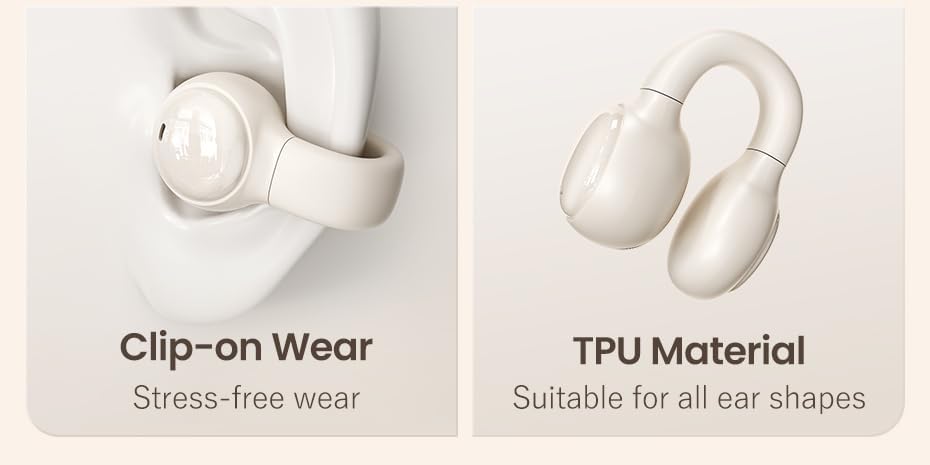
Internal view of the 13mm high-performance driver unit, designed for clear audio with rich bass and treble.

Diagram illustrating the advanced Bluetooth 5.3 chip, ensuring stable and low-latency wireless connectivity.

Illustration of the non-intrusive ear clip design for secure and comfortable wear, made from flexible TPU material suitable for various ear shapes.
4. Setup
4.1 Charging the Earbuds and Case
Before first use, fully charge the earbuds and the charging case. The charging case features a digital display to show the battery status.
- Connect the provided USB charging cable to the charging port on the case and a power source.
- The digital display on the case will show the charging progress.
- Place the earbuds into the charging case. They will begin charging automatically.
- A full charge for the case takes approximately 1.5 hours. The earbuds provide up to 5 hours of listening time on a single charge.

The charging case with earbuds inside, displaying the digital battery indicator and highlighting the 5-hour battery life per charge.
4.2 Pairing with a Bluetooth Device
Follow these steps to pair your earbuds with your smartphone or other Bluetooth-enabled device:
- Ensure the earbuds are charged and placed in the charging case.
- Open the charging case. The earbuds will automatically enter pairing mode, indicated by a flashing LED light on the earbuds.
- On your device, go to Bluetooth settings and turn Bluetooth on.
- Search for available devices. You should see "toocki TTWS-PS01" or a similar name appear in the list.
- Select the earbuds from the list to connect. Once connected, the LED indicator on the earbuds will stop flashing.
- The earbuds will automatically reconnect to the last paired device when taken out of the case, if Bluetooth is enabled on the device.
5. Operating Instructions
The toocki earbuds feature integrated digital touch controls for easy management of music and calls.
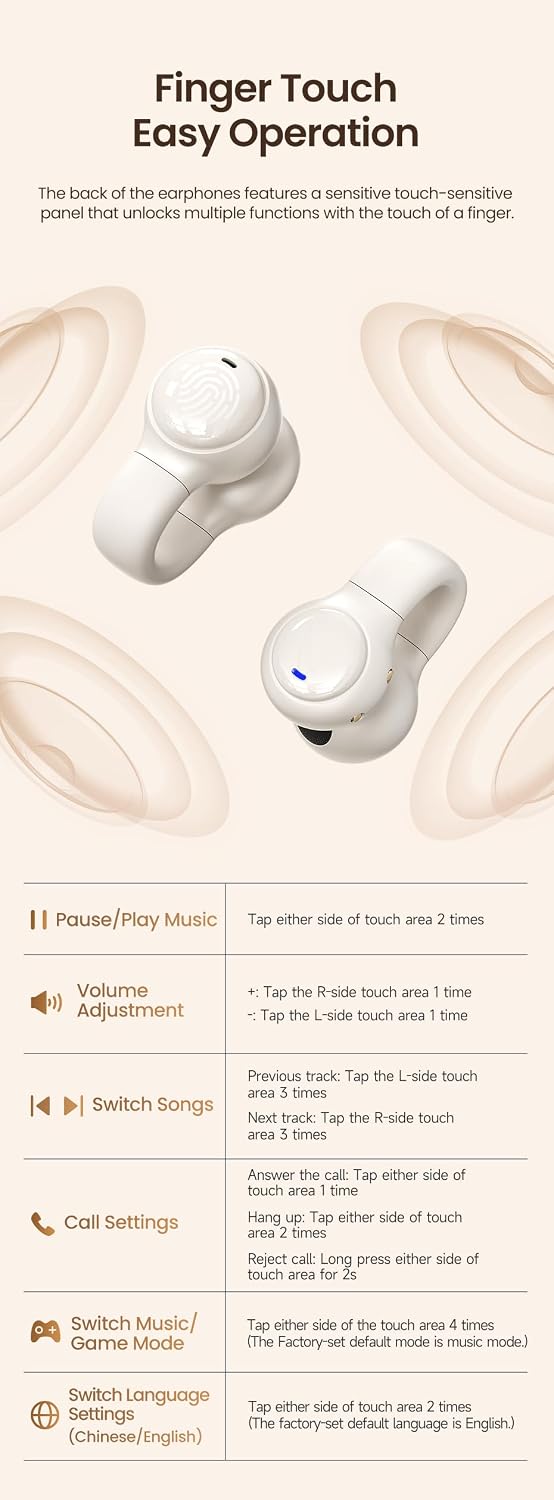
Detailed diagram of the earbud's touch control panel, outlining functions for music playback, call management, volume adjustment, and mode switching.
| Function | Action |
|---|---|
| Pause/Play Music | Tap either side of touch area 2 times |
| Volume Adjustment | +: Tap the R-side touch area 1 time -: Tap the L-side touch area 1 time |
| Switch Songs | Previous track: Tap the L-side touch area 3 times Next track: Tap the R-side touch area 3 times |
| Call Settings | Answer the call: Tap either side of touch area 1 time Hang Up: Tap either side of touch area 2 times Reject call: Long press either side of touch area for 2 seconds |
| Switch Music/Game Mode | Tap either side of the touch area 4 times (Factory-set default mode is music mode.) |
| Switch Language Settings (Chinese/English) | Tap either side of touch area 2 times (The factory-set default language is English.) |
6. Maintenance
Proper maintenance ensures the longevity and optimal performance of your earbuds.
- Cleaning: Regularly clean the earbuds and charging case with a soft, dry, lint-free cloth. Do not use harsh chemicals or abrasive materials.
- Storage: When not in use, store the earbuds in their charging case to protect them from dust and damage. Store in a cool, dry place.
- Avoid Water: The earbuds are not waterproof. Avoid exposure to water, moisture, or extreme temperatures.
- Charging: Use only the provided charging cable or a certified equivalent.
7. Troubleshooting
If you encounter any issues with your earbuds, refer to the following common solutions:
- Earbuds not pairing:
- Ensure both earbuds are charged.
- Turn off Bluetooth on your device and turn it back on.
- Delete the earbuds from your device's Bluetooth list and try pairing again.
- Restart your device.
- No sound from one earbud:
- Place both earbuds back into the charging case, close the lid, and then take them out again.
- Ensure both earbuds are charged.
- Check your device's audio balance settings.
- Charging case not charging:
- Ensure the charging cable is securely connected to both the case and the power source.
- Try a different USB port or power adapter.
- Check if the charging cable is damaged.
- Low volume or poor sound quality:
- Adjust the volume on both your device and the earbuds.
- Ensure the earbuds are clean and free from debris.
- Move closer to your connected device to avoid interference.
8. Specifications
| Feature | Specification |
|---|---|
| Model Number | TTWS-PS01 |
| Bluetooth Version | 5.3 |
| Connectivity Technology | Wireless |
| Bluetooth Range | Up to 10 meters |
| Driver Size | 13 mm |
| Impedance | 32 Ohms |
| Frequency Range | 20 Hz - 20,000 Hz |
| Battery Life (Earbuds) | Up to 5 hours |
| Charging Case Battery Capacity | 250 mAh |
| Charging Time (Case) | Approx. 1.5 hours |
| Control Type | Touch Control |
| Ear Placement | Supra-aural (Over-ear clip) |
| Product Dimensions | 7 x 4 x 3 cm |
| Product Weight | 55 Grams |
| Material (Case) | Plastic |
| Compatible Devices | Desktop computers, Laptops, Phones, Video game consoles |
9. Safety Information
Please read and follow these safety guidelines for safe operation:
- Do not disassemble, repair, or modify the product.
- Keep the earbuds and charging case away from extreme temperatures, direct sunlight, and open flames.
- Avoid exposing the product to water or other liquids.
- Do not use the earbuds at high volume for extended periods to prevent hearing damage.
- Keep out of reach of children and pets.
10. Warranty and Support
toocki products are designed for reliability and performance. For any warranty claims or technical support, please refer to the retailer's return policy or contact the point of purchase. Please retain your proof of purchase for warranty purposes.
