Introduction
Thank you for choosing the Blaupunkt Infinite 20W Party Speaker with Wired Mic. This manual provides essential information for the safe and efficient operation of your speaker. Please read it thoroughly before use and retain it for future reference.
Important Safety Information
- Do not expose the speaker to water or excessive moisture.
- Avoid placing the speaker near heat sources or in direct sunlight.
- Do not attempt to disassemble or repair the unit yourself. Refer all servicing to qualified personnel.
- Use only the specified charging cable.
- Keep out of reach of children.
Product Overview
The Blaupunkt Infinite 20W Party Speaker (Model BSP101) is a portable audio system designed for powerful sound and entertainment. It features Bluetooth connectivity, USB/TF card playback, FM radio, karaoke function with a wired microphone, and dynamic flash lights.
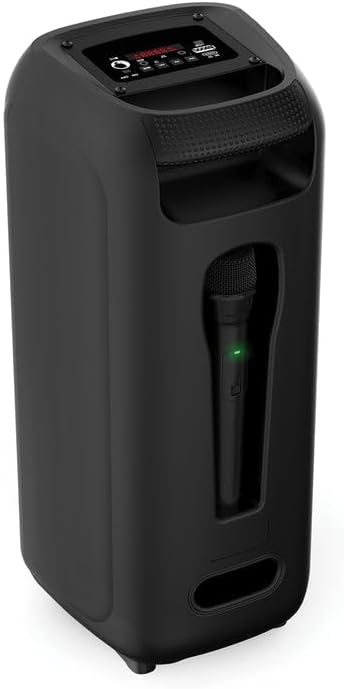
Figure 1: Front View of the Speaker

Figure 2: Back View of the Speaker
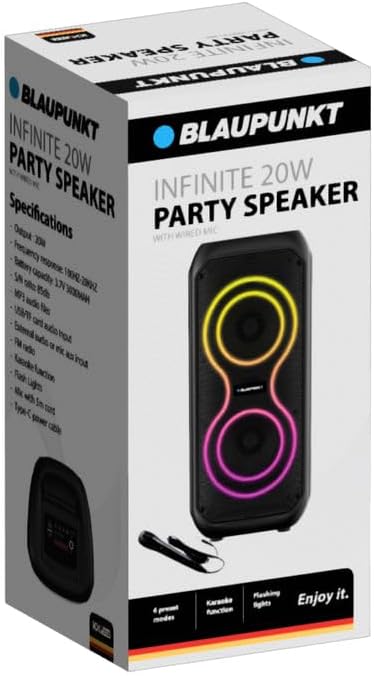
Figure 3: Wired Microphone
Setup Guide
1. Unboxing and Initial Inspection
Carefully remove all components from the packaging. Ensure the following items are present:
- Blaupunkt Infinite 20W Party Speaker
- Wired Microphone with 5m Cord
- Type-C Power Cable
Inspect the speaker and accessories for any signs of damage. If any items are missing or damaged, contact customer support.
2. Charging the Speaker
Before first use, fully charge the speaker. Connect the supplied Type-C power cable to the DC 5V port on the speaker and the other end to a compatible USB power adapter (not included). The charging indicator (if present) will show the charging status.
3. Connecting the Wired Microphone
Insert the 6.35mm jack of the wired microphone into the "MIC" input port on the speaker's control panel.
Operating Instructions

Figure 4: Control Panel Layout
1. Power On/Off
Locate the "ON/OFF" switch on the control panel. Slide it to the "ON" position to power on the speaker. Slide it to "OFF" to power off.
2. Bluetooth Pairing
- Power on the speaker. It will automatically enter Bluetooth pairing mode, indicated by a flashing LED or an audible prompt.
- On your mobile device, enable Bluetooth and search for available devices.
- Select "Blaupunkt Infinite" (or similar name) from the list.
- Once paired, the speaker will confirm with an audible sound, and the LED indicator will become solid.
3. USB/TF Card Playback
Insert a USB flash drive or TF (microSD) card containing MP3 audio files into the respective "USB" or "TF" port. The speaker will automatically detect the storage device and begin playing music. Use the track control buttons (previous/next) to navigate songs.
4. FM Radio
Press the "MODE" button repeatedly until "FM" mode is selected. Press and hold the "Play/Pause" button to auto-scan and save available FM stations. Use the previous/next track buttons to switch between saved stations.
5. Karaoke Function
Ensure the wired microphone is connected to the "MIC" input. Play music via Bluetooth, USB, TF card, or AUX. Adjust the microphone volume (if available) and speaker volume to your preference. Sing along with the music.
6. Flash Lights
The speaker features dynamic flash lights. These lights typically activate automatically when the speaker is on and playing music. There may be a dedicated button or a combination of buttons to cycle through light modes or turn them off (refer to control panel for specific button if available).
7. External Audio (AUX) Input
Connect an external audio device (e.g., smartphone, MP3 player) to the "AUX" input port using a 3.5mm audio cable (not included). Press the "MODE" button until "AUX" mode is selected. Audio will play from the connected device.
Maintenance
- Cleaning: Use a soft, dry cloth to clean the speaker's exterior. Do not use abrasive cleaners or solvents.
- Storage: When not in use for extended periods, store the speaker in a cool, dry place, away from direct sunlight and extreme temperatures.
- Battery Care: To prolong battery life, avoid fully discharging the battery frequently. Charge the speaker regularly, even if not in use.
Troubleshooting
| Problem | Possible Cause | Solution |
|---|---|---|
| Speaker does not power on. | Battery is discharged. Power switch is off. | Charge the speaker using the Type-C cable. Ensure the power switch is in the "ON" position. |
| No sound. | Volume is too low. Incorrect input mode selected. Device not connected properly. | Increase speaker and source device volume. Press "MODE" to select the correct input (Bluetooth, USB, TF, AUX). Reconnect the device. |
| Bluetooth disconnects frequently. | Device is out of range. Interference from other devices. Low speaker battery. | Move the paired device closer to the speaker. Avoid obstacles. Charge the speaker fully. Try re-pairing the device. |
| Microphone not working. | Microphone not fully plugged in. Microphone switch is off (if applicable). | Ensure the microphone jack is securely inserted into the "MIC" port. Check if the microphone has an ON/OFF switch and ensure it is ON. |
Specifications
| Brand | BLAUPUNKT |
| Model Number | BSP101 |
| Output Power | 20W |
| Connectivity Technology | Bluetooth |
| Audio Output Mode | Stereo |
| Frequency Response | 100Hz-20KHz |
| Battery Capacity | 3.7V 3000mAh |
| S/N Ratio | 85dB |
| Audio Support | MP3, USB, TF card |
| Power Input | Type-C (DC 5V) |
| Included Components | Wired Mic, Type-C Power Cable |
| Product Dimensions (D x W x H) | 22D x 20W x 48H millimetres |
| Material | Plastic |
| Color | Black |
Warranty and Support
For warranty information or technical support, please refer to the warranty card included with your product or visit the official Blaupunkt website. Do not attempt to repair the product yourself.


