
1. Introduction
Thank you for choosing the Zevemomo Twin Daybed. This versatile furniture piece is designed to maximize space and provide comfort, featuring a soft upholstered headboard, two storage drawers, a built-in charging station, and adjustable LED lighting. This manual provides essential information for safe assembly, operation, maintenance, and troubleshooting to ensure optimal use of your new daybed.

Figure 1.1: Overview of the Zevemomo Twin Daybed, showcasing its design with storage drawers and integrated lighting.
2. Safety Information
Please read and understand all safety information before assembly and use. Failure to follow these instructions may result in injury or damage to the product.
- Weight Limit: Do not exceed the maximum weight capacity of 400 lbs. Overloading can cause structural failure and injury.
- Sharp Edges: Exercise caution during assembly and handling, as some components may have sharp edges.
- Assembly: Ensure all bolts and screws are securely tightened before use. Periodically check and re-tighten fasteners.
- Children: Keep small parts and packaging materials away from children to prevent choking hazards.
- Placement: Place the daybed on a flat, level surface to ensure stability.
- Electrical Safety: Do not expose the charging station or LED lights to water or excessive moisture. Disconnect power before cleaning or maintenance of electrical components.

Figure 2.1: The daybed features a safe round design on its armrests to minimize sharp edges and enhance user safety.
3. Package Contents
Before beginning assembly, verify that all components listed below are present and undamaged. If any parts are missing or damaged, please contact customer support.
- Daybed Frame Components (Metal and Upholstered Sections)
- 2 x Storage Drawers
- Installation Manual
- LED Light Strips and Controller
- Charging Station Unit (USB, Type-C, AC Outlets)
- Hardware Pack (Screws, Bolts, Allen Wrench, etc.)
4. Setup and Assembly
The Zevemomo Twin Daybed is designed for hassle-free setup. Please refer to the included Installation Manual for detailed, step-by-step instructions, labeled parts, and all necessary tools. The precision-drilled holes ensure a quick and smooth assembly process.
General Assembly Steps:
- Unpack all components and lay them out on a clean, soft surface to prevent scratches.
- Identify all parts and hardware using the provided parts list in the Installation Manual.
- Assemble the main bed frame structure according to the manual's diagrams, ensuring all connections are secure.
- Attach the upholstered headboard and integrate the charging station and LED light strips as instructed.
- Assemble the two storage drawers and insert them into their designated slots under the daybed.
- Once fully assembled, ensure all fasteners are tightened and the daybed is stable before placing a mattress on it.

Figure 4.1: The heavy-duty metal frame provides outstanding durability and support, with an embedded design to keep the mattress in place.
5. Operating Instructions
5.1. Charging Station
The integrated charging station in the headboard allows convenient charging of multiple devices.
- Ports: The charging station includes 1 USB Port, 1 Type-C Port, and 2 AC Outlets.
- Usage: Simply plug your device's charging cable into the appropriate port or outlet. Ensure the daybed is connected to a power source.

Figure 5.1: The headboard features a convenient built-in charging station for various electronic devices.
5.2. Adjustable RGB LED Light
The LED lighting system offers customizable ambiance for your space.
- Control: The LED lights are controlled via a smartphone application. Download the recommended app (details in the Installation Manual) to your mobile device.
- Customization: Use the app to select from over 60,000 colors and various lighting modes, including Mic Mode (reacts to sound), Music Mode (syncs with music), and Timing Mode (set schedules).

Figure 5.2: The adjustable RGB LED lights can be controlled via a smartphone app, offering a wide range of colors and dynamic modes.
5.3. Storage Drawers
The two integrated drawers provide convenient storage space.
- Access: Each drawer is equipped with wheels underneath, allowing for easy pull-out and push-in access.
- Capacity: Use the drawers for storing bedding, books, clothes, or other personal items.

Figure 5.3: The daybed includes two spacious drawers on wheels for convenient storage.
6. Maintenance
Regular maintenance will help prolong the life and appearance of your daybed.
- Cleaning: Wipe metal and wooden surfaces with a soft, damp cloth. For upholstered parts, use a fabric cleaner suitable for the material, testing on an inconspicuous area first.
- Fasteners: Periodically check all bolts and screws to ensure they remain tight. Re-tighten as necessary.
- Electrical Components: Keep the charging station and LED lights free from dust. Do not use liquid cleaners directly on electrical parts.
- Drawers: Keep the drawer wheels clean and free of debris to ensure smooth operation.
7. Troubleshooting
This section addresses common issues you might encounter.
| Problem | Possible Cause | Solution |
|---|---|---|
| Daybed is wobbly or unstable. | Loose fasteners; uneven floor. | Check and tighten all bolts and screws. Move the daybed to a level surface or use shims if necessary. |
| Charging station not working. | Not plugged in; power outlet issue; faulty device cable. | Ensure the daybed's power cord is securely plugged into a working wall outlet. Test the outlet with another device. Try a different charging cable for your device. |
| LED lights not turning on or responding. | Power connection issue; app not connected; faulty LED strip. | Check the power connection to the LED controller. Ensure your smartphone's Bluetooth is on and the app is correctly paired. Refer to the LED light section of the Installation Manual for specific pairing instructions. |
| Drawers are difficult to open/close. | Debris in wheels; misaligned. | Clean any debris from the drawer wheels. Ensure the drawers are properly aligned within their tracks. |
8. Specifications
Detailed specifications for the Zevemomo Twin Daybed.
| Feature | Detail |
|---|---|
| Model Number | Daybed 2 |
| Size | Twin |
| Product Dimensions (L x W x H) | 77"L x 45.27"W x 39.17"H |
| Color | Black |
| Weight Capacity | Up to 400 lbs |
| Material | Heavy-duty Metal Frame, Upholstered Headboard, Scratch-Resistant Plank |
| Charging Station | 1 USB Port, 1 Type-C Port, 2 AC Outlets |
| LED Lighting | Adjustable RGB, Over 60,000 Colors, Mic Mode, Music Mode, Timing Mode, APP Control |
| Storage | 2 Drawers with Wheels |
| Compatible Mattress Size | Standard Twin-size (39" x 75") |
| Recommended Mattress Height | 6-8 inches |
| Assembly Required | Yes |
| Item Weight | 61 pounds |
| UPC | 810152798737 |
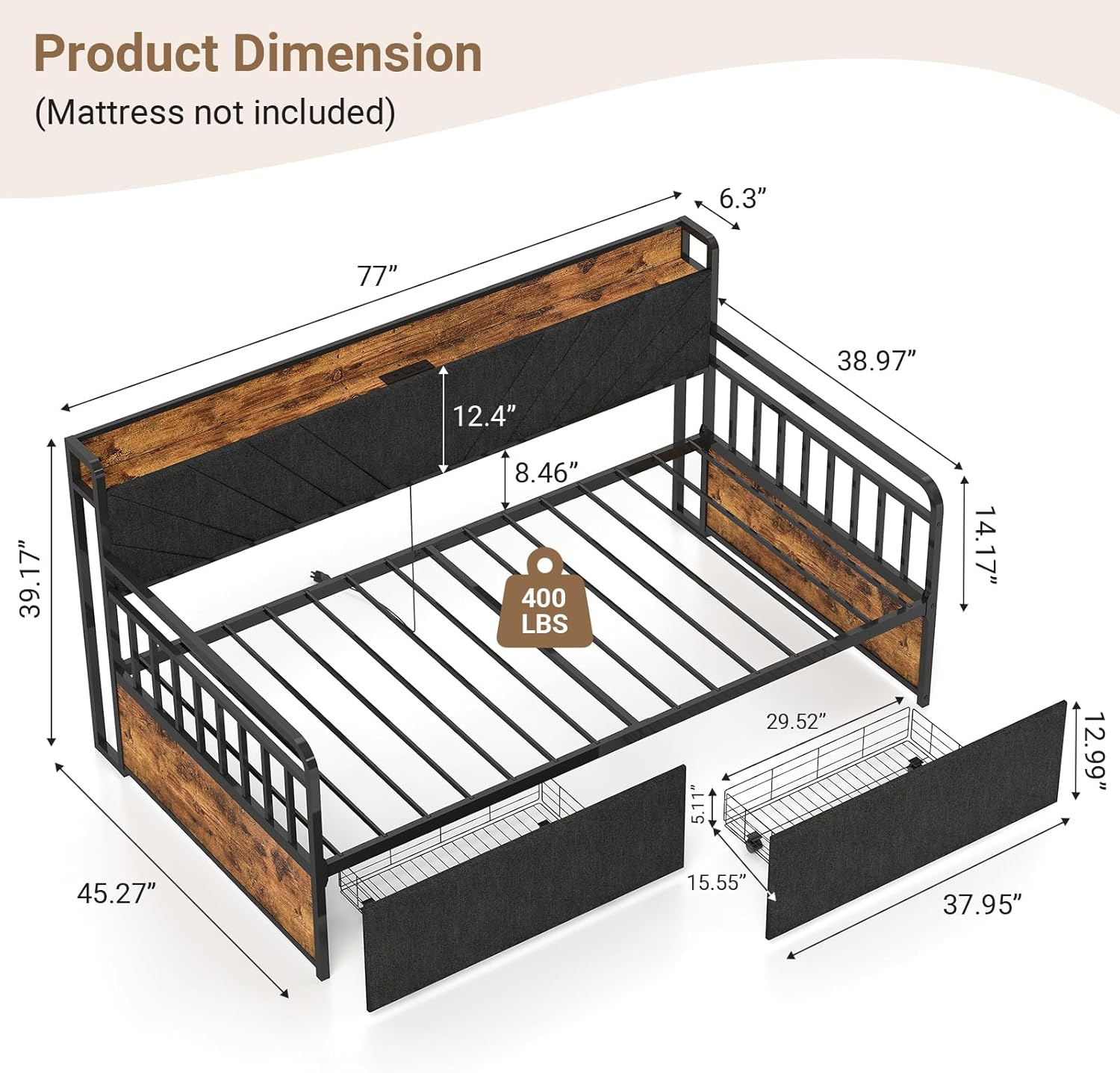
Figure 8.1: Detailed product dimensions for the Zevemomo Twin Daybed.
9. Warranty and Support
For any questions, concerns, or assistance with your Zevemomo Twin Daybed, please refer to the contact information provided in your purchase documentation or visit the official Zevemomo store on Amazon. While specific warranty details are not provided in this manual, general customer support is available for product inquiries, missing parts, or assembly guidance.
Online Support: Visit the Zevemomo Store on Amazon