
OneGame OG6608
OneGame OG6608 Ergonomic Gaming Chair User Manual
Model: OG6608
Introduction
Thank you for choosing the OneGame OG6608 Ergonomic Gaming Chair. This manual provides essential information for the safe assembly, operation, and maintenance of your new chair. Please read these instructions carefully before use and retain them for future reference.

Image: Front view of the OneGame OG6608 Ergonomic Gaming Chair, highlighting its 360-degree swivel capability.
Safety Information
- Ensure all components are securely fastened before use.
- Do not stand on the chair.
- Avoid placing heavy objects on the chair that exceed its maximum load capacity.
- Keep hands and fingers clear of moving parts during adjustment.
- Use the chair on a flat, stable surface.
- This chair is designed for indoor use only.
Package Contents
Please verify that all parts are present before beginning assembly. If any parts are missing or damaged, contact customer support.
- Backrest
- Seat Cushion
- Armrests (2)
- Star Base
- Casters (5)
- Gas Lift Cylinder
- Gas Lift Cover
- Mechanism Plate
- Headrest Pillow
- Lumbar Support Pillow
- Assembly Hardware (screws, washers, Allen wrench)
Setup and Assembly
Assembly of the OneGame OG6608 chair is designed to be straightforward. Most users can complete the setup in under 20 minutes. Detailed instructions and all necessary tools are included in the package.
- Attach Casters to Base: Insert the five casters into the holes on the star base until they click securely into place.
- Install Gas Lift: Place the gas lift cylinder into the center hole of the star base. Cover it with the gas lift cover.
- Mount Mechanism Plate: Align the mechanism plate with the screw holes on the underside of the seat cushion. Secure it with the provided screws and Allen wrench. Ensure the front of the mechanism faces the front of the seat.
- Attach Armrests: Secure the armrests to the sides of the seat cushion using the designated screws.
- Connect Backrest to Seat: Align the backrest with the mounting brackets on the seat cushion and secure it with screws.
- Place Seat Assembly on Gas Lift: Carefully place the assembled seat and backrest onto the gas lift cylinder.
- Attach Pillows: Secure the headrest and lumbar support pillows to the chair as desired.

Image: The OneGame OG6608 Gaming Chair fully assembled within a typical gaming environment.
Operating Instructions
Chair Height Adjustment
To adjust the chair's height, locate the lever on the right side beneath the seat. Pull the lever upwards while seated to lower the chair, or stand up and pull the lever upwards to raise the chair. Release the lever at your desired height.

Image: Illustration of the chair's height adjustment range (3.9 inches) and the smooth 360-degree silent wheels.
Backrest Recline Function
The backrest can be reclined between 90 and 155 degrees. To recline, pull the lever on the left side of the chair upwards and lean back to your desired angle. Release the lever to lock the backrest in position. The chair offers multiple angles for working (90°), gaming (135°), and resting (155°).

Image: Visual representation of the chair's 155-degree recline function, illustrating optimal angles for various activities.
3D Adjustable Armrests
The armrests are 3D adjustable, allowing for vertical (up/down) and horizontal (forward/backward) movement. Use the buttons or levers on the armrests to adjust them to your preferred height and depth for optimal arm and shoulder support.
- Height Adjustment: Press the button on the side of the armrest and move it up or down (approx. 7cm / 2.76 inches).
- Forward/Backward Adjustment: Slide the armrest pad forward or backward (approx. 6cm / 2.36 inches).
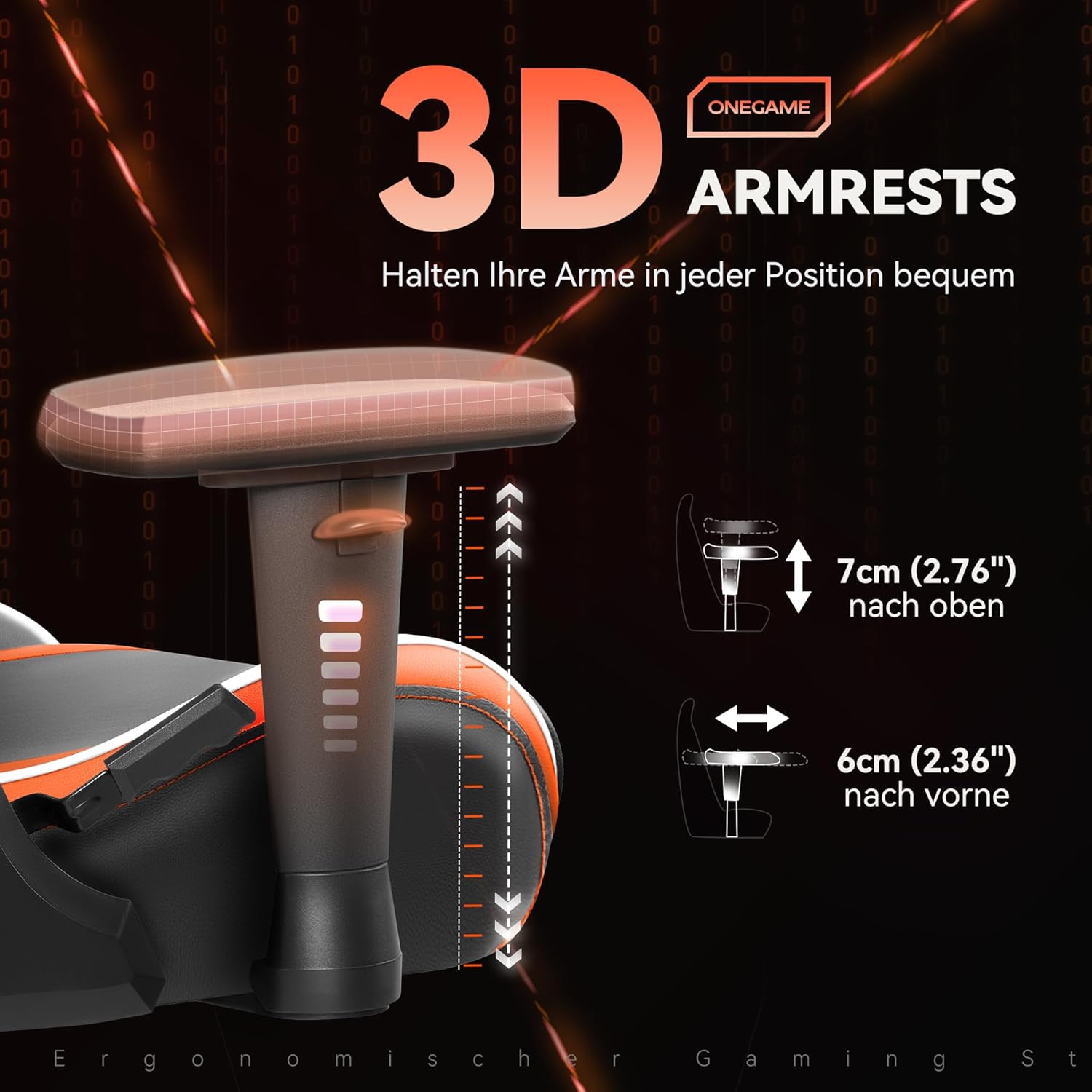
Image: Detailed view of the 3D adjustable armrests, showing their vertical and horizontal adjustment capabilities.
360° Swivel Function
The chair features a smooth 360-degree swivel, allowing for effortless movement and access to your surroundings without needing to reposition the entire chair.
Maintenance
Cleaning
The chair is constructed with wear-resistant PU leather, which is waterproof and easy to clean.
- For general cleaning, wipe the surface with a soft, damp cloth.
- For stubborn stains, use a mild soap solution and wipe immediately with a clean, damp cloth, then dry thoroughly.
- Avoid using harsh chemicals, abrasive cleaners, or solvents, as these can damage the material.

Image: Detailed view of the chair's wear-resistant PU leather, highlighting its texture and easy-to-clean properties.
General Care
- Periodically check all screws and bolts to ensure they are tight. Retighten if necessary.
- Inspect casters for any debris or hair that might impede smooth movement. Clean as needed.
- Avoid prolonged exposure to direct sunlight or extreme temperatures, which can cause material degradation.
Troubleshooting
| Problem | Possible Cause | Solution |
|---|---|---|
| Chair does not adjust height | Gas lift cylinder malfunction or lever not engaged. | Ensure the height adjustment lever is fully pulled. If the issue persists, the gas lift may need replacement. Contact support. |
| Chair wobbles or feels unstable | Loose screws or uneven floor. | Check and tighten all assembly screws. Ensure the chair is on a flat surface. |
| Casters do not roll smoothly | Debris caught in casters or damaged casters. | Remove any hair or debris from the caster wheels. If damaged, casters may need replacement. |
| Armrests are loose or unstable | Mounting screws are loose. | Tighten the screws securing the armrests to the seat. |
Specifications
- Brand: OneGame
- Model: OG6608
- Color: Blackorange
- Product Dimensions (D x W x H): 10"D x 15"W x 15"H (Note: These dimensions may refer to a component. Refer to the diagram for full chair dimensions.)
- Overall Height Range: 125-135 cm (49.2-53.2 inches)
- Seat Width: 60 cm (24 inches)
- Base Diameter: 73 cm (28.7 inches)
- Maximum Load Capacity: 150 kg (330 lbs) recommended, up to 181 kg (400 lbs)
- Item Weight: 39.6 pounds
- Arm Style: Rounded, 3D Adjustable
- Reclining Position Count: 2 (90-155 degrees)
- Indoor/Outdoor Usage: Indoor
- Material: Wear-Resistant PU Leather, High-Density Styling Sponge, Rugged High-Density Chassis

Image: Diagram illustrating the chair's key dimensions (height, seat width, base diameter) and its maximum load capacity.
Warranty and Support
For warranty information, technical support, or to inquire about replacement parts, please contact OneGame customer service directly. You can find more information and contact details on the official OneGame store page:
Ask a question about this manual
Ask about setup, troubleshooting, compatibility, parts, safety, or missing instructions. Manuals+ will review the question and use this page’s manual context to help answer it.