
UMUTOO MG001
UMUTOO MG001 Retro Vintage Portable Radio User Manual
Model: MG001
1. Introduction
The UMUTOO MG001 is a versatile retro-style portable radio designed for excellent reception and a rich audio experience. It combines classic AM/FM/SW radio functionality with modern features such as Bluetooth connectivity, USB, and TF/Micro-SD card playback. Its compact size and long-lasting rechargeable battery make it ideal for both indoor and outdoor use.

Figure 1.1: Front view of the UMUTOO MG001 Retro Portable Radio.
2. Key Features
- Multi-Band Radio: Supports AM (520-1710KHz), FM (87-108MHz), and Shortwave (5.9-18.0MHz) bands with excellent reception due to a 50cm retractable antenna and advanced DSP chip.
- Bluetooth 5.4 Connectivity: Seamlessly stream audio from compatible devices like smartphones and computers.
- Multiple Playback Modes: In addition to radio and Bluetooth, play audio from USB flash drives and Micro-SD/TF cards.
- Dual Loudspeakers: Equipped with double 5W bass speakers for rich, well-balanced stereo sound.
- Rechargeable Battery: Built-in 1200mAh Lithium-Ion battery provides up to 10 hours of playback on a single charge, rechargeable via Micro USB-C cable.
- Portable Design: Lightweight (1.42 pounds) with a large handle for easy transport.
- Retro Aesthetic: Elegant vintage design that complements various home decors.
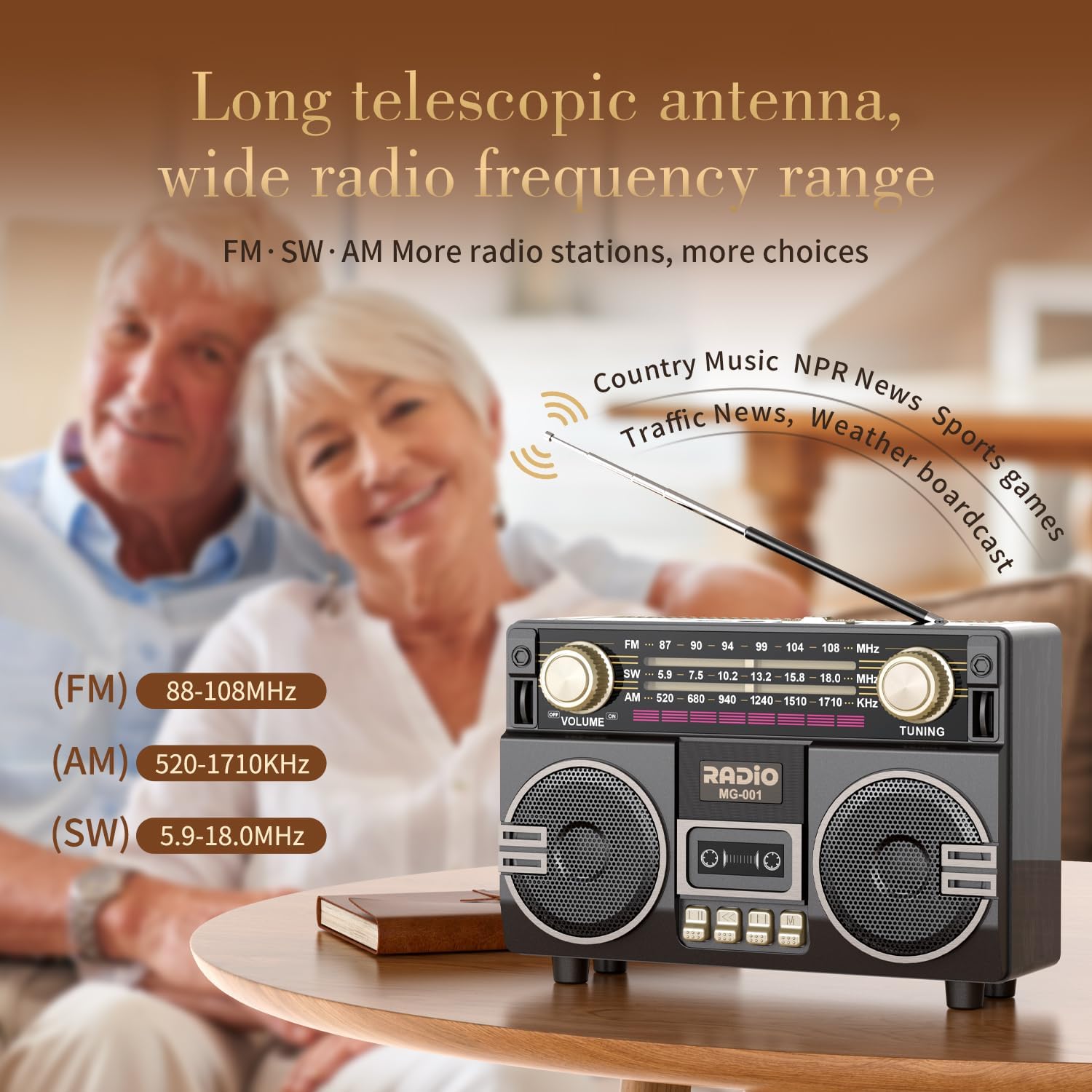
Figure 2.1: The long telescopic antenna provides wide radio frequency range for enhanced reception.

Figure 2.2: The MG001 functions as a wireless Bluetooth speaker, compatible with various devices.

Figure 2.3: The built-in 1200mAh rechargeable battery offers extended playback time.
3. Setup
3.1 Initial Charging
- Locate the Micro USB-C charging port on the side of the radio.
- Connect the included Micro USB-C cable to the radio and a compatible USB power adapter (not included).
- The charging indicator light will illuminate. A full charge typically takes 3-4 hours.
- Once fully charged, disconnect the cable.
3.2 Antenna Extension
For optimal radio reception, fully extend the telescopic antenna located on the top of the unit. Adjust its direction for the best signal clarity.
4. Operating Instructions
4.1 Power On/Off and Volume Control
- To power on the radio, rotate the VOLUME knob clockwise. You will hear a click.
- Continue rotating the VOLUME knob clockwise to increase the volume, and counter-clockwise to decrease it.
- To power off, rotate the VOLUME knob counter-clockwise until it clicks off.
4.2 Radio Operation (AM/FM/SW)
- Switch the mode selector on the side of the radio to FM, AM, or SW.
- Extend the telescopic antenna for better reception.
- Rotate the TUNING knob to scan for radio stations. The frequency scale on the front panel will indicate the current frequency.
- Adjust the TUNING knob finely to achieve the clearest signal for your desired station.
4.3 Bluetooth Mode
- Switch the mode selector to MP3-FM-AM-SW and then ensure it is in the MP3 position. The radio will announce "Bluetooth Mode".
- On your Bluetooth-enabled device (e.g., smartphone, tablet), turn on Bluetooth and search for available devices.
- Select "MG001" from the list of devices to pair.
- Once paired, you can play audio from your device through the radio.

Figure 4.1: Pairing the MG001 with a Bluetooth device.
4.4 USB/TF Card Playback
- Switch the mode selector to MP3-FM-AM-SW and ensure it is in the MP3 position.
- Insert a USB flash drive into the USB port or a TF/Micro-SD card into the TF slot.
- The radio will automatically detect and begin playing audio files (e.g., MP3) from the inserted storage device.
- Use the playback control buttons (Play/Pause, Next/Previous Track) located on the front panel to manage your music.

Figure 4.2: Connectivity options including USB, AUX, and TF card slots.
4.5 AUX Input
- Switch the mode selector to MP3-FM-AM-SW and ensure it is in the MP3 position.
- Connect an external audio device (e.g., MP3 player, smartphone) to the AUX port using a 3.5mm audio cable (not included).
- Audio from the connected device will now play through the radio's speakers.
5. Maintenance
- Cleaning: Wipe the radio with a soft, dry cloth. Do not use abrasive cleaners or solvents.
- Storage: Store the radio in a cool, dry place away from direct sunlight and extreme temperatures.
- Battery Care: To prolong battery life, avoid fully discharging the battery frequently. Recharge it regularly, even if not in use for extended periods.
- Antenna: Handle the telescopic antenna gently to prevent bending or breakage. Retract it when not in use or when transporting the radio.
6. Troubleshooting
| Problem | Possible Cause | Solution |
|---|---|---|
| No power/Radio does not turn on. | Battery is depleted. | Charge the radio using the provided USB-C cable. |
| Poor radio reception. | Antenna not extended or improperly positioned; weak signal area. | Fully extend the telescopic antenna and adjust its direction. Try moving the radio to a different location. |
| Bluetooth device cannot pair. | Radio not in Bluetooth mode; device too far; previously paired with another device. | Ensure radio is in Bluetooth mode. Move device closer to radio. Disconnect from other Bluetooth devices. |
| USB/TF card not playing. | Radio not in MP3 mode; unsupported file format; card/drive corrupted. | Ensure radio is in MP3 mode. Check if audio files are in a supported format (e.g., MP3). Try a different USB drive or TF card. |
| Sound distortion or low volume. | Volume too low; weak signal; audio source issue. | Adjust volume knob. For radio, improve reception. For Bluetooth/USB/AUX, check volume on source device. |
7. Specifications
| Feature | Detail |
|---|---|
| Model Number | MG001 |
| Dimensions (L x W x H) | 7.48 x 3 x 5.1 inches (19 x 7.6 x 13 cm) |
| Item Weight | 1.42 pounds (0.64 kg) |
| Radio Bands Supported | AM (520-1710KHz), FM (87-108MHz), Shortwave (5.9-18.0MHz) |
| Connectivity Technology | Bluetooth 5.4, USB, AUX, TF/Micro-SD Card |
| Speaker Output | Double 5W Bass Speakers |
| Battery Type | 1200mAh Lithium Ion (rechargeable, included) |
| Playback Time | Up to 10 hours (on a full charge) |
| Charging Time | 3-4 hours |
| Power Source | Battery Powered (via Micro USB-C) |
| Included Components | Owner's Manual, Charging cable |
8. Warranty and Support
UMUTOO products are designed for reliability and performance. For any questions, technical support, or warranty inquiries, please refer to the contact information provided with your purchase or visit the official UMUTOO website. Please retain your proof of purchase for warranty claims.
Ask a question about this manual
Ask about setup, troubleshooting, compatibility, parts, safety, or missing instructions. Manuals+ will review the question and use this page’s manual context to help answer it.