
DAZZLEEX FY2H8XM4Q63109J068OT6EWA170K
User Manual for DAZZLEEX Tuya 9-in-1 WiFi Indoor Air Quality Monitor
Model: FY2H8XM4Q63109J068OT6EWA170K
Introduction
The DAZZLEEX Tuya 9-in-1 WiFi Indoor Air Quality Monitor is a comprehensive device designed to provide real-time monitoring of various environmental parameters within your indoor space. Equipped with multiple integrated sensors, it accurately detects temperature, humidity, and levels of carbon dioxide (CO2), formaldehyde (HCHO), total volatile organic compounds (TVOC), particulate matter (PM2.5 and PM10), and carbon monoxide (CO). This monitor helps you maintain a healthy living environment by providing immediate insights into your air quality.

Figure 1: Front view of the monitor showing its vibrant display with real-time readings for AQI, HCHO, TVOC, PM2.5, PM10, CO, and CO2.
Package Contents
- 1 x DAZZLEEX Tuya 9-in-1 WiFi Indoor Air Quality Monitor
- 1 x USB Power Cable
- 1 x User Manual (this document)
Setup
- Unpacking: Carefully remove the monitor from its packaging. Inspect for any visible damage.
- Powering On: Connect the monitor to a 5V power source using the provided USB cable. The device will automatically power on and the display will illuminate.
- Initial Placement: Place the monitor in a central location within the room you wish to monitor. Avoid placing it near windows, vents, or direct heat sources, as this may affect sensor accuracy.
- WiFi Connection (Tuya App):
- Download the "Tuya Smart" or "Smart Life" app from your smartphone's app store.
- Register or log in to your account.
- Add a new device in the app. Follow the on-screen instructions to connect the monitor to your home WiFi network. This typically involves putting the device into pairing mode (refer to the device's specific button sequence if not automatic) and entering your WiFi credentials in the app.
- Once connected, you can view real-time data, historical trends, and set up alerts directly from the app.

Figure 2: The monitor connected to the Tuya app, allowing remote monitoring and control.
Operating Instructions
The monitor features a large TFT color screen for easy readability of all air quality parameters. The device provides real-time data updates using advanced infrared and electrochemical detection technologies.
Understanding the Display:
The display shows various readings, typically including:
- AQI (Air Quality Index): An overall indicator of air quality.
- HCHO (Formaldehyde): Measured in mg/m³.
- TVOC (Total Volatile Organic Compounds): Measured in mg/m³.
- PM2.5: Particulate matter less than 2.5 micrometers, measured in ug/m³.
- PM10: Particulate matter less than 10 micrometers, measured in ug/m³.
- CO (Carbon Monoxide): Measured in ppm.
- CO2 (Carbon Dioxide): Measured in ppm.
- Temperature: Displayed in Celsius or Fahrenheit.
- Humidity: Displayed as a percentage.
- Power Level: Battery indicator.

Figure 3: Detailed view of the monitor's screen, highlighting the clarity of the readings.
One-Touch Calibration:
The device supports easy calibration to ensure accurate readings. To calibrate the sensor data, simply press the power button multiple times. Refer to the specific number of presses required in the device's quick start guide or app for precise calibration instructions. It is recommended to perform calibration in a well-ventilated outdoor environment for best results.
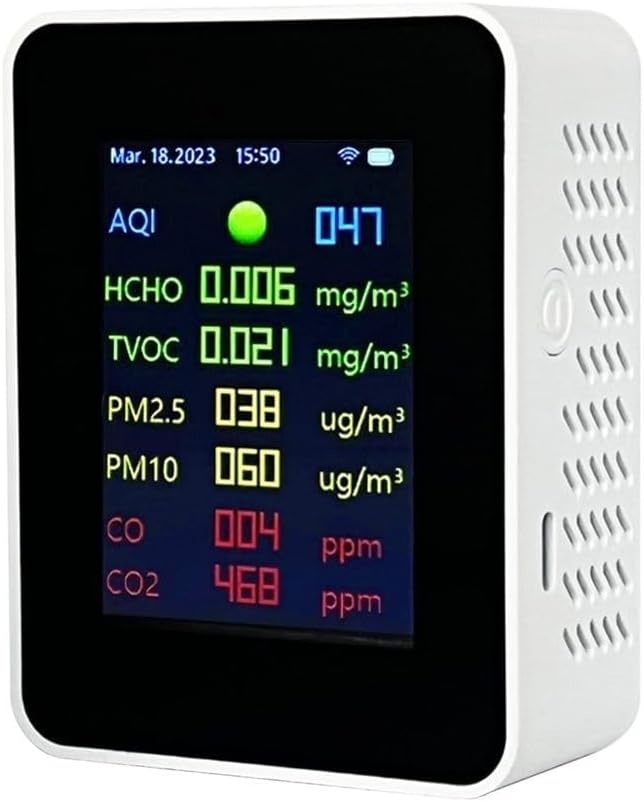
Figure 4: Side view of the monitor, indicating the location of the power button used for calibration.
Maintenance
- Cleaning: Use a soft, dry cloth to wipe the exterior of the monitor. Do not use liquid cleaners, aerosols, or abrasive materials, as these can damage the device or interfere with sensor operation.
- Sensor Care: Avoid blocking the ventilation holes on the device, as these are crucial for proper air circulation to the sensors. Do not insert any objects into the sensor openings.
- Storage: When not in use for extended periods, store the monitor in a cool, dry place away from direct sunlight and extreme temperatures.

Figure 5: Back view of the monitor, showing the speaker and mounting points, important for proper air circulation and placement.
Troubleshooting
| Problem | Possible Cause | Solution |
|---|---|---|
| Device not powering on. | No power supply or faulty cable. | Ensure the USB cable is securely connected to both the monitor and a working 5V power source. Try a different USB cable or power adapter. |
| Inaccurate readings. | Sensor not calibrated or environmental interference. | Perform a one-touch calibration in a fresh air environment. Ensure the device is not placed near strong air currents, chemicals, or extreme temperatures. |
| Cannot connect to WiFi/Tuya app. | Incorrect WiFi password, weak signal, or device not in pairing mode. | Ensure your WiFi network is 2.4GHz. Double-check the WiFi password. Move the monitor closer to the router. Put the device into pairing mode as per app instructions. Restart your router and the monitor. |
| Display is blank or frozen. | Software glitch or power issue. | Unplug the device, wait 10 seconds, and plug it back in to perform a restart. If the issue persists, contact customer support. |
Specifications
| Parameter | Value |
|---|---|
| Brand | DAZZLEEX |
| Model Number | FY2H8XM4Q63109J068OT6EWA170K |
| Material | ABS |
| Dimensions (L x W x H) | 70 x 90 x 35 mm |
| Color | White |
| CO2 Measurement Range | 400-5000 ppm |
| CO2 Measurement Accuracy | 1 ppm |
| Operating Temperature | 0 to 50 °C |
| Display Mode | TFT Color Screen |
| Working Voltage | 5 V |
| Sensors | PM2.5 sensor, Semiconductor sensor, Infrared sensor, Electrochemical sensor |
| PM2.5 Detection Range | 0-999 ug/m³ |
| PM10 Detection Range | 0-999 ug/m³ |
| Formaldehyde Detection Range | 0-9.999 mg/m³ |
| Organic Pollutants (TVOC) Detection Range | 0-9.999 mg/m³ |
| Carbon Monoxide Detection Range | 0-1000 ppm |
| AQI Detection Range | 0-500 |
Warranty and Support
For warranty information and technical support, please refer to the contact details provided on the product packaging or the official DAZZLEEX website. Keep your purchase receipt as proof of purchase for warranty claims.
no relevant documents