
Introduction
Thank you for choosing the KWANWA Digital Alarm Clock. This manual provides detailed instructions for setting up, operating, maintaining, and troubleshooting your new alarm clock. Please read this manual thoroughly before use to ensure proper functionality and to maximize your user experience.
Product Overview
The KWANWA Digital Alarm Clock (Model KW319) is designed for convenience and reliability, featuring a large LED display and user-friendly controls.

Image: Front view of the KWANWA Digital Alarm Clock with blue LED display showing 12:45.
Key Features:
- Jumbo 2.4" LED Display: Large, clear digits for easy readability from a distance.
- 3-Level Dimmer: Adjustable brightness (Low/Medium/High) to suit your preference.
- Auto Night Mode: Automatically dims the display between 8 PM and 6 AM.
- Battery Backup: Requires 3xAA batteries (not included) to save time and alarm settings during power outages. LED digits are hidden in battery mode, tap top to check time for 10 seconds.
- Gradual Wake-Up Alarm: Alarm volume gradually increases over 120 seconds.
- Smart Snooze Function: Allows up to 3 snoozes with 7-minute intervals.
- Oversized Tactile Buttons: Easy to operate, even in low light.
- Dual Power: Operates via UL-certified adapter (included) with 59-inch cord, or battery backup.
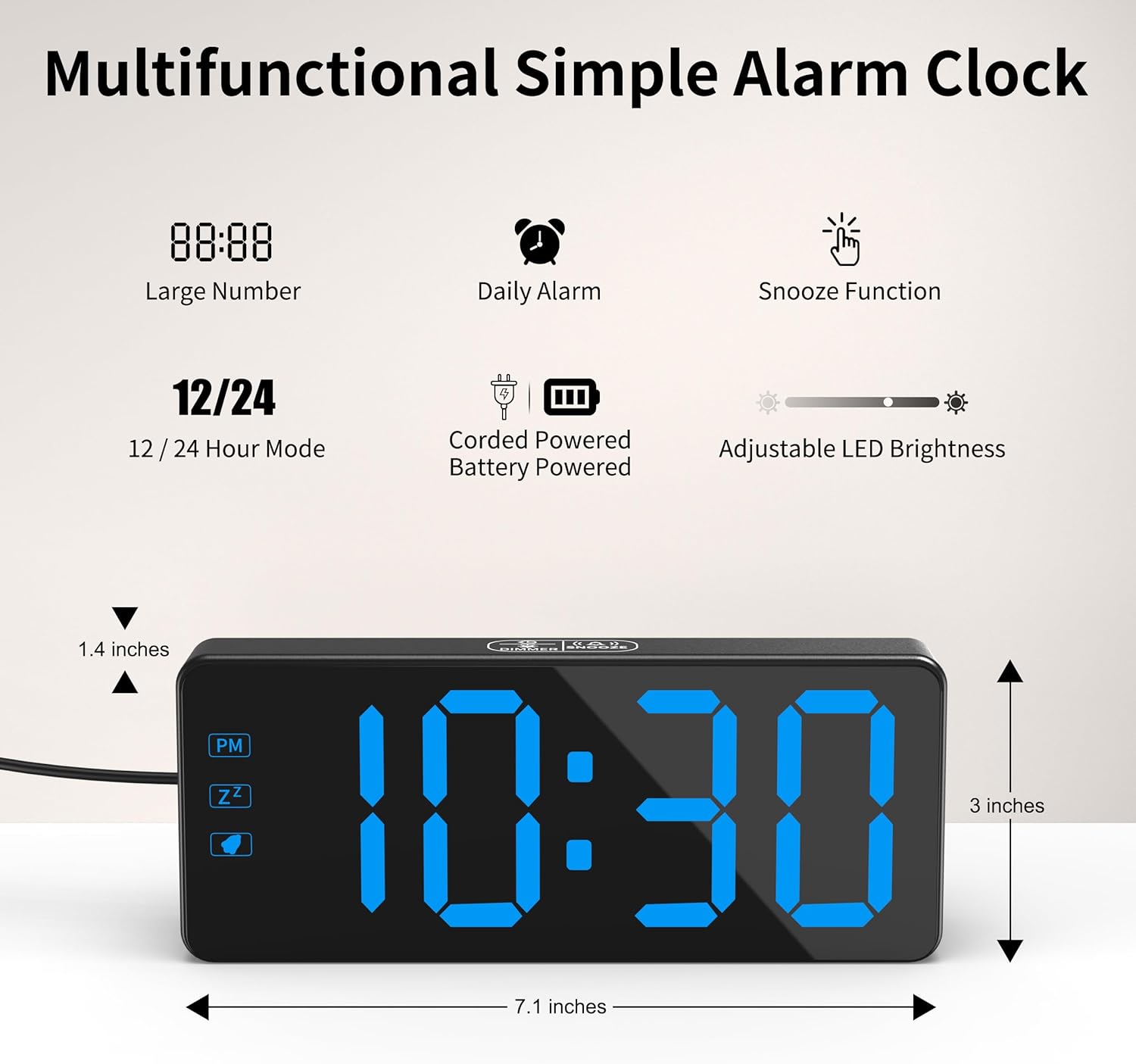
Image: Diagram illustrating the multifunctional features and dimensions (7.1 inches wide, 3 inches high, 1.4 inches deep) of the alarm clock.
Setup Guide
1. Power Connection
Connect the included UL-certified power adapter to the DC IN port on the back of the clock and plug it into a standard wall outlet. The LED display will light up, indicating the clock is powered.

Image: The KWANWA Digital Alarm Clock connected to a wall outlet via its power adapter, displaying 10:30.

Image: Close-up of the UL-certified power adapter and its cable, highlighting its safety certification.
2. Battery Backup Installation (Optional but Recommended)
For battery backup functionality, open the battery compartment on the back of the clock and insert 3xAA batteries (not included), ensuring correct polarity (+/-). In case of a power outage, the display will turn off to conserve battery, but the time and alarm settings will be retained. Tap the top of the clock to temporarily display the time for 10 seconds.
Operating Instructions

Image: Back view of the KWANWA Digital Alarm Clock, illustrating the location of the 'TIME SET', 'AL SET', 'UP 12/24', and 'DOWN AL ON/OFF' buttons.
1. Setting the Time
- Press and hold the TIME SET button on the back of the clock until the hour digits begin to flash.
- Use the UP 12/24 or DOWN AL ON/OFF buttons to adjust the hour. Pay attention to the PM indicator if using 12-hour format.
- Press TIME SET again to move to the minute setting. The minute digits will flash.
- Use the UP 12/24 or DOWN AL ON/OFF buttons to adjust the minutes.
- Press TIME SET once more to confirm and exit time setting mode.
2. Switching 12/24 Hour Format
In normal time display mode, short press the UP 12/24 button to toggle between 12-hour and 24-hour time formats.
3. Setting the Alarm
- Press and hold the AL SET button on the back of the clock until the alarm hour digits begin to flash.
- Use the UP 12/24 or DOWN AL ON/OFF buttons to adjust the alarm hour.
- Press AL SET again to move to the alarm minute setting. The minute digits will flash.
- Use the UP 12/24 or DOWN AL ON/OFF buttons to adjust the alarm minutes.
- Press AL SET once more to confirm and exit alarm setting mode.
4. Turning Alarm On/Off
In normal time display mode, short press the DOWN AL ON/OFF button to toggle the alarm on or off. An alarm icon will appear on the display when the alarm is active.
5. Snooze Function
When the alarm sounds, press the large DIMMER/SNOOZE button on the top of the clock to activate the snooze function. The alarm will pause for 7 minutes and then sound again. You can snooze up to 3 times. To turn off the alarm completely, press any button on the back of the clock.

Image: Illustration of the auto-ascending alarm volume feature, showing sound waves emanating from the clock.
6. Adjusting Display Brightness (Dimmer)
Press the large DIMMER/SNOOZE button on the top of the clock (when the alarm is not sounding) to cycle through the 3 brightness levels: High, Medium, and Low (Dim).

Image: Three representations of the clock display showing different brightness levels: High, Medium, and Dim, with a person sleeping comfortably next to the dimmed clock.
7. Auto Night Mode
The clock automatically enters a dimmed state between 8:00 PM and 6:00 AM to provide a comfortable viewing experience during nighttime hours. This feature is automatic and does not require manual adjustment.
Maintenance
Cleaning
To clean the clock, gently wipe the surface with a soft, dry cloth. Do not use abrasive cleaners, waxes, or solvents as they may damage the finish. Avoid spraying liquids directly onto the clock.
Battery Replacement
If the clock is frequently losing time or alarm settings during power interruptions, it may be time to replace the 3xAA backup batteries. Ensure the clock is connected to AC power before replacing batteries to avoid losing current time settings.
Troubleshooting
| Problem | Possible Cause | Solution |
|---|---|---|
| Display is off or flickering. | No AC power; loose power connection; battery backup active. | Ensure power adapter is securely plugged into the clock and wall outlet. If on battery backup, tap the top of the clock to temporarily display time. |
| Alarm does not sound. | Alarm is not set or turned off; alarm volume too low. | Verify alarm is set and the alarm icon is visible on the display. The alarm volume is fixed and gradually increases. |
| Time is inaccurate or running slow. | Power interruption; weak backup batteries. | Reset the time. Check and replace backup batteries if necessary. Ensure stable power supply. |
| Dimmer function not working. | Incorrect operation; unit malfunction. | Ensure you are pressing the DIMMER/SNOOZE button when the alarm is not sounding. If the issue persists, contact customer support. |
| Buttons are unresponsive. | Temporary software glitch; power issue. | Unplug the clock from power for a few minutes, then plug it back in. If using battery backup, remove and reinsert batteries. |
Specifications
| Feature | Detail |
|---|---|
| Brand | KWANWA |
| Model Number | KW319 |
| Colour | Black Case-blue Led |
| Product Dimensions | 12.95 x 3.81 x 6.35 cm |
| Item Weight | 281 g |
| Display Type | Digital LED |
| Power Source | Corded Electric (UL Adapter) |
| Battery Backup | 3xAA batteries (not included) |
| Special Features | 3-Level Dimmer, Auto Night Mode, 7-Min Snooze, Jumbo LED Display |
Warranty and Support
Warranty Information
KWANWA products are manufactured with high-quality standards. For specific warranty details regarding your Digital Alarm Clock, please refer to the warranty card included with your purchase or visit the official KWANWA website. Keep your purchase receipt as proof of purchase for any warranty claims.
Customer Support
If you encounter any issues or have questions not covered in this manual, please contact KWANWA customer support. You can typically find contact information on the product packaging, the KWANWA brand store on Amazon, or their official website. Please provide your product model (KW319) and a detailed description of the issue when contacting support.
Visit the KWANWA Store: KWANWA Amazon Store