1. Introduction
Thank you for choosing the Sanpyl Bluetooth Number Pad. This manual provides detailed instructions for setting up, operating, maintaining, and troubleshooting your new numeric keypad. Please read this manual thoroughly before use to ensure proper functionality and to maximize your user experience. This device is designed to enhance data input speed and accuracy across various devices such as laptops, desktops, and smartphones.

Figure 1: Applicable scenarios for the Sanpyl Bluetooth Number Pad, including office work, data analysis, and gaming.
2. Safety Information
- Do not expose the device to water or other liquids.
- Avoid extreme temperatures, direct sunlight, and high humidity.
- Do not attempt to disassemble or modify the device. This will void the warranty.
- Keep out of reach of children.
- Use only the provided or a certified Type-C charging cable.
3. Package Contents
Please check the package for the following items:
- 1 x Sanpyl Bluetooth Number Pad
- 1 x 2.4G USB Receiver
- 1 x Type-C Charging Cable

Figure 2: Contents of the Sanpyl Bluetooth Number Pad package.
4. Product Overview
The Sanpyl Bluetooth Number Pad is a versatile 35-key numeric keypad designed for efficiency and convenience. It supports multiple connection modes (2.4G wireless, Bluetooth 5.0, and Bluetooth 3.0) allowing seamless switching between different devices. Its ergonomic tilt, scissor key design, and non-slip pad ensure comfortable and stable use. The keypad features a built-in 350mAh lithium-ion battery, offering up to 120 hours of standby time on a full charge, and includes an automatic sleep function to conserve power.

Figure 3: Top view of the Sanpyl Bluetooth Number Pad, highlighting the 35-key layout.
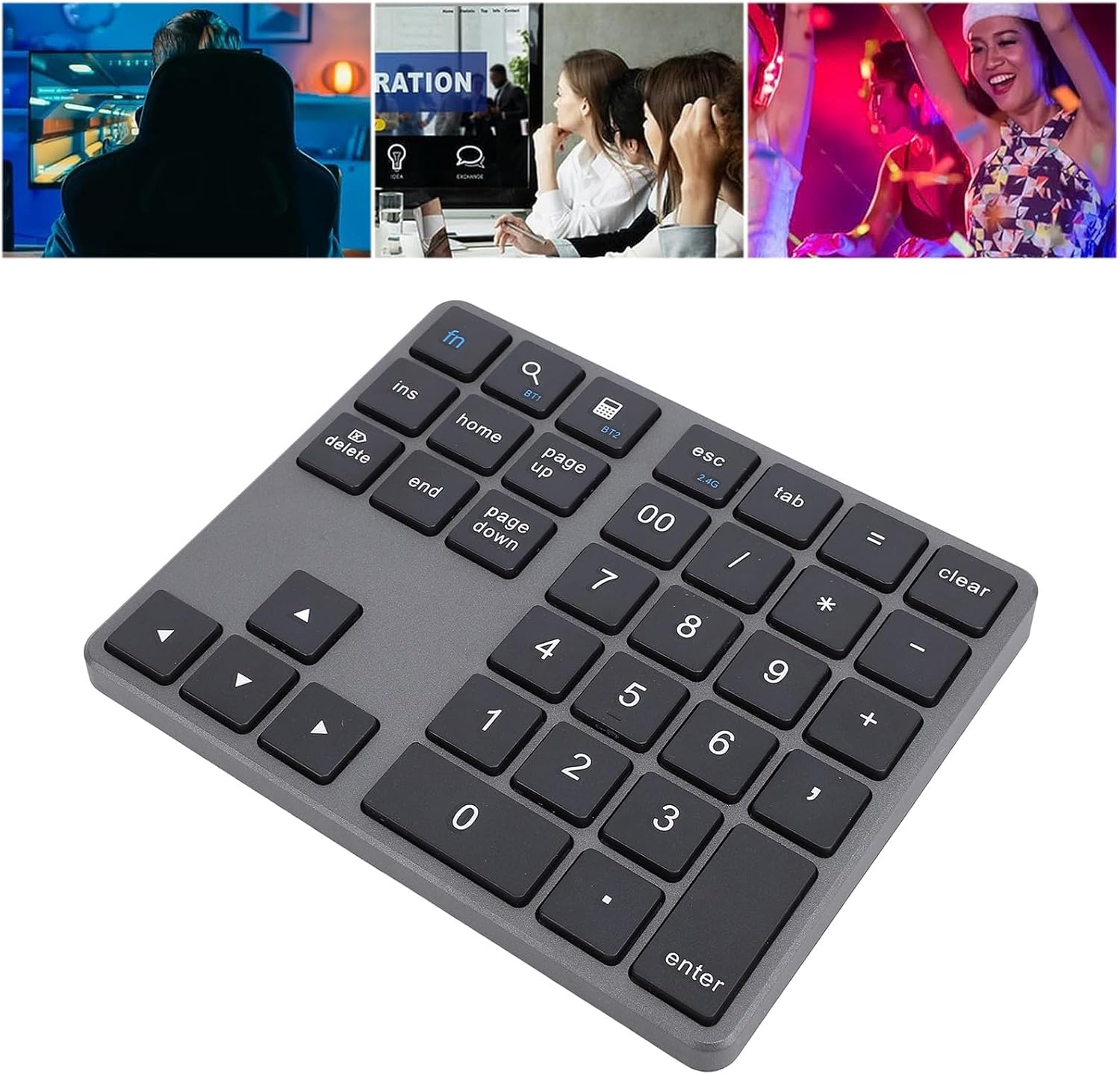
Figure 4: Angled view of the numeric keypad, illustrating its ergonomic design.
5. Setup
5.1 Charging the Keypad
Before first use, fully charge the keypad. Connect the provided Type-C charging cable to the keypad's charging port and the other end to a USB power source (e.g., computer USB port, USB wall adapter). The charging indicator light will show the charging status and turn off when fully charged. A full charge provides up to 120 hours of standby time.
5.2 2.4G Wireless Connection
- Insert the 2.4G USB receiver into an available USB port on your computer or device.
- Turn on the numeric keypad using the power switch located on the side.
- Press the fn key and the 2.4G key simultaneously to switch the keypad to 2.4G wireless mode. The indicator light will confirm the mode.
- The keypad should automatically connect to your device. No additional drivers are typically required.
5.3 Bluetooth Connection (BT1 / BT2)
The keypad supports two independent Bluetooth channels (BT1 and BT2), allowing you to connect to two different Bluetooth-enabled devices and switch between them.
- Turn on the numeric keypad using the power switch.
- Press the fn key and either BT1 or BT2 key simultaneously to select the desired Bluetooth channel. The corresponding indicator light will blink slowly.
- To enter pairing mode, press and hold the fn key and the selected BT1 or BT2 key for 3-5 seconds until the indicator light blinks rapidly.
- On your device (laptop, smartphone, tablet), go to Bluetooth settings and search for new devices.
- Select "Sanpyl Numpad" (or similar name) from the list of available devices to pair.
- Once paired, the indicator light on the keypad will stop blinking and remain solid for a few seconds before turning off.
- To switch between connected Bluetooth devices, simply press fn + BT1 or fn + BT2.

Figure 5: The numeric keypad connected and in use with a laptop.
6. Operating Instructions
6.1 Key Functions
The 35-key layout includes standard numeric keys, arithmetic operators, and dedicated control keys to enhance productivity:
- Numeric Keys (0-9): Standard number input.
- Operators (+, -, *, /, =): Basic arithmetic operations.
- . (Decimal Point): For decimal numbers.
- Enter: Confirms input.
- Clear: Clears current input.
- Tab: Moves cursor to the next field.
- Esc: Escape key.
- fn + Ins: Insert key function.
- fn + Home: Home key function.
- fn + Page Up: Page Up key function.
- fn + Delete: Delete key function.
- fn + End: End key function.
- fn + Page Down: Page Down key function.
- fn + Calculator Icon: Opens calculator application (system dependent).
- fn + Screen Catch Icon: Takes a screenshot (system dependent).
- Arrow Keys (Up, Down, Left, Right): Navigation.
6.2 Automatic Sleep Mode
To conserve battery life, the keypad will automatically enter sleep mode after a period of inactivity. To wake it up, simply press any key. The keypad will reconnect to the last active device.
7. Maintenance
- Cleaning: Use a soft, dry, lint-free cloth to clean the surface of the keypad. For stubborn dirt, slightly dampen the cloth with water or a mild cleaning solution, then wipe dry immediately. Do not spray cleaners directly onto the keypad.
- Storage: When not in use for extended periods, store the keypad in a cool, dry place away from direct sunlight and extreme temperatures.
- Battery Care: To prolong battery life, avoid fully discharging the battery frequently. Charge the keypad when the battery indicator is low.
8. Troubleshooting
- Keypad not responding:
- Ensure the keypad is powered on.
- Check the battery level and charge if necessary.
- Verify that the correct connection mode (2.4G, BT1, or BT2) is selected.
- For 2.4G, ensure the USB receiver is properly inserted.
- For Bluetooth, ensure the keypad is paired with your device and Bluetooth is enabled on your device. Try re-pairing if necessary.
- Lagging or intermittent connection:
- Ensure the keypad is within the effective range of your device (typically 10 meters).
- Avoid placing the keypad near strong sources of interference (e.g., Wi-Fi routers, other wireless devices).
- Charge the keypad if the battery is low.
- Keypad not charging:
- Ensure the Type-C cable is securely connected to both the keypad and the power source.
- Try a different Type-C cable or USB power source.
9. Specifications
- Model Number: Sanpylm3fiw4q2ta-11
- Connection Modes: 2.4G Wireless, Bluetooth 5.0, Bluetooth 3.0
- Number of Keys: 35
- Battery Capacity: 350mAh Lithium-ion
- Standby Time: Up to 120 hours (fully charged)
- Charging Port: Type-C
- Material: ABS
- Item Weight: 7.2 ounces (approx. 204 grams)
- Package Dimensions: 7.09 x 5.12 x 1.18 inches (approx. 18 x 13 x 3 cm)
- Manufacturer: Sanpyl
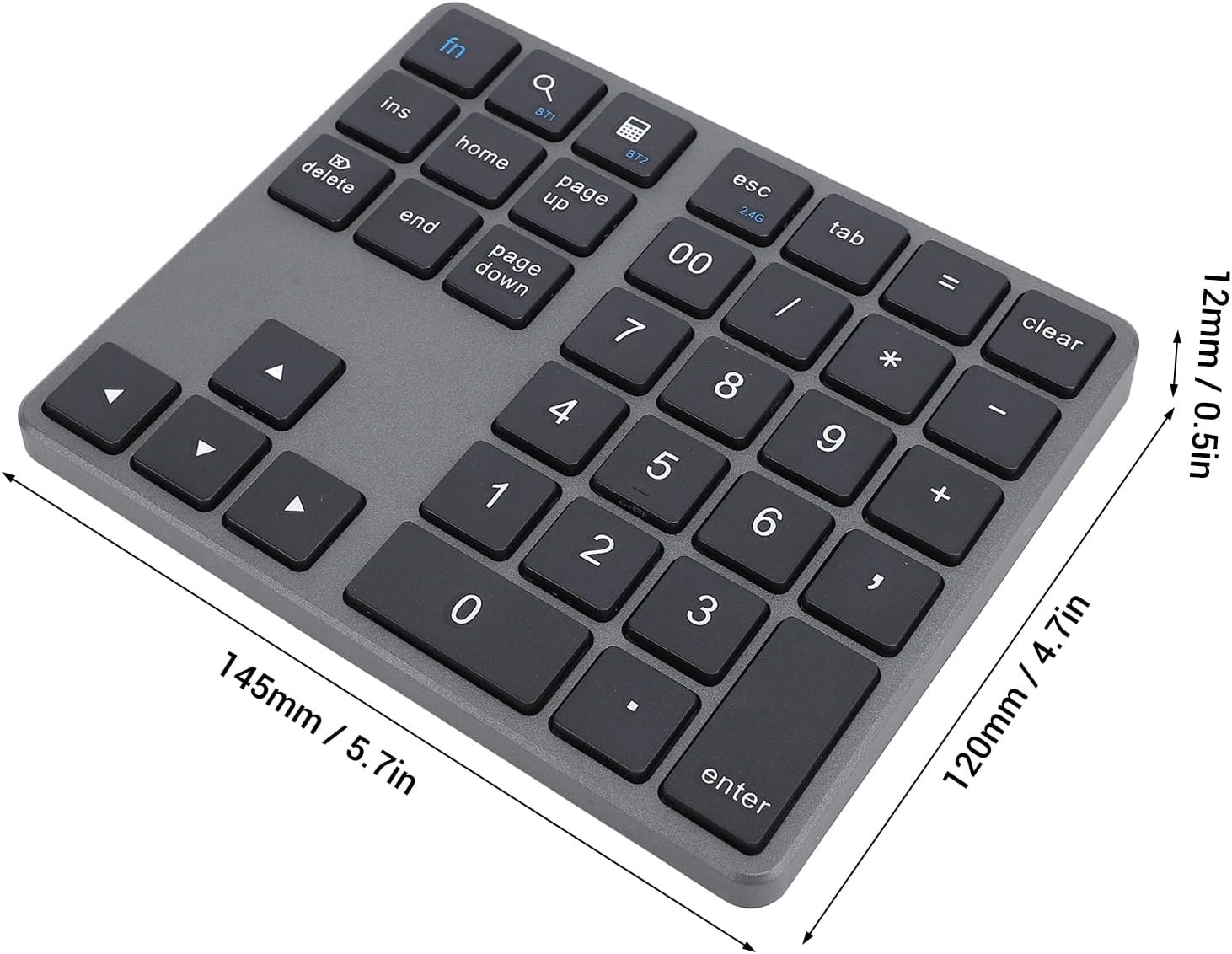
Figure 6: Dimensions of the Sanpyl Bluetooth Number Pad.
10. Warranty and Support
For warranty information or technical support, please refer to the documentation provided with your purchase or contact Sanpyl customer service through the retailer where the product was purchased. Please have your model number (Sanpylm3fiw4q2ta-11) and purchase details ready when contacting support.