
1. Product Overview
The ThermoMaven Professional Meat Thermometer HT04 is designed for precise temperature measurement in various cooking applications. It features ultra-fast readings, NIST certified accuracy, and a durable, waterproof design. This manual provides essential information for proper setup, operation, and maintenance of your device.

Image: The ThermoMaven HT04 thermometer, showing its digital display and probe.
2. Initial Setup
2.1 Battery Installation
Your ThermoMaven HT04 thermometer requires 1 AAA battery, which is included. To install or replace the battery:
- Locate the battery compartment cover on the back of the device.
- Use a small screwdriver or coin to gently open the cover.
- Insert one AAA battery, ensuring the correct polarity (+/-) as indicated inside the compartment.
- Securely close the battery compartment cover.
2.2 First Use
Upon battery installation, the device is ready for use. Extend the probe to activate the thermometer. The display will illuminate and show the current temperature.
3. Operating Instructions
3.1 Taking a Temperature Reading
- Unfold the stainless steel probe from the thermometer body. The device will automatically power on.
- Insert the probe tip into the thickest part of the food item, avoiding bone or gristle.
- Wait approximately 0.5 seconds for the temperature reading to stabilize on the digital display.
- To turn off the device, fold the probe back into the body. The thermometer will automatically power off.

Image: Examples of the thermometer in use for various cooking methods including oven, liquid, baking, and BBQ.
3.2 Temperature Unit Selection
The thermometer can display temperatures in Celsius (°C) or Fahrenheit (°F). To switch between units, locate the °C/°F button (usually inside the battery compartment or on the back of the device) and press it once.
3.3 Auto-Rotating Display and Backlight
The display automatically rotates 180 degrees for ambidextrous use, ensuring readability from any angle. The intelligent backlight activates automatically in low-light conditions or when the device is in motion, allowing for clear readings.

Image: The thermometer showing its motion-sensing wake feature and the display rotating for different orientations.
3.4 Recommended Internal Temperatures
For food safety, refer to the recommended internal temperature guidelines printed on the device or consult official food safety charts. A general guideline is provided below:
| Food Type | Recommended Internal Temperature |
|---|---|
| Beef Well | 156°F / 69°C |
| Beef Medium | 136°F / 58°C |
| Beef Med Rare | 131°F / 55°C |
| Pork | 153°F / 68°C |
| Poultry | 168°F / 76°C |
| Salmon | 145°F / 63°C |
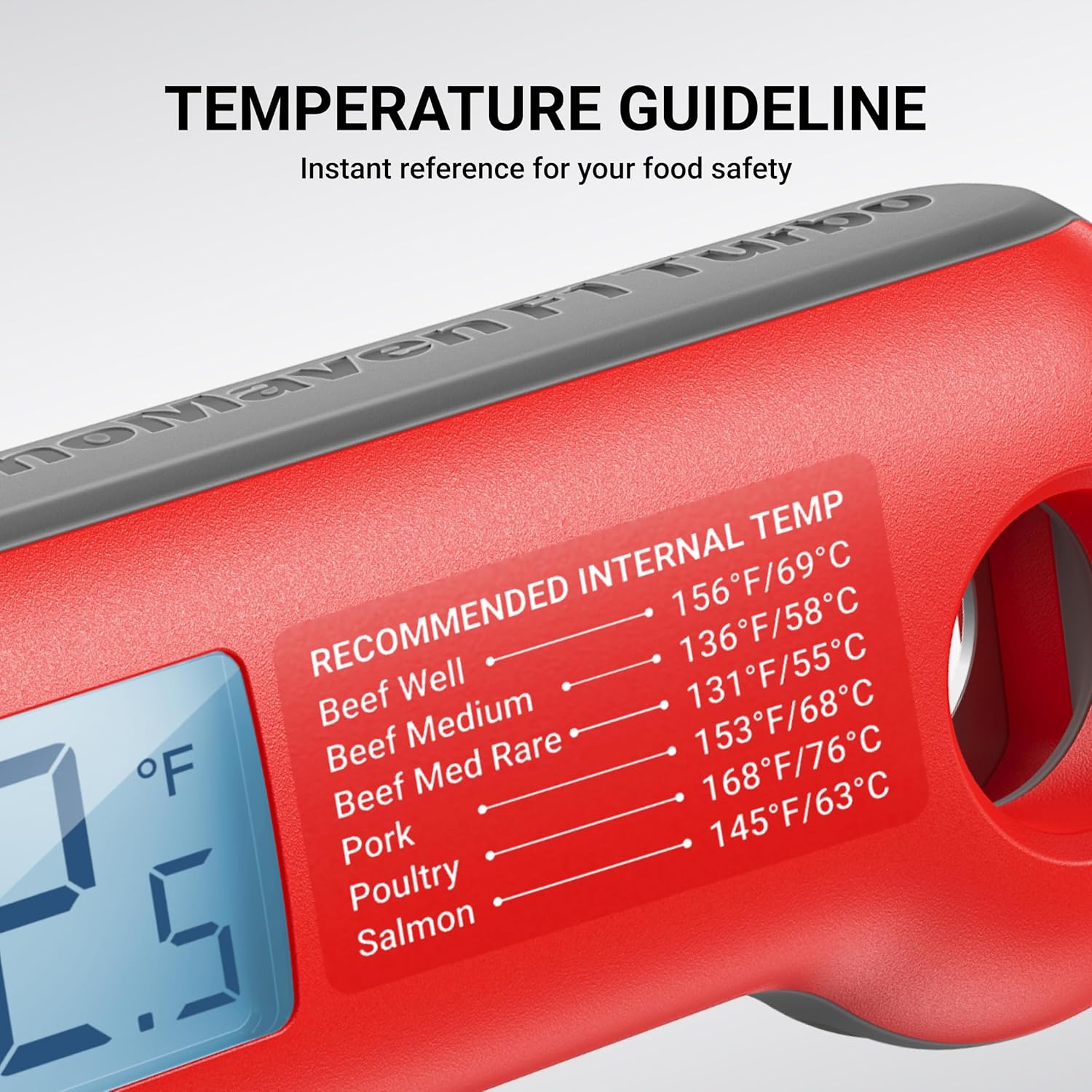
Image: A detailed view of the temperature guideline chart printed on the thermometer body.
4. Key Features
- 0.5s Instant Readings: Provides rapid and accurate temperature measurements.
- NIST Certified Accuracy: Ensures high precision with an accuracy of ±0.5°F.
- 100% Waterproof (IP67): Designed for easy cleaning and durability in kitchen environments.
- Auto-Rotating Backlit Display: Offers seamless usability for both right and left-handed users, with clear visibility in any lighting condition.
- Lift-to-Wake & Smart Sleep Function: Automatically powers on when the probe is extended or lifted, and conserves battery life by entering sleep mode when inactive.
- Convenient Storage: Features a magnetic back for attaching to metallic surfaces and a hook for hanging.
- Built-in Bottle Opener: Adds practical utility for various occasions.

Image: Visual summary of the thermometer's key features.

Image: The thermometer magnetically attached to a metal surface for easy storage.
5. Care and Maintenance
5.1 Cleaning Instructions
The ThermoMaven HT04 is IP67 waterproof, allowing for easy cleaning. After each use:
- Wash the probe and the body of the thermometer with warm, soapy water.
- Rinse thoroughly under running water.
- Dry completely with a clean cloth before storing.
Note: The device is designed for hand washing only. Do not immerse in water for extended periods or wash in a dishwasher.

Image: The thermometer being cleaned under a faucet, highlighting its waterproof design.
5.2 Storage
Store the thermometer with the probe folded to protect it and to ensure the device powers off, preserving battery life. Utilize the magnetic back or hanging hook for convenient storage.
6. Troubleshooting
- No Display/Device Not Turning On:
- Check if the AAA battery is correctly installed with proper polarity.
- Replace the battery if it is depleted.
- Ensure the probe is fully extended to activate the device.
- Inaccurate Readings:
- Ensure the probe is inserted deeply enough into the food, avoiding bone or fat.
- Allow sufficient time (approx. 0.5 seconds) for the reading to stabilize.
- If issues persist, refer to the calibration certification included with your product.
- Display Not Rotating:
- Ensure the device is not held completely still for an extended period, as motion activates the rotation.
- Gently move the thermometer to trigger the auto-rotation feature.
7. Product Specifications
| Specification | Detail |
|---|---|
| Model Number | HT04 |
| Product Dimensions | 6.7 x 1.8 x 0.8 inches |
| Weight | 3.35 ounces |
| Batteries | 1 AAA battery (included) |
| Accuracy | ±0.5°F |
| Read Time | 0.5 seconds |
| Waterproof Rating | IP67 |
| Display Type | Digital, Auto-Rotating, Backlit |
| Material | Plastic (Outer), Stainless Steel (Probe) |
| Certifications | NIST, NSF |
| Included Components | Meat Thermometer, AAA Battery, User Manual, Calibration Certification |

Image: NIST certification details and a sample calibration certificate.
8. Warranty and Support
8.1 Warranty Information
The ThermoMaven Professional Meat Thermometer HT04 comes with a lifetime warranty, ensuring long-term reliability and performance. Please refer to the included warranty card or contact ThermoMaven customer service for specific terms and conditions.
8.2 Customer Support
For any questions, technical assistance, or warranty claims, please visit the official ThermoMaven store on Amazon or contact their customer support directly. You can find more information at: ThermoMaven Amazon Store.