
SUMRY SOLAR ECO-3.6KW
SUMRY 3600W Solar Inverter Charger User Manual
Model: ECO-3.6KW
Brand: SUMRY SOLAR
1. Introduction
This manual provides essential information for the safe and efficient operation of your SUMRY 3600W Solar Inverter Charger. Please read this manual thoroughly before installation and use to ensure optimal performance and longevity of the product. Keep this manual for future reference.
2. Safety Information
Please observe the following safety precautions during installation, operation, and maintenance:
- High Voltage Warning: The inverter operates with high voltage. All electrical work must be performed by qualified and authorized personnel.
- Proper Grounding: Ensure the inverter is properly grounded to prevent electrical shock.
- Ventilation: Install the inverter in a well-ventilated area to prevent overheating. Do not block cooling fans or vents.
- Environmental Conditions: Avoid exposure to water, excessive dust, corrosive substances, and flammable materials.
- Overload Protection: The inverter has built-in overload protection. Do not exceed the rated power to prevent damage.
- Battery Safety: Handle batteries with care. Ensure correct polarity when connecting.
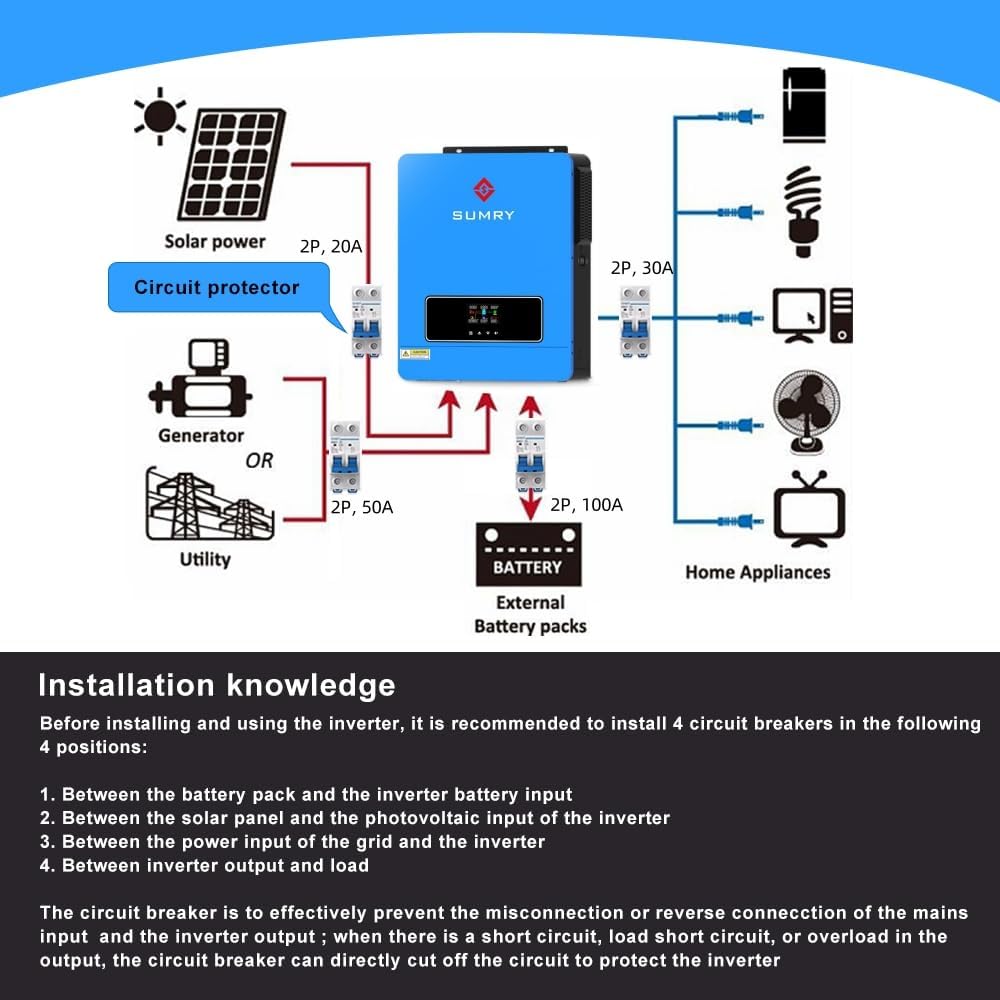
Figure 2.1: All-round protection features of the SUMRY Inverter, including overload, short circuit, battery, overheating, overcurrent, and high/low voltage protection.
3. Product Overview
The SUMRY 3600W Solar Inverter Charger is a hybrid power conversion system designed to provide reliable AC power from various sources, including solar panels, batteries, and utility grids. It integrates a powerful inverter, a 120A MPPT solar charge controller, and a battery charger into one compact unit.
3.1 Key Features
- 3600W rated power, 7200W peak power, dual AC 110V output.
- Pure Sine Wave output for sensitive electronics.
- Built-in 120A MPPT charge controller for maximum solar energy harvesting.
- Wide PV input range: 60V-500VDC, 4200W max.
- Compatible with various 24V battery types (AGM, Gel, Lead-acid, Lithium-ion, LiFePO4).
- Supports battery-less operation when PV input voltage exceeds 120V.
- Multiple protection features: overload, over-heat, over-voltage, short circuit.
- LCD display and function buttons for easy parameter settings and monitoring.
3.2 Components

Figure 3.1: Front view of the SUMRY 3600W Solar Inverter Charger, showing the LCD display and control buttons.

Figure 3.2: Rear view of the inverter, highlighting the AC input/output terminals, battery terminals, PV input terminals, and communication ports.
4. Setup
4.1 Unpacking
Upon unpacking, ensure all items are present and undamaged:
- 3600W Hybrid Solar Inverter
- User Manual
4.2 Installation Location
Choose a suitable location for installation, considering:
- Ventilation: Ensure adequate airflow around the unit.
- Temperature: Install in a cool, dry place, away from direct sunlight and heat sources.
- Accessibility: Allow sufficient space for wiring and maintenance.
- Safety: Avoid areas with flammable gases, liquids, or excessive dust.
4.3 Wiring Diagram
Refer to the following diagram for proper wiring connections. It is recommended to install circuit breakers at four key positions for safety and effective system management:
- Between the battery pack and the inverter battery input.
- Between the solar panel and the photovoltaic input of the inverter.
- Between the power input of the grid and the inverter.
- Between inverter output and load.

Figure 4.1: General wiring diagram showing connections for solar power, generator/utility, battery, and home appliances.
4.4 Battery Connection
The inverter supports various 24V battery types. Ensure correct polarity (+ to + and - to -) when connecting the battery bank to the inverter's battery terminals.

Figure 4.2: The inverter is compatible with most common battery types, including Gel, Lithium (Li), AGM, User-defined, and Flooded (FLD) batteries.
4.5 PV Input Connection
Connect your solar panels to the PV input terminals. The inverter's MPPT charge controller optimizes solar energy harvesting. The PV input range is 60V-500VDC, with a maximum power of 4200W and maximum current of 18A.
5. Operating
5.1 LCD Display and Buttons
The inverter features an intuitive LCD display and function buttons for monitoring operating status, input/output power information, and setting various parameters such as battery charging current and energy priority.
5.2 Operating Modes
The hybrid solar inverter offers flexible operating modes to suit different needs and scenarios, allowing you to optimize electricity costs and ensure continuous power supply:
- Solar First: Prioritizes solar power for loads and battery charging.
- Solar and Utility: Uses solar power primarily, with utility grid as a backup.
- Only Solar: Operates solely on solar power.
- Mains First: Prioritizes utility grid, with solar/battery as backup.
- SBU Priority: Solar, Battery, then Utility priority.

Figure 5.1: The inverter supports three safe charging modes (Solar First, Solar and Utility, Only Solar) and three output modes (Mains First, Solar First, SBU priority) for versatile power management.
5.3 Battery-Less Operation
This inverter can operate without a connected battery. In this mode, it uses PV power directly to run loads, provided the PV input voltage exceeds 120VDC.

Figure 5.2: The inverter's capability to power loads directly from the PV array without a battery connected, offering flexibility in system design.
5.4 Power Output
The inverter provides a powerful 3600W rated output with a 7200W peak, featuring dual AC 110V outputs. It is suitable for a wide range of general electronics and motor-type appliances.

Figure 5.3: The 3600W inverter can power various household appliances, including refrigerators, air conditioners, washing machines, and microwave ovens.
5.5 Pure Sine Wave Output
The inverter produces a pure sine wave output, which is identical to grid power. This ensures cleaner and smoother power delivery, extending the life of your sensitive appliances and electronics.
6. Maintenance
Regular maintenance ensures the longevity and optimal performance of your inverter:
- Cleaning: Keep the inverter clean and free from dust. Use a dry cloth for cleaning.
- Fan Check: Periodically check the cooling fans for obstructions and ensure they are operating correctly.
- Connection Check: Inspect all wiring connections regularly to ensure they are secure and free from corrosion.
- Battery Health: Monitor battery voltage and health according to battery manufacturer guidelines.
6.1 Factory Settings Reset
The inverter allows you to restore factory settings with a single click via the LCD interface. Refer to the on-screen menu for this option.
7. Troubleshooting
This section provides solutions to common issues you might encounter:
| Issue | Possible Cause | Solution |
|---|---|---|
| No power output | Battery low; Overload; Input disconnected | Check battery charge; Reduce connected load; Verify all input connections (PV, Utility, Battery) |
| Inverter beeping continuously | Overload; Over-temperature; Battery low/high voltage | Reduce load; Ensure proper ventilation; Check battery voltage and connections |
| PV input not charging battery | Insufficient solar input; PV voltage out of range; PV connection issue | Check solar panel orientation/shading; Verify PV voltage is within 60-500VDC; Inspect PV wiring |
7.1 Video Resources
For visual guidance on operation and functionality, please refer to the official product video:
Video 7.1: An official demonstration of the SUMRY Solar inverter 3600W, showcasing its ability to operate both with and without a battery connected.
8. Specifications
| Specification | Value |
|---|---|
| Product Dimensions | 12.2 x 4.33 x 16.54 inches |
| Item Weight | 19.36 pounds |
| ASIN | B0DNMGP89N |
| Item model number | ECO-LV-3.6KW PLUS |
| Manufacturer | GUANGDONG SUNRAY POWER CO., LTD. |
| Country of Origin | China |
| Recommended Uses For Product | Office, Garage, Home |
| Power Source | Solar, Utility and Battery Powered |
| Wattage | 3600 watts |
| Model Name | ECO-LV-3.6KW PLUS |
9. Warranty and Support
Your SUMRY Solar Inverter Charger is backed by a manufacturer's warranty. For specific warranty terms and conditions, please refer to the documentation included with your product or contact the manufacturer directly. Extended protection plans may also be available for purchase.
For technical support, troubleshooting assistance, or any inquiries regarding your product, please contact SUMRY SOLAR customer service. Contact details can typically be found on the product packaging or the official SUMRY SOLAR website.
Ask a question about this manual
Ask about setup, troubleshooting, compatibility, parts, safety, or missing instructions. Manuals+ will review the question and use this page’s manual context to help answer it.