
1. Introduction
Thank you for choosing the Goniyado 52" Low Profile Ceiling Fan. This modern indoor ceiling fan is designed to provide efficient air circulation and lighting for your bedroom, living room, kitchen, dining room, or study room. It features a high-efficiency DC motor for quiet operation, 6 adjustable speeds, 3 color temperatures with stepless dimming, and convenient control via both a remote and a dedicated mobile application. This manual provides detailed instructions for installation, operation, maintenance, and troubleshooting to ensure optimal performance and longevity of your fan.
2. Safety Information
Please read all instructions carefully before beginning installation. Failure to do so could result in electric shock, fire, or personal injury.
- Ensure the power is turned off at the circuit breaker before installation or maintenance.
- All wiring must be in accordance with national and local electrical codes. If you are unfamiliar with wiring, consult a qualified electrician.
- The mounting structure must be capable of supporting a minimum of 35 lbs (15.9 kg).
- Do not bend the blade holders during installation, balancing, or cleaning.
- Keep hands, fingers, and other objects away from rotating fan blades.
- This fan is designed for indoor and outdoor covered usage.
3. Package Contents
Verify that all components are present and undamaged before proceeding with installation. If any parts are missing or damaged, contact customer support.
- Ceiling Fan Motor Assembly
- Fan Blades (6 double-sided blades)
- Light Kit
- Remote Control (2 AAA batteries included)
- Mounting Bracket and Hardware
- User Manual
4. Setup and Installation
The Goniyado 52" Low Profile Ceiling Fan is designed for easy assembly. For detailed visual guidance, please refer to the online installation video.

Figure 4.1: Product Dimensions and Mounting Type. This fan is suitable for flat mount installations.
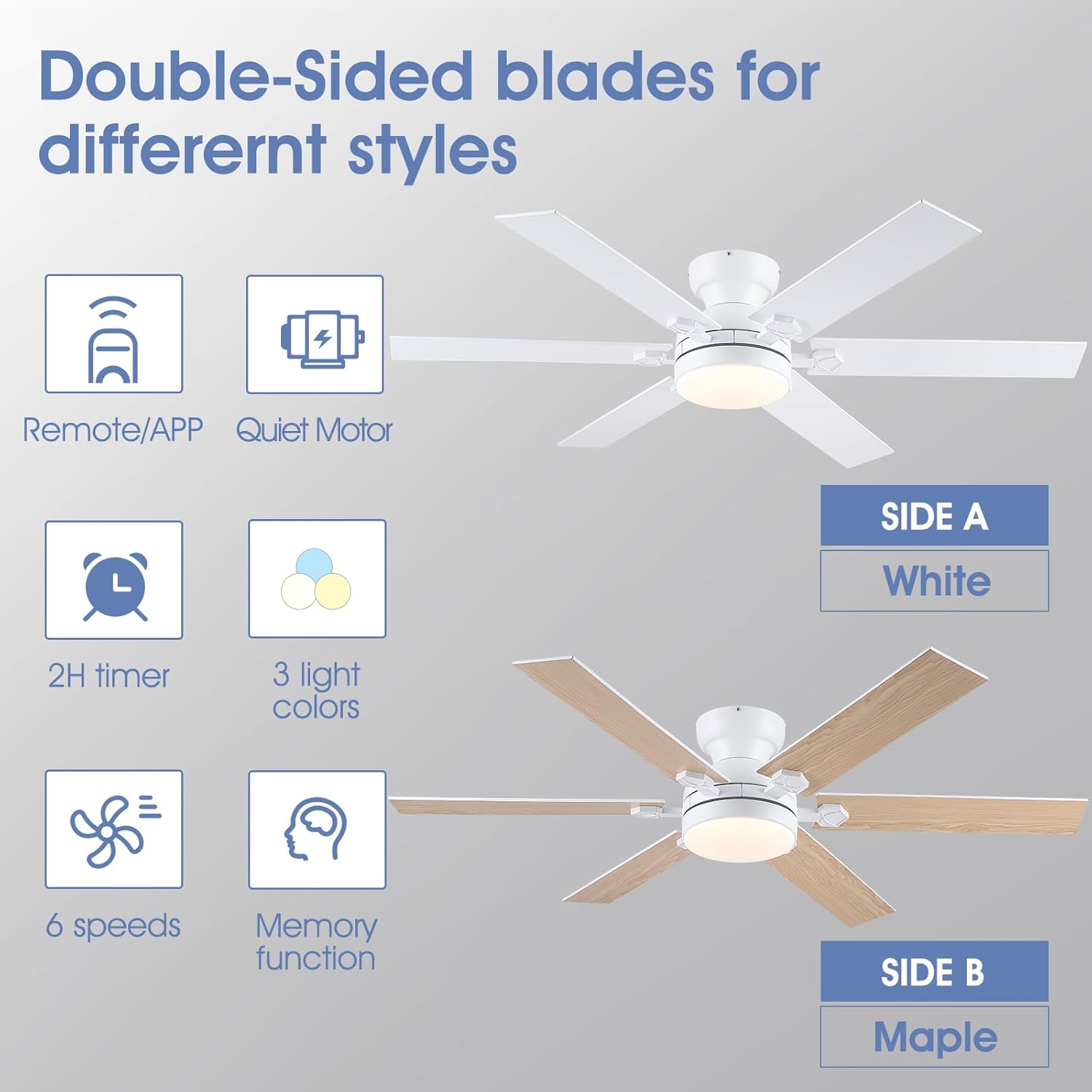
Figure 4.2: Double-Sided Fan Blades. The blades feature a reversible design with white on one side and maple on the other to match various decor styles.
4.1 App Setup and Pairing
The fan supports control via a mobile application. Follow these steps to set up the app and pair your device:
- Scan the QR code provided in the manual or on the product packaging to download the "Fan Lamp Pro" application.
- Ensure Bluetooth is enabled on your phone.
- Open the "Fan Lamp Pro" app and select the language.
- Click the "+" button to add a new device.
- Turn off the main power to the fan, then turn it back on. While the fan is powering on, click the "connecting" button in the app. The fan light will blink twice to indicate a successful connection.
Video 4.1: APP Settings Guide. This video demonstrates how to set up and pair your ceiling fan with the mobile application for smart control.
5. Operating Instructions
Your Goniyado ceiling fan can be controlled using the included remote control or the "Fan Lamp Pro" mobile application.
5.1 Fan Control
- 6 Speeds Adjustable: Adjust the fan speed from a gentle breeze (1-2 speeds) to a strong airflow (5-6 speeds) to suit your comfort needs.
- Reversible Function: The fan supports a reverse function, allowing you to change the direction of the blades seasonally. In summer, the fan operates in downdraft mode to create a cooling effect. In winter, it operates in updraft mode to circulate warm air.
- Quiet Operation: The high-efficiency DC motor ensures quiet operation, with noise levels as low as 35dB, making it ideal for bedrooms and quiet environments.

Figure 5.1: 6 Speeds Adjustable. Choose from six fan speeds to meet different airflow requirements.

Figure 5.2: Reversible Air Circulation. Optimize comfort year-round by switching between downdraft and updraft modes.

Figure 5.3: Noiseless Experience. The fan operates at a very low noise level, comparable to rustling leaves.
5.2 Light Control
- 3 Color Temperatures: Switch between 3000K (Warm Light), 4000K (Natural Light), and 6000K (White Light) to set the desired ambiance.
- Stepless Dimming: Adjust the brightness from 0% to 100% to create the perfect lighting for any activity.
- Memory Function: The fan remembers your last light setting (color temperature and brightness) when turned off and on again.
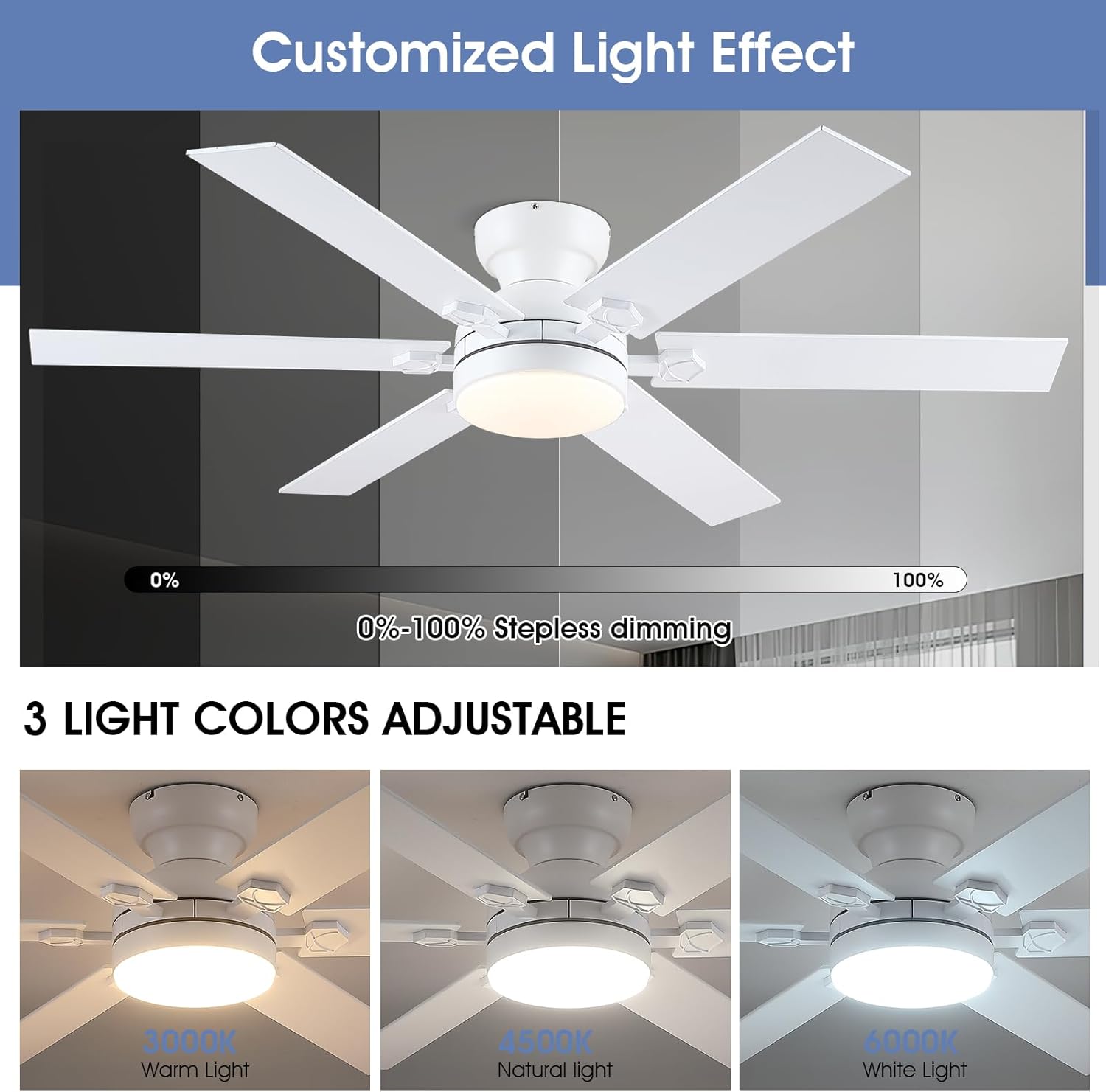
Figure 5.4: Customized Light Effect. Easily adjust light color and brightness to your preference.
5.3 Timer Function
- Set a 2-hour timer for automatic shut-off, available via the mobile application.
6. Maintenance
Regular maintenance helps ensure the long-term performance and appearance of your ceiling fan.
- Cleaning: To clean the fan, wipe with a soft, damp cloth. Do not use abrasive cleaners or solvents, as these may damage the finish.
- Blade Care: The double-sided wooden fan blades can be cleaned with a dry or slightly damp cloth. Ensure they are dry before operating the fan.
- Light Source: The LED light source is energy-saving and designed for long life. If replacement is ever needed, consult the manufacturer or a qualified technician.
- Tighten Screws: Periodically check and tighten all screws on the fan assembly to ensure secure operation.
7. Troubleshooting
If you encounter issues with your fan, refer to the following common problems and solutions:
| Problem | Possible Cause | Solution |
|---|---|---|
| Fan does not operate / Light does not turn on | No power supply; Remote/App not paired; Loose wiring. | Check circuit breaker and wall switch. Ensure main power is on. Re-pair remote/app (see Section 4.1). Verify all wiring connections are secure. |
| Remote control not working | Batteries are dead or incorrectly inserted; Remote not paired correctly. | Replace AAA batteries. For pairing, some users found pressing the "setup" button for 5 seconds worked better than the "power" button. Ensure the main power is cycled during pairing. |
| App control not working | Bluetooth is off; App not paired; App glitch. | Ensure Bluetooth is enabled on your phone. Follow app pairing steps in Section 4.1. Try restarting the app or your phone. |
| Light issues (e.g., RGB button not working, light won't turn off) | Software glitch; Remote issue. | Try resetting the fan by turning off the main power at the circuit breaker for a few minutes, then turning it back on. Replace remote batteries. |
| Fan wobbles | Loose blades or mounting; Unbalanced blades. | Check and tighten all screws on the fan blades and mounting bracket. Ensure blades are securely attached. |
| No manual pull chain control | This model relies solely on remote and app control. | Ensure remote and app are always accessible and functional. Keep spare batteries for the remote. |
If problems persist after attempting these solutions, please contact customer support for further assistance.
8. Specifications
| Feature | Detail |
|---|---|
| Brand | Goniyado |
| Model Name | #8900X |
| Color | 52" White |
| Material | Acrylic, Engineered Wood, Iron |
| Style | Modern |
| Light Fixture Form | Ceiling Fan Light |
| Room Type | Bedroom, Dining Room, Kitchen, Living Room, Study Room |
| Product Dimensions | 52"L x 52"W x 10.62"H |
| Indoor/Outdoor Usage | Indoor, Outdoor (covered) |
| Power Source | DC |
| Special Feature | App Operable, LED Light, Quiet Operation, Remote Controlled, Timer |
| Control Method | App, Remote |
| Light Source Type | LED |
| Finish Type | White |
| Number of Light Sources | 1 |
| Voltage | 120 Volts (DC) |
| Included Components | Light Kit, Remote Control |
| Item Weight | 13 Pounds |
| Number of Items | 1 |
| Wattage | 50 watts |
| Controller Type | App Control, Remote Control |
| Unit Count | 1.0 Count |
| Brightness | 3250 Lumen |
| Efficiency | High Efficiency |
| Mounting Type | Ceiling Mount |
| Assembly Required | Yes |
| Size | 6 Blades |
| Light Output Maximum | 3250 Lumens |
| Recommended Uses For Product | Air Circulation |
| Batteries | 2 AAA batteries required (included) |
| Date First Available | January 22, 2025 |

Figure 8.1: Energy Guide. Estimated yearly energy cost and airflow efficiency.
9. Warranty and Support
We provide free replacement service for any damage and quality problems and a one-year quality warranty. Please feel free to contact us if you have any questions or require assistance. We are committed to providing a satisfactory answer within 24 hours.
For support, please contact the seller: PHORUS.