1. Introduction
This manual provides essential instructions for the safe and effective operation, setup, and maintenance of the Generic LHIVP90 Veterinary Infusion Pump. This device is designed for precise fluid administration in veterinary applications. Please read this manual thoroughly before operating the device.
The LHIVP90 infusion pump features a 3.5-inch colorful touch screen, a flow rate range of 0.1-2000 ml/h, and a history record capacity of 2000 entries. It includes a night mode, dual CPU control, and an IP34 dustproof and waterproof design. Its compact and lightweight design, along with AC/DC power options and a large battery, ensure long working times and ease of transport.
2. Safety Information
Important Safety Precautions:
- Always operate the pump in accordance with this manual and veterinary medical guidelines.
- Ensure the device is placed on a stable, level surface or securely mounted to an IV pole.
- Use only compatible IV sets.
- Regularly monitor the patient and the infusion process.
- Do not immerse the device in liquid. Clean with a damp cloth as instructed in the Maintenance section.
- Disconnect power before cleaning or maintenance.
- Keep out of reach of unauthorized personnel and animals.
- In case of malfunction or alarm, refer to the Troubleshooting section or contact technical support.
3. Product Overview
The Generic LHIVP90 Infusion Pump is a compact and user-friendly device designed for veterinary use. Key features include a touch screen interface, precise flow control, and various safety alarms.
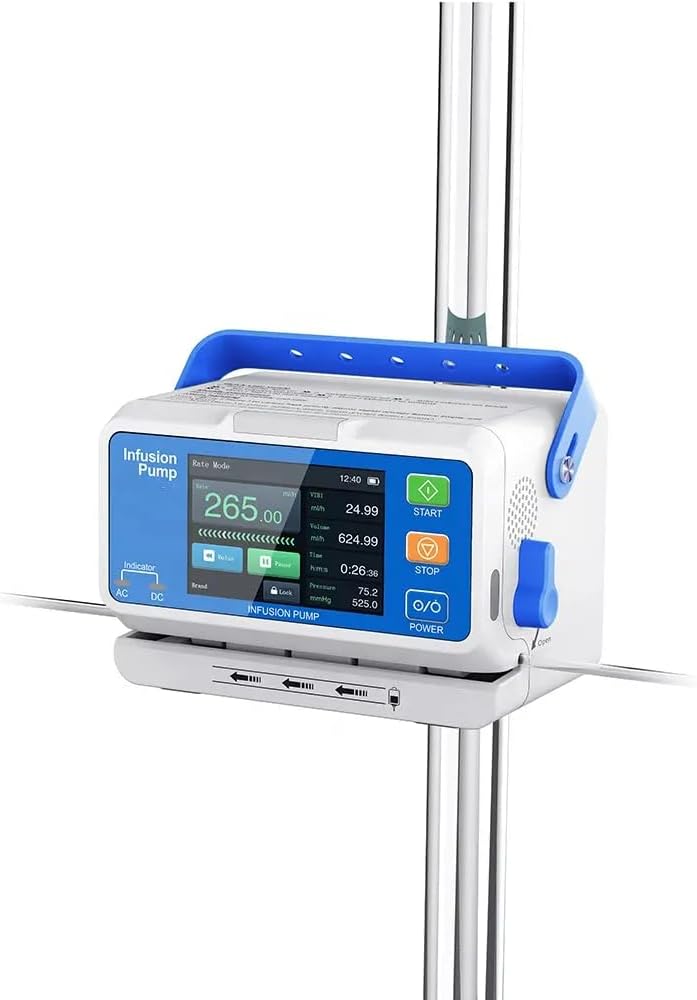
Figure 3.1: Front View with Labeled Components
This image displays the front panel of the LHIVP90 infusion pump, highlighting its key operational parts. Visible are the 3.5-inch colorful touch screen, the "START/BOLUS" button (green), "STOP" button (orange), "POWER" button (O/O), AC/DC power indicators, and the liquid check clip. The movable handle is also visible at the top.
Key Components:
- 3.5" Colorful Touch Screen: For displaying information and user interaction.
- Function Buttons: Physical buttons for START/BOLUS, STOP, and POWER.
- Movable Handle: For easy carrying and transport.
- Liquid Check Clip: Mechanism for securing and checking the IV line.
- IV Set Knob: For opening and closing the IV set insertion area.
- Power Indicators: Lights for AC and DC power status.
- AC/DC Power Input: Ports for connecting external power sources.
- Mounting Clamp: Located on the back for attaching to an IV pole.
4. Setup
4.1 Mounting the Pump
The LHIVP90 can be mounted to a standard IV pole using its integrated clamp.
- Locate the mounting clamp on the back of the pump.
- Loosen the knob on the clamp by turning it counter-clockwise.
- Position the clamp around the IV pole at the desired height.
- Tighten the knob by turning it clockwise until the pump is securely fastened to the pole. Ensure the pump is stable and does not wobble.

Figure 4.1: Pump Mounted on IV Pole
This image shows the LHIVP90 infusion pump securely attached to a vertical IV pole using its integrated mounting clamp. The pump is positioned at a suitable height for operation.
4.2 Power Connection
The pump can be powered by AC (mains) or DC (internal battery).
- AC Power: Connect the provided power adapter to the AC input port on the pump and then to a suitable wall outlet. The AC indicator light will illuminate.
- DC Power (Internal Battery): The pump has a built-in rechargeable battery for portable operation. Ensure the battery is sufficiently charged before use. The DC indicator light will illuminate when running on battery power.
4.3 IV Set Installation
Proper installation of the IV set is crucial for accurate infusion.
- Prepare the IV solution bag and prime the IV set according to standard medical procedures, ensuring all air is removed from the tubing up to the pump insertion point.
- Open the IV set knob on the side of the pump to access the infusion channel.
- Carefully insert the IV tubing into the designated channel, ensuring it is seated horizontally and correctly within the pump mechanism. The unique doorless design allows for visible placement.
- Close the IV set knob to secure the tubing.
- Ensure the liquid check clip is properly engaged with the tubing.

Figure 4.2: IV Set Insertion
This image illustrates the correct method for inserting the IV tubing into the LHIVP90 infusion pump. The tubing is shown horizontally placed within the pump's mechanism, ready for infusion.
5. Operating Instructions
5.1 Power On/Off
- Power On: Press and hold the "POWER" (O/O) button until the screen illuminates.
- Power Off: Press and hold the "POWER" (O/O) button until the screen shuts down.
5.2 Basic Infusion Settings
The 3.5-inch colorful touch screen allows for intuitive setting adjustments.
- After powering on, the main screen will display current settings.
- Setting Flow Rate: Touch the "Rate Mode" area on the screen. Use the on-screen keypad to enter the desired flow rate (0.1-2000 ml/h) and confirm.
- Setting Volume to be Infused (VTBI): Touch the "Volume" area. Enter the total volume of fluid to be infused.
- Setting Infusion Time: Touch the "Time" area. Enter the desired infusion duration. The pump will automatically calculate the flow rate if VTBI and Time are set, or vice-versa.
- Night Mode: Access the settings menu via the touch screen to enable or adjust night mode, which reduces screen brightness and alarm volume for quieter operation.
5.3 Starting and Stopping Infusion
- Start Infusion: Once all settings are confirmed, press the green "START/BOLUS" button. The pump will begin infusion, and the screen will display real-time infusion data.
- Bolus Function: During infusion, a short press of the "START/BOLUS" button may activate a bolus delivery, if configured. Refer to on-screen prompts for specific bolus settings.
- Stop Infusion: To pause or stop the infusion, press the orange "STOP" button.
5.4 History Record
The pump stores up to 2000 history records. To access:
- Navigate to the "History" or "Record" section via the touch screen menu.
- Browse through past infusion data, including flow rates, volumes, and durations.
6. Maintenance
Regular maintenance ensures the longevity and accurate performance of your infusion pump.
- Cleaning: Disconnect the pump from power. Wipe the exterior surfaces with a soft cloth dampened with a mild disinfectant solution. Do not use abrasive cleaners or immerse the device.
- Battery Care: For optimal battery life, fully charge the pump before first use and periodically if stored for extended periods. Avoid complete discharge whenever possible.
- Inspection: Regularly inspect the power cord, IV set channel, and mounting clamp for any signs of wear or damage.
- Storage: Store the pump in a clean, dry environment away from extreme temperatures and direct sunlight.
7. Troubleshooting
This section addresses common issues you might encounter with the LHIVP90 infusion pump.
| Problem | Possible Cause | Solution |
|---|---|---|
| Pump does not power on. | No power supply; discharged battery. | Connect to AC power; charge battery. |
| Alarm sounds during infusion. | Occlusion, air in line, end of infusion, low battery. | Check IV line for kinks/occlusions; check for air bubbles; verify infusion status; charge battery. DPS dynamic pressure monitoring helps identify occlusions. |
| Incorrect flow rate. | IV set not properly installed; incorrect settings. | Re-install IV set ensuring horizontal placement; verify programmed flow rate on screen. |
| Touch screen unresponsive. | Temporary software glitch; screen damage. | Restart the pump. If issue persists, contact technical support. |
If you encounter an issue not listed here or if the suggested solutions do not resolve the problem, please contact your supplier or qualified service personnel.
8. Specifications
| Feature | Detail |
|---|---|
| Model Number | LHIVP90 |
| Flow Rate Range | 0.1 - 2000 ml/h (increment 0.01 ml/h) |
| History Record | 2000 entries |
| Display | 3.5" Colorful Touch Screen |
| Control System | Dual CPU |
| Ingress Protection | IP34 (Dustproof and Waterproof) |
| Power Source | AC/DC (Corded Electric, Internal Battery) |
| Weight | 1.3 KG (approx.) |
| Material | Plastic |
| Item Volume | 2000 Milliliters (maximum infusion volume) |
| Dynamic Pressure Monitoring | DPS (real-time display of current pressure value) |
9. Warranty and Support
For information regarding warranty coverage, technical support, or service, please refer to the documentation provided with your purchase or contact the seller directly. Keep your purchase receipt and model number (LHIVP90) readily available when seeking support.