Introduction
This manual provides essential instructions for the safe and effective use of your Ridgemonkey VRH300X Pro USB Rechargeable Headtorch. Please read this manual thoroughly before operating the device and retain it for future reference. The VRH300X Pro is designed for durability and extended use, offering versatile lighting options for various outdoor activities.
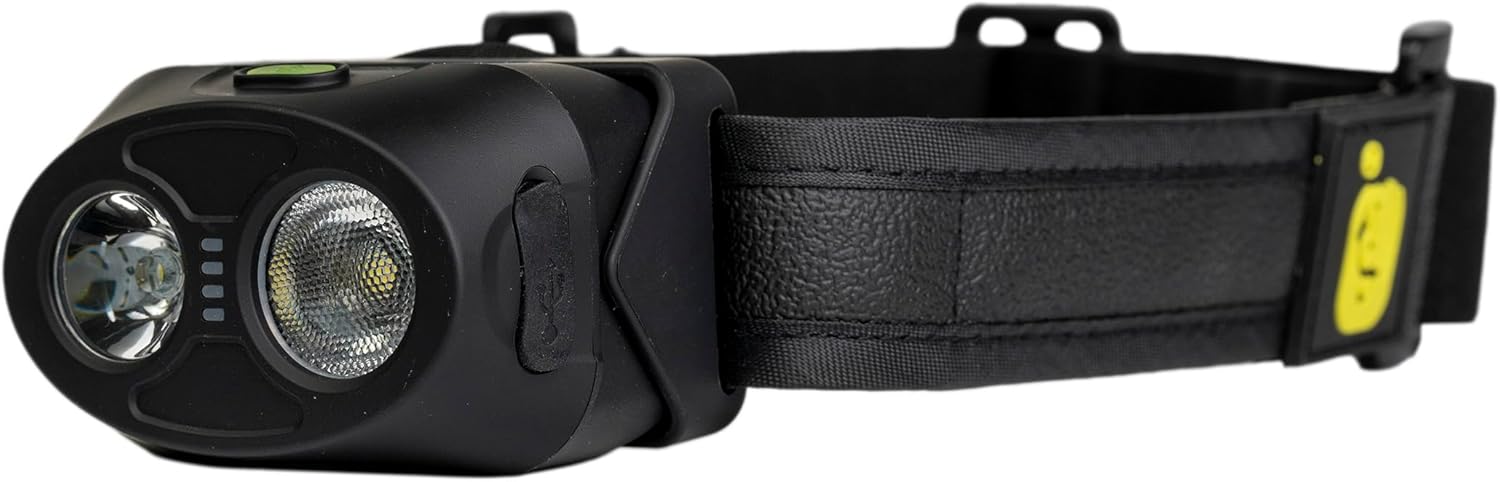
Image: Ridgemonkey VRH300X Pro Headtorch, side view showing the main light, secondary light, and power indicator LEDs, with the adjustable strap visible.
Package Contents
Ensure all items are present in the package:
- Ridgemonkey VRH300X Pro Headtorch
- USB-C Charging Cable
Product Features
The Ridgemonkey VRH300X Pro Headtorch includes the following features:
- Five Colour Choices: White, Red, Green, Orange, and Violet light modes.
- Variable Brightness: Adjustable from 1 to 200 lumens.
- Dual Beam: Frosted wide beam and a direct main beam.
- Straight to Bright White Mode: Quick access to maximum white light.
- Night Location Feature: Keeps the headtorch on at 1% power for easy locating in the dark.
- High-Power LED Output: Enhanced brightness across all modes.
- Power Button Protection Shroud: Prevents accidental activation.
- Adjustable Elasticated Head Strap: For comfortable and secure fit.
- IP66 Water and Dust Resistant: Suitable for various weather conditions.
- Dual Orientation: No "upside down" for ease of use.
- Dual Nite Glo Multi-Function Buttons: Illuminated buttons for visibility in low light.
- 90-Degree Tilt Function: Adjustable beam angle.
- Quad LED Power Display: Indicates battery level.
- USB-C Input Port: With integral cover for charging.
- High Capacity Battery: 2000mAh lithium-ion battery.
Setup
1. Initial Charging
Before first use, fully charge the headtorch. Connect the supplied USB-C cable to the headtorch's USB-C input port and to a compatible 5V USB charge adapter (not included). The Quad LED power display will indicate charging progress. A full charge takes approximately 1 hour 40 minutes.

Image: Side view of the Ridgemonkey VRH300X Pro Headtorch showing the USB-C charging port with its protective cover.
2. Adjusting the Head Strap
Place the headtorch on your head and adjust the elasticated strap for a comfortable and secure fit. Ensure the headtorch is stable during movement.
Operating Instructions

Image: Front view of the Ridgemonkey VRH300X Pro Headtorch showing the two main light lenses, the four battery indicator LEDs, and the two Nite Glo buttons on top.
1. Power On/Off and Mode Selection
The headtorch features dual Nite Glo multi-function buttons. Press either button to cycle through the available light modes:
- White Light: General illumination.
- Red Light: Preserves night vision, ideal for map reading.
- Green Light: Maintains night vision with improved clarity.
- Orange Light: Warm, ambient light for social settings.
- Violet Light: Creates ambiance and can charge glow-in-the-dark items.
To turn off the headtorch, press and hold either button for approximately 2 seconds.
2. Brightness Adjustment
While a light mode is active, press the other button (not the one used for mode selection) to adjust the brightness. The brightness levels range from 1 to 200 lumens.

Image: Front view of the Ridgemonkey VRH300X Pro Headtorch with both main lights illuminated, demonstrating active light output.
3. Straight to Bright White Mode
To quickly activate the brightest white light setting, press both power buttons simultaneously.
4. Night Location Feature
This feature keeps the headtorch on at 1% power, making it easy to locate in complete darkness. Refer to the product's specific instructions for activating and deactivating this mode, typically involving a long press or specific button combination.
5. 90-Degree Tilt Function
The headtorch unit can be tilted up to 90 degrees to direct the light beam precisely where needed. Adjust the angle by gently pushing or pulling the headtorch body.

Image: Ridgemonkey VRH300X Pro Headtorch resting on a tree log in an outdoor setting, demonstrating its use in nature.
Maintenance
1. Cleaning
Wipe the headtorch with a soft, damp cloth. Do not use abrasive cleaners or solvents. Ensure the USB-C port cover is securely closed before cleaning or exposing to water.
2. Storage
Store the headtorch in a cool, dry place away from direct sunlight when not in use. For long-term storage, it is recommended to charge the battery every 3-6 months to maintain battery health.
3. Water and Dust Resistance
The VRH300X Pro is IP66 rated, meaning it is protected against powerful water jets and is dust-tight. While it can withstand rain and splashes, it is not designed for submersion.
Troubleshooting
- Headtorch not turning on: Ensure the battery is charged. If the battery is low, connect it to a power source using the USB-C cable.
- Light output is dim: The battery may be low, or the brightness setting is at its minimum. Recharge the battery or adjust the brightness.
- Charging issue: Ensure the USB-C cable is properly connected to both the headtorch and the power adapter. Try a different USB-C cable or power adapter.
- Accidental activation: The power button protection shroud is designed to minimize this. Ensure no objects are pressing against the buttons during transport.
Specifications
| Feature | Detail |
|---|---|
| Brand | Ridgemonkey |
| Model Number | RM930 |
| Product Dimensions | 4.8 x 6.5 x 4 cm |
| Item Weight | 130 g |
| Material | ABS |
| Power Source | Battery Powered |
| Battery Type | 2000mAh Lithium-ion |
| Charge Time | 1 hour 40 minutes (0-100%) |
| Battery Life | 4-670 hours (dependent on colour/mode) |
| Luminous Flux | 1-200 Lumens |
| Water/Dust Resistance | IP66 |
| Included Components | Headtorch, USB Cable |
Warranty and Support
For warranty information and customer support, please refer to the documentation provided with your purchase or visit the official Ridgemonkey website. Keep your proof of purchase for any warranty claims.
For further assistance, contact your retailer or the manufacturer directly.


