
1. Introduction
This manual provides essential information for the safe and effective operation of your YKLWORLD Mini Monster Truck. Please read it thoroughly before first use and retain it for future reference. This 1:64 scale remote control monster truck features a compact design, 2.4GHz control, adjustable speed, and integrated lights, suitable for indoor and outdoor racing.
2. What's in the Box
- Mini RC Monster Truck
- Remote Control
- USB Charging Cable
- Instruction Manual
3. Product Features
- Compact 1:64 Scale Design: Portable and suitable for various play environments.
- 2.4GHz Remote Control: Ensures stable signal and multi-car play without interference.
- Adjustable Speed: Features three-speed proportional output (20%, 50%, 100%) for varied control.
- Integrated Lights: White headlights and red taillights change according to vehicle function.
- Durable Construction: Alloy case provides impact resistance.
- Cushioned Underbody: Designed for constant cruising and shock absorption.
- USB Rechargeable: Convenient charging for the vehicle's battery.
- Optional Trailer: Some models include a removable trailer with storage.

Image 1: The YKLWORLD Mini Monster Truck in pink, showcasing its compact size and the remote control. Other color variants are also visible.

Image 2: A blue YKLWORLD Mini Monster Truck with an attached trailer, emphasizing its 2.4G remote control, adjustable speed, and alloy construction.
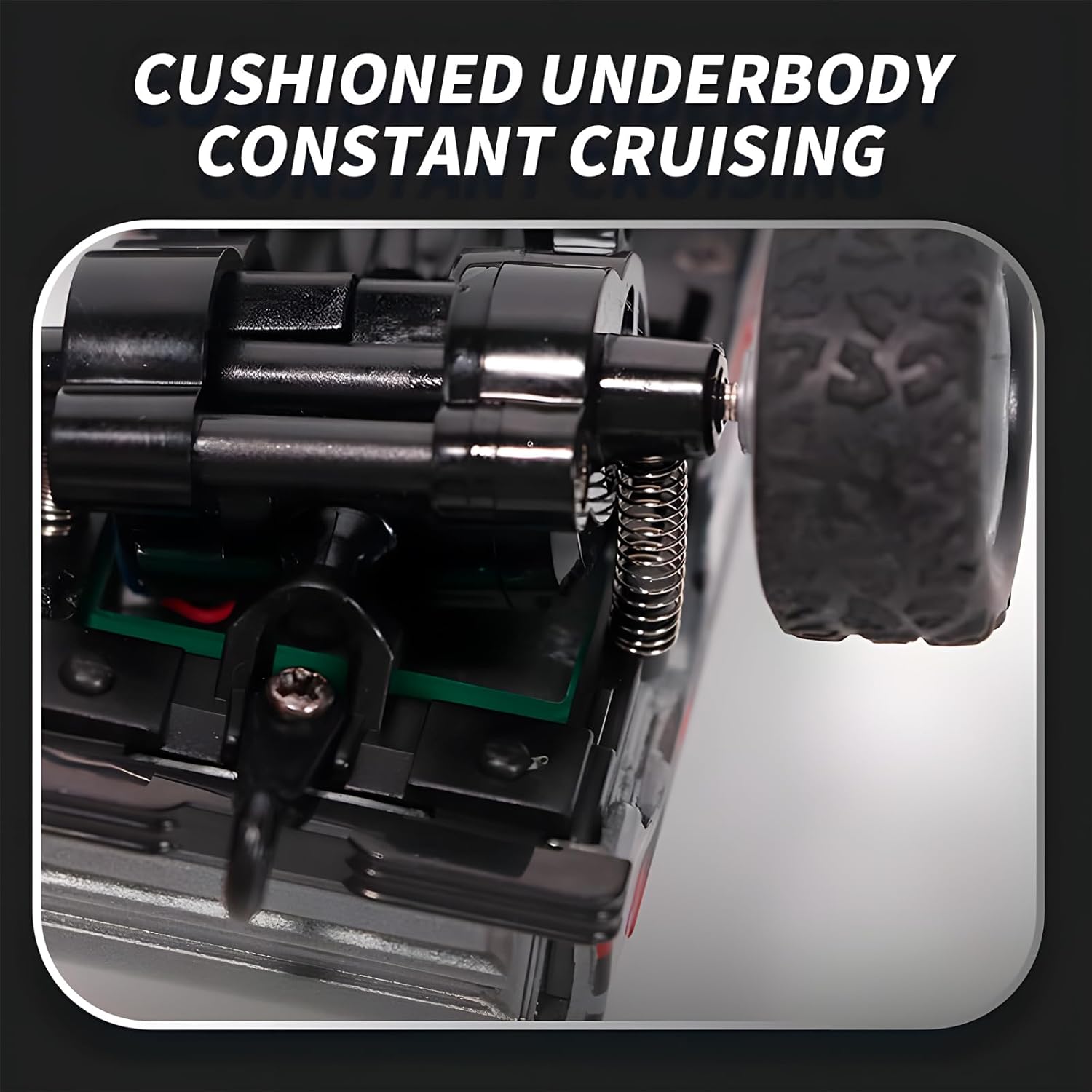
Image 3: Multiple YKLWORLD Mini Monster Trucks with their headlights and taillights illuminated, illustrating the running lamp feature.

Image 4: A detailed view of the truck's underbody, highlighting the cushioned suspension system for smooth operation.

Image 5: A hand holding the mini monster truck, illustrating its small and convenient 1:64 scale size.

Image 6: A silver mini monster truck positioned on grass, highlighting its durable alloy case designed for impact resistance.

Image 7: The remote control with labeled buttons for various functions, alongside an image displaying the six available colors for the truck.
4. Setup
4.1 Charging the Vehicle Battery
- Locate the USB charging port on the underside of the Mini Monster Truck.
- Connect the provided USB charging cable to the truck's charging port.
- Plug the other end of the USB cable into a standard USB power adapter (not included) or a computer's USB port.
- The indicator light on the cable or truck will show charging status (refer to specific product indicator behavior). Charging typically takes approximately 30-60 minutes.
- Disconnect the cable once charging is complete.
4.2 Installing Remote Control Batteries
- Open the battery compartment on the back of the remote control.
- Insert 2 AAA batteries (not included), ensuring correct polarity (+/-).
- Close the battery compartment securely.
4.3 Pairing the Vehicle and Remote Control
- Ensure both the vehicle and remote control have fresh or fully charged batteries.
- Turn on the Mini Monster Truck using the power switch located on its underside.
- Turn on the remote control. The indicator light on the remote should blink.
- The remote control and vehicle should automatically pair. The indicator light on the remote will become solid once paired.
- If pairing fails, turn both devices off and repeat the steps.
5. Operating Instructions
5.1 Basic Controls
- Advance: Press the forward button on the remote control.
- Recoil (Reverse): Press the backward button on the remote control.
- Turn Left: Press the left turn button while moving forward or backward.
- Turn Right: Press the right turn button while moving forward or backward.
5.2 Speed Adjustment (Three-Gear Shift)
The remote control features a three-gear shift function to adjust the vehicle's speed:
- Press the '%' button once to cycle through speed modes: 20%, 50%, and 100% proportional output.
- Observe the remote control's indicator lights to confirm the current speed setting (e.g., one light for 20%, two for 50%, three for 100%).
5.3 Chassis Calibration
If the vehicle does not drive straight, you may need to calibrate the chassis:
- Locate the calibration switch or knob on the underside of the vehicle.
- Adjust it slightly until the vehicle maintains a straight path when driving forward.
5.4 Trailer Operation (if applicable)
For models equipped with a trailer:
- Attach the trailer to the rear hitch of the truck.
- The trailer can be controlled along with the truck's movements.
- The trailer may have a removable bucket for storing small items.
5.5 Multi-Terrain Driving
The Mini Monster Truck is designed to handle various indoor and light outdoor terrains, including small obstacles, thanks to its damping system and robust wheels.
Video 1: Demonstration of the Mini RC Monster Truck's features including trailer control, flexible steering, precise control, chassis calibration, damping system, and multi-terrain driving capabilities.
6. Maintenance
- Cleaning: Wipe the vehicle and remote control with a soft, dry cloth after use. Avoid water or harsh chemicals.
- Battery Care: Remove batteries from the remote control if not in use for extended periods. Do not overcharge the vehicle's battery.
- Storage: Store the product in a cool, dry place away from direct sunlight and extreme temperatures.
7. Troubleshooting
| Problem | Possible Cause | Solution |
|---|---|---|
| Vehicle does not move. | Low battery in vehicle or remote; Not paired; Power switch off. | Charge vehicle battery; Replace remote batteries; Ensure both power switches are ON; Re-pair devices. |
| Poor control or short range. | Interference; Low remote battery. | Move to an area with less interference; Replace remote batteries. |
| Vehicle does not drive straight. | Chassis out of calibration. | Adjust the chassis calibration switch/knob on the underside of the vehicle. |
8. Specifications
- Model Number: HG4-80
- Scale: 1:64
- Product Dimensions: 7 x 1.6 x 2.3 inches
- Item Weight: 5.6 ounces
- Control Frequency: 2.4GHz
- Power Source: USB Rechargeable (Vehicle), AAA Batteries (Remote Control)
- Recommended Age: 6 years and up
9. Safety Information
Any questions or concerns, please contact us in time.
- Not suitable for children under 3 years due to small parts.
- Adult supervision is recommended during play.
- Do not operate near water or in wet conditions.
- Avoid impact with people or animals.
- Do not modify or disassemble the product.
10. Warranty and Support
For any product inquiries, technical support, or warranty claims, please contact YKLWORLD customer service through your purchase platform. Please have your order number and product model (HG4-80) ready for faster assistance.