
1. Product Overview
The SubSun Universal Portable Level 2 EV Charger is designed for efficient and safe charging of electric vehicles. This 50A, 240V charger provides a fast charging solution for all North American EVs equipped with a J1772 charging port. It features adjustable current settings and a timed charging function for user convenience.
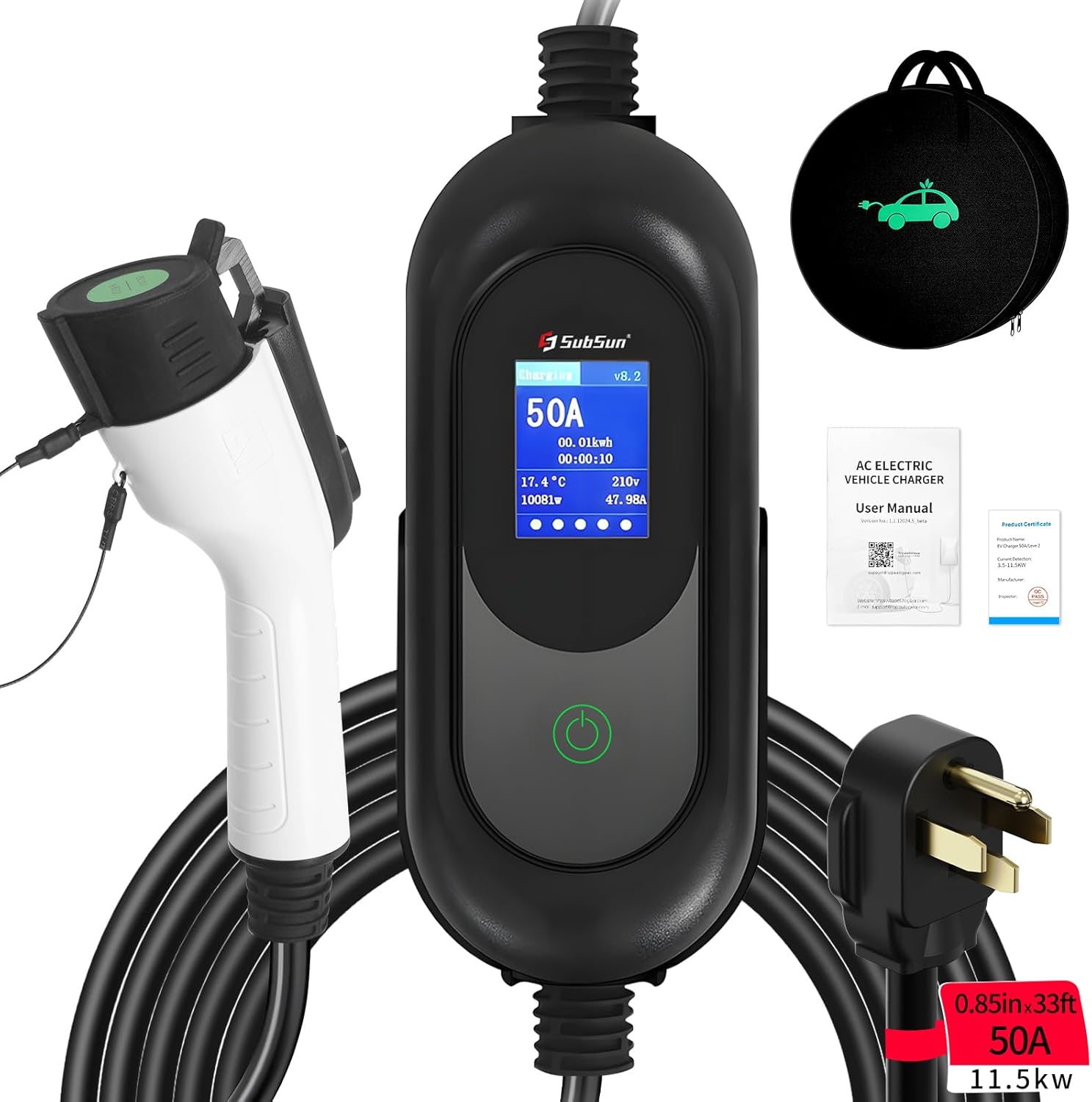
Image 1.1: The SubSun Universal Portable Level 2 EV Charger, showing the J1772 connector, the central control unit with a display, and the NEMA 14-50 plug. A carrying bag and user manual are also visible.
2. Safety Information
This charger is equipped with multiple safety features to protect both the device and your vehicle. Adhere to the following guidelines for safe operation:
- FCC Certification: Ensures product quality and safe usage.
- Integrated Protections: Includes overcharging, overvoltage, overheat, overcurrent, short circuit, and leakage protection.
- Waterproof Rating: IP67 rated for internal circuit protection.
- Temperature Management: Operates within -22°F to 122°F. The charger automatically reduces charging speed if ambient temperature is too high to protect the product and vehicle.
- Secure Connection: Features a locking design to prevent accidental disconnection during charging.
- Cable Material: Constructed with 100% copper wire TPU cable for durability and safety.
- Pre-Charging Check: Before charging, always inspect the car charging port, charging head, and plug for cleanliness. Stains can affect efficiency and safety.
- Weather Conditions: Suitable for normal rainy days. Avoid use in extreme weather conditions such as heavy rainstorms.

Image 2.1: An illustration highlighting the safety features of the charger, such as FCC certification, IP67 waterproofing, and protections against overcharging, overvoltage, and short circuits.
3. Product Components
The package includes the following items:
- SubSun 240V 50A 33FT Universal EV Charger
- Charger Holder
- Storage Bag
- User Manual (this document)
4. Setup and Installation
The SubSun EV charger is designed for plug-and-play operation with a NEMA 14-50 outlet. Ensure your electrical system meets the requirements below.
4.1 Electrical Requirements
This EV charger requires a standard NEMA 14-50 plug (Level 2 circuits, 240V, 50A) power cord. It is essential to have your home equipped with 240V outlets and a NEMA 14-50 socket. A 60A circuit breaker is recommended for safe operation when charging at 50A.

Image 4.1: Visual representation of connecting the NEMA 14-50 plug to a compatible 240V outlet and then to an electric vehicle. The image emphasizes the 33-foot cable length.
4.2 Circuit Breaker Recommendations
The required circuit breaker size depends on the maximum charging current you intend to use:
| Max Charging Current | Required Circuit Breaker |
|---|---|
| 16A | 20A |
| 32A | 40A |
| 40A | 50A |
| 50A | 60A |
5. Operating Instructions
5.1 Starting a Charge
- Pull the handbrake of the car.
- Insert the charging head into the vehicle's charging port. Ensure a "clicking" sound is heard, indicating a secure connection.
- Set the desired current (refer to Section 5.2).
- Set the delayed charging function if desired (0H for immediate start, 2H, 4H, 6H, or 8H for delayed start).
- Charging will commence.

Image 5.1: A visual guide detailing the steps to start charging, stop charging, and adjust the charging current on the control box.
5.2 Adjusting Charging Current
The charger offers 5 current settings: 16A, 24A, 32A, 40A, and 50A. By default, the charger displays 40A. For safety, the current can only be changed before charging begins.
- Long press the control button on the charger's display unit.
- Wait for the indicator light to complete the progress bar. The display will then show options for current adjustment and timed charging.
- Press the control button once to select either current setting or timer setting.
- Long press again (wait for the indicator light to complete the progress bar) to enter the selected regulation or timer setting.
- Press the control button to switch between current sizes (16A, 24A, 32A, 40A, 50A) or timed charging options (2H, 4H, 6H, 8H).
- Long press and hold (wait for the indicator light to complete the progress bar) to confirm the setting. The screen will display "SUCCESS".

Image 5.2: A step-by-step visual guide demonstrating how to change the charging current from the default 40A to 50A using the control button.
5.3 Timed Charging Function
The charger allows you to set a delay before charging begins. Options include 0H (immediate start), 2H, 4H, 6H, and 8H. Once fully charged, the unit will automatically stop charging.
To cancel a set delay time, unplug the charger for 2 seconds and then plug it back in to return to normal charging status.

Image 5.3: Details on the timed charging function, illustrating how to set a delay and the potential cost benefits of charging during off-peak hours. It also shows how to cancel a delay.
5.4 Stopping a Charge
- Unlock the vehicle.
- Click "Stop Charging" on the car's screen or through the car's mobile application.
- The charging head will be released.
- Pull out the charging head from the vehicle.
- Unplug the charger from the NEMA 14-50 outlet.
6. Compatibility
The SubSun portable EV charger is compatible with all J1772 electric vehicles and plug-in hybrids in North America. This includes, but is not limited to, models from Chevrolet, Nissan, VW, KIA, BMW, Ford, Honda, and Hyundai.

Image 6.1: A comprehensive list of electric vehicle models from various brands that are compatible with the SAE J1772 charging standard used by this charger.
7. Specifications
- Model Number: 1B501711T3303
- Input Voltage: 240V
- Max Current: 50A (Adjustable: 16A, 24A, 32A, 40A, 50A)
- Max Power: 11.5 kW
- Charging Cable Length: 33 feet
- Plug Type: NEMA 14-50
- Connector Type: J1772
- Operating Temperature: -22°F to 122°F (-30°C to 50°C)
- Waterproof Rating: IP67
- Item Weight: 14.87 pounds
- Package Dimensions: 17.13 x 13.35 x 6.85 inches
- Manufacturer: SubSun

Image 7.1: A table illustrating estimated charging times for various EV models (Chevy Volt, Chevy Bolt EV, Nissan Leaf S) when using Level 2 charging at 16A and 50A, for emergency, daily, and full charges.
8. Troubleshooting
8.1 Charger Does Not Charge My Car
If your car is not charging, consider the following:
- Ensure the car's handbrake is engaged.
- Restart the car and then attempt to start the charging action again.
- Verify that the charging gun tip and the car charging interface are properly inserted. A crisp clicking sound should be heard when the gun head is fully inserted.
- Check the charging interface of the car for any thimble pops up or protrusions. If found, reset before charging.
- After initiating charging, check if the car instrument panel shows any fault phenomena or if the charging control box is operating normally.
- If the charging station displays normally but the car is not charging, check if the car has a delayed charging setting activated.
8.2 EV Charger Feels Warm During Charging
It is normal for the EV charger to feel slightly warm to the touch during operation, especially when high current passes through it. The product has overheating protection; if the temperature becomes too high, the charger will automatically reduce the charging current to cool down, and the current will automatically increase once the temperature has decreased. This is a normal protective function.
8.3 Actual Charging Current Differs from Description
First, verify that the correct current setting is selected on the charger. Additionally, confirm that the maximum charging power supported by your electric vehicle matches the set charging current. For example, if your vehicle only supports up to 13A charging, even if the charger is set to 16A, it will only charge at the vehicle's maximum supported current of 13A.

Image 8.1: A frequently asked questions section covering common troubleshooting scenarios such as the charger not initiating a charge, the charger becoming warm, and discrepancies in charging current.
9. Maintenance
To ensure optimal performance and longevity of your SubSun EV charger, regular maintenance is recommended:
- Cleanliness: Regularly inspect and clean the charging port of your vehicle, the charging head, and the NEMA 14-50 plug. Dust, dirt, or moisture can impair connection and charging efficiency.
- Cable Inspection: Periodically check the charging cable for any signs of damage, cuts, or fraying. Do not use the charger if the cable is damaged.
- Storage: When not in use, store the charger in its provided storage bag in a dry, clean environment, away from direct sunlight and extreme temperatures. Utilize the charger holder for organized storage.
10. Warranty and Support
SubSun provides 2 years of customer service for this product. If you encounter any problems or require assistance, please contact our customer support team. Our engineering team aims to provide satisfactory solutions within 24 hours.
For support, please refer to the contact information provided with your purchase documentation or visit the official SubSun website.