
1. Introduction
This manual provides instructions for the proper setup, operation, and maintenance of your Shaledig 150lbs Commercial Digital Receiving Scale. This scale is designed for accurate weighing in commercial environments such as restaurants, catering businesses, and other food service establishments. Please read this manual thoroughly before using the device to ensure safe and efficient operation.

Image 1.1: Shaledig 150lbs Commercial Digital Receiving Scale with a crate of potatoes on the platform.
2. Safety Information
- Do not overload the scale beyond its maximum capacity of 150 lbs (68 kg).
- Avoid dropping the scale or subjecting it to strong impacts.
- Keep the scale away from water and excessive moisture to prevent electrical damage.
- Use only the provided DC adapter or specified AA batteries.
- Ensure the scale is placed on a stable, level surface during operation.
- Do not attempt to disassemble or repair the scale yourself. Contact customer support for assistance.
3. Package Contents
Verify that all items are present in the package:
- Weighing Platform (1)
- LCD Display Unit (1)
- Coiled Cable (pre-attached to display unit) (1)
- DC Power Adapter (1)
- Mounting Bracket for Display Unit (1)
- User Manual (1)
4. Product Features
The Shaledig 150lbs Commercial Digital Receiving Scale incorporates several features for reliable and accurate weighing:
- High Capacity: Weighs items up to 150 lbs (68 kg) with a minimum capacity of 0.7 lbs (0.3 kg).
- Dual Weighing Modes: Easily switch between pounds (lb) and kilograms (kg).
- Durable Platform: An 11.8" x 11.8" anti-slip aluminum platform designed to accommodate various item sizes and prevent slippage.
- High Accuracy: Equipped with 4 high-precision sensors for consistent and accurate measurements. Readout accuracy is 0.1 lb or 50 grams.
- TARE Function: Allows for subtracting the weight of containers or vessels.
- HOLD Function: Freezes the displayed weight for easy reading, even after removing the item.
- Flexible Power Options: Can be powered by the included DC adapter or 4xAA batteries (not included) for portable use.
- LCD Display: Large, clear LCD display with adjustable angle for optimal viewing.
- Auto-Off Feature: Automatically turns off after 5 minutes of inactivity when operating on batteries to conserve power.
- Versatile Placement: The display unit can be used on a tabletop or wall-mounted using the included bracket.

Image 4.1: Overview of scale features including platform dimensions, compact design, angle adjustment, sealed keypad, and non-slip base.

Image 4.2: Demonstration of the scale's 150lb capacity and consistent, accurate weighing using 4 high-precision sensors.
5. Setup
5.1 Unpacking and Placement
- Carefully remove all components from the packaging.
- Place the weighing platform on a firm, level, and stable surface. Avoid surfaces with vibrations or drafts.
- Ensure the coiled cable connecting the platform to the display unit is securely attached.
5.2 Display Unit Mounting
The display unit can be used on a tabletop or wall-mounted.
- Tabletop Use: Simply place the display unit on a flat surface. Adjust the angle using the side knobs for optimal viewing.
- Wall Mounting: Use the included mounting bracket. Secure the bracket to a wall using appropriate fasteners (not included). Attach the display unit to the bracket and adjust the angle as needed.

Image 5.1: The display unit can be wall-mounted or placed on a tabletop for convenience.
5.3 Powering the Scale
The scale can be powered by a DC adapter or 4xAA batteries.
- DC Adapter: Connect the provided DC power adapter to the power port on the display unit and plug it into a standard electrical outlet.
- Batteries: Open the battery compartment on the back of the display unit. Insert 4 AA batteries (not included), ensuring correct polarity. Close the compartment securely.

Image 5.2: The scale offers flexible power options: DC adapter or 4 AA batteries.
6. Operation
6.1 Turning On/Off
- Press the ON/OFF button to turn the scale on. The display will show "0.0" or "0.00" when ready.
- Press and hold the ON/OFF button to turn the scale off.
6.2 Weighing Items
- Ensure the scale is on and displays zero.
- Carefully place the item to be weighed onto the center of the weighing platform.
- Read the weight displayed on the LCD screen.
6.3 Changing Weighing Modes (lb/kg)
- Press the lb/kg button to toggle between pounds (lb) and kilograms (kg). The selected unit will be indicated on the display.
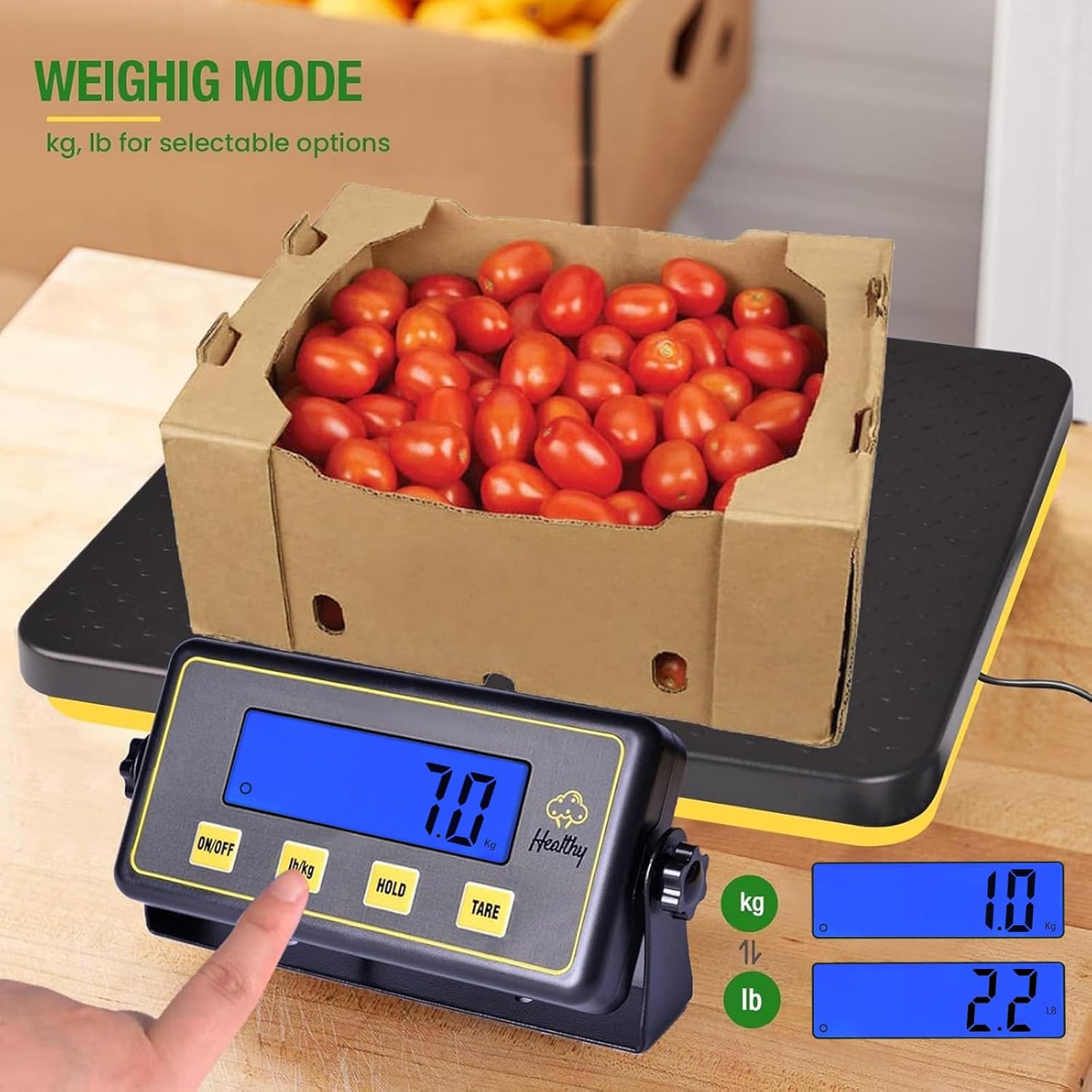
Image 6.1: The scale allows easy switching between kilogram (kg) and pound (lb) weighing modes.
6.4 TARE Function
The TARE function allows you to subtract the weight of a container, so only the contents are weighed.
- Place an empty container on the weighing platform. The display will show its weight.
- Press the TARE button. The display will reset to zero.
- Add items to the container. The display will now show only the net weight of the items.
6.5 HOLD Function
The HOLD function allows you to lock the displayed weight, even after removing the item from the platform.
- Place an item on the weighing platform and wait for the weight to stabilize.
- Press the HOLD button. The displayed weight will be locked.
- You can now remove the item, and the weight will remain on the display for easy reading.
- Press the HOLD button again to release the held value and return to normal weighing mode.
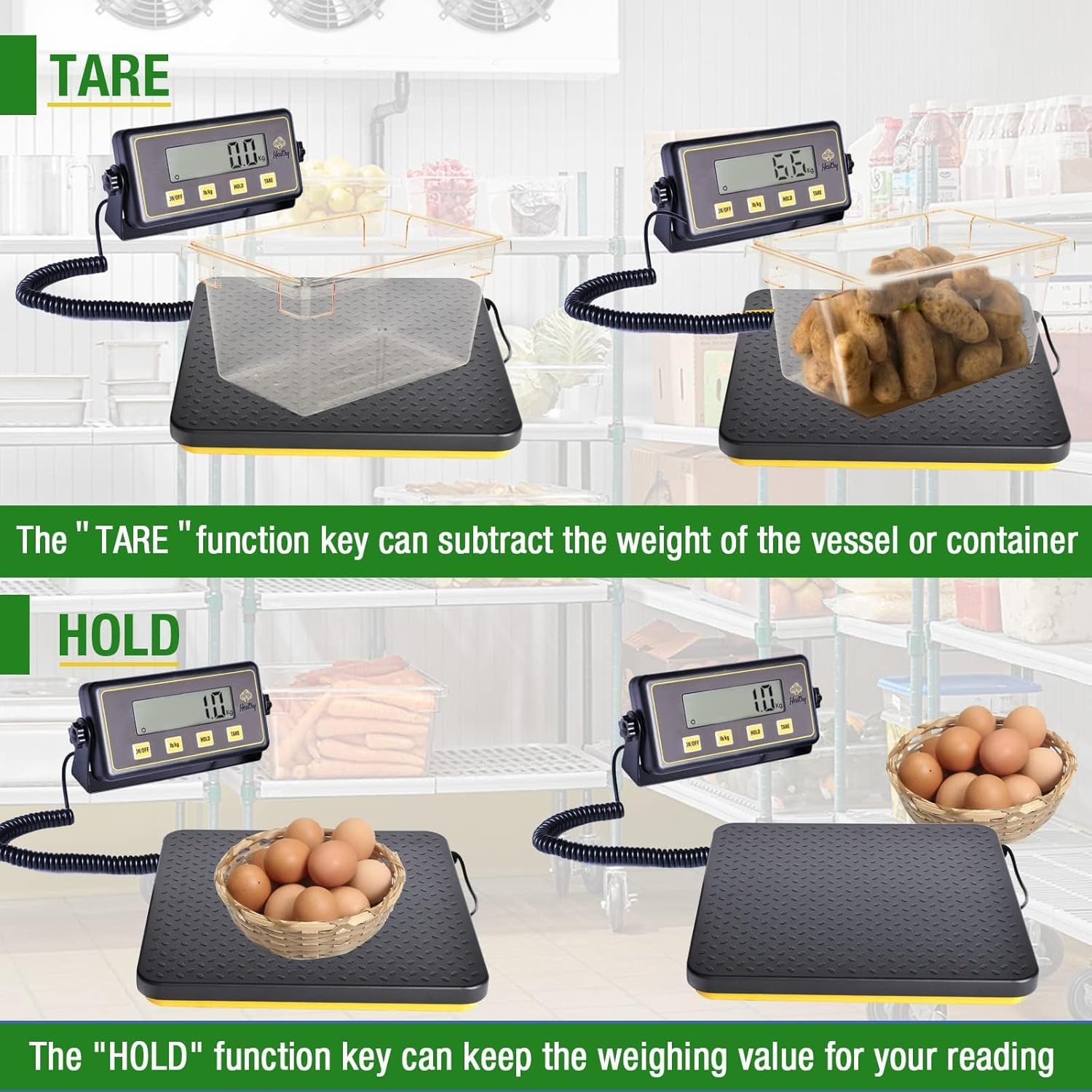
Image 6.2: The TARE function subtracts container weight, and the HOLD function retains the weight value on the display.
6.6 Auto-Off Feature
When operating on batteries, the scale will automatically turn off after approximately 5 minutes of inactivity to conserve power. To prevent auto-off during an operation, you may briefly press the HOLD button to refresh the activity timer, or use the DC adapter for continuous power.
7. Maintenance
7.1 Cleaning
- Wipe the scale platform and display unit with a soft, damp cloth.
- Do not use abrasive cleaners, solvents, or immerse the scale in water.
- Ensure the scale is dry before storage or next use.
7.2 Storage
- Store the scale in a cool, dry place away from direct sunlight and extreme temperatures.
- If storing for an extended period, remove the batteries to prevent leakage.
7.3 Battery Replacement
- When the battery indicator appears on the display, replace the 4 AA batteries.
- Ensure correct polarity when inserting new batteries.
8. Troubleshooting
| Problem | Possible Cause | Solution |
|---|---|---|
| Scale does not turn on | No power (dead batteries or unplugged adapter) | Replace batteries or ensure DC adapter is securely connected and plugged in. |
| Inaccurate readings | Unstable surface, scale overloaded, or calibration issue | Place scale on a stable, level surface. Do not exceed 150 lbs. If issue persists, contact support. |
| Display shows "Err" | Overload or internal error | Remove item from scale. If overloaded, reduce weight. Turn off and on again. If error persists, contact support. |
| Auto-off too quickly | Operating on batteries with no activity | Use DC adapter for continuous power or briefly press HOLD button to reset auto-off timer. |
9. Specifications
| Feature | Specification |
|---|---|
| Brand | Shaledig |
| Model | 150LBS |
| Weight Limit | 150 Pounds (68 kg) |
| Minimum Capacity | 0.7 Pounds (0.3 kg) |
| Readout Accuracy | 0.1 lb or 50 grams |
| Weighing Modes | lb, kg |
| Platform Dimensions | 11.8 x 11.8 inches |
| Product Dimensions | 11.8 x 11.8 x 1.6 inches (Platform) |
| Item Weight | 5.3 pounds (2.41 kg) |
| Display Type | LCD |
| Power Source | DC Adapter or 4xAA Batteries |
| UPC | 761026470474 |
10. Warranty and Support
For warranty information or technical support, please contact Shaledig customer service. Refer to your purchase documentation for specific warranty terms and contact details.
Brand: Shaledig
Model: 150LBS