
Kenwood DMX400S
KENWOOD DMX400S 6.8" Capacitive Touchscreen Digital Multimedia Receiver User Manual
Model: DMX400S
Introduction
This manual provides detailed instructions for the installation, operation, and maintenance of your KENWOOD DMX400S Digital Multimedia Receiver. Please read this manual thoroughly before using the product to ensure correct operation and to prevent damage.
Safety Information
Observe the following safety precautions to prevent personal injury or damage to the unit.
- Do not operate the unit in any way that distracts you from safe driving.
- Ensure proper wiring and installation to prevent short circuits or electrical hazards.
- Consult a qualified technician for installation if you are unsure about any steps.
- Do not disassemble or modify the unit. This may cause accidents, fire, or electric shock.
- Keep the volume at a level where you can still hear outside sounds, such as emergency vehicles.
Package Contents
Verify that all items are present in the package before proceeding with installation.
- KENWOOD DMX400S Digital Multimedia Receiver
- Wiring Harness
- Mounting Hardware
- USB Extension Cable
- Microphone
- GPS Antenna (if included with specific model variant)
- User Manual (this document)
Setup and Installation
Proper installation is crucial for optimal performance and safety. It is recommended to have this unit installed by a professional car audio technician.
Wiring Connections
Refer to the wiring diagram below for connecting the power, speakers, and other accessories. Ensure all connections are secure and insulated.
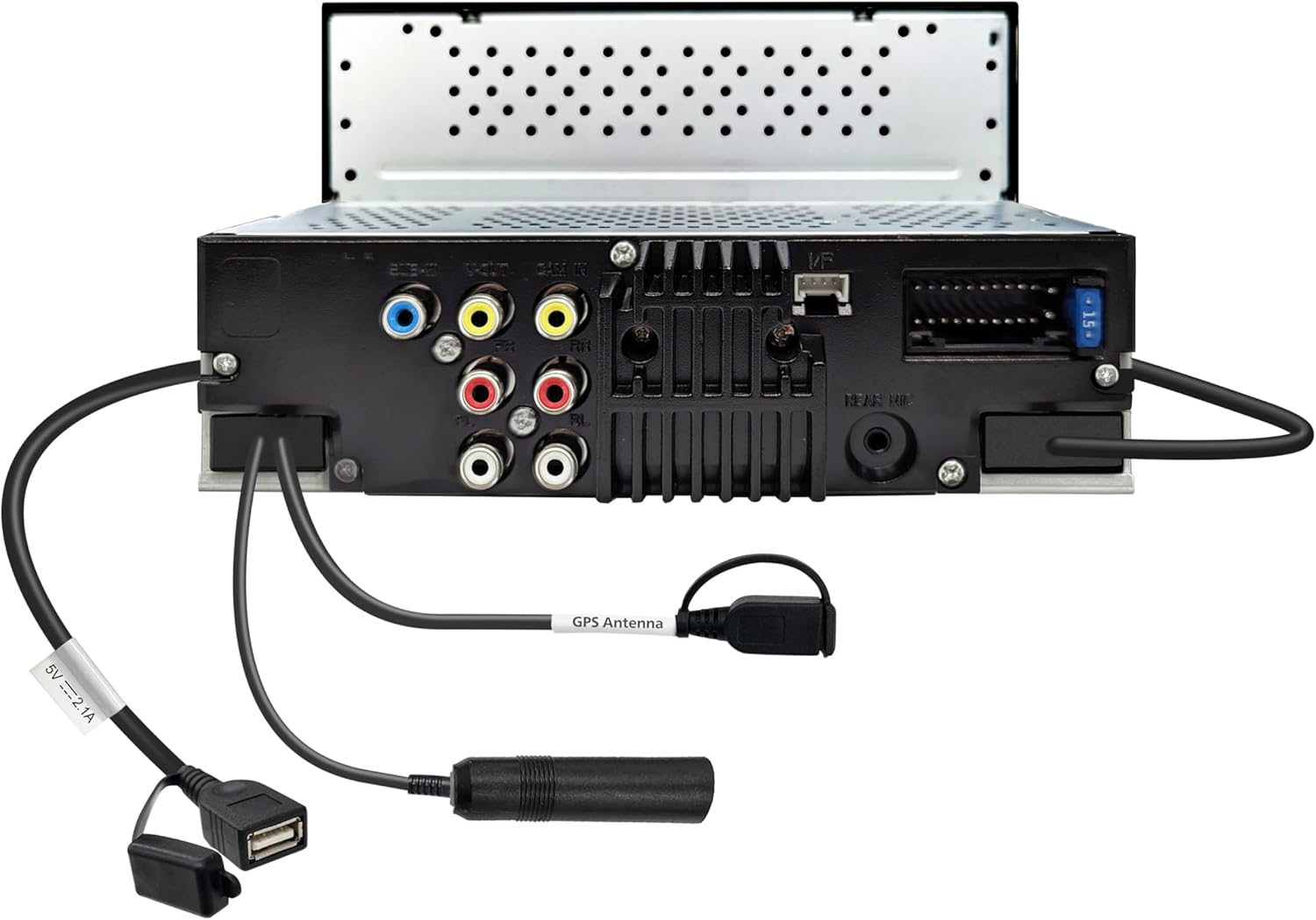
This image displays the rear panel of the DMX400S, highlighting the main wiring harness connector, RCA pre-outs, video input, USB port, and the GPS antenna input. The 15A fuse is also visible.
Mounting the Unit
Install the receiver into the vehicle's dashboard using the provided mounting hardware. Ensure the unit is securely fastened and does not obstruct any vehicle controls or airbags.
Operating Instructions
Basic Operation
The DMX400S features a 6.8-inch capacitive touchscreen for intuitive control. Use the on-screen icons and physical buttons (HOME, MENU, VOICE, VOL) for navigation and adjustments.

This image illustrates the main display of the DMX400S, showcasing the Apple CarPlay interface with common applications. The left side features physical buttons for Home, Menu, Voice, and Volume control.
Apple CarPlay
Connect your iPhone via a USB cable to enable Apple CarPlay. This allows you to access navigation, make calls, send messages, and listen to music directly from the receiver's display.

This image shows the Apple CarPlay interface on the DMX400S, demonstrating the search functionality within the Maps application. Options for finding nearby points of interest are displayed.
Android Auto
Connect your Android smartphone via a USB cable to activate Android Auto. This feature integrates your phone's essential functions, including navigation, communication, and media playback, onto the receiver's screen.

This image presents the Android Auto interface on the DMX400S, displaying various app icons and a navigation bar at the bottom with current route information.
Bluetooth Connectivity
Pair your Bluetooth-enabled device with the DMX400S for hands-free calling and wireless audio streaming. Navigate to the Bluetooth settings menu on the receiver to initiate pairing.
USB Mirroring (for Android Devices)
For compatible Android devices, connect via USB to mirror your smartphone's screen directly onto the DMX400S display. This allows control of your phone's apps from the receiver.
Audio Settings
Utilize the 13-band graphic equalizer and digital time alignment features to customize the audio output. Access these settings through the main menu to fine-tune sound to your preference.
Maintenance
To ensure the longevity and optimal performance of your DMX400S, follow these maintenance guidelines:
- Cleaning the Screen: Use a soft, dry cloth to gently wipe the touchscreen. Avoid abrasive cleaners or solvents.
- General Care: Keep the unit free from dust and extreme temperatures. Do not expose it to moisture.
Troubleshooting
If you encounter issues with your DMX400S, refer to the table below for common problems and their solutions. If the problem persists, contact Kenwood customer support.
| Problem | Solution |
|---|---|
| No power | Check power connections and vehicle fuse. |
| No sound | Verify speaker connections and audio settings. Ensure volume is not muted. |
| CarPlay/Android Auto not connecting | Ensure your phone is compatible and connected via a certified USB cable. Check phone settings for permissions. |
| Touchscreen unresponsive | Perform a soft reset (refer to the unit's reset button location, usually a small pinhole). If issue persists, contact support. |
Specifications
| Feature | Detail |
|---|---|
| Model Number | DMX400S |
| Display | 6.8" Capacitive Touchscreen |
| Connectivity Technology | USB, Bluetooth |
| Special Features | Android Auto, Apple CarPlay, Built-In Bluetooth, Hands-Free Calling, Touchscreen |
| Compatible Devices | Smartphone, Tablet |
| Audio Output Mode | Stereo |
| Surround Sound Channel Configuration | 5.1 |
| Output Power | 22 Watts |
| Item Weight | 3.56 pounds |
| Package Dimensions | 9.06 x 7.28 x 6.38 inches |
| Manufacturer | Kenwood |
Warranty and Support
Your KENWOOD DMX400S Digital Multimedia Receiver is covered by a manufacturer's warranty. Please refer to the warranty card included in your package for specific terms and conditions. For technical support or service inquiries, visit the official Kenwood website or contact their customer service department.
Official Kenwood Website: www.kenwood.com
Related Documents - DMX400S
 |
KENWOOD DMX4710S/DMX40S/DMX400S Monitor Receiver Instruction Manual This instruction manual provides detailed guidance for the KENWOOD DMX4710S, DMX40S, and DMX400S monitor receivers, covering installation, basic operations, features like Bluetooth, Apple CarPlay, Android Auto, SiriusXM, and troubleshooting. |
 |
KENWOOD DMX4710S/DMX40S/DMX400S Instruction Manual Official instruction manual for the KENWOOD DMX4710S, DMX40S, and DMX400S monitor with receiver. Covers installation, operation, features like Apple CarPlay, Android Auto, Bluetooth, SiriusXM, and troubleshooting. |
 |
KENWOOD DMX809S/DMX8709S Quick Start Guide Get started with your KENWOOD DMX809S or DMX8709S Monitor with Receiver. This quick start guide provides essential information on setup, basic operations, and features like Apple CarPlay, Android Auto, and Bluetooth connectivity. |
 |
KENWOOD DMX4710S/DMX40S/DMX400S Instruction Manual This instruction manual provides detailed information on the KENWOOD DMX4710S, DMX40S, and DMX400S monitor with receiver. Learn about setup, basic operations, audio control, connectivity options like Bluetooth, Apple CarPlay, and Android Auto, troubleshooting, and more. |
 |
KENWOOD DMX4707S/DMX47S/DMX5020S: Car Multimedia Receiver Instruction Manual Comprehensive instruction manual for KENWOOD DMX4707S, DMX47S, and DMX5020S car multimedia receivers. Covers installation, operation, features like Apple CarPlay, Android Auto, Bluetooth, SiriusXM, and troubleshooting. |
 |
Manual de Instrucciones KENWOOD DMX4710S DMX40S DMX400S Manual de instrucciones detallado para los receptores con monitor KENWOOD DMX4710S, DMX40S y DMX400S. Cubre instalación, configuración, funciones básicas, aplicaciones como Apple CarPlay y Android Auto, control de Bluetooth, radio, SiriusXM y solución de problemas. |
Ask a question about this manual
Ask about setup, troubleshooting, compatibility, parts, safety, or missing instructions. Manuals+ will review the question and use this page’s manual context to help answer it.