
Introduction
Thank you for choosing the Generic KK-62 Portable AM/FM Digital Radio. This device is designed for ease of use, offering stable signal reception, a built-in rechargeable battery, and a compact, ergonomic design. It supports FM radio and MP3 playback via a memory card, making it ideal for both indoor and outdoor listening, especially for seniors.
Product Overview
Familiarize yourself with the components and controls of your KK-62 radio.

Figure 1: Front View of KK-62 Radio
This image shows the front of the radio, highlighting the speaker, digital display, and control buttons.
Key Components:
- Digital Display: Shows frequency, mode, and battery status.
- Speaker: Integrated audio output.
- Control Buttons: Number keys (0-9), Mode (M), Play/Pause, Previous/Next Track, Volume Up/Down.
- Telescopic Antenna: For improved FM signal reception.
- Lanyard: For easy portability.

Figure 2: Side View with Ports
This image illustrates the side of the radio, indicating the headphone audio output jack, TF card slot, and USB charging port.
- Headphone Audio Output Jack: For private listening with headphones.
- TF Card Slot: Insert a memory card for MP3 playback.
- USB Charging Port: Connect a USB cable for charging the internal battery.
- Power Switch (ON/OFF): Located on the side/back.
Setup
1. Charging the Battery
Before first use, fully charge the radio's internal battery.
- Locate the USB charging port on the side of the radio (refer to Figure 2).
- Connect the provided USB charging cable to the radio's USB port.
- Connect the other end of the USB cable to a standard USB power adapter (5V 1A, not included) or a computer's USB port.
- The charging indicator (if present) will illuminate during charging and turn off or change color when fully charged.
- A full charge typically takes 2-3 hours.
2. Inserting a TF Card (Optional)
To play MP3 music, insert a TF (microSD) card with your audio files.
- Ensure the radio is powered off.
- Locate the TF card slot on the side of the radio (refer to Figure 2).
- Gently insert the TF card into the slot until it clicks into place. Ensure the card is inserted in the correct orientation.
- To remove, gently push the card in again until it clicks, then release, and it will spring out.
Operating Instructions
1. Power On/Off
- To turn on the radio, slide the ON/OFF switch (usually on the side or back) to the "ON" position. The digital display will light up.
- To turn off, slide the switch to the "OFF" position.
2. Mode Selection (FM Radio / MP3 Player)
Press the M (Mode) button to switch between FM radio mode and MP3 player mode (if a TF card is inserted).
3. FM Radio Operation
- Extend the Antenna: Fully extend the telescopic antenna for optimal signal reception.
- Automatic Station Scan: In FM mode, press and hold the Play/Pause button (often labeled with a play/pause icon) for a few seconds. The radio will automatically scan and save available FM stations. Up to 40 stations can be stored.
- Manual Tuning: Use the number keys (0-9) to directly input a frequency (e.g., 88.5 for 88.5 MHz).
- Navigate Stations: Use the Previous Track (|◀) and Next Track (►|) buttons to cycle through saved stations.
4. MP3 Player Operation
Ensure a TF card with MP3 files is inserted.
- Switch to MP3 mode using the M (Mode) button.
- The radio will automatically start playing the first MP3 file.
- Play/Pause: Press the Play/Pause button to pause or resume playback.
- Previous/Next Track: Use the Previous Track (|◀) and Next Track (►|) buttons to skip between tracks.
- Direct Track Selection: Use the number keys (0-9) to directly select a track number (e.g., 001 for the first track).
5. Volume Control
Use the V- (Volume Down) and V+ (Volume Up) buttons to adjust the audio level.

Figure 3: Control Panel Detail
This image provides a detailed view of the radio's control buttons for mode selection, tuning, and volume adjustment.
6. Using Headphones
For private listening, plug standard 3.5mm headphones into the headphone audio output jack (refer to Figure 2).
Maintenance
- Cleaning: Wipe the radio with a soft, dry cloth. Do not use liquid cleaners or abrasive materials.
- Storage: Store the radio in a cool, dry place away from direct sunlight and extreme temperatures.
- Battery Care: To prolong battery life, avoid fully discharging the battery frequently. Charge it regularly, even if not in use for extended periods.
- Water Exposure: This radio is not waterproof. Avoid exposure to water or high humidity.
Troubleshooting
| Problem | Possible Cause | Solution |
|---|---|---|
| Radio does not turn on. | Battery is discharged. Power switch is off. | Charge the battery using the USB cable. Ensure the power switch is in the "ON" position. |
| Poor FM reception. | Antenna not extended. Weak signal area. | Fully extend the telescopic antenna. Try moving to a different location or adjusting the antenna direction. |
| No sound from MP3 player. | No TF card inserted. TF card is empty or files are not MP3 format. Volume is too low. | Insert a TF card with MP3 files. Ensure MP3 files are present and correctly formatted. Increase the volume using the V+ button. |
| Buttons are unresponsive. | Temporary software glitch. | Turn the radio off and then on again to reset it. |
Specifications
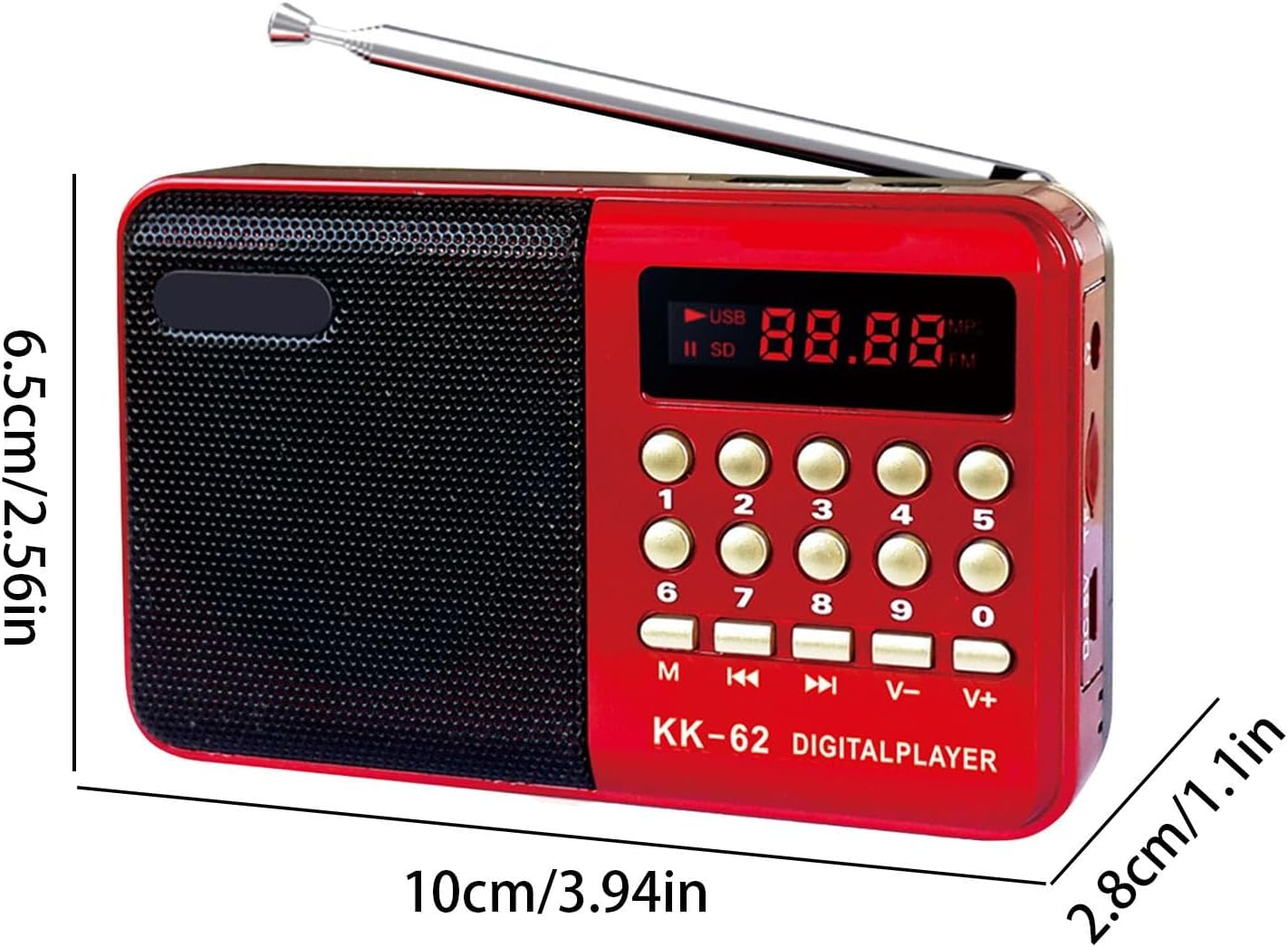
Figure 4: Product Dimensions
This image provides the physical dimensions of the KK-62 radio.
- Model: KK-62
- Brand: Generic
- Radio Type: Portable AM/FM Digital Radio
- Channel Selection: Manual
- Sound Quality: Mono
- Stored Stations: Up to 40 (FM)
- Signal-to-Noise Ratio: ≥98dB
- Input Voltage: 5V 1A (USB)
- Rated Wattage: 4.5 W
- FM Frequency Range: 70MHz-108MHz
- Material: ABS
- Dimensions: Approximately 10 x 2.8 x 6.5 cm (3.94 x 1.1 x 2.56 inches)
- Weight: Approximately 110g
- Supported Audio Format: MP3
- Battery Capacity: 1100mAh-1500mAh (Integrated)
- Color: Red
Warranty Information
The product description states "Refer to description" for warranty information. Please refer to the original product listing or contact your retailer for specific warranty terms and conditions.
Support
For further assistance, technical support, or inquiries regarding your Generic KK-62 Portable AM/FM Digital Radio, please contact the retailer where you purchased the product. You may also refer to the manufacturer's website if available.