
1. Introduction
This manual provides detailed instructions for the safe and efficient operation of your FRIENGOOD LS4 Plus Portable Karaoke Party Speaker. Please read this manual thoroughly before use and retain it for future reference.
2. What's in the Box
Verify that all items are present upon unpacking:
- 1 x FRIENGOOD LS4 Plus Portable Karaoke Party Speaker
- 2 x Rechargeable Wireless Microphones
- 1 x Remote Control
- 1 x USB Charging Cable (Type-C 5V=3A)
- 1 x Backpacking Strap

Figure 2.1: Package Contents. This image displays the FRIENGOOD LS4 Plus speaker, two wireless microphones, a remote control, a USB-C charging cable, and a shoulder strap, illustrating all items included in the product box.
3. Product Overview
3.1 Speaker Components
The LS4 Plus speaker features a robust design with integrated audio components and controls.

Figure 3.1: Front view of the FRIENGOOD LS4 Plus speaker, showcasing its main body, integrated handle, shoulder strap, two wireless microphones, and remote control.
3.2 Audio System
The speaker is equipped with a 160W audio system for clear and powerful sound reproduction.
- Dual 50W Bass Horns: Provide deep and resonant low frequencies.
- Dual 30W Tweeter Horns: Deliver crisp and clear high frequencies.
- Bass Up 3.0 Technology: Enhances bass performance in real-time.

Figure 3.2: Exploded view of the speaker's internal components, highlighting the dual 50W woofers and dual 30W silk tweeters, along with a vibrating membrane for light flashing.
3.3 Wireless Microphones
Two rechargeable wireless microphones are included for karaoke functionality.
- U-band Connection: Ensures instant, delay-free pairing with the speaker.
- Battery Life: Up to 20 hours of use, 100 hours standby (2000mAh lithium battery).
- Construction: High-quality aviation aluminum with an LED digital display.

Figure 3.3: Close-up view of the two wireless microphones, showing their digital displays and power buttons.
3.4 Remote Control
A remote control is provided for convenient operation of the speaker's functions.

Figure 3.4: The remote control for the speaker, displaying buttons for power, mute, volume, microphone controls, bass/treble adjustments, mode selection, and sound effects.
3.5 LED Light Show
The speaker features dynamic RGB seven-color LED lights that synchronize with music.
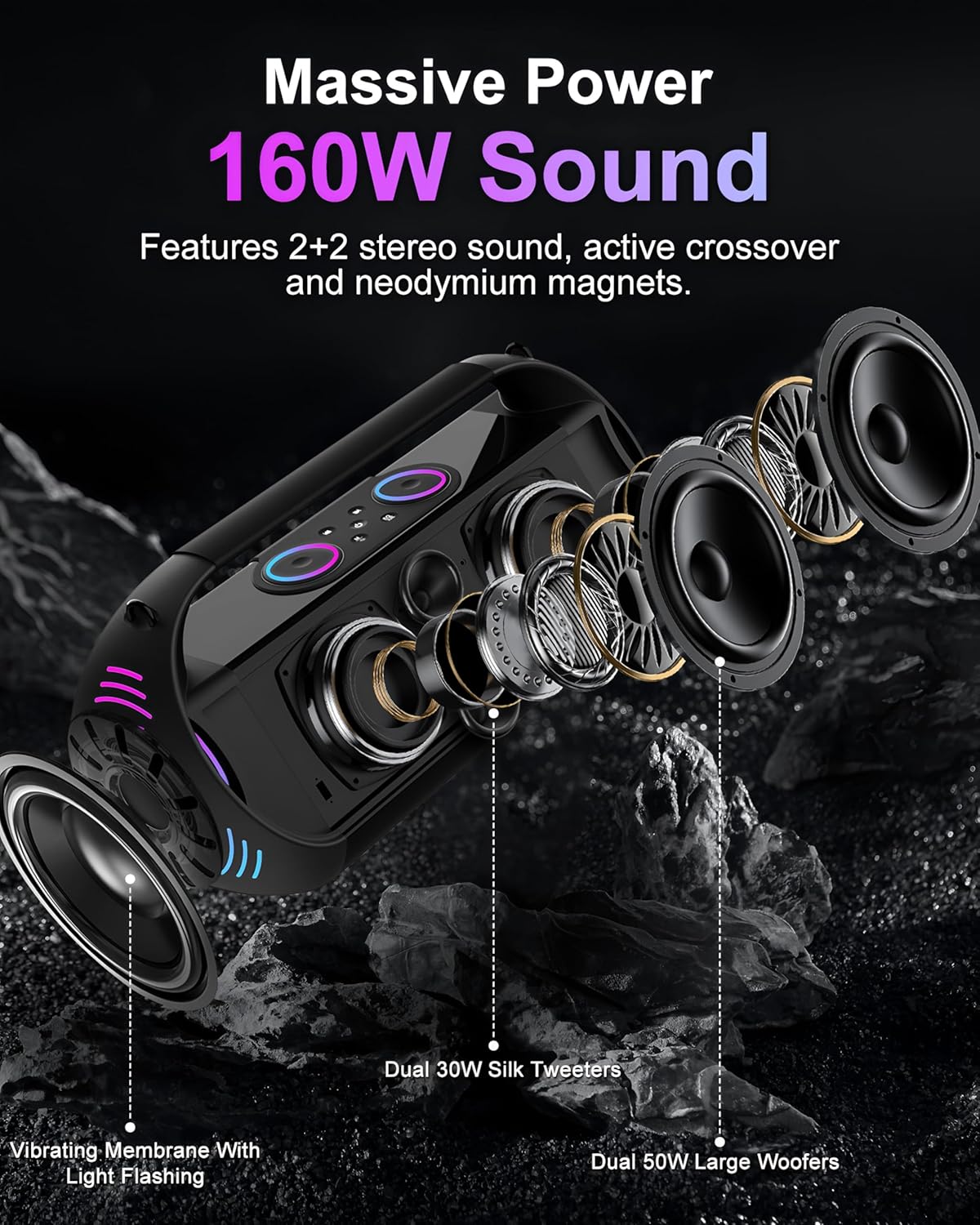
Figure 3.5: The speaker with its RGB LED lights illuminated, showing various color patterns.
4. Setup
4.1 Charging the Speaker
- Connect the provided USB Type-C charging cable to the speaker's charging port.
- Connect the other end of the cable to a compatible 5V/3A USB power adapter (not included).
- The charging indicator will illuminate. A full charge typically takes several hours.
- Once fully charged, disconnect the charging cable. The speaker provides up to 20 hours of playback.
4.2 Charging the Wireless Microphones
- Each microphone has a built-in rechargeable battery. Use a suitable charging method (e.g., USB-C cable, if provided, or specific charging dock if applicable).
- Refer to the microphone's LED display for charging status.
- A full charge provides up to 20 hours of use.
4.3 Attaching the Backpacking Strap
- Locate the attachment points on the speaker.
- Securely fasten the clips of the backpacking strap to these points.
- Ensure the strap is properly attached before carrying the speaker.
5. Operating Instructions
5.1 Power On/Off
- To Power On: Press and hold the power button on the speaker.
- To Power Off: Press and hold the power button again.
5.2 Bluetooth Connection
- Power on the speaker. It will automatically enter Bluetooth pairing mode.
- On your device (smartphone, tablet, etc.), enable Bluetooth and search for available devices.
- Select "FRIENGOOD LS4 Plus" from the list to connect.
- A confirmation sound will indicate a successful connection.
5.3 Multiple Playback Modes
The speaker supports various input sources:
- AUX Input: Connect an external audio device using a 3.5mm AUX cable (not included). The speaker will automatically switch to AUX mode.
- USB Disk Playback: Insert a USB flash drive containing audio files into the USB port. The speaker will automatically detect and play the files.
- TF Card Playback: Insert a TF (Micro SD) memory card containing audio files into the TF card slot. The speaker will automatically detect and play the files.

Figure 5.1: Illustration of the speaker's connectivity options, including Bluetooth 5.3, AUX in, Micro SD card slot, and USB flash drive port.
5.4 Using the Wireless Microphones
- Power on the speaker.
- Power on the wireless microphones. They will automatically connect to the speaker via U-band technology.
- Adjust microphone volume using the "Mike +" and "Mike -" buttons on the remote control or speaker controls.
- Utilize the "Reverb +" and "Reverb -" buttons for echo effects.
- The "Delay +" and "Delay -" buttons adjust the delay effect.
5.5 Remote Control Functions
The remote control provides comprehensive command over the speaker. Refer to the diagram for button layout.
| Button | Function |
|---|---|
| OFF | Power off |
| Mute | Mute/Unmute audio |
| Reverb+ / Reverb- | Reverb Boost / Reverb Decrease |
| Mike+ / Mike- | Microphone Volume up / down |
| Delay+ / Delay- | Extension Increase / Decrease (Delay effect) |
| Bass+ / Bass- | Bass Boost / Bass Reduction |
| High+ / High- | Treble Boost / Treble Reduction |
| Volume+ / Volume- | Master Volume up / down |
| PREV | Previous song |
| NEXT | Next song |
| Thank | "Thanks" sound effect |
| Cheer | "Cheer" sound effect |
| Applause | "Acclamation" sound effect |
| Laugh | "Laugh happily" sound effect |
| Warm | "Warm up the stage" sound effect |
| Umlaut | Change the sound (voice changer) |
| Regard | "Respect" sound effect |
| Mode | Mode Switching (Bluetooth, AUX, USB, TF) |
| Accompany | Backup Singing On/Off |
| Effects | Sound Effects Switch |
| Cycle | Loop Play |
5.6 LED Light Control
The LED lights can be controlled via the speaker's interface or remote control. Different modes include breathing, circling, and flickering, synchronizing with the music rhythm.
Figure 5.2: The speaker displaying its RGB colorful lights, with icons indicating various light modes such as breathing, circling, and flickering.
5.7 Real-time OTG Recording Function
This function allows for real-time recording, typically used for live broadcasting or conference recording. Connect a wired microphone or wired headset to utilize this feature.
6. Maintenance
6.1 Cleaning
- Ensure the speaker is powered off and disconnected from any power source before cleaning.
- Use a soft, dry cloth to wipe the exterior surfaces.
- Do not use abrasive cleaners, alcohol, benzene, or other chemical solvents, as these may damage the surface.
- For the microphone grilles, use a soft brush to gently remove dust.
6.2 Storage
- Store the speaker and accessories in a cool, dry place away from direct sunlight and extreme temperatures.
- If storing for an extended period, charge the speaker and microphones periodically (e.g., every 3 months) to maintain battery health.
6.3 Water Resistance
The speaker is IPX5 life waterproof and splash-proof. This means it is resistant to water splashes and light rain but should not be immersed in water.

Figure 6.1: The speaker positioned near a swimming pool, demonstrating its IPX5 daily waterproof rating, indicating resistance to splashes and light rain.
7. Troubleshooting
| Problem | Possible Cause | Solution |
|---|---|---|
| Speaker does not power on | Low battery; Power button not pressed correctly | Charge the speaker fully. Press and hold the power button for a few seconds. |
| No sound from speaker | Volume too low; Incorrect input mode; Device not connected | Increase volume on speaker and connected device. Ensure correct input mode (Bluetooth, AUX, USB, TF). Reconnect Bluetooth device. |
| Microphones not connecting | Microphone battery low; Microphone not powered on; Interference | Charge microphones. Ensure microphones are powered on. Move closer to the speaker. |
| Bluetooth connection unstable | Device too far; Obstructions; Interference | Move the connected device closer to the speaker. Remove any obstructions. Avoid strong electromagnetic interference. |
| Remote control not working | Remote battery low; Obstruction between remote and speaker | Replace remote control batteries. Ensure clear line of sight to the speaker's IR receiver. |
8. Specifications
| Feature | Detail |
|---|---|
| Model Number | LS4 Plus |
| Output Wattage | 160 Watts |
| Speaker Configuration | Dual 50W Woofers, Dual 30W Tweeters (4 channels) |
| Frequency Response | 20 Hz - 20 KHz |
| Noise Level | 100 dB |
| Connectivity Technology | Bluetooth 5.3, AUX, USB, TF Card, Remote |
| Bluetooth Version | 5.3 |
| Battery Capacity (Speaker) | 30000mAh Lithium Polymer |
| Playback Time | Up to 20 hours |
| Charging Input | USB Type-C 5V/3A |
| Microphone Battery Capacity | 2000mAh Lithium Battery (each) |
| Microphone Connection | U-band Wireless |
| Water Resistance | IPX5 (Splash-proof) |
| Material | ABS Plastic |
| Product Dimensions (L x W x H) | 8.07 x 17.8 x 8.35 inches |
| Item Weight | 10.51 pounds |
| Manufacturer | Shenzhen Penghexing Electronic Technology Co., Ltd |
9. Warranty & Support
9.1 Warranty Information
FRIENGOOD products are designed and manufactured to the highest quality standards. For specific warranty details, please refer to the warranty card included with your product or contact customer support.
9.2 Customer Support
If you encounter any issues or have questions regarding your FRIENGOOD LS4 Plus speaker, please contact our customer support team. Contact information can typically be found on the product packaging or the official FRIENGOOD website.