1. Introduction
The Generic ABM200 Video Baby Monitor is designed to provide reliable monitoring of your baby. It features a 4.3-inch HD display, night vision capabilities, two-way audio communication, and a secure wireless signal. This manual provides instructions for setting up, operating, and maintaining your baby monitor.

Figure 1.1: Generic ABM200 Video Baby Monitor System Overview
2. Package Contents
Please check the package contents to ensure all items are present:
- Camera Unit (Baby Unit)
- Monitor Unit (Parent Unit)
- User Manual
- Power Adapters and Cables (for both camera and monitor)
3. Product Overview
3.1 Parent Unit (Monitor)
The parent unit features a 4.3-inch HD display for clear video monitoring. It includes controls for menu navigation, volume, and two-way audio communication.

Figure 3.1: Parent Unit Front View
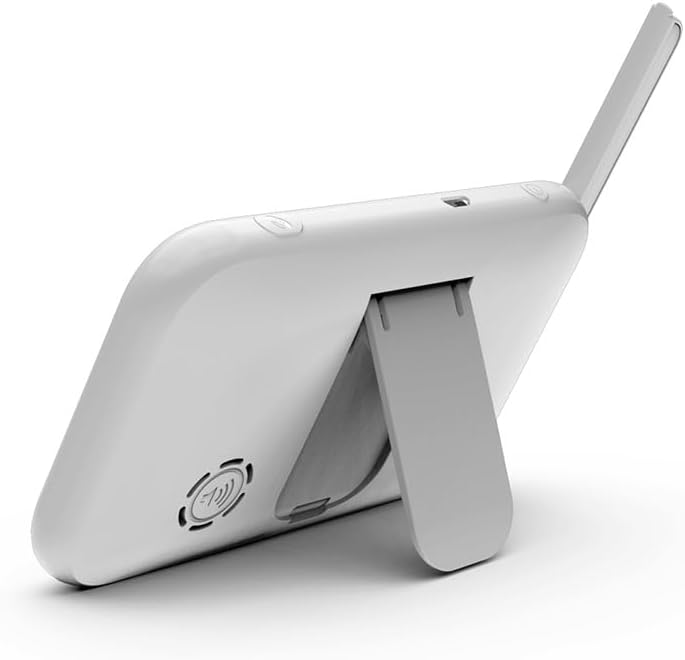
Figure 3.2: Parent Unit Back View with Kickstand
3.2 Baby Unit (Camera)
The baby unit is equipped with a camera that offers pan, tilt, and zoom functions. It includes a night lamp, temperature sensor, and a slot for local recording via an SD card.
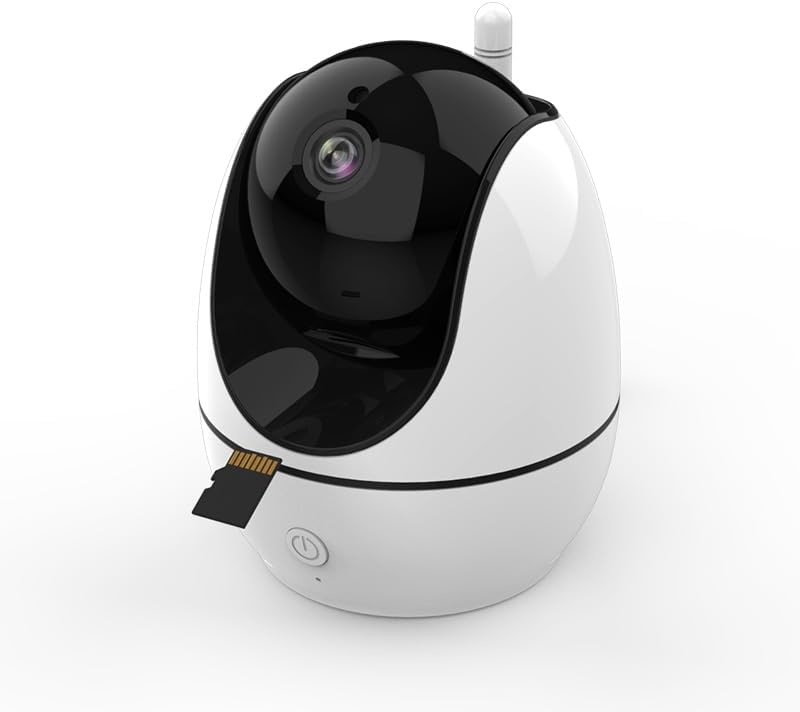
Figure 3.3: Baby Unit (Camera) with SD Card Slot
4. Setup Instructions
4.1 Powering On
- Connect the power adapter to the baby unit and plug it into an electrical outlet.
- Connect the power adapter to the parent unit and plug it into an electrical outlet.
- Press and hold the power button on the parent unit to turn it on.
4.2 Placement
- Place the baby unit (camera) in a location that provides a clear view of your baby, ensuring it is out of reach of the baby.
- Position the parent unit (monitor) in a convenient location where you can easily monitor your baby.
- Ensure both units are within the signal range (up to 400m in open areas) for optimal performance.
5. Operating Instructions
5.1 Basic Controls
- Power Button: Press and hold to turn the unit on/off.
- Volume Buttons: Adjust the listening volume on the parent unit.
- Menu Button: Access the monitor's settings and features.
- Navigation Buttons: Use up/down/left/right to navigate menus and control camera pan/tilt.
- OK Button: Confirm selections.
5.2 Two-Way Audio
To speak to your baby, press and hold the talk button on the parent unit. Release the button to hear your baby.

Figure 5.1: Two-Way Audio Communication
5.3 Pan, Tilt, and Zoom Camera
Use the navigation buttons on the parent unit to remotely adjust the camera's viewing angle. The camera supports 355° pan and 75° tilt. Digital zoom is also available through the menu.

Figure 5.2: Camera Pan, Tilt, and Zoom Functionality
5.4 Night Vision and Night Lamp
The camera automatically activates infrared night vision in low-light conditions, providing a clear black and white image. The integrated night lamp can be controlled from the parent unit to provide soft illumination.

Figure 5.3: Night Vision in Operation
5.5 Temperature Monitoring
The baby unit includes a temperature sensor that monitors the room temperature. This reading is displayed on the parent unit, and alerts can be set for high or low temperature thresholds.

Figure 5.4: Room Temperature Monitoring
5.6 Lullabies
The monitor includes 8 pre-programmed lullabies that can be played from the baby unit to soothe your child. Access and control lullaby playback through the parent unit's menu.
5.7 Built-in Recorder (Local Recording)
Insert a compatible SD card (not included) into the baby unit's slot to enable local video recording. Manage recording settings via the parent unit's menu.
5.8 Cry Detection and Sound Activation (VOX)
The monitor features cry detection and VOX (Voice Operated eXchange) functionality. When enabled, the parent unit's screen will activate or alert you when sounds above a set threshold are detected in the baby's room.
5.9 Feeding Reminder
Set feeding reminders through the parent unit's menu to help maintain a consistent feeding schedule for your baby.
6. Maintenance
- Cleaning: Use a soft, dry cloth to clean the surfaces of both the parent and baby units. Do not use abrasive cleaners or solvents.
- Power: Always use the provided power adapters. Disconnect power during extended periods of non-use.
- Environment: Keep units away from water, direct sunlight, and extreme temperatures.
7. Troubleshooting
- No Picture/Sound: Ensure both units are powered on and within range. Check power connections.
- Poor Signal: Move the parent unit closer to the baby unit. Avoid placing units near large metal objects or other electronic devices that may cause interference.
- Screen Freezes: Try restarting both units by disconnecting and reconnecting their power.
- Temperature Reading Inaccurate: Ensure the baby unit is not placed in direct sunlight or near heat sources/vents.
8. Specifications
| Model Number | ABM200 |
| Display Size | 4.3 inches |
| Video Capture Resolution | 720p |
| Connectivity Technology | Wireless (Radio, FHSS protocol) |
| Signal Range | Up to 400m (open field) |
| Camera Pan/Tilt | 355° Pan, 75° Tilt |
| Special Features | 2 Way Audio, Cry Detection, HD Resolution, Local Recording, Motion Sensor, Night Vision, Night Lamp, Temperature Control, Lullabies |
| Indoor/Outdoor Use | Indoor |
| Product Dimensions | 16 x 10 x 11 cm |
| Weight | 607.81 g |
9. Warranty and Support
9.1 Warranty Information
This product comes with a 1-year local warranty against manufacturing defects. Please retain your proof of purchase for warranty claims.
9.2 Customer Support
For technical assistance or warranty inquiries, please refer to the contact information provided with your purchase documentation or visit the manufacturer's official website.