
Important Safety Instructions
Please read and understand all instructions before assembly and use. Keep this manual for future reference.
- Anti-Tip Device: Always install the anti-tip device provided to prevent serious injury from furniture tipping over.
- Weight Limits: Do not exceed the maximum weight capacity of 110 pounds per drawer. The top surface also has a weight limit; avoid placing excessively heavy items on top.
- Children Safety: Do not allow children to climb on drawers or the dresser. Keep small parts away from children during assembly.
- Electrical Safety: Ensure the charging station is properly connected to a grounded outlet. Do not overload the outlets. Keep liquids away from the charging station.
- Stable Placement: Place the dresser on a flat, level surface to ensure stability.
Product Overview
The Fameill 9-Drawer Dresser is designed to provide ample storage and convenience for your home. It features a sturdy wood construction, nine spacious drawers with metal handles, and an integrated charging station on the top surface.
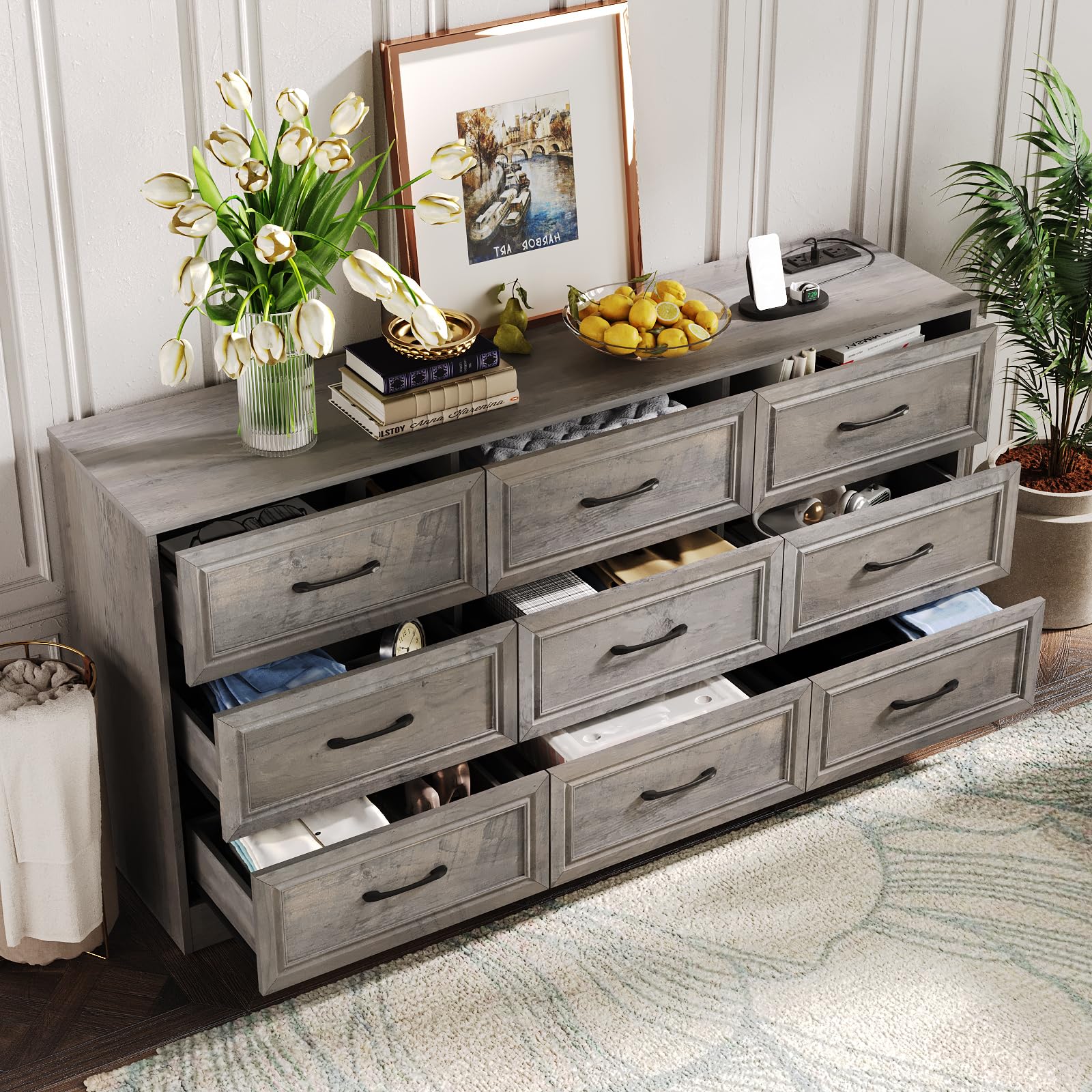
Image: Fameill 9-Drawer Dresser in Ash Grey, showing overall dimensions (15.3"D x 63"W x 31"H).
This dresser is suitable for various rooms, including bedrooms, living rooms, and hallways, offering a versatile storage solution. The upgraded back panel design enhances stability and prevents dust accumulation.

Image: Rear view of the dresser, highlighting the upgraded solid back panel for improved stability and dust prevention.
Package Contents
Before beginning assembly, ensure all parts are present and undamaged. Refer to the included parts list in your packaging for specific item identification.
- Dresser Panels (Top, Bottom, Sides, Back)
- Drawer Fronts, Sides, and Bottoms (9 sets)
- Metal Handles (9 pieces)
- Drawer Slides (18 pairs)
- Charging Station Unit with Power Cord
- Assembly Hardware (screws, dowels, cam locks, etc.)
- Anti-Tip Kit
- Assembly Tools (e.g., Allen wrench, screwdriver)
Assembly Instructions
Assembly typically requires two people. Follow the step-by-step instructions provided in the separate assembly manual included with your product. Below are general guidelines:
- Unpack and Identify: Lay out all components on a soft, clean surface. Match each part to the numbered labels in the assembly manual.
- Assemble the Frame: Begin by connecting the side panels to the base and top panel using the provided hardware.
- Install Drawer Slides: Attach the drawer slides to the inner side panels of the dresser frame and to the drawer sides as indicated.
- Assemble Drawers: Construct each of the nine drawers by attaching the sides, front, and back to the drawer bottom. Install the metal handles.
- Insert Drawers: Carefully insert each assembled drawer into its corresponding slot in the dresser frame. Note: Drawers may be specific to certain sides (left or right). If a drawer does not fit smoothly, try swapping it with another from the opposite side.
- Install Charging Station: Secure the charging station unit into the pre-drilled opening on the top surface of the dresser. Route the power cord through the designated opening at the back.
- Attach Back Panel: Secure the solid back panel to the rear of the dresser frame.
- Install Anti-Tip Kit: Follow the instructions to securely attach the anti-tip device to the dresser and to a wall stud. This is crucial for safety.
For detailed visual guidance, please refer to the official assembly video:
Video: Official assembly and feature overview for the Fameill Dresser with Charging Station. This video demonstrates the product's features and provides a general overview of its construction.
Operating Instructions
Using the Drawers
The nine drawers are designed for smooth operation. To open, gently pull the metal handle. To close, push the drawer firmly until it is fully seated within the frame. Avoid forcing drawers if they feel stiff; ensure they are properly aligned on their slides.

Image: The dresser with drawers open, demonstrating ample storage space for clothes, books, toys, and other items.
Using the Charging Station
The integrated charging station provides convenient power access. Ensure the dresser's power cord is plugged into a functional wall outlet.
- Power Outlets: Plug standard electrical devices into the AC outlets.
- USB Ports: Connect USB-compatible devices (e.g., smartphones, tablets) to the USB-A ports for charging.
- Do not exceed the maximum power rating of the charging station.

Image: Close-up view of the integrated charging station on the dresser's top surface, featuring two AC outlets and two USB ports.
Maintenance
Proper care will extend the life of your dresser.
- Cleaning: Wipe surfaces with a soft, damp cloth. Avoid abrasive cleaners, harsh chemicals, or excessive moisture, which can damage the finish.
- Dusting: Regularly dust with a dry, soft cloth.
- Hardware: Periodically check and tighten all screws and fasteners to ensure the dresser remains stable.
- Drawer Slides: If drawers become difficult to open or close, clean the drawer slides and apply a silicone-based lubricant if necessary.
Troubleshooting
| Problem | Possible Cause | Solution |
|---|---|---|
| Drawers do not close smoothly or are misaligned. | Incorrect drawer placement (left/right specific), loose hardware, obstruction. |
|
| Charging station is not working. | Power cord not plugged in, faulty outlet, device issue, overloaded circuit. |
|
| Dresser feels unstable or wobbly. | Uneven floor, loose hardware, anti-tip device not installed. |
|
Specifications
| Feature | Detail |
|---|---|
| Brand | Fameill |
| Model | 9-Drawer Wide Dresser Organizer with Charging Station |
| Color | Ash Grey |
| Material | Wood (Medium Density Fiberboard and Solid Wood) |
| Product Dimensions (D x W x H) | 15.3" x 63" x 31" |
| Number of Drawers | 9 |
| Drawer Weight Capacity | 110 lbs per drawer |
| Additional Features | Integrated Charging Station (AC outlets, USB ports), Metal Handles, Solid Back Panel |
| Assembly Required | Yes |
Warranty and Support
For warranty information, missing parts, or any product-related inquiries, please contact Fameill customer service directly. Refer to the contact information provided in your product packaging or visit the official Fameill website for support.
"If you encounter any problems that you cannot solve on your own with this product, you can contact us and we will do our best to serve you."