
Important Safety Information
Please read all instructions carefully before using this product. Failure to follow these instructions may result in injury or damage to the product.
- This elliptical machine is designed for seated use only. Do not stand on the pedals.
- Keep children and pets away from the machine during operation.
- Consult a physician before starting any new exercise program, especially if you have pre-existing health conditions.
- Do not use if you are pregnant, have hypertension, heart disease, or any other medical condition that could be aggravated by exercise.
- Ensure the machine is placed on a stable, flat surface before use.
- Keep hands and feet clear of all moving parts.
- Unplug the machine from the power outlet when not in use or before cleaning.

Image: Remote control with warning text indicating not for children, pregnant women, or individuals with hypertension or heart disease.
Product Overview
The OLIXIS Under-Desk Elliptical Machine is a compact and quiet mini pedal exerciser designed for low-impact leg workouts while seated. It features adjustable speed levels, an LED display, and both manual and remote controls for convenience.
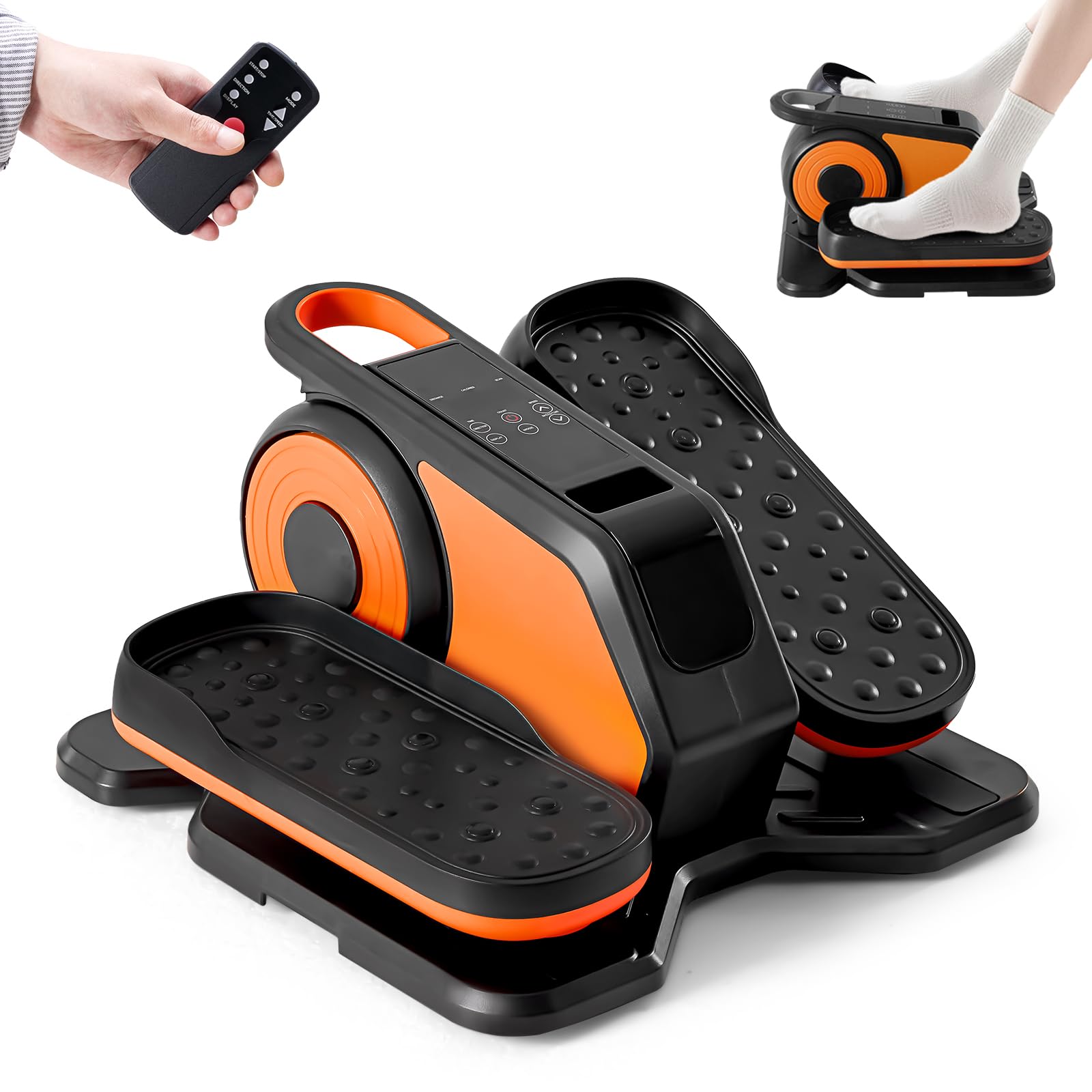
Image: The OLIXIS Under-Desk Elliptical Machine in black and orange.
Setup
- Unpacking: Carefully remove the elliptical machine from its packaging. Retain all packaging materials for future storage or transport.
- Placement: Place the elliptical machine on a flat, stable surface under your desk or in front of your chair/sofa. Ensure there is enough space for your legs to move freely without obstruction.
- Power Connection: Connect the power adapter to the machine's power input port, then plug the adapter into a standard electrical outlet.
- Remote Control: Insert batteries into the remote control (if not already installed).

Image: A person using the OLIXIS elliptical machine while seated at a desk, demonstrating its compact design for office use.

Image: A person using the OLIXIS elliptical machine while seated on a sofa and reading, highlighting its versatility for home use.
Operating Instructions
Getting Started
- Sit comfortably in a chair with the elliptical machine placed in front of you.
- Place your feet securely on the pedals.
- Press the "Start/Stop" button on the machine or remote control to begin exercising.
Controls and Functions
The OLIXIS elliptical machine can be controlled via the buttons on the unit or the included remote control.
- Start/Stop: Initiates or pauses the exercise.
- Speed Adjustment: The machine offers 12 adjustable speed levels. Use the speed buttons on the unit or remote to increase or decrease the intensity.
- Direction: The pedals can move in both forward and reverse directions. Use the direction button to switch between modes, engaging different muscle groups.
- Mode Selection: Choose between manual mode (HR Mode) where you control speed and direction, or automatic modes (P1-P12) which cycle through various speeds and directions every 3 minutes.
- LED Display: The integrated LED display tracks key metrics such as:
- Time (duration of exercise)
- Distance (simulated distance covered)
- Speed (current speed level)
- Count (number of pedal rotations)
- Calories (estimated calories burned)

Image: The control panel and display of the OLIXIS elliptical, illustrating its various functions including speed, mode, direction, time, distance, count, and calorie tracking.

Image: Demonstration of the dual-direction pedal motion (forward and backward) of the OLIXIS elliptical, highlighting its benefits for circulation and joint protection.

Image: A user operating the elliptical, with text explaining the HR (manual) mode and Auto mode, which changes speed and direction every 3 minutes.
Official Product Video
Video: An official overview of the OLIXIS Under-Desk Elliptical Machine, demonstrating its features and use.
Maintenance
- Cleaning: Wipe down the machine with a soft, damp cloth after each use. Avoid abrasive cleaners or solvents.
- Storage: Store the elliptical in a cool, dry place away from direct sunlight and extreme temperatures. Its compact size and light weight (11 lbs) make it easy to move and store.
- Inspection: Periodically check all screws and connections to ensure they are tight and secure.

Image: A person easily carrying the OLIXIS elliptical machine, demonstrating its portability and light weight of 11 lbs.
Troubleshooting
- Machine Not Turning On:
- Ensure the power adapter is securely plugged into both the machine and a working electrical outlet.
- Check if the power outlet is functional by plugging in another device.
- Pedals Not Moving Smoothly:
- Verify that no objects are obstructing the pedal movement.
- Ensure the machine is on a flat, stable surface.
- Remote Control Not Working:
- Check and replace the batteries in the remote control.
- Ensure there are no obstructions between the remote and the machine's sensor.
- Unusual Noises:
- Stop using the machine immediately.
- Inspect for any loose parts or foreign objects.
- If the noise persists, contact customer support.
Specifications
| Feature | Detail |
|---|---|
| Model Name | Elliptical Machine |
| Brand | OLIXIS |
| Model Number | OL-TYJ-OG253 |
| Color | Black/Orange |
| Product Dimensions (D x W x H) | 15.5"D x 15.24"W x 8.66"H |
| Item Weight | 11 Pounds |
| Material | Acrylonitrile Butadiene Styrene (ABS), Alloy Steel, Polypropylene (PP) |
| Resistance Mechanism | Magnetic |
| Number of Resistance Levels | 12 |
| Maximum Weight Recommendation | 100 Kilograms (220 lbs) |
| Included Components | Elliptical Machine |

Image: A visual representation of the OLIXIS elliptical machine's dimensions (15.55 inches depth, 15.24 inches width, 8.66 inches height) and its maximum weight capacity of 220 lbs.
Warranty Information
This OLIXIS Under-Desk Elliptical Machine comes with a 1 Year Manufacturer Warranty from the date of purchase. This warranty covers defects in materials and workmanship under normal use.
The warranty does not cover:
- Damage caused by improper use, maintenance, or storage.
- Normal wear and tear.
- Damage resulting from unauthorized repairs or modifications.
- Accidental damage.
To make a warranty claim, please retain your proof of purchase and contact OLIXIS customer support.
Customer Support
For any questions, concerns, or technical assistance regarding your OLIXIS Under-Desk Elliptical Machine, please contact our customer support team.
- Website: Visit the official OLIXIS website for FAQs and support resources.
- Email: [Insert Customer Support Email Here]
- Phone: [Insert Customer Support Phone Number Here]
Please have your model number (OL-TYJ-OG253) and proof of purchase ready when contacting support.