
Introduction
This manual provides essential information for the safe and efficient operation of your EARNMee 3000W Pure Sine Wave Inverter. This device converts 12V DC battery power to 110V/120V AC household power, suitable for various applications in vehicles, RVs, homes, and solar power systems. Please read these instructions thoroughly before installation and use.
Important Safety Instructions
Failure to follow these safety guidelines may result in electric shock, fire, or serious injury.
- Ventilation: Ensure adequate ventilation around the inverter. Do not block cooling vents.
- Environment: Operate the inverter in a dry, cool, and well-ventilated area, away from direct sunlight, heat sources, and flammable materials.
- Water Exposure: Do not expose the inverter to rain, moisture, or water.
- Connections: Always connect the inverter to a 12V DC battery system. Ensure all connections are tight and correct polarity is observed (positive to positive, negative to negative).
- Load Capacity: Do not exceed the inverter's continuous power rating of 3000W or peak power rating of 6000W.
- Children: Keep the inverter out of reach of children.
- Servicing: Do not attempt to disassemble or modify the inverter. Refer all servicing to qualified personnel.

The inverter is equipped with multiple protection features: Short-circuit, Under-voltage, Over-temperature, Overload, and Over-voltage protection to ensure safe operation.
Product Overview
The EARNMee 3000W Pure Sine Wave Inverter features a robust design with essential input and output terminals, cooling fans, and a digital display for monitoring. Understanding its components is key to proper use.
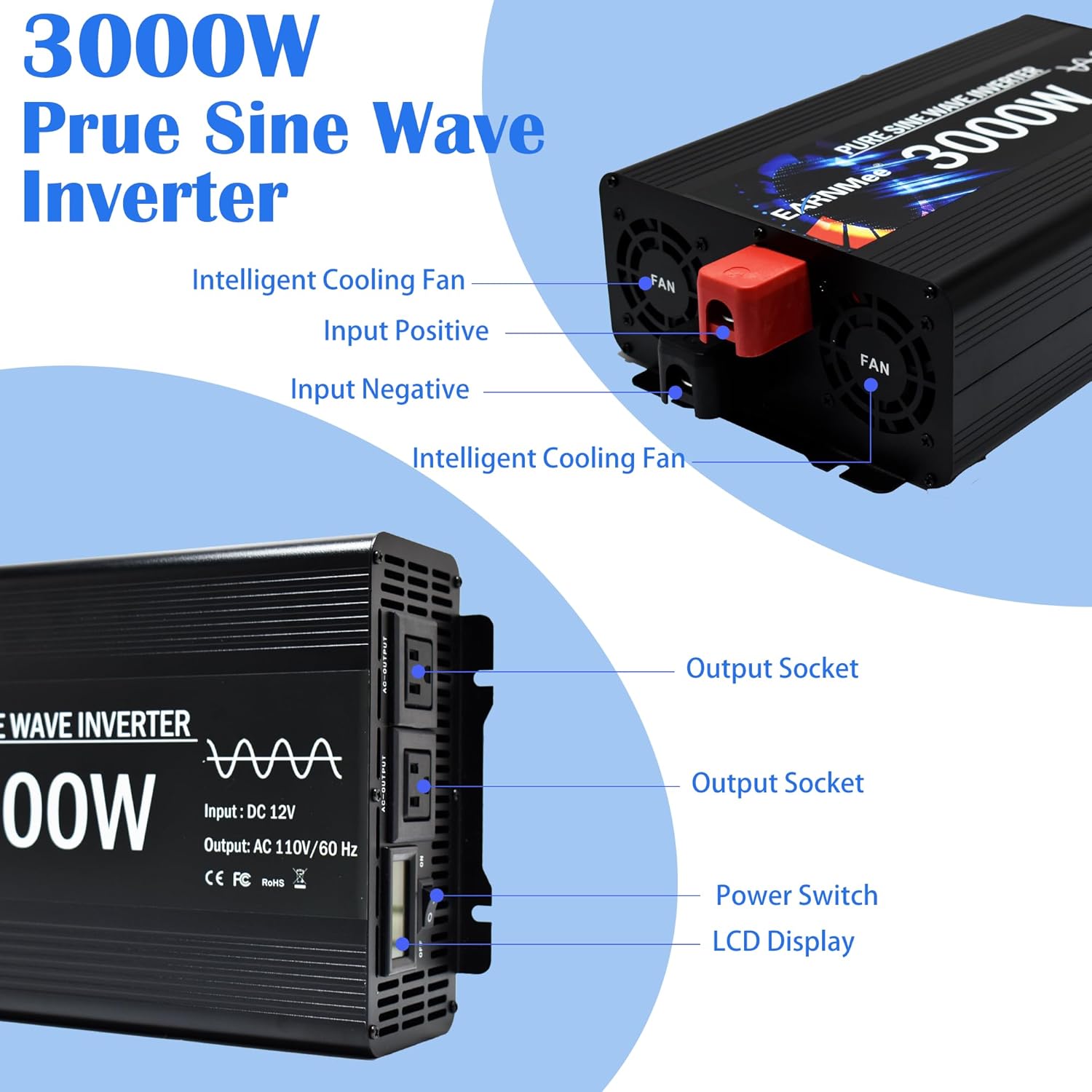
Front Panel: Features two AC output sockets, a power switch, and an LCD display. Rear Panel: Includes intelligent cooling fans and input terminals (positive and negative) for battery connection.
Setup and Installation
Follow these steps to properly set up your inverter:
- Prepare the Battery: Ensure your 12V DC battery is fully charged and in good condition.
- Connect Cables: Connect the red battery cable to the positive (+) terminal of the inverter and the positive (+) terminal of the battery. Connect the black battery cable to the negative (-) terminal of the inverter and the negative (-) terminal of the battery. Ensure connections are secure.
- Grounding: For safety, connect the inverter's grounding terminal to a proper earth ground.
- Placement: Place the inverter on a stable, flat surface in a well-ventilated area.

Proper connection of battery cables to the inverter's input terminals is crucial for safe operation.

The inverter can be integrated into various power systems, including RVs with solar panels, to provide AC power for appliances.
Operating Instructions
To operate your EARNMee inverter:
- Power On: After ensuring all connections are secure, switch the inverter's power button to the 'ON' position. The LCD display will illuminate.
- Monitor Display: The LCD display shows input/output voltage, output power, temperature, and protection indicators. Monitor these readings during operation.
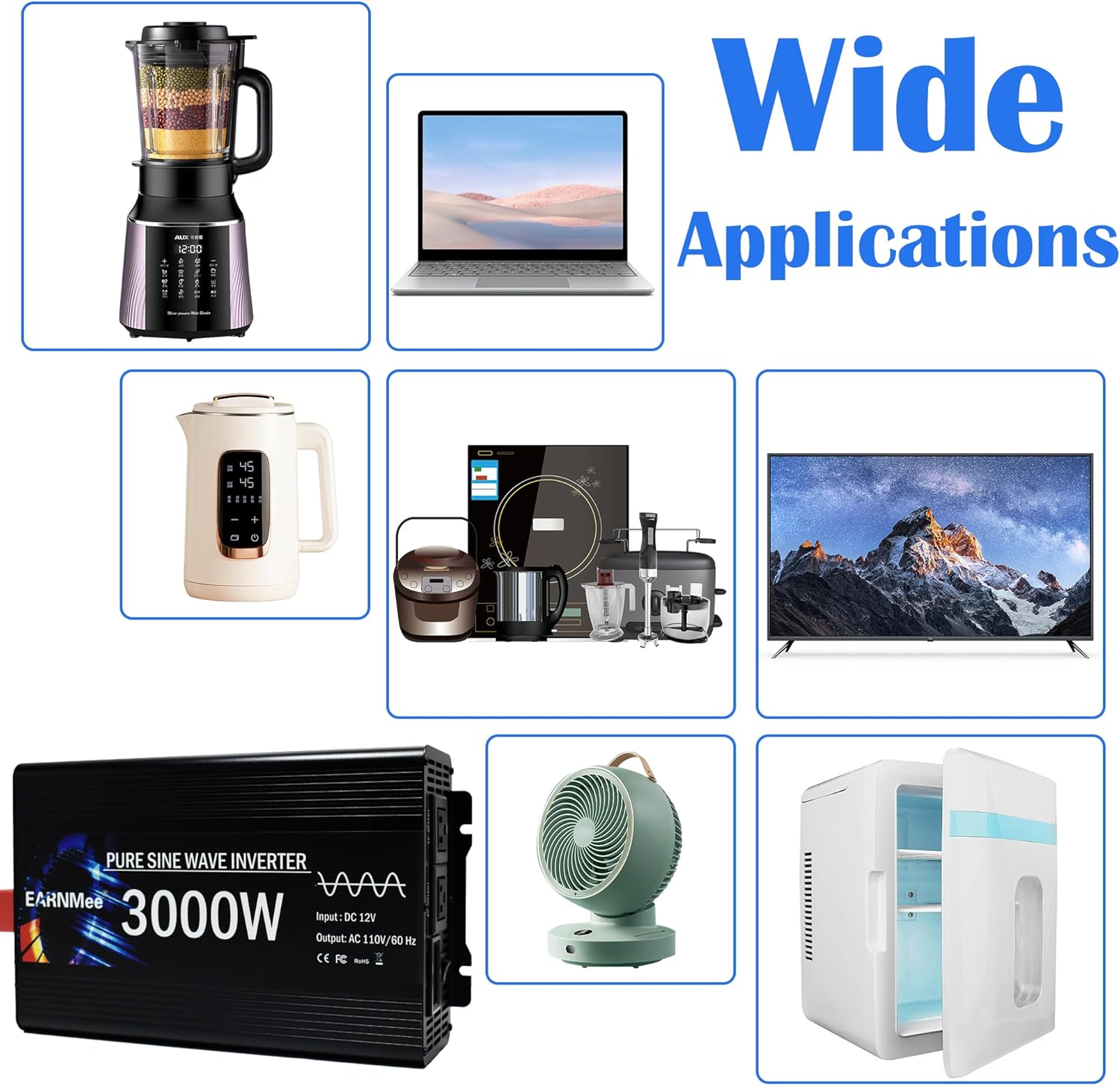
- Connect Appliances: Plug your AC appliances into the output sockets. Ensure the total wattage of connected devices does not exceed 3000W.
- Power Off: When finished, switch the inverter's power button to the 'OFF' position before disconnecting appliances or battery.
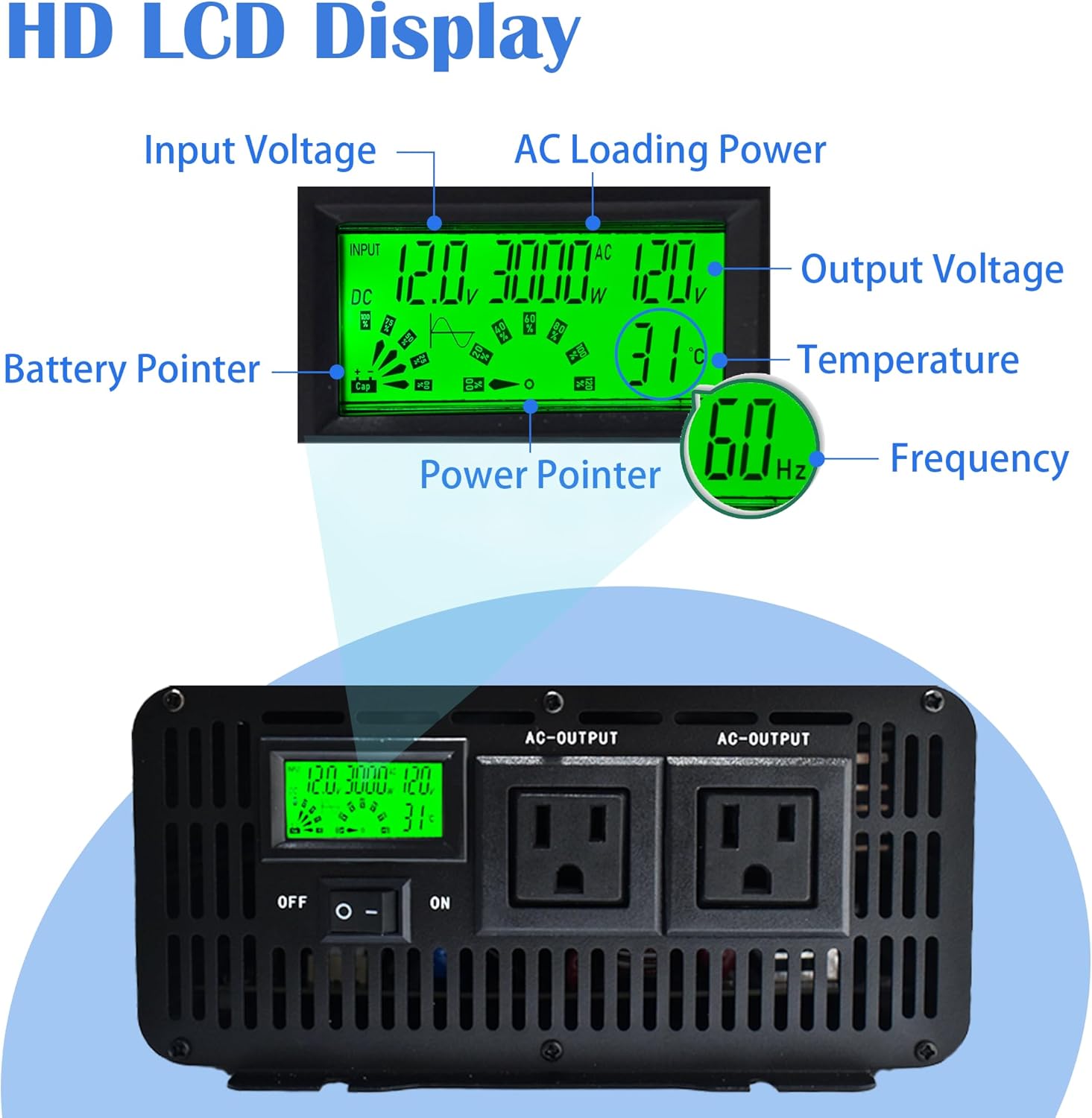
The digital LCD display provides real-time information on input/output voltage, power, temperature, and frequency, allowing you to monitor the inverter's status.
This video demonstrates the EARNMee 3000W Pure Sine Wave Inverter in operation, powering a kettle to boil water, showcasing its capability to run household appliances.
Maintenance
Regular maintenance ensures the longevity and optimal performance of your inverter:
- Cleaning: Keep the inverter clean and free from dust and debris. Use a dry cloth to wipe the exterior. Do not use liquid cleaners.
- Ventilation: Periodically check that the cooling fans and vents are clear and unobstructed.
- Connections: Inspect battery connections regularly to ensure they remain tight and free from corrosion.
- Storage: If storing the inverter for an extended period, disconnect it from the battery and store it in a cool, dry place.
The intelligent cooling fans automatically adjust speed based on load and temperature, preventing overheating and ensuring stable operation.
Troubleshooting
If you encounter issues, refer to the following table for common problems and solutions. The LCD display will show error codes (E1-E6) for specific protection indications.
| Problem / Error Code | Possible Cause | Solution |
|---|---|---|
| No Output / Inverter Off | Loose battery connections, low battery voltage, power switch off. | Check battery connections, charge battery, turn power switch ON. |
| E1: Short-circuit Protection | Short circuit in output wiring or connected appliance. | Disconnect all appliances, check wiring for shorts, reconnect one by one. |
| E2: Under-voltage Protection | Battery voltage is too low. | Recharge or replace the battery. |
| E3: Over-temperature Protection | Inverter is overheating due to poor ventilation or excessive load. | Reduce load, ensure proper ventilation, allow inverter to cool down. |
| E4: Overload Protection | Total power draw of connected appliances exceeds 3000W. | Reduce the number or wattage of connected appliances. |
| E5: Over-voltage Protection | Input voltage from battery is too high. | Check battery voltage; ensure it is within the 12V DC range. |
| E6: Pre-power Overload Protection | Indicates an overload condition detected before full power output. | Similar to E4, reduce connected load. |
This video provides a 360-degree view of the EARNMee Pure Sine Wave Power Inverter, showcasing its design and various ports, which can be helpful for visual troubleshooting and identification of components.
Specifications
Detailed technical specifications for the EARNMee 3000W Pure Sine Wave Inverter:
| Feature | Specification |
|---|---|
| Brand | EARNMee |
| Model Name | MY-E3000W (E3000-12) |
| Wattage | 3000 Watts (Continuous) |
| Peak Output Power | 6000 Watts |
| Input Voltage | 12 Volts DC |
| Output Voltage | 110-120 Volts AC |
| Electrical Output Waveform | Pure Sine Wave |
| Frequency | 60 Hz |
| Display Type | LCD |
| Conversion Efficiency | >90% |
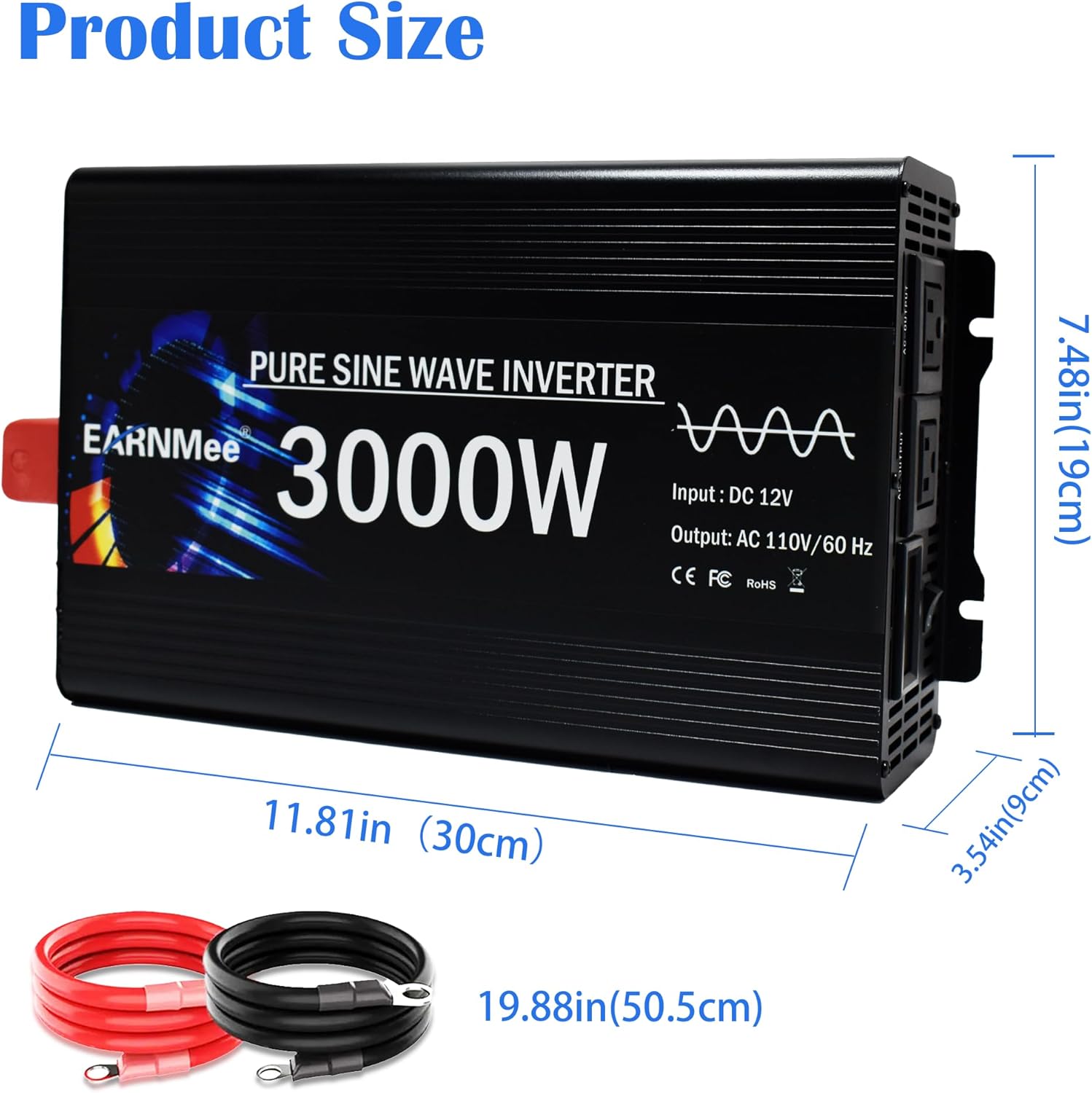
| Item Dimensions (L x W x H) | 11.81" x 7.48" x 3.54" (30cm x 19cm x 9cm) |
| Item Weight | 7 Pounds |
| Color | Black |
The inverter's compact dimensions make it suitable for various installations, and the included battery cables provide sufficient length for connection.
Warranty and Support
Your EARNMee 3000W Pure Sine Wave Inverter comes with a 1-year manufacturer's warranty. This warranty covers defects in materials and workmanship under normal use.
If you have any questions, require technical assistance, or need to claim warranty service, please contact EARNMee customer support. Refer to the contact information provided with your product packaging or visit the official EARNMee website for support details.