
BALDR SE0666BL1
BALDR Wireless Weather Station Remote Sensor User Manual
Model: SE0666BL1
1. Introduction
This user manual provides detailed instructions for the BALDR Wireless Weather Station Remote Sensor (Model: SE0666BL1). This sensor is designed to accurately measure and transmit outdoor temperature and humidity data to compatible BALDR weather stations (sold separately). Please read this manual thoroughly before use to ensure proper operation and longevity of your device.
2. Package Contents
- 1 x BALDR Wireless Weather Station Remote Sensor
- 1 x User Manual

Image: Contents of the BALDR Wireless Weather Station Remote Sensor package, including the sensor and user manual.
3. Product Overview
Familiarize yourself with the components of your BALDR Wireless Weather Station Remote Sensor.

Image: Front view of the black BALDR Wireless Weather Station Remote Sensor, showing its sleek design and the BALDR logo.
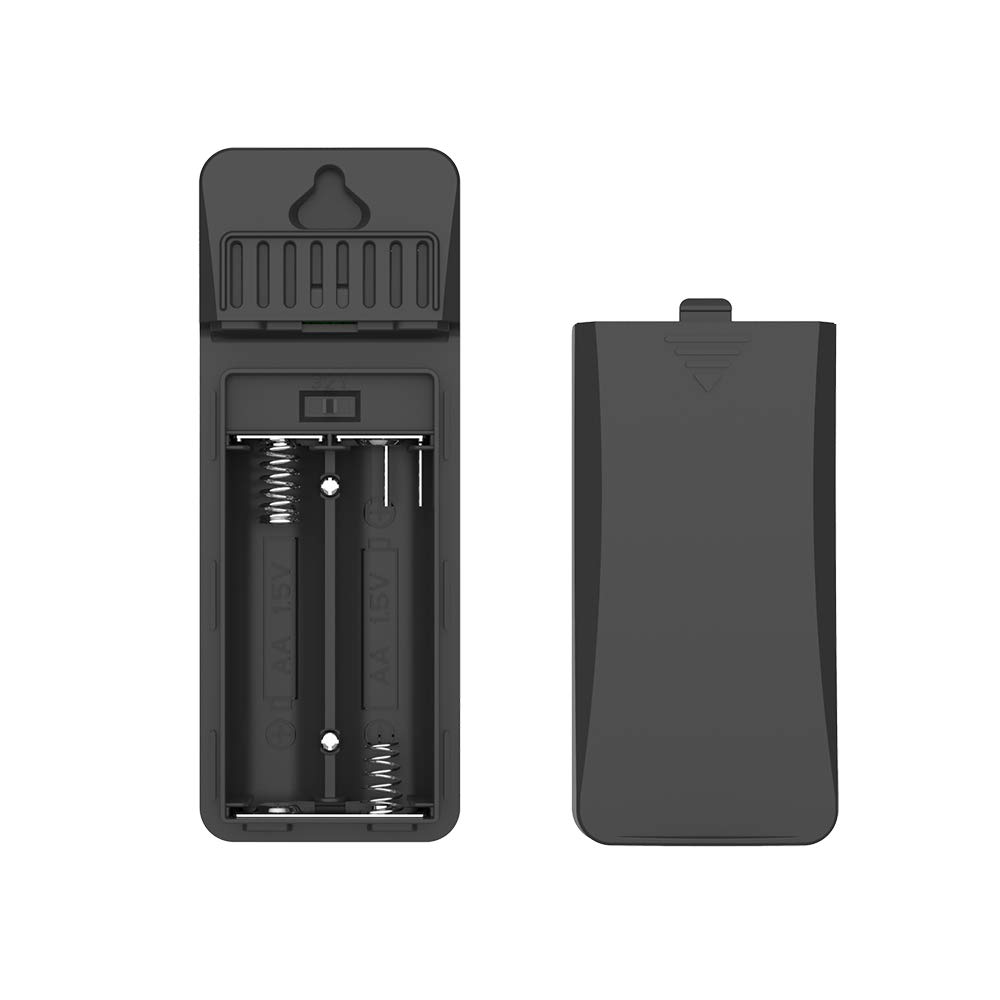
Image: Rear view of the sensor with the battery compartment cover removed, revealing slots for two AA batteries and a channel switch.
- Signal Light: Indicates data transmission.
- Hanging Hole: For wall mounting.
- Channel 1-2-3 Switch: Selects the transmission channel for pairing with the main weather station.
- Battery Compartment: Holds two AA batteries (not included).
4. Setup
Follow these steps to set up your remote sensor and pair it with your BALDR weather station.
- Insert Batteries: Open the battery compartment on the back of the sensor. Insert two AA batteries, ensuring correct polarity (+/-).
- Select Channel: Use the 1-2-3 switch inside the battery compartment to select a channel (e.g., Channel 1). Ensure this channel matches the one you intend to use on your main BALDR weather station.
- Close Compartment: Securely close the battery compartment cover.
- Pairing: Place the sensor near your main BALDR weather station. Refer to your main weather station's manual for specific pairing instructions. Typically, the weather station will automatically detect the sensor once powered on and set to the same channel.

Image: Detailed view of the sensor's internal components, highlighting the battery compartment and channel selection switch for setup.
5. Operating Instructions
Once paired, the sensor will continuously transmit temperature and humidity data to your main weather station. The signal light on the sensor will briefly flash during transmission.
Video: An overview of the BALDR Wireless Weather Station Outdoor Remote Sensor, demonstrating its compatibility with various BALDR weather stations and highlighting its weatherproof design and flexible placement options. The video shows the sensor in different home environments and emphasizes its role in providing local weather conditions for daily planning.
6. Placement Guidelines
Proper placement of the remote sensor is crucial for accurate readings and optimal wireless transmission. Consider the following guidelines:
- Orientation: The sensor can be shelf-standing or wall-hanging. For best results, ensure it stands upright or is mounted vertically. Avoid laying it down horizontally.
- Weather Protection: While weatherproof, it is recommended to place the sensor under a shelter (e.g., eaves, porch) to protect it from direct rain, snow, and prolonged direct sunlight.
- Air Circulation: Choose a location with permanent shade and plenty of fresh air circulation. Avoid enclosed spaces.
- Interference: Place the sensor far away from interfering sources such as large metal objects, electrical appliances, and thick walls, which can obstruct the wireless signal.
- Height: For outdoor placement, position the sensor at least 1.2 meters (approximately 4 feet) from the ground to ensure accurate readings and prevent ground-level interference. Avoid placing it too close to the ground.
- Transmission Range: The sensor has a maximum transmission range of up to 100 meters (328 feet) in open air. Walls and obstacles will reduce this range.

Image: Visual guide on how to correctly use the sensor, showing proper upright standing, placement under shelter, away from interfering sources, and at an appropriate height from the ground.

Image: The sensor mounted on an interior wall, demonstrating its wireless capability and ease of integration into a home environment.

Image: The sensor positioned on an exterior wall, emphasizing its high accuracy and ability to transmit data up to 100 meters wirelessly.
7. Maintenance
To ensure optimal performance and longevity of your sensor:
- Battery Replacement: Replace batteries when the low battery indicator appears on your main weather station display. Always replace both AA batteries at the same time.
- Cleaning: Wipe the sensor with a soft, damp cloth. Do not use abrasive cleaners or solvents.
- Storage: If storing the sensor for an extended period, remove the batteries to prevent leakage.
8. Troubleshooting
If you experience issues with your BALDR Wireless Weather Station Remote Sensor, try the following solutions:
| Problem | Possible Cause | Solution |
|---|---|---|
| No temperature/humidity reading on main station. |
|
|
| Inaccurate readings. |
|
|
For more detailed troubleshooting, please refer to the Troubleshooting Guide (PDF) available online.
9. Specifications
| Feature | Detail |
|---|---|
| Model Number | SE0666BL1 |
| Product Dimensions | 4 x 1.5 x 1.5 inches; 1.62 ounces |
| Power Source | 2 x AA batteries (not included) |
| Connectivity Technology | Wireless |
| Special Features | Weatherproof, Battery powered |
| Material | Sensor |
| Color | Black Sensor |
| Manufacturer | BALDR Electronic |
10. Warranty and Support
For warranty information and customer support, please visit the official BALDR website or contact their customer service directly. Keep your purchase receipt for warranty claims.
You can also visit the BALDR Store on Amazon for more products and information.
Ask a question about this manual
Ask about setup, troubleshooting, compatibility, parts, safety, or missing instructions. Manuals+ will review the question and use this page’s manual context to help answer it.