1. Product Overview
The MaiKar A500 Car Head Up Display (HUD) is an intelligent digital speedometer designed to project crucial driving data directly onto your car's windshield. This allows drivers to monitor speed, RPM, water temperature, voltage, and other vital information without diverting their gaze from the road. It supports both OBD2 and GPS functions, offering versatility for a wide range of vehicles. The A500 features a 3.5-inch color LCD screen, automatic brightness adjustment, and multiple display interfaces to suit user preferences.
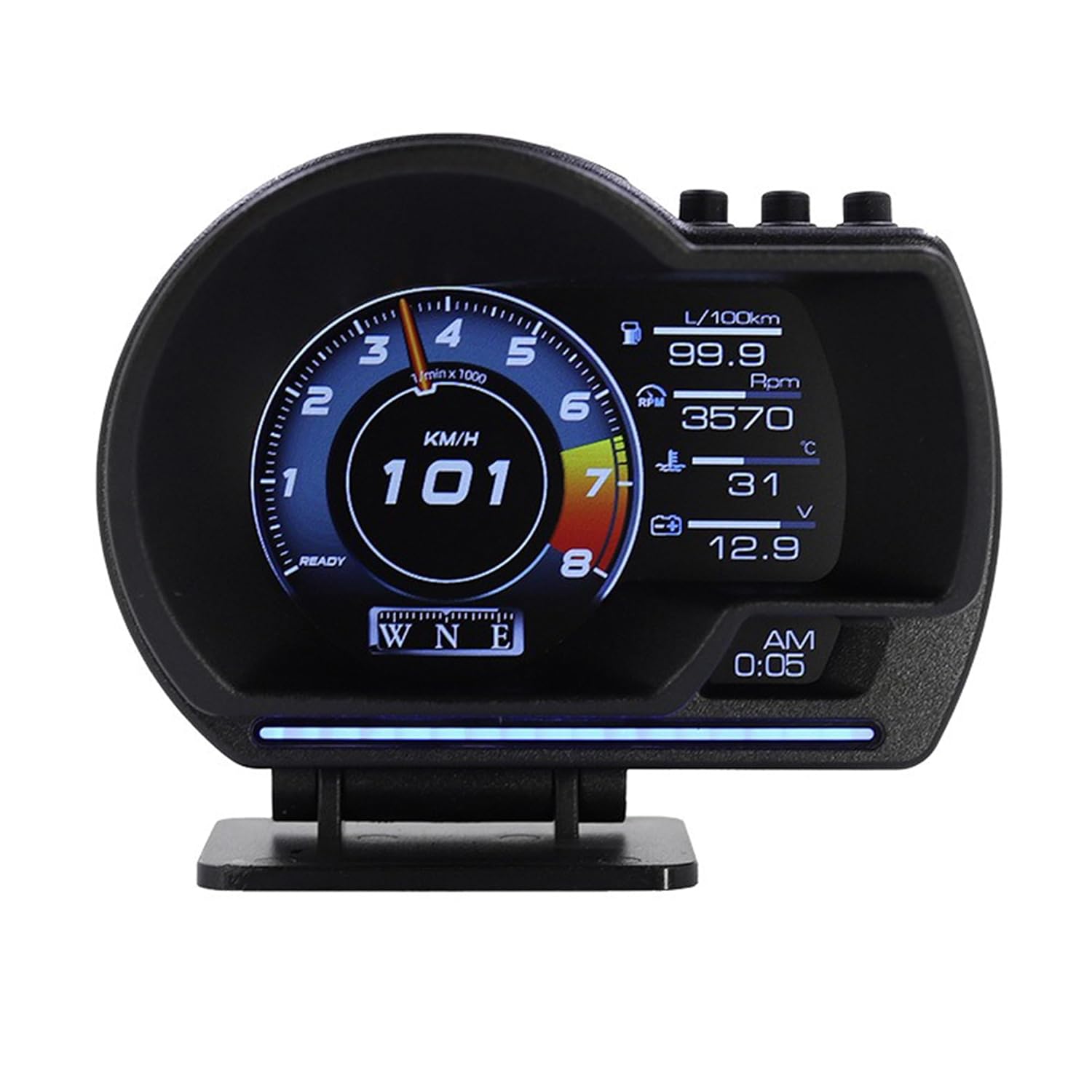
Figure 1.1: MaiKar A500 Car Head Up Display showing real-time vehicle data.
2. Package Contents
Please verify that all items listed below are included in your package:
- A500 Car Head Up Display Unit (x1)
- OBD Cable (x1)
- User Manual (x1)
- Double-faced Adhesive Tape (x1)
3. Features and Functions
- Dual Functionality: Supports both OBD and GPS modes, allowing for broad vehicle compatibility.
- Extensive Data Display: Real-time display of speed, RPM, fuel level, coolant & oil temperature, fuel consumption, air-fuel ratio, turbocharger data, GPS altitude, direction of travel, and more.
- Multiple Interface Styles: Offers 9 different interface styles including cool, mechanical, digital, GT, and turbo themes, providing a customizable user experience.
- Alarm System: Includes alarms for over-speed, high water temperature, battery voltage, engine fault, shift reminders, and fatigued driving.
- Fault Code Clearing: Ability to clear engine fault codes directly from the device.
- Automatic Brightness: Integrated light sensor automatically adjusts display brightness according to ambient light conditions.
- High Refresh Rate: Up to 10 Hz refresh rate ensures smooth and lag-free data display.
- Performance Testing: Features acceleration and brake testing functions.

Figure 3.1: Examples of the 9 different display interfaces available on the A500 HUD.
4. Setup and Installation
The A500 HUD offers two primary installation methods for convenience and optimal viewing angle.
4.1 Pre-Installation Check
Before installation, ensure your vehicle is OBD II compliant. Most vehicles manufactured after 2008 are compatible. Look for a 16-pin Data Link Connector (DLC) under your dashboard and a sticker under the engine hood stating "OBD II compliant or certified." If your vehicle is not OBD II compliant, the device will operate in GPS mode only.
4.2 Device Components

Figure 4.1: Front view of the A500 HUD with button and feature labels.
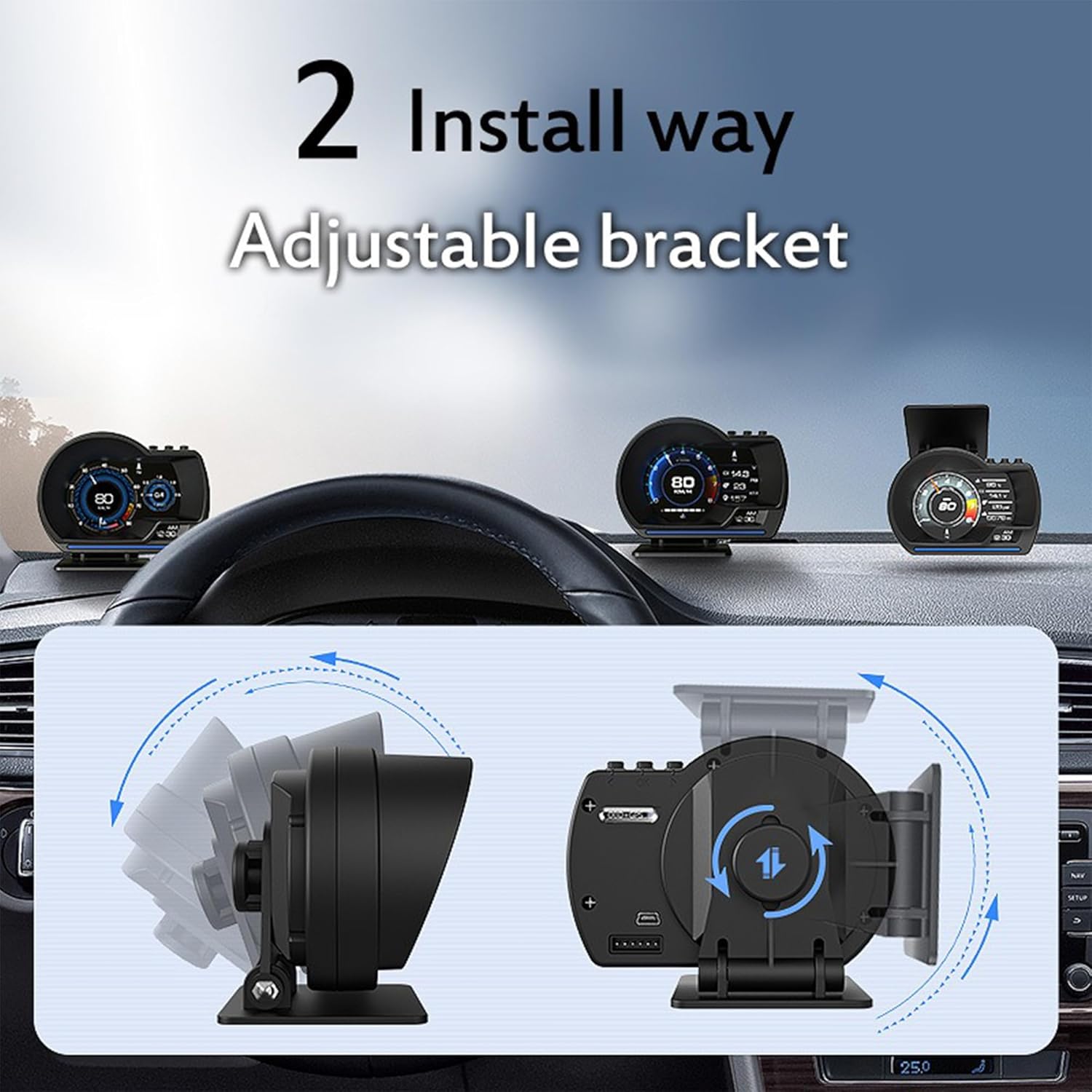
Figure 4.2: Side and back view of the A500 HUD showing ports and adjustable bracket.
4.3 Installation Methods
The A500 HUD comes with a split bracket that supports 360° rotation for adjusting the visual angle and height.
- Adhesive Installation on the Center Console:
- Clean the desired area on your car's center console.
- Attach the double-faced adhesive tape to the base of the HUD unit.
- Securely place the HUD unit on the cleaned surface.
- Connect the OBD cable to the HUD's OBD Interface (Figure 4.2) and then to your vehicle's OBD II port.
- Suction Installation on the Windshield:
- Attach the suction cup mount (if included, or use a compatible one) to the base of the HUD unit.
- Clean a suitable area on your windshield for clear visibility.
- Press the suction cup firmly onto the windshield to secure the unit.
- Connect the OBD cable to the HUD's OBD Interface (Figure 4.2) and then to your vehicle's OBD II port.

Figure 4.3: Illustration of the two primary installation methods.
Once connected, the device is plug-and-play. It will power on automatically with your vehicle's ignition.
5. Operating Instructions
The A500 HUD is designed for intuitive operation. Use the buttons on the top of the unit (refer to Figure 4.1) to navigate menus and select options.
5.1 Display Modes and Data
The device can display a wide array of data. You can switch between different interface styles using the navigation buttons. Common display parameters include:
- Speed (KM/H or MPH)
- Engine RPM (rotations per minute)
- Water Temperature (Celsius ℃ or Fahrenheit ℉)
- Voltage (V)
- Single Mileage (KM or M)
- Fuel Consumption (L/100km or L/H)
- Turbocharger pressure
- Air-fuel ratio
- GPS Altitude and Direction
5.2 Alarm Functions
The A500 HUD provides visual and audible alerts for various conditions:
- Shift Reminder: Indicates optimal shift points.
- Over Speed Alarm: Alerts when a preset speed limit is exceeded.
- Engine Fault: Displays an icon upon detection of an engine fault code.
- Fatigued Driver Reminder: Prompts the driver to take a break after extended driving.
- High Water Temperature Alarm: Warns if engine coolant temperature becomes too high.
- Battery Voltage Alarm: Alerts if battery voltage is outside normal operating range.
5.3 Fault Code Clearing
When an engine fault code is detected, the corresponding icon will illuminate. To clear the fault code, navigate to the fault code clearing function in the menu and confirm the action. This can help resolve minor issues or reset the system after repairs.
6. Maintenance
The MaiKar A500 HUD requires minimal maintenance to ensure longevity and optimal performance.
- Cleaning: Use a soft, dry cloth to wipe the display screen and the unit's housing. Avoid using abrasive cleaners or solvents, as they may damage the surface.
- Cable Management: Ensure the OBD cable is not pinched or exposed to excessive heat, which could damage the wiring.
- Storage: If storing the device for an extended period, disconnect it from the vehicle and store it in a cool, dry place away from direct sunlight.
7. Troubleshooting
If you encounter issues with your A500 HUD, please refer to the following common troubleshooting steps:
- No Power/Display:
- Ensure the OBD cable is securely connected to both the HUD unit and the vehicle's OBD II port.
- Check your vehicle's ignition. The HUD powers on with the vehicle.
- Verify your vehicle's OBD II compatibility (refer to Section 4.1).
- Inaccurate Readings:
- Ensure the correct unit settings (KM/H vs. MPH, ℃ vs. ℉) are selected in the device menu.
- If using GPS mode, ensure the device has a clear view of the sky for satellite acquisition.
- For OBD readings, ensure the vehicle's ECU is functioning correctly.
- Device Freezes or Resets:
- Disconnect the device from the OBD port, wait 30 seconds, and reconnect it.
- Ensure your vehicle's battery voltage is stable.
- OBD HUD Not Working in Older Cars:
- The OBD HUD is generally suitable for cars manufactured after 2008. If your car is older or not OBD II compliant, only the GPS function will be available.
- If unsure about compatibility, please contact customer service with your vehicle's make, model, and year before purchase.
8. Specifications
| Product Name | A500 Car Head Up Display |
| Brand | MaiKar |
| Display Screen | 3.5 inch Color LCD |
| Housing Material | Plastic |
| Dimensions (L x W x H) | 4.29 x 2.95 x 3.39 inches |
| Weight | 10.58 ounces |
| Supported Protocols | ISO 9141, KWP2000, SAE J1850, CAN, J1850 VPW, J1850 PWM |
| Refresh Rate | Up to 10 Hz |
9. Warranty and Support
MaiKar offers a one-year after-sales service for the A500 Car Head Up Display to address any potential issues or defects. For support, please contact the seller, Mai Car Store, through your purchase platform. Ensure you have your purchase details ready for faster assistance.