
1. Introduction
Thank you for choosing the XOOPON AK16 13-in-1 Indoor Air Quality Monitor. This device is designed to provide real-time monitoring of various air quality parameters in your home, office, or car, helping you maintain a healthier environment. It features a high-definition display for clear data visualization and offers portability with a long-lasting rechargeable battery.
Key Features:
- 13-in-1 Monitoring: Tracks 9 essential air quality parameters (PM1.0, PM2.5, PM10, CO2, HCHO, TVOC, Temperature, Humidity, Time) and includes 4 alarm modes.
- High Precision Sensors: Equipped with a built-in micro laser particle sensor and a Sweden premium NDIR sensor for accurate and reliable readings every 3 seconds.
- Portable Design: Compact size with a 2000mAh rechargeable battery, offering up to 8 hours of operation. Includes a USB Type-C charging cable.
- Versatile Placement: Suitable for desktop use or wall-mounting with a dedicated hanging hole.
- Audible Alarm: Features an audible alarm for critical air quality levels.

Image: The monitor's display showing the nine key metrics it detects, including particulate matter, volatile organic compounds, carbon dioxide, temperature, and humidity.

Image: The air quality monitor shown in different application environments, such as a car, a greenhouse, a living room, and a child's bedroom, highlighting its versatility.
2. Package Contents
Please check the package contents upon unboxing to ensure all items are present:
- 1x XOOPON AK16 Air Quality Monitor
- 1x USB Type-C Charging Cable
- 1x User Manual (this document)
3. Product Overview
Device Layout
The XOOPON AK16 monitor features a clear display and intuitive design. Familiarize yourself with its components:

Image: A detailed front view of the monitor, showcasing its digital display with readings for PM2.5, PM1.0, PM10, TVOC, HCHO, Temperature, CO2, and Humidity, along with the current time.
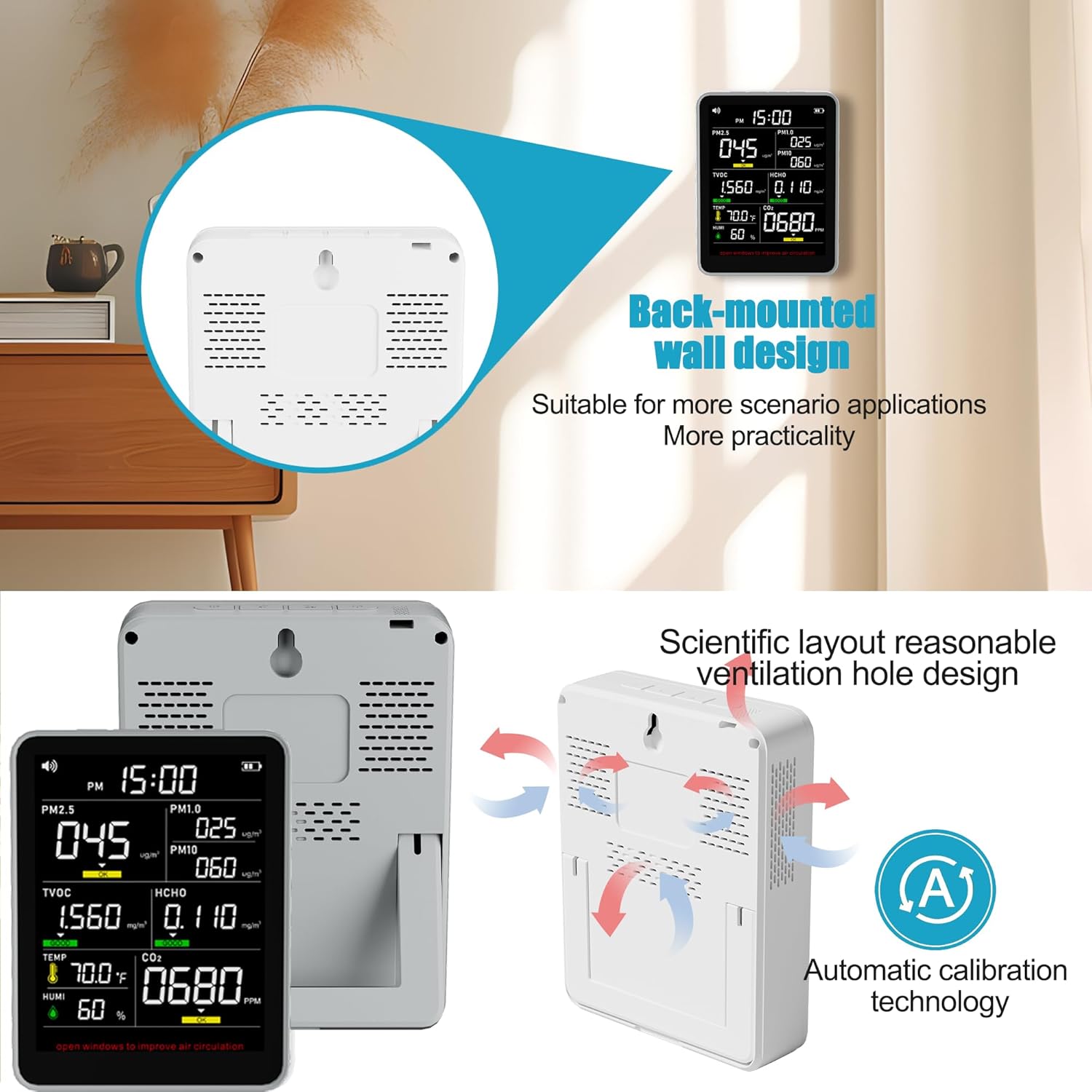
Image: The rear of the monitor, illustrating the integrated stand for desktop use, the hanging hole for wall mounting, and the strategically placed ventilation holes for optimal air sampling.
- Display Screen: High-definition screen showing all monitored parameters.
- Power Button: Located on the side for turning the device on/off and for initial calibration.
- USB Type-C Port: For charging the internal battery.
- Ventilation Grilles: Located on the sides and back for air intake and sensor operation.
- Integrated Stand: For stable desktop placement.
- Wall-Mount Hole: For hanging the device on a wall.
4. Setup
4.1 Charging the Device
Before first use, fully charge the monitor. Connect the provided USB Type-C cable to the device's charging port and plug the other end into a standard USB power adapter (not included) or a computer's USB port. The battery indicator on the display will show charging status.

Image: The monitor being charged via its USB Type-C port, illustrating the connection point and the charging cable.
4.2 Powering On/Off
- To Power On: Press and hold the power button on the side of the device for a few seconds until the display illuminates.
- To Power Off: Press and hold the power button again until the display turns off.
4.3 Initial Calibration/Reset
For optimal accuracy, especially during the first use or after prolonged storage, perform an initial calibration:
- With the device powered on, press and hold the power button until you hear two "beep" sounds.
- The display data will be cleared, and the device will begin a new measurement cycle. Ensure the device is in a well-ventilated area during this process.
5. Operation
5.1 Understanding the Display
The monitor's high-definition display shows real-time readings for all monitored parameters. Each parameter is clearly labeled with its unit of measurement.

Image: A family observing the air quality monitor, emphasizing the device's role in providing insights into the air quality for a healthy living environment.
5.2 Monitored Parameters
- PM1.0, PM2.5, PM10: Particulate Matter (μg/m³) – Fine inhalable particles.
- CO2: Carbon Dioxide (ppm) – A common indoor pollutant.
- HCHO: Formaldehyde (mg/m³) – A volatile organic compound.
- TVOC: Total Volatile Organic Compounds (mg/m³) – Various organic chemicals.
- TEMP: Temperature (°F/°C) – Ambient temperature.
- HUMI: Humidity (%) – Relative humidity.
- Time: Current time display.

Image: The monitor displaying temperature and humidity readings, shown in a greenhouse environment to illustrate its utility in monitoring environmental conditions for plant growth.
5.3 Alarm Modes
The device includes 4 alarm modes to alert you to deteriorating air quality. When a parameter exceeds a predefined safe level, the monitor will trigger an audible alarm and/or visual indication on the display. Refer to the Air Quality Pollution Level Reference Table for specific thresholds.
6. Air Quality Pollution Level Reference Table
This table provides a general guide for understanding the measured air quality levels. The monitor uses color-coded indicators (Good, OK, Poor) to visually represent these levels.
| Parameter | Good (Qualified) | OK | Poor |
|---|---|---|---|
| CO2 | ≤800ppm | >800ppm; ≤1500ppm | >1500ppm |
| HCHO | ≤0.08mg/m³ | >0.08 mg/m³; ≤0.10 mg/m³ | >0.10mg/m³ |
| PM2.5 | ≤75ug/m³ | >75-150ug/m³ | >150ug/m³ |
| TVOC | ≤0.6 mg/m³ | >0.6 mg/m³; ≤1.5 mg/m³ | >1.5mg/m³ |
| PM10 | ≤75ug/m³ | >75-150ug/m³ | >150ug/m³ |

Image: A visual representation of the air quality reference table, showing thresholds for CO2, HCHO, PM2.5, TVOC, and PM10, categorized into Good, OK, and Poor levels.
7. Maintenance
To ensure the longevity and accuracy of your air quality monitor, follow these maintenance guidelines:
- Cleaning: Gently wipe the device with a soft, dry cloth. Do not use abrasive cleaners, solvents, or immerse the device in water.
- Ventilation: Keep the ventilation grilles clear of dust and obstructions to ensure proper air circulation for the sensors.
- Storage: When not in use for extended periods, store the monitor in a cool, dry place away from direct sunlight and extreme temperatures.
- Avoid Harsh Environments: Do not expose the device to high humidity, corrosive gases, or strong vibrations.
8. Troubleshooting
If you encounter issues with your XOOPON AK16 monitor, refer to the following common problems and solutions:
- Device does not power on:
- Ensure the battery is charged. Connect the device to a power source using the USB Type-C cable.
- Press and hold the power button firmly for a few seconds.
- Inaccurate or fluctuating readings:
- Perform an initial calibration/reset as described in Section 4.3.
- Ensure the device is placed in a stable environment, away from direct airflow, heat sources, or strong odors.
- Check that the ventilation grilles are not obstructed.
- Alarm sounds frequently:
- Refer to the Air Quality Pollution Level Reference Table (Section 6) to understand the thresholds.
- Improve ventilation in the area by opening windows or using an air purifier.
- Display is dim or unresponsive:
- Charge the device fully.
- Restart the device by powering it off and then on again.
9. Specifications
Detailed technical specifications for the XOOPON AK16 Indoor Air Quality Monitor:
| Feature | Detail |
|---|---|
| Product Name | XOOPON AK16 13-in-1 Air Quality Monitor |
| Model Number | AK16 |
| Detection Hardware | Electrochemical, Semiconductor Temperature/Humidity, Micro Laser Particle Sensor, NDIR Sensor |
| Detection Items | PM1.0, PM2.5, PM10, CO2, HCHO, TVOC, Temperature, Humidity, Time Display |
| Alarm Mode | Audible Buzzer alarm (4 modes) |
| Product Dimensions (H x W x D) | 4.72" x 3.66" x 0.95" (approx. 12cm x 9.3cm x 2.4cm) |
| Product Weight | 9.4 ounces (approx. 0.5 LB) |
| Battery Type | 1 Lithium Ion battery (included) |
| Battery Capacity | 2000mAh |
| Power Source | Battery Powered (USB Type-C charging) |
| Style | Indoor |
| Manufacturer | XOOPON |
| UPC | 717701252385 |

Image: A summary of the product specifications, including product name, detection hardware, detection items, alarm mode, size, weight, battery capacity, and included accessories.
10. Warranty and Support
XOOPON provides 12 months of customer support for your purchase. If you have any questions, concerns, or require assistance with your AK16 Indoor Air Quality Monitor, please do not hesitate to contact us. We are committed to addressing your issue within 24 hours.
For support, please refer to the contact information provided with your product packaging or visit the official XOOPON website.