
1. Introduction
Thank you for choosing the Toxicologist Electric Nail Clipper m7. This innovative 3-in-1 device is designed to simplify your nail care routine by combining trimming, filing, and polishing functions into one compact and easy-to-use tool. Its automatic operation and safety features make it suitable for both adults and children, ensuring a precise and comfortable experience.
Please read this manual thoroughly before first use to ensure proper operation and maintenance of your device.
2. Product Features
- 3-in-1 Design: Combines nail trimming, filing, and polishing functions.
- Safe Operation: Automatic rotating blade designed for precise trimming without skin nicks.
- Adjustable Speed: Two speed settings to accommodate various nail thicknesses and user preferences.
- Built-in LED Light: Illuminates the trimming area for enhanced visibility and accuracy.
- Versatile Use: Suitable for adults, elderly, and children.
3. Package Contents
- Toxicologist Electric Nail Clipper m7
- Filing/Polishing Attachment
- USB Charging Cable
- User Manual
4. Setup
4.1 Charging the Device
The Electric Nail Clipper m7 is powered by an included Lithium Ion battery. Before first use, ensure the device is fully charged.
- Locate the charging port on the device.
- Connect the provided USB charging cable to the device and a suitable USB power source (e.g., computer, wall adapter).
- The charging indicator light will show the charging status. Refer to the device's specific light indicators for full charge notification.
4.2 Attaching the Filing/Polishing Head
For filing or polishing tasks, the specialized attachment can be used.
- Ensure the device is turned off.
- Gently insert the filing/polishing attachment into the designated slot on the device until it clicks securely into place.
- To remove, gently pull the attachment out.
5. Operating Instructions
5.1 Power On/Off and Speed Adjustment
To turn the device on, press and hold the power button. Press the button again to cycle through the two available speed settings. Press and hold the power button to turn the device off.
5.2 Nail Trimming
The device features an automatic rotating blade for efficient nail trimming. The built-in LED light will activate to provide clear visibility during use.
- Turn on the device and select your desired speed.
- Carefully insert your fingernail or toenail into the trimming slot.
- Gently move your nail from side to side within the slot to allow the rotating blade to trim it evenly. Avoid applying excessive pressure.
- Once the desired length is achieved, remove your nail.
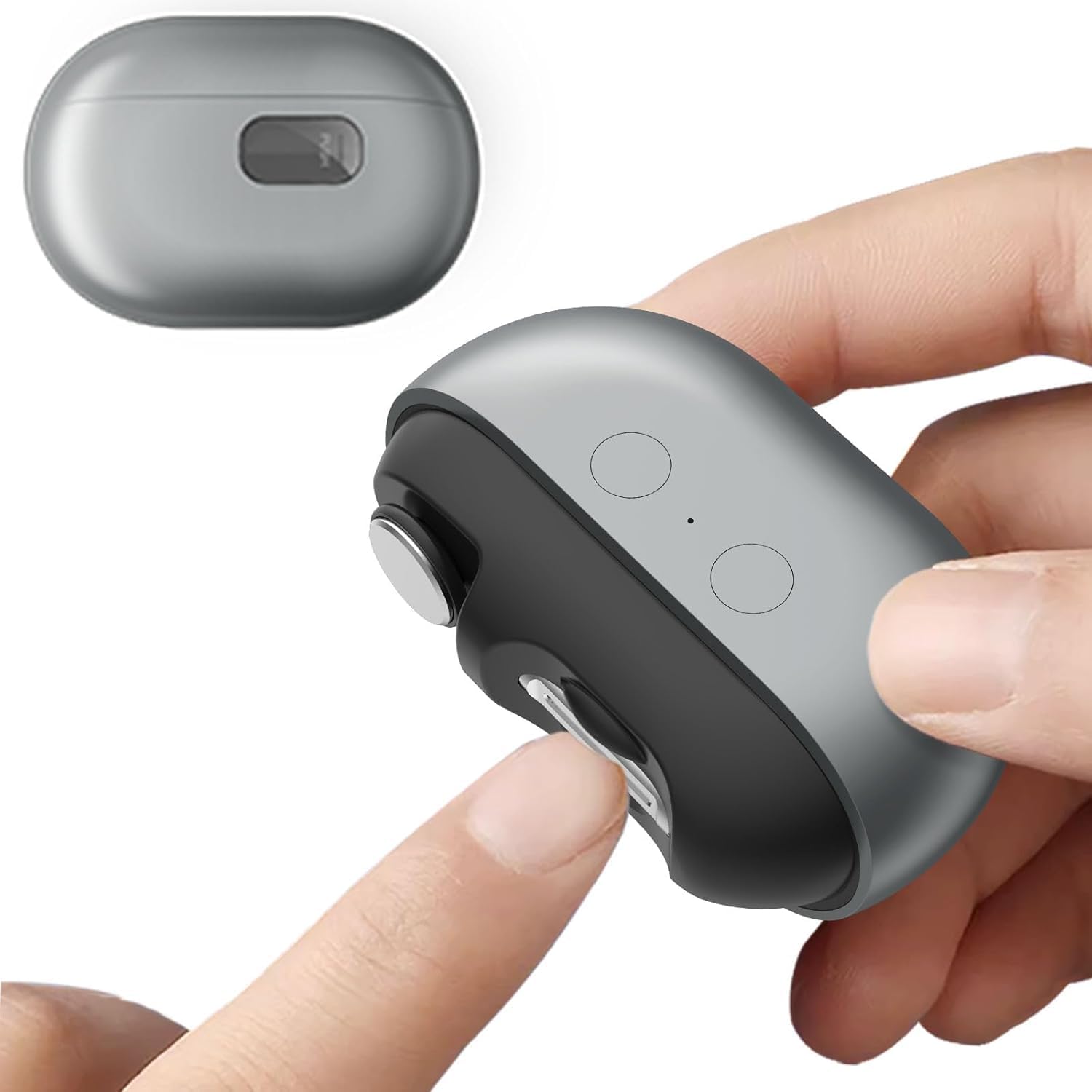
Image: Demonstrating how to insert a finger into the trimming slot of the Electric Nail Clipper m7.
5.3 Nail Filing and Polishing
After trimming, you can use the filing/polishing attachment to smooth nail edges and refine the nail surface.
- Ensure the filing/polishing attachment is securely in place.
- Turn on the device and select your desired speed.
- Gently guide the rotating filing head along the edges of your nails to smooth them.
- For polishing, lightly move the attachment across the nail surface to achieve a smooth finish.
- Exercise caution and avoid over-filing or applying too much pressure to prevent damage to the nail or skin.
6. Maintenance
6.1 Cleaning the Nail Debris Compartment
The device collects nail clippings in an internal compartment. Regular cleaning is essential for optimal performance.
- Ensure the device is turned off.
- Locate the nail debris compartment cover (usually a small, removable panel).
- Open the cover and carefully empty the collected nail clippings.
- Use a small brush (not included) to remove any remaining debris from the compartment and around the blade area.
- Close the compartment cover securely.
6.2 General Care
- Wipe the exterior of the device with a soft, dry cloth. Do not use harsh chemicals or abrasive cleaners.
- Do not immerse the device in water or any other liquid.
- Store the device in a cool, dry place away from direct sunlight and out of reach of children.
7. Troubleshooting
- Device not turning on: Ensure the device is fully charged. Connect it to a power source using the provided USB cable.
- Ineffective trimming/filing: Ensure the nail is properly positioned within the slot/attachment. Check if the debris compartment is full and needs emptying.
- Unusual noise or vibration: Turn off the device immediately. Check for any obstructions in the blade or attachment area. If the issue persists, contact customer support.
8. Specifications
| Feature | Detail |
|---|---|
| Item Model Number | m7 |
| Batteries | 1 Lithium Ion battery (included) |
| Manufacturer | Toxicologist |
| Target Audience | Adults, Elderly, Kids |
| Material Type | Metal, Plastic |
| Blade Material | Alloy Steel |
| Blade Edge | Curved |
9. Warranty and Support
This product comes with a standard manufacturer's warranty. For detailed warranty information, please refer to the warranty card included in your package or visit the official Toxicologist website. For technical support, troubleshooting assistance, or any inquiries regarding your Electric Nail Clipper m7, please contact Toxicologist customer service through the contact information provided on the product packaging or website.