1. Introduction
This instruction manual provides essential information for the proper handling, installation, operation, maintenance, and troubleshooting of your Jumplushion KSM-213CCM Optical Pickup Lens. This component is designed as a replacement part for compatible DVD and VCD players. Please read this manual thoroughly before attempting any installation or repair to ensure correct usage and to prevent damage to the product or your device.
2. Product Overview
The KSM-213CCM optical pickup lens is a critical component within optical disc drives, primarily responsible for reading data from CDs and DVDs. It consists of a laser diode, optical components, and a tracking mechanism, all integrated onto a compact assembly. This lens is manufactured from durable materials to ensure long-lasting performance and is designed to be compatible with various DVD and VCD player models.
- Core Component: Serves as the heart of the optical drive, essential for data retrieval.
- Compatibility: Specifically designed for use with DVD and VCD players.
- Quality Construction: Made from robust materials for durability and reliable operation.
- Replacement Part: An ideal solution for restoring functionality to devices with worn or damaged original lenses.

Figure 2.1: Overview of the KSM-213CCM Optical Pickup Lens assembly. This image shows the complete unit including the laser lens, tracking mechanism, and associated circuit board.
3. Setup and Installation
The KSM-213CCM optical pickup lens is a precision electronic component. Its installation requires technical expertise and careful handling. Improper installation can lead to damage to the lens, the optical drive, or the host device. It is highly recommended that installation be performed by a qualified technician.
3.1 Safety Precautions
- Power Disconnection: Always disconnect the host device from its power source before beginning any installation or repair work.
- Static Electricity: Wear an anti-static wrist strap to prevent electrostatic discharge (ESD), which can damage sensitive electronic components.
- Laser Safety: Avoid direct eye exposure to the laser beam, as it can cause eye damage. The laser is typically active only when the device is powered on and attempting to read a disc.
- Handle with Care: Do not touch the lens surface directly. Fingerprints or dust can impair performance.
3.2 Installation Steps (General Guidance)
- Disassembly: Carefully disassemble the DVD/VCD player to access the optical drive mechanism. Refer to your device's service manual for specific disassembly instructions.
- Remove Old Lens: Disconnect the ribbon cable and any mounting screws securing the old optical pickup lens. Gently remove the old unit.
- Install New Lens: Position the KSM-213CCM lens in the optical drive mechanism. Ensure proper alignment with the guide rails and secure it with the appropriate screws.
- Connect Cables: Carefully connect the ribbon cable to the new optical pickup lens, ensuring it is seated correctly and securely.
- Reassembly: Reassemble the DVD/VCD player, ensuring all components are correctly placed and secured.
- Testing: After reassembly, connect the device to power and test its functionality with a known good disc.
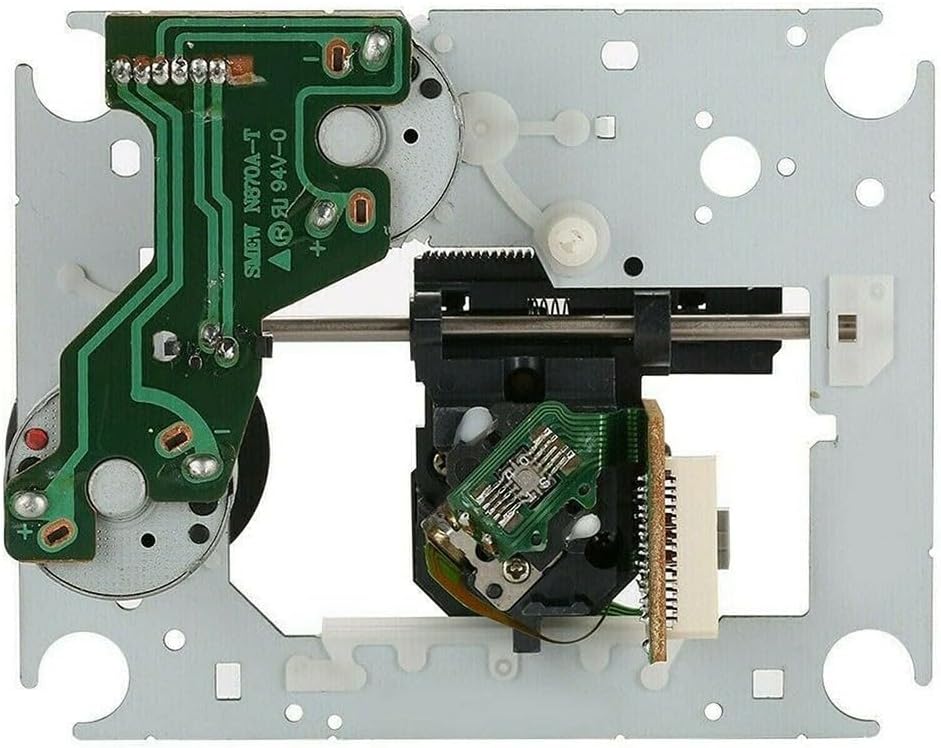
Figure 3.1: Top-down view of the KSM-213CCM, highlighting the circuit board and laser lens. Note the delicate ribbon cable connector.
4. Operating Principles
Once installed, the KSM-213CCM optical pickup lens functions automatically within the DVD/VCD player. When a disc is inserted, the drive spins the disc, and the optical pickup lens emits a laser beam onto the disc's surface. The laser beam reflects off the disc, and the reflected light is detected by a photodiode within the lens assembly. Variations in the reflected light, caused by the pits and lands on the disc, are converted into electrical signals, which are then processed by the player's circuitry to reproduce audio, video, or data.
The lens mechanism also includes a tracking system that ensures the laser beam stays centered on the data track and a focusing system that keeps the laser beam precisely focused on the disc's surface, compensating for minor disc imperfections or warping.
5. Maintenance
Proper maintenance can extend the lifespan and ensure optimal performance of your optical pickup lens. Since the lens is an internal component, direct user maintenance is limited.
- Keep Environment Clean: Operate your DVD/VCD player in a clean, dust-free environment to minimize the accumulation of particles inside the drive.
- Handle Discs Carefully: Always handle discs by their edges to avoid fingerprints and scratches on the data surface, which can lead to reading errors and strain on the optical lens.
- Avoid Physical Shocks: Protect the device from impacts or vibrations, as these can misalign the delicate optical components.
- Professional Cleaning: If disc reading issues persist and are suspected to be due to a dirty lens, consider professional cleaning by a qualified technician. Avoid using abrasive materials or harsh chemicals.
6. Troubleshooting
If you experience issues after installing the KSM-213CCM optical pickup lens, consider the following troubleshooting steps:
| Problem | Possible Cause | Solution |
|---|---|---|
| Disc not recognized / No Disc error | Incorrect installation, dirty lens, faulty disc, or other drive component failure. |
|
| Skipping or freezing during playback | Dirty or scratched disc, dirty lens, or vibration. |
|
| No laser emission | Faulty lens, power supply issue, or mainboard problem. |
|
Note: Due to the delicate nature of optical drive components, extensive troubleshooting by untrained individuals is not recommended. If problems persist, seek assistance from a qualified electronics repair technician.
7. Specifications
| Feature | Detail |
|---|---|
| Model | KSM-213CCM |
| Type | Optical Pickup Laser Lens with Mechanism |
| Compatibility | DVD and VCD Players (KSS-213B, KSS-213C, KSS-213VS compatible) |
| Item Weight | Approximately 163 grams (5.6 ounces) |
| Product Dimensions | 3.94 x 3.15 x 1.18 inches |
| Manufacturer | Jumplushion |
| ASIN | B0DNDRT3YV |
| Item Model Number | 8G33JC7MBBO3A5BPHU213K |
8. Warranty and Support
For warranty information or technical support regarding your Jumplushion KSM-213CCM Optical Pickup Lens, please contact the manufacturer directly through their official channels or the retailer from whom the product was purchased. Keep your proof of purchase for any warranty claims.
Manufacturer: Jumplushion
For further assistance, please visit the Jumplushion Store on Amazon.