
1. Introduction
1.1 Product Overview
The HANYOUNG AX4-1A is a high-performance digital temperature controller designed for precise temperature regulation in various industrial and commercial applications. It features multi-input capabilities, PID control with auto-tuning, and a clear 7-segment LED display for process value (PV) and set value (SV).
1.2 Package Contents
Upon unpacking, please verify that all components are present and undamaged:
- HANYOUNG AX4-1A Temperature Controller Unit
- Terminal Block (pre-installed or separate)
- Instruction Manual (this document)
- Mounting Brackets (if applicable)

Image 1.1: HANYOUNG AX4-1A Temperature Controller product box with label showing model AX4-1A, TEMP.CONTROLLER, LOT NO, INPUT, RANGE, OUTPUT, POWER (100-240V a.c), and HANYOUNG NUX branding. The label also includes a QR code and 'MADE IN CHINA'.
2. Safety Information
Please read and understand all safety precautions before installing, operating, or maintaining the HANYOUNG AX4-1A Temperature Controller. Failure to follow these instructions may result in injury, product damage, or improper operation.
- Electrical Safety: Installation and wiring should only be performed by qualified personnel. Ensure power is disconnected before performing any wiring or maintenance.
- Power Supply: Use only the specified power supply voltage (100-240 V a.c, 50/60 Hz).
- Environment: Do not install the controller in locations subject to excessive vibration, shock, direct sunlight, high humidity, or corrosive gases.
- Grounding: Ensure proper grounding to prevent electrical shock.
- Ventilation: Allow adequate space around the unit for proper heat dissipation.
3. Product Features
The HANYOUNG AX4-1A Temperature Controller offers a range of features for versatile temperature control:
- Multi-Input Support: Compatible with various thermocouple types (K, J, T) and RTD (Pt100 Ω) sensors.
- High Accuracy: Precise temperature measurement and control.
- PID Control: Advanced Proportional-Integral-Derivative control algorithm for stable and accurate temperature regulation.
- Auto-Tuning Function: Simplifies PID parameter setup for optimal performance.
- Multiple Output Options: Supports Relay output and Voltage pulse output for SSR drive.
- Clear Display: Dual 7-segment LED display (red for PV, green for SV) for easy monitoring.
- Compact Design: Standard 48x48mm panel mount size.
4. Setup and Installation
4.1 Mounting
The AX4-1A is designed for panel mounting. Ensure the panel cutout dimensions are appropriate for a 48x48mm device. Secure the controller using the provided mounting brackets.
4.2 Wiring
WARNING: Disconnect all power before performing any wiring to prevent electric shock or damage to the unit.
Refer to the wiring diagram provided with your unit for specific terminal connections. General wiring considerations include:
- Power Supply: Connect the 100-240 V a.c, 50/60 Hz power supply to the designated power terminals.
- Input Sensor: Connect your thermocouple (K, J, T) or RTD (Pt100 Ω) sensor to the input terminals. Ensure correct polarity for thermocouples.
- Control Output: Connect your load (e.g., heater, SSR) to the appropriate output terminals (Relay or Voltage Pulse). Observe the maximum current and voltage ratings for the output type.

Image 4.1: View of the terminal block for the HANYOUNG AX4-1A Temperature Controller, showing multiple screw terminals for electrical connections.

Image 4.2: The HANYOUNG AX4-1A Temperature Controller unit partially visible inside its cardboard packaging, showing the rear connections and some included documentation.
5. Operating Instructions
5.1 Front Panel Overview

Image 5.1: Front view of the HANYOUNG AX4-1A Temperature Controller, displaying two 4-digit LED readouts (PV and SV), indicator lights (AL1, AL2, OUT, TUNE), and three control buttons: MODE, Up arrow, and Down arrow.
- PV Display (Red): Shows the current process value (measured temperature).
- SV Display (Green): Shows the set value (desired temperature).
- Indicators: AL1, AL2 (Alarm indicators), OUT (Output status), TUNE (Auto-tuning status).
- MODE Button: Used to cycle through parameters and confirm settings.
- Up/Down Buttons: Used to adjust set values and parameter settings.
5.2 Basic Operation
- Power On: After proper wiring, apply power to the unit. The PV and SV displays will illuminate.
- Setting the Set Value (SV): In normal operating mode, use the Up and Down arrow buttons to adjust the SV to your desired temperature. The SV display will flash during adjustment.
- Monitoring: The PV display will show the current temperature, and the OUT indicator will show when the control output is active.
5.3 Parameter Settings and Auto-Tuning
To access advanced settings such as input type, control method (PID/ON-OFF), alarm settings, and auto-tuning, press and hold the MODE button for a few seconds. Use the Up/Down buttons to change values and the MODE button to confirm and move to the next parameter. Refer to the detailed parameter list in the full manual for specific codes and ranges.
- Auto-Tuning: This function automatically calculates optimal PID parameters for your system. Activate auto-tuning from the parameter menu. The TUNE indicator will flash during the process.
- Control Output Operation: Select between Reverse operation (heating control) or Direct operation (cooling control) based on your application requirements.
6. Maintenance
The HANYOUNG AX4-1A Temperature Controller is designed for reliable operation with minimal maintenance. Follow these guidelines to ensure longevity:
- Cleaning: Gently wipe the front panel with a soft, dry cloth. Do not use abrasive cleaners or solvents.
- Environmental Conditions: Ensure the operating environment remains within the specified temperature (-5 ~ 50°C) and humidity (35 ~ 85% RH, non-condensing) ranges.
- Connection Checks: Periodically inspect wiring connections for tightness and signs of corrosion.
7. Troubleshooting
If you encounter issues with your HANYOUNG AX4-1A, consider the following common troubleshooting steps:
- No Power/Display: Check the power supply connections and ensure the correct voltage is applied. Verify the power fuse if accessible.
- Incorrect Temperature Reading (PV): Verify the sensor wiring and ensure the correct input type is selected in the parameter settings. Check for sensor damage.
- No Output Control: Check the output wiring. Ensure the SV is set correctly and the control output operation (heating/cooling) matches your application. Verify that the OUT indicator illuminates when expected.
- Unstable Control: If temperature oscillates excessively, re-run the auto-tuning function or manually adjust PID parameters if you have expertise.
- Error Codes: If the display shows an error code, consult the full product manual for specific interpretations and solutions.
8. Specifications
Detailed technical specifications for the HANYOUNG AX4-1A Temperature Controller:
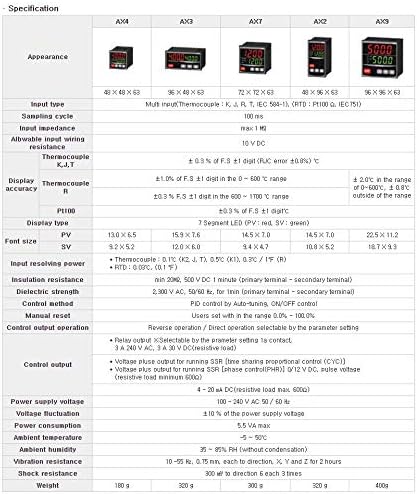
Image 8.1: A table detailing specifications for HANYOUNG AX series temperature controllers, with the AX4 column highlighted for reference.
| Feature | Specification (AX4) |
|---|---|
| Appearance (Dimensions) | 48 x 48 x 63 mm |
| Input Type | Multi input (Thermocouple: K, J, T, IEC 584-1), (RTD: Pt100 Ω, IEC751) |
| Sampling Cycle | 100 ms |
| Input Impedance | max 1 MΩ |
| Allowable Input Wiring Resistance | 10 V DC |
| Thermocouple Accuracy (K, J, T) | ± 0.3% of F.S ± 1 digit (R,K error ±0.8%) °C |
| Display Accuracy (R) | ± 1.0% of F.S ± 1 digit in 0 ~ 600°C range; ± 2.0°C in 0~600°C, ± 0.8% outside range |
| PT100 Accuracy | ± 0.3% of F.S ± 1 digit |
| Display Type | 7 Segment LED (PV: red, SV: green) |
| Font Size (PV/SV) | PV 13.0 x 5.5, SV 12.0 x 6.0 |
| Input Resolving Power | Thermocouple: 0.1°C (K, J, T), 0.5°C (K), 0.3°F (R); RTD: 0.05°C, (0.1°F) |
| Insulation Resistance | min 20MΩ, 500 V DC 1 minute (primary terminal - secondary terminal) |
| Dielectric Strength | 2,300 V AC, 50/60 Hz, for 1min (primary terminal - secondary terminal) |
| Control Method | PID control by Auto-tuning, ON/OFF control |
| Manual Reset | Users set within the range 0.0% - 100.0% |
| Control Output Operation | Reverse operation / Direct operation selectable by the parameter setting |
| Control Output (Relay) | Selectable by parameter setting 1a contact, 3 A 240 V AC, 3 A 30 V DC (resistive load) |
| Control Output (Voltage Pulse) | 0/12 V DC, pulse voltage (resistive load minimum 600Ω) |
| Power Supply Voltage | 100 - 240 V AC 50/60 Hz |
| Voltage Fluctuation | ± 10 % of the power supply voltage |
| Power Consumption | 5.5 VA max |
| Ambient Temperature | -5 ~ 50°C |
| Ambient Humidity | 35 ~ 85% RH (without condensation) |
| Vibration Resistance | 10 ~ 55 Hz, 0.75 mm, each to direction, X, Y and Z for 2 hours |
| Shock Resistance | 300 m/s² to direction 6 each 3 times |
| Weight | 180 g |
9. Warranty and Support
For technical support, service, or warranty inquiries regarding your HANYOUNG AX4-1A Temperature Controller, please contact the manufacturer directly:
HANYONG NUX ELECTRONIC(SHANGHAI) CO.,LTD.
Telephone: 021-59547598
Fax: 021-59547738
Website: hyelec.com.cn
Please have your product model (AX4-1A) and any relevant purchase information ready when contacting support.


