
BRUBOSES DM56
BRUBOSES DM56 GPS Smart Watch User Manual
Comprehensive Guide for Your Military Rugged Smartwatch
Introduction
Thank you for choosing the BRUBOSES DM56 GPS Smart Watch. This military-grade rugged smartwatch is designed for durability and high performance, featuring advanced GPS capabilities, comprehensive health monitoring, and a robust build. This manual provides detailed instructions to help you set up, operate, and maintain your new device, ensuring you get the most out of its powerful features.
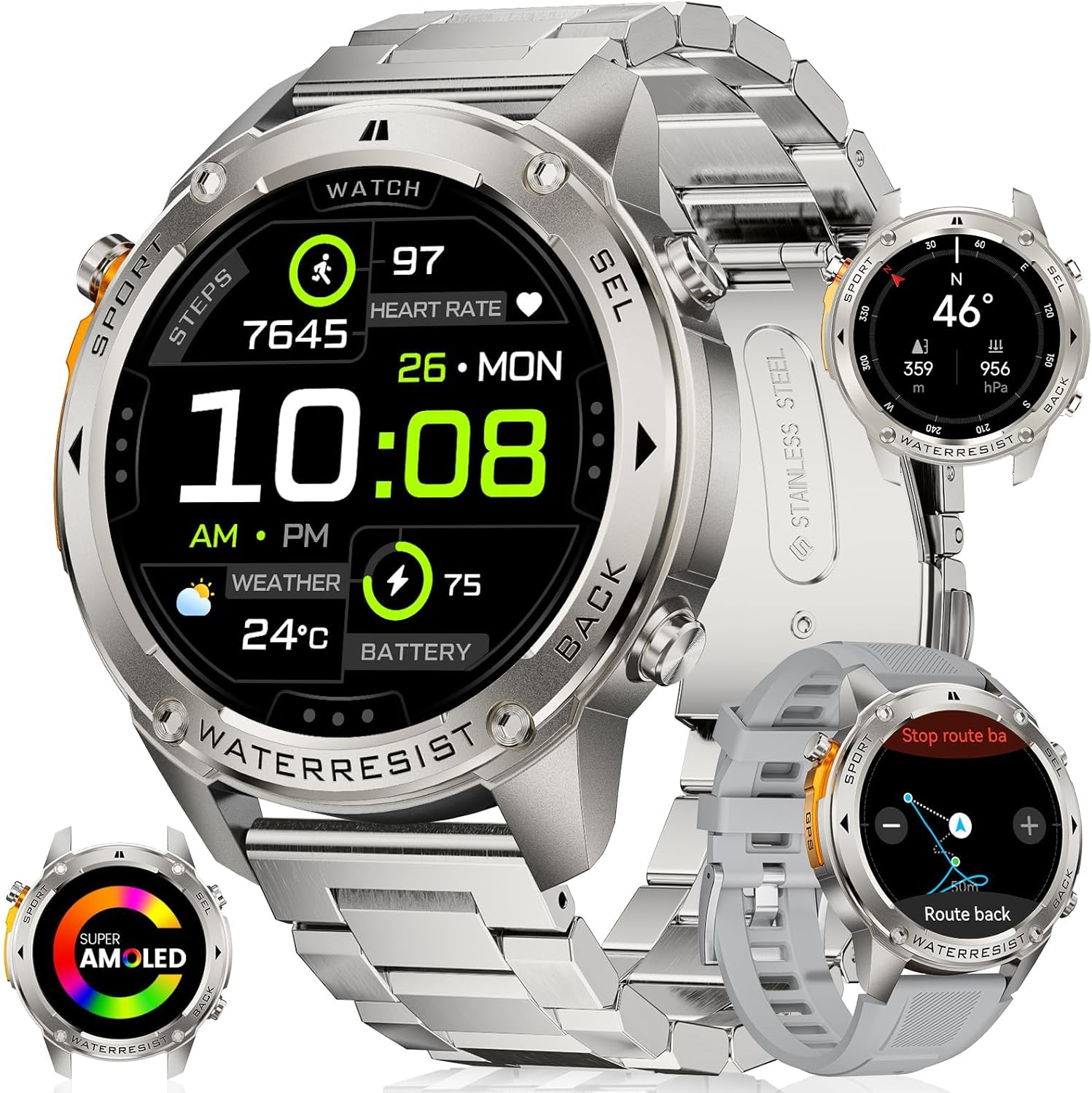
Figure 1: The BRUBOSES DM56 GPS Smart Watch, showcasing its robust design and included interchangeable bands.
What's in the Box
Upon opening your BRUBOSES DM56 package, you should find the following items:
- 1 x BRUBOSES DM56 GPS Smart Watch (with pre-installed metal band)
- 1 x Silicone Replacement Band
- 1 x Magnetic Charging Cable
- 1 x User Manual (this document)
- 1 x Link Removal Tool (for adjusting the metal band)

Figure 2: Packaging contents including the smartwatch, two bands, charging cable, and user manual.
Setup Guide
1. Charging the Smart Watch
Before initial use, fully charge your BRUBOSES DM56 smartwatch.
- Connect the magnetic charging cable to a USB power adapter (not included) or a computer's USB port.
- Align the magnetic end of the cable with the charging contacts on the back of the watch. The watch will vibrate and display a charging icon.
- Allow approximately 2-3 hours for a full charge. A full charge can provide up to 2 weeks of typical usage or over 40 days in power-saving mode.

Figure 3: The smartwatch connected to its magnetic charging cable, illustrating the charging process.
2. Installing the Companion App
To unlock all features and synchronize data, download and install the "Fit Cloud Pro" app on your smartphone.
- For Android: Search for "Fit Cloud Pro" on the Google Play Store.
- For iOS: Search for "Fit Cloud Pro" on the Apple App Store.
- Alternatively, scan the QR code provided in the quick start guide (if applicable) to directly download the app.
3. Pairing with Your Smartphone
Ensure your smartphone's Bluetooth is enabled.
- Open the "Fit Cloud Pro" app on your smartphone.
- Follow the on-screen instructions to create an account or log in.
- Navigate to the "Device" or "My Device" section within the app.
- Tap "Add Device" or "Search for Device."
- Select "DM56" from the list of available devices.
- Confirm the pairing request on both your watch and smartphone.
The smartwatch is compatible with iOS 11.0+ and Android 5.0+ smartphone devices.

Figure 4: The BRUBOSES DM56 Smart Watch is compatible with a wide range of iOS and Android devices.
Operating Instructions
Basic Navigation
- Touch Screen: Swipe left/right, up/down to navigate through menus and features. Tap to select.
- Side Buttons: The watch features multiple physical buttons for quick access to functions like Sport, Select, and Back. Refer to the watch face for specific button labels.
- "Always On Display" Mode: The 1.43" AMOLED screen supports an "Always On Display" mode, ensuring the time is always visible without needing to wake the screen.
Making and Receiving Calls
With Bluetooth connectivity, you can answer and make calls directly from your watch.
- Answering Calls: When a call comes in, tap the green phone icon on the watch screen.
- Making Calls: Access the call function from the watch menu. You can dial numbers or select contacts synchronized from your phone.
AI Voice Assistant
Utilize the built-in AI voice assistant for hands-free control.
- Activate the voice assistant through the watch menu.
- Speak commands to ask questions, play music, check weather, set alarms, or even initiate calls.

Figure 5: The smartwatch demonstrating its call answering and AI voice assistant capabilities.
Message Notifications
Receive notifications from your smartphone directly on your watch.
- Enable app notifications in the "Fit Cloud Pro" app settings.
- View incoming texts and social media alerts on your watch screen.

Figure 6: The smartwatch displaying various message notifications from connected apps.
Customizing Watch Faces
Personalize your watch with over 500 exquisite watch faces available through the companion app.
Key Features
Built-in GPS & Satellite Positioning
The DM56 features a military-grade dual-band and 6-satellite system (GPS, Galileo, GLONASS, BeiDou, QZSS, and NAVIC/IRNSS) for fast and accurate positioning (8-45 seconds), significantly faster than standard smartwatches. This ensures clear GPS tracking even in crowded urban environments.

Figure 7: The smartwatch displaying its advanced dual-band GPS tracking capabilities for enhanced accuracy.
Video 1: Demonstrating the robust features of the BRUBOSES DM56, including its durability, low-temperature resistance, dual-band GPS for improved accuracy, professional swimming analysis, and health tracking capabilities. It also highlights the long battery life and built-in compass for outdoor navigation.
Military Grade Standard (MIL-STD-DM56) Durability
Constructed with a military-grade stainless steel body and Panda King glass screen (Mohs hardness up to 9H), the DM56 is built to withstand harsh environments. It has successfully passed 15 military standard tests, including salt spray, rain, and impact, ensuring exceptional toughness and resistance.

Figure 8: Visual representation of the smartwatch undergoing various military-grade durability tests, including anti-impact, 5ATM waterproof, anti-fluid corrosion, and temperature tests.
5ATM Waterproof Rating
With a 5ATM waterproof level, the DM56 can be immersed in up to 50 meters of water, making it suitable for swimming and diving enthusiasts. It also supports professional swimming analysis to optimize your training.

Figure 9: The smartwatch being used underwater, demonstrating its 5ATM waterproof capability for swimming activities.
Long-Lasting Battery Life
Equipped with a 500mAh battery and power-saving AI algorithms, the DM56 offers extended usage.
- Normal Usage: Up to 2 weeks.
- Power-Saving Mode: Over 40 days (with continuous sports mode and health index measurement).
Health Monitoring
The BRUBOSES DM56 provides real-time health data tracking:
- 24-hour Heart Rate Monitoring
- Real-time Blood Oxygen (SpO2) Monitoring
- All-day Sleep Monitoring (including sleep stages and daytime naps)
- Pedometer for tracking steps and calories burned

Figure 10: The smartwatch displaying various health metrics such as heart rate, blood oxygen, and blood pressure (stress test).

Figure 11: The smartwatch tracking sleep patterns, showing sleep stages and duration for comprehensive sleep analysis.
170+ Sports Modes & Intelligent Recognition
Track your workouts with precision across over 170 sports modes. The watch also features 6 intelligent sports recognition functions, automatically detecting and recording your activity.

Figure 12: An overview of the extensive range of over 170 sports modes supported by the smartwatch, from outdoor running to skiing.
Built-in Sensors: Compass, Altitude, and Air Pressure
The DM56 includes an internal compass, altitude pressurization, and altimeter sensors to provide essential outdoor navigation data.
- Compass: Orient yourself with accurate directions.
- Altimeter: Track your current altitude and graph altitude trends.
- Barometer: Measure current air pressure and view changes.

Figure 13: The smartwatch showing its integrated compass, altimeter, and barometer functions, crucial for outdoor activities.
Maintenance and Care
- Cleaning: Regularly wipe the watch screen and body with a soft, damp cloth. For the bands, use mild soap and water if necessary, then rinse thoroughly and dry.
- Avoid Chemicals: Do not use harsh chemicals, cleaning solvents, or strong detergents, as they may damage the watch's finish or internal components.
- Storage: When not in use for extended periods, store the watch in a cool, dry place.
- Water Resistance: While 5ATM waterproof, avoid exposing the watch to hot water, steam, or high-pressure water jets, as this can compromise the seals.
- Charging Contacts: Keep the charging contacts on the back of the watch clean and free of debris to ensure efficient charging.
Troubleshooting
- Watch Not Turning On: Ensure the watch is fully charged. Connect it to the charger and wait a few minutes before attempting to power it on.
- Cannot Pair with Phone:
- Ensure Bluetooth is enabled on your phone.
- Make sure the watch is within range of your phone.
- Restart both the watch and your phone.
- Check if the "Fit Cloud Pro" app is updated to the latest version.
- If previously paired, try unpairing and re-pairing the device.
- Inaccurate Health Data: Ensure the watch is worn snugly on your wrist, not too tight or too loose. Clean the sensor on the back of the watch.
- Notifications Not Appearing:
- Verify that app notifications are enabled in your phone's settings for the "Fit Cloud Pro" app.
- Check notification settings within the "Fit Cloud Pro" app itself.
- Ensure the watch is connected via Bluetooth.
- GPS Not Connecting: Ensure you are in an open area with a clear view of the sky. Allow sufficient time for the watch to acquire satellite signals.
Specifications
| Feature | Detail |
|---|---|
| Model Number | DM56 |
| Display | 1.43" AMOLED Screen, 466*466 Pixels, 1000NIT Peak Brightness |
| Battery Capacity | 500mAh Lithium Ion |
| Water Resistance | 5ATM (up to 50 meters) |
| GPS | Built-in Dual-band GPS & 6 Satellite Positioning Systems |
| Durability Standard | MIL-STD-DM56 Military Grade, Panda King Glass (9H Mohs hardness) |
| Connectivity | Bluetooth |
| Operating System | Compatible with Android 5.0+ and iOS 11.0+ |
| Sensors | Heart Rate, Blood Oxygen, Compass, Altimeter, Barometer |
| Dimensions | 10 x 0.6 x 0.4 inches (Product), 52mm (Watch Diameter), 13.5mm (Thickness) |
| Item Weight | 10.6 ounces |
| Memory Storage | 4 GB |
Warranty and Support
BRUBOSES products are manufactured to the highest quality standards. While specific warranty details are not provided in this manual, please refer to the product packaging or the official BRUBOSES website for the most up-to-date warranty information.
For technical support, troubleshooting assistance, or any inquiries regarding your BRUBOSES DM56 Smart Watch, please contact BRUBOSES customer service through the contact information provided on the official website or your purchase platform.
You may also consider purchasing extended protection plans offered at the time of purchase for additional coverage.
Ask a question about this manual
Ask about setup, troubleshooting, compatibility, parts, safety, or missing instructions. Manuals+ will review the question and use this page’s manual context to help answer it.