
1. Introduction
This user manual provides comprehensive instructions for the installation, operation, and maintenance of your TotalHome Room STAT Wired Digital Thermostat (Model TTHWP). Please read this manual thoroughly before installation and use to ensure proper function and safety. Keep this manual for future reference.
2. Product Overview
The TotalHome Room STAT Wired Digital Thermostat is a programmable, wired digital thermostat designed for controlling your home's heating and cooling systems. It features a clear digital display, intuitive controls, and can be integrated with Amazon Alexa for voice control.
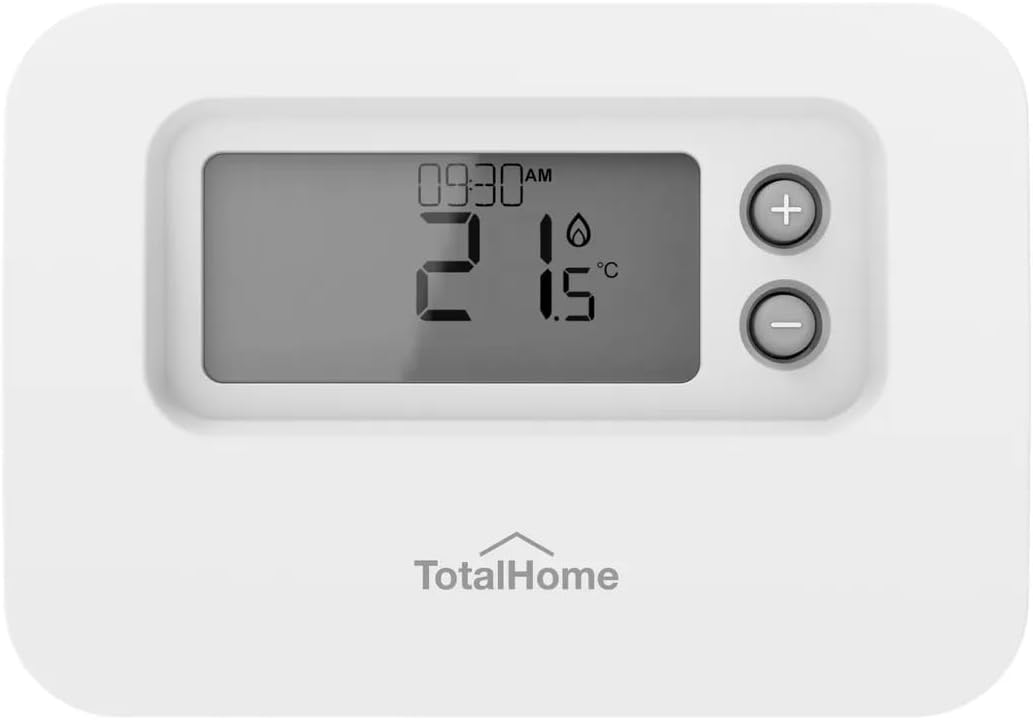
Figure 2.1: Front view of the TotalHome Room STAT Wired Digital Thermostat. The image displays the white rectangular thermostat with a central digital screen showing "09:30 AM", "21°C", and a flame icon with "1.5". To the right of the screen are two circular buttons, one with a plus (+) sign and one with a minus (-) sign. The "TotalHome" logo is visible below the screen.
Key Features:
- Wired connectivity for reliable operation.
- Digital display for clear temperature and time readings.
- Programmable settings for energy efficiency.
- Voice control capability via Amazon Alexa (requires compatible Alexa device).
- Built-in microphone for voice commands.
- Simple push-button controls for manual adjustments.
3. Safety Information
Please observe the following safety precautions to prevent damage to the product or personal injury:
- Electrical Hazard: Installation must be performed by a qualified electrician or trained service technician. Always turn off power at the main circuit breaker before installing or servicing the thermostat.
- Proper Wiring: Ensure all wiring connections comply with local electrical codes and the wiring diagram provided with your heating/cooling system.
- Indoor Use Only: This thermostat is designed for indoor use in dry environments. Do not expose to water or excessive humidity.
- Temperature Limits: Do not operate the thermostat outside its specified temperature range.
- Cleaning: Use a soft, dry cloth for cleaning. Do not use liquid cleaners or aerosol sprays.
4. Installation and Setup
This section outlines the general steps for installing your wired digital thermostat. For detailed wiring diagrams specific to your HVAC system, consult your system's manual or a qualified professional.
4.1. Pre-Installation Checklist:
- Ensure power to the HVAC system is OFF at the circuit breaker.
- Gather necessary tools: screwdriver, wire strippers, drill (if mounting new location).
- Identify existing thermostat wires. Label them if necessary.
4.2. Mounting the Thermostat:
- Carefully remove your old thermostat from the wall.
- Mount the new thermostat's backplate to the wall using the provided screws. Ensure it is level.
- Feed the thermostat wires through the opening in the backplate.
4.3. Wiring Connections:
- Connect the wires from your HVAC system to the corresponding terminals on the thermostat. Refer to the wiring diagram specific to your HVAC system and the thermostat's terminal labels.
- Ensure all connections are secure and no bare wire is exposed.
4.4. Initial Power-Up and Configuration:
- Once wiring is complete and the thermostat is securely mounted, restore power at the circuit breaker.
- The thermostat display should illuminate. Follow the on-screen prompts for initial setup, which may include:
- Setting current time and date.
- Selecting heating/cooling system type.
- Configuring Wi-Fi (if applicable, though this model is wired, it might have smart features).
5. Operation
The TotalHome Room STAT Wired Digital Thermostat offers both manual and programmable operation, along with voice control capabilities.
5.1. Manual Temperature Adjustment:
- Use the + button to increase the set temperature.
- Use the - button to decrease the set temperature.
- The display will show the new set temperature briefly before returning to the current room temperature.
5.2. Programming Schedules:
This thermostat allows you to set daily or weekly temperature schedules to optimize comfort and energy savings. Refer to the on-screen menu for detailed programming instructions. Typical programming options include:
- Wake: Temperature for morning hours.
- Away: Temperature when no one is home.
- Home: Temperature for evening hours.
- Sleep: Temperature for nighttime.
5.3. Voice Control (Amazon Alexa):
If you have a compatible Amazon Alexa device, you can control your thermostat using voice commands. Ensure your thermostat is properly linked to your Alexa account through the Alexa app.
Common voice commands include:
- "Alexa, set [Thermostat Name] to 22 degrees."
- "Alexa, what is the temperature of [Thermostat Name]?"
- "Alexa, turn on the heat on [Thermostat Name]."
- "Alexa, turn off [Thermostat Name]."
Note: The "Built-In Microphone" feature suggests the thermostat itself might listen for commands, or it refers to its compatibility with external Alexa devices. For direct voice control on the unit, consult the specific Alexa integration guide.
6. Maintenance
Regular maintenance ensures optimal performance and longevity of your thermostat.
6.1. Cleaning:
- Wipe the thermostat's exterior with a soft, dry, lint-free cloth.
- Do not use abrasive cleaners, solvents, or chemical sprays, as these can damage the display or casing.
6.2. Battery Replacement:
This model is "Corded Electric" and "Batteries required: No", so battery replacement is not applicable.
6.3. Firmware Updates:
If your thermostat has smart features, check the manufacturer's website or associated app for any available firmware updates to ensure the best performance and security.
7. Troubleshooting
If you encounter issues with your TotalHome Room STAT Wired Digital Thermostat, refer to the following common problems and solutions:
| Problem | Possible Cause | Solution |
|---|---|---|
| Display is blank. | No power to the thermostat. | Check the circuit breaker for your HVAC system. Ensure all wiring connections are secure. |
| Thermostat not responding to commands. | Incorrect wiring; system malfunction; temporary glitch. | Verify wiring connections. Power cycle the thermostat by turning off and on the circuit breaker. If issues persist, contact a qualified technician. |
| Temperature readings seem inaccurate. | Thermostat location; sensor obstruction. | Ensure the thermostat is not exposed to direct sunlight, drafts, or heat sources. Clean any dust from the vents on the thermostat casing. |
| Voice control not working. | Alexa integration issue; network problem. | Verify your Alexa device is connected to the internet. Check the Alexa app to ensure the thermostat is linked and online. Try re-linking the device. |
If the problem persists after attempting these solutions, please contact TotalHome customer support or a qualified HVAC technician.
8. Specifications
| Feature | Detail |
|---|---|
| Brand | TotalHome |
| Model Number | TTHWP |
| Color | White |
| Controller Type | Amazon Alexa |
| Special Feature | Built-In Microphone |
| Specific Uses For Product | Air Conditioner (and heating, as it's a thermostat) |
| Temperature Control Type | Digital, Smart/Remote |
| Connectivity Technology | Wired |
| Power Source | Corded Electric |
| Item Weight | 122 Grams (4.3 ounces) |
| Display Type | Digital |
| Control Method | Voice |
| Mounting Type | Wall Mount |
| Package Dimensions | 3.94 x 2.76 x 2.76 inches |
| Batteries Required | No |
9. Warranty and Support
For warranty information, please refer to the documentation included with your purchase or visit the official TotalHome website. TotalHome provides customer support for product inquiries, technical assistance, and warranty claims.
Manufacturer: TotalHome
For further assistance, please contact TotalHome customer service through their official channels.